It is currently Sat Jun 27, 2026 2:52 pm


All times are UTC - 5 hours [ DST ]


Post new topic Reply to topic  [ 16 posts ] 
Author Message
 Post subject: Help With Creating a Certain Art Form From an Image
PostPosted: Fri Dec 01, 2017 10:58 am  (#1) 
Offline
GimpChat Member

Joined: Nov 28, 2017
Posts: 18
GIMP Version: 2.9.7
Operating System: Mac OS
OS Version: 10.11.6 El Capitan
GIMP Experience: Basic Level

List any relevant plug-ins or scripts:
McGimp 2.9.7


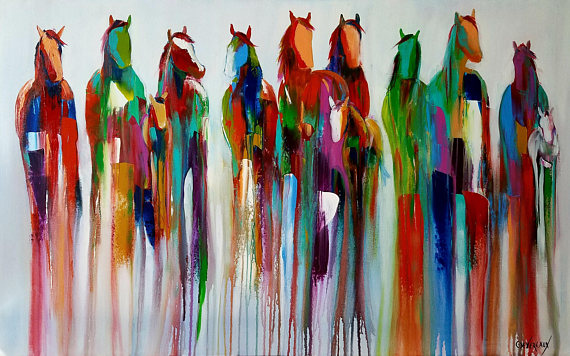
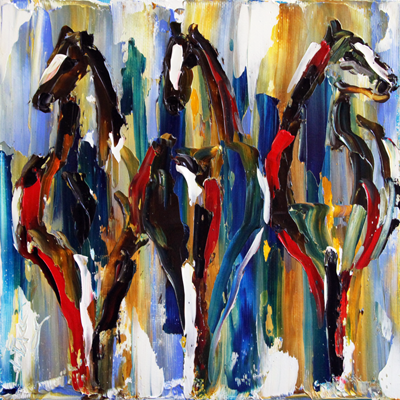
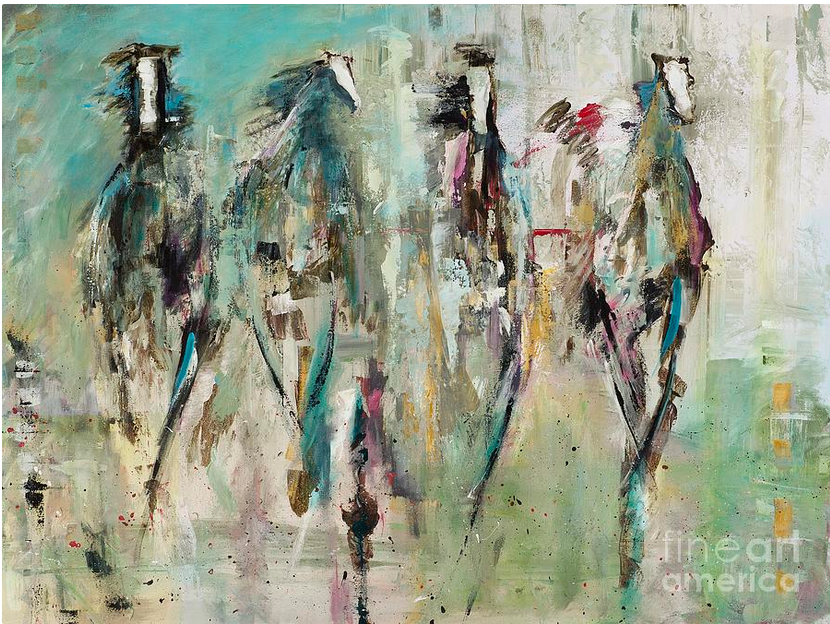
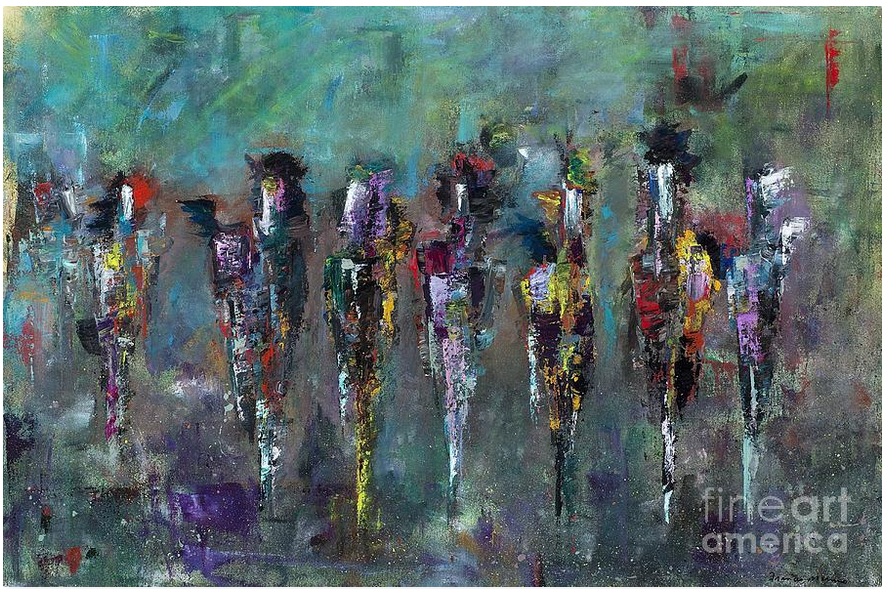
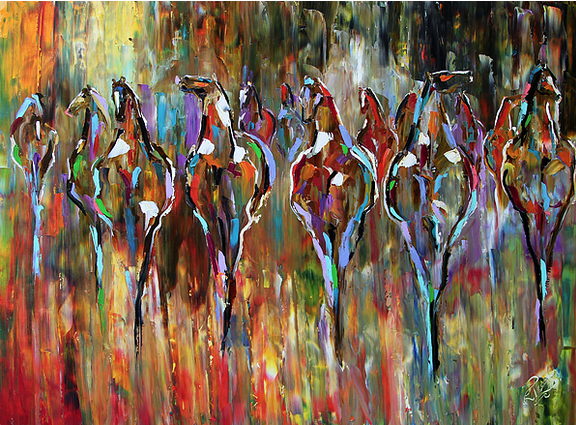
This may be an unusual question and I hope I can describe it well. I have horses and some great images of them. My desire is to create a certain abstract art from those images. I am most fascinated by paintings where they use very primitive lines with no detail, yet you can still tell what the painting is about. I have included a number of examples of this. I would like to take one of my photos and remove as much detail from it as I can, replacing it with non-realistic colors, and still be able to tell it is a horse, much like these examples. I realize that I could probably use Gimp to actually "paint" from scratch, but I would rather edit the photo.

Does anyone know how I would approach this? Is there a script or plug-in that exists to help do something like this?

Thanks for any help!

Image
Image
Image
Image
Image


Share on Facebook Share on Twitter Share on Orkut Share on Digg Share on MySpace Share on Delicious Share on Technorati
Top
 Post subject: Re: Help With Creating a Certain Art Form From an Image
PostPosted: Fri Dec 01, 2017 11:45 am  (#2) 
Offline
GimpChat Member
User avatar

Joined: Jan 20, 2013
Posts: 14831
Location: roma, italy
The examples are each other very different, hence there is a lot of freedom...
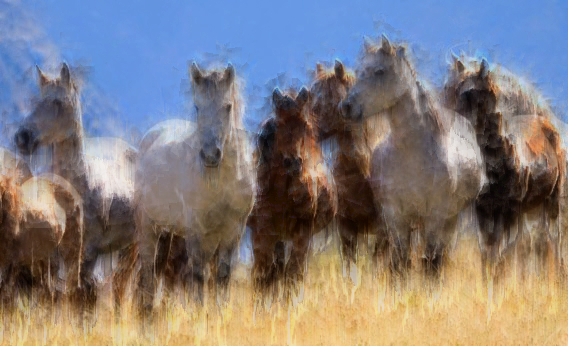
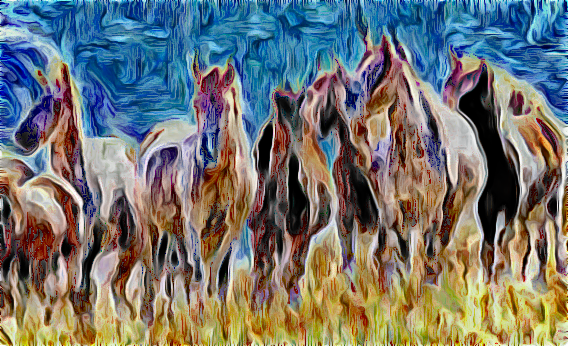
My first attempt to do something in that area.

original
Attachment:
120214_EX_horses.jpg.CROP.rectangle3-large.jpg
120214_EX_horses.jpg.CROP.rectangle3-large.jpg [ 38.06 KiB | Viewed 4563 times ]


some manipulation
Attachment:
Trial.jpg
Trial.jpg [ 444.97 KiB | Viewed 4563 times ]


If you want to try there were 4 steps:
1) posterize 4 colours
2) saturate
3) heavy vertical shift (25, I think)
4) gradient map with a strong colours mix

_________________
"Where am I ?"


Top
 Post subject: Re: Help With Creating a Certain Art Form From an Image
PostPosted: Fri Dec 01, 2017 11:46 am  (#3) 
Offline
GimpChat Member
User avatar

Joined: Jan 20, 2013
Posts: 14831
Location: roma, italy
likely other chatters will suggest other manipulations

_________________
"Where am I ?"


Top
 Post subject: Re: Help With Creating a Certain Art Form From an Image
PostPosted: Fri Dec 01, 2017 11:49 am  (#4) 
Offline
GimpChat Member
User avatar

Joined: Jul 04, 2010
Posts: 2253
Location: Retired Moderator Slowly Returning to the Living.
I would play with some of the G'Mic filters. I've come up with similar things while just playing with it. Often I run one G'Mic filter on the results of another G'Mic filter. It is the single most versatile filter and can definitely do what you are looking for.

_________________
Artists aren't crazy! We're eccentric! ~G.M. Ross

Image

My Sigs = My Photos
Check out my work at http://www.flickr.com/photos/photomastergreg.


Top
 Post subject: Re: Help With Creating a Certain Art Form From an Image
PostPosted: Fri Dec 01, 2017 11:53 am  (#5) 
Offline
GimpChat Member
User avatar

Joined: Jan 20, 2013
Posts: 14831
Location: roma, italy
Yes, I agree, hence please provide an example to pawnee, she will appreciate.

_________________
"Where am I ?"


Top
 Post subject: Re: Help With Creating a Certain Art Form From an Image
PostPosted: Fri Dec 01, 2017 11:55 am  (#6) 
Offline
GimpChat Member
User avatar

Joined: Jan 20, 2013
Posts: 14831
Location: roma, italy
Just repeated my previous trial with different # of colours and gradient
Attachment:
Trial2.jpg
Trial2.jpg [ 872.29 KiB | Viewed 4559 times ]

_________________
"Where am I ?"


Top
 Post subject: Re: Help With Creating a Certain Art Form From an Image
PostPosted: Fri Dec 01, 2017 11:59 am  (#7) 
Offline
GimpChat Member
User avatar

Joined: Jan 20, 2013
Posts: 14831
Location: roma, italy
...and adding huge contours
Attachment:
Trial3.jpg
Trial3.jpg [ 881.84 KiB | Viewed 4558 times ]

_________________
"Where am I ?"


Top
 Post subject: Re: Help With Creating a Certain Art Form From an Image
PostPosted: Fri Dec 01, 2017 12:01 pm  (#8) 
Offline
GimpChat Member

Joined: Nov 28, 2017
Posts: 18
Thank you, dinasset! I had no idea how to even start...very cool!

I tried to download G'MIC earlier without much success, but now that I've moved to McGimp 2.9.7 and am seeing the plug-ins now, perhaps I need to revisit that. Thank you, PhotoMaster.

I guess what fascinates me is that we can alter the colors to something unreal, take out almost all of the details, and yet with a couple lines we can see what the image is. Why is that?! (just a rhetorical question).


Top
 Post subject: Re: Help With Creating a Certain Art Form From an Image
PostPosted: Fri Dec 01, 2017 12:13 pm  (#9) 
Offline
GimpChat Member
User avatar

Joined: Jan 20, 2013
Posts: 14831
Location: roma, italy
Even simpler and quicker (different outlook).
- posterize 5
- dup layer and apply a huge (neon) edge
- set mode to grain merge

original
Attachment:
19950_en_1.jpg
19950_en_1.jpg [ 650 KiB | Viewed 4552 times ]


outcome
Attachment:
another-subject.jpg
another-subject.jpg [ 774.22 KiB | Viewed 4552 times ]

_________________
"Where am I ?"


Top
 Post subject: Re: Help With Creating a Certain Art Form From an Image
PostPosted: Fri Dec 01, 2017 12:13 pm  (#10) 
Offline
GimpChat Member
User avatar

Joined: Jan 20, 2013
Posts: 14831
Location: roma, italy
...afterwards you may change the colours

as for instance
Attachment:
another-subject2.jpg
another-subject2.jpg [ 1.39 MiB | Viewed 4551 times ]

_________________
"Where am I ?"


Top
 Post subject: Re: Help With Creating a Certain Art Form From an Image
PostPosted: Sat Dec 02, 2017 1:29 am  (#11) 
Offline
GimpChat Member
User avatar

Joined: Sep 24, 2010
Posts: 12781
If you are willing to cheat (Impressionist and FotoSketcher in the mix), then a lot of things are possible. Used Diego's horse capture for this abstract. :)


Attachments:
120214_EX_horses.jpg.CROP.rectangle3-large.jpg
120214_EX_horses.jpg.CROP.rectangle3-large.jpg [ 1.9 MiB | Viewed 2473 times ]

_________________
Lyle

Psalm 109:8

Image
Top
 Post subject: Re: Help With Creating a Certain Art Form From an Image
PostPosted: Sun Dec 03, 2017 9:05 am  (#12) 
Offline
GimpChat Member
User avatar

Joined: May 10, 2013
Posts: 1430
Location: FInland
Used 3 Gmic filters on these, with tweaked settings.

Cubism, Wind, Vector painting.

Image

Lylejk's painting, paint daub, graphic boost.

Image


Top
 Post subject: Re: Help With Creating a Certain Art Form From an Image
PostPosted: Sun Dec 03, 2017 12:06 pm  (#13) 
Offline
GimpChat Member

Joined: Nov 28, 2017
Posts: 18
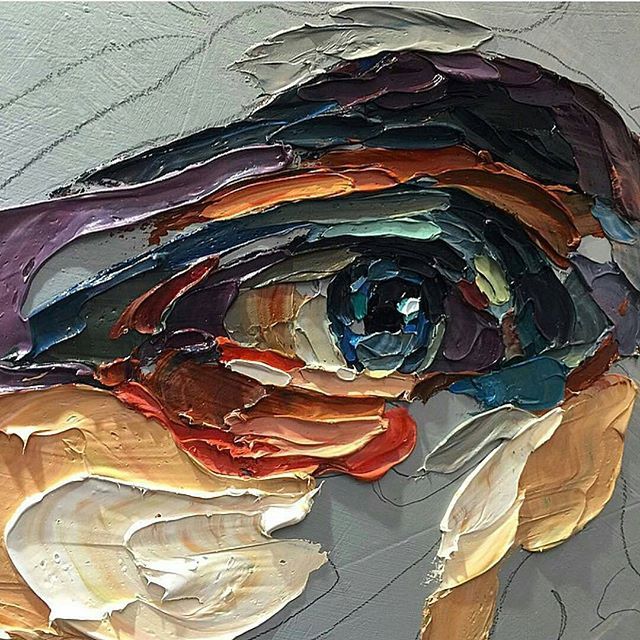
Thank you for all the awesome ideas! By combining some of these looks, it is getting close to what I want. Is there some technique to give it that thick acrylic textured paint effect like this attached picture?

Image


Top
 Post subject: Re: Help With Creating a Certain Art Form From an Image
PostPosted: Sun Dec 03, 2017 11:40 pm  (#14) 
Offline
GimpChat Member
User avatar

Joined: Sep 24, 2010
Posts: 12781
Good idea, Nidhogg.

As for creating impasto (thick paint) renders, that's a tough one. Have had some success using DAP (digital auto painter), but still no panacea. Below's a render I did a year ago that used DAP and some G'MIC thingys for the result (as I recall). :)

https://www.flickr.com/photos/34520999@ ... ateposted/

_________________
Lyle

Psalm 109:8

Image


Top
 Post subject: Re: Help With Creating a Certain Art Form From an Image
PostPosted: Mon Dec 04, 2017 5:18 pm  (#15) 
Offline
GimpChat Member

Joined: Nov 28, 2017
Posts: 18
Very helpful to know that it's called "impasto," lylejk. The bouquet is really good...I had to chuckle when I read your comment about tapping out a detailed oil painting in an evening. I think the impasto effect has a lot to do with the shading and the light to give it that 3-dimensional effect. Then, there is the ridges between colors.


Top
 Post subject: Re: Help With Creating a Certain Art Form From an Image
PostPosted: Tue Dec 05, 2017 7:27 am  (#16) 
Offline
GimpChat Member
User avatar

Joined: Jan 20, 2013
Posts: 14831
Location: roma, italy
You may try gimpressionist to create something in that direction.
It's quite tricky working with the parameters, but it's a powerful plug-in.

_________________
"Where am I ?"


Top
Post new topic Reply to topic  [ 16 posts ] 

All times are UTC - 5 hours [ DST ]


* Login  


Powered by phpBB3 © phpBB Group