It is currently Sat Jun 27, 2026 6:47 am


All times are UTC - 5 hours [ DST ]


Post new topic Reply to topic  [ 5 posts ] 
Author Message
 Post subject: No Brushes
PostPosted: Tue Dec 26, 2017 6:03 pm  (#1) 
Offline
New Member

Joined: Dec 26, 2017
Posts: 2
GIMP Version: 2.8.14
Operating System: Mac OS
OS Version: 10.13.2
GIMP Experience: Basic Level


I imagine that this is embarrassingly simple, but I can't find any brushes. I choose paint brush, and there's nothing in the tool options box. The choices to modify the brushes are all greyed out as well. I wanted to dodge/burn a photo and I couldn't figure out how to get it going and then I noticed that there're no brushes, period, zip. I'll attach a screen shot of the situation. I hope it's just something ignorant on my part. Thank you for any help. Paul


Attachments:
Screen Shot 2017-12-26 at 5.01.31 PM.png
Screen Shot 2017-12-26 at 5.01.31 PM.png [ 441.61 KiB | Viewed 3026 times ]

_________________
“I would rather have questions that can't be answered than answers that can't be questioned.”
Richard Feynman
Share on Facebook Share on Twitter Share on Orkut Share on Digg Share on MySpace Share on Delicious Share on Technorati
Top
 Post subject: Re: No Brushes
PostPosted: Tue Dec 26, 2017 6:27 pm  (#2) 
Offline
Administrator
User avatar

Joined: Aug 10, 2012
Posts: 14078
Location: Native to NYC living in Arizona, Gimp 2.8 - 3.0, Win 11 PC.
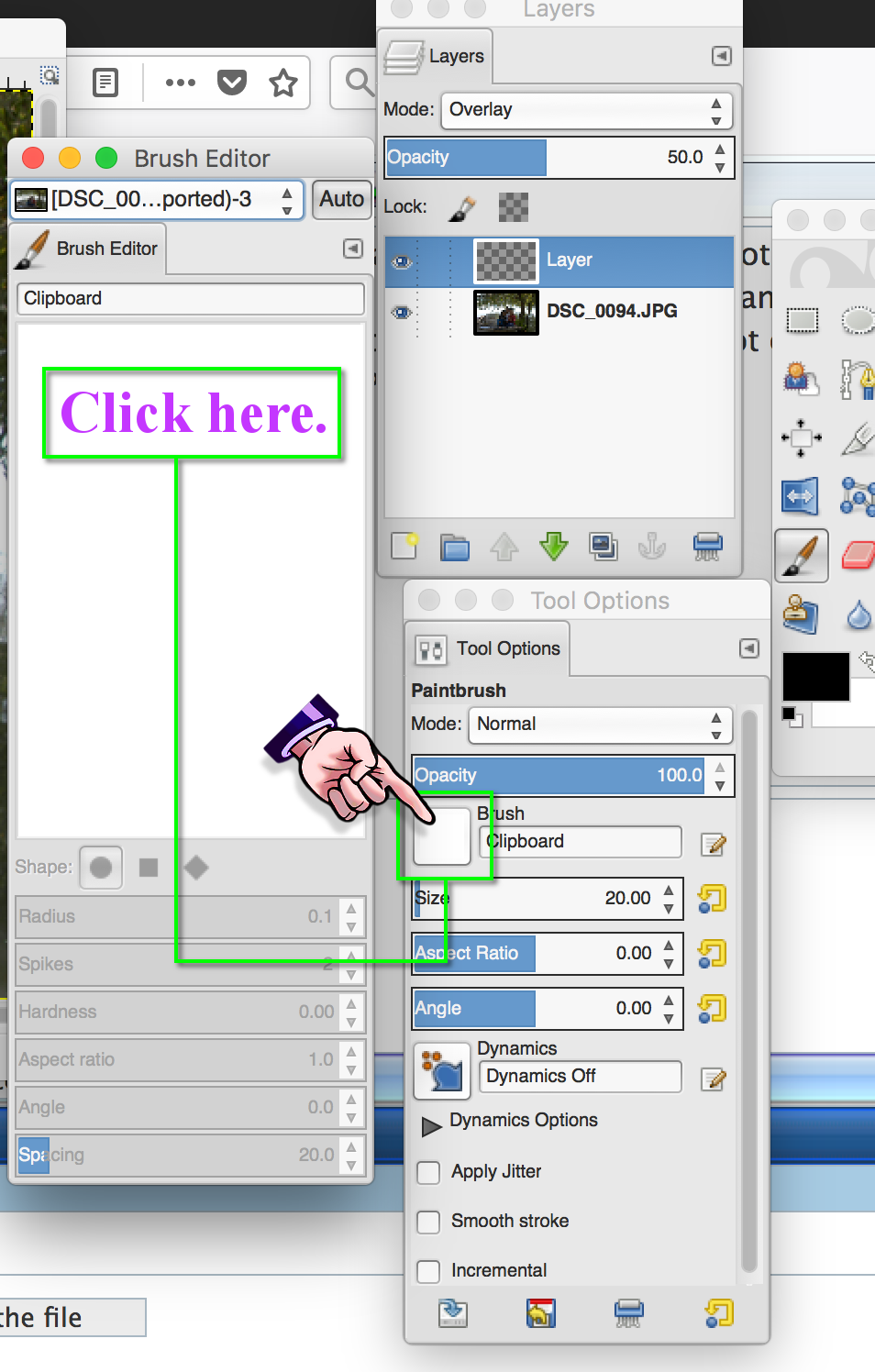
The brush that is selected by default might be the clipboard brush.
Click on this brush,
as seen in the image below.

Image

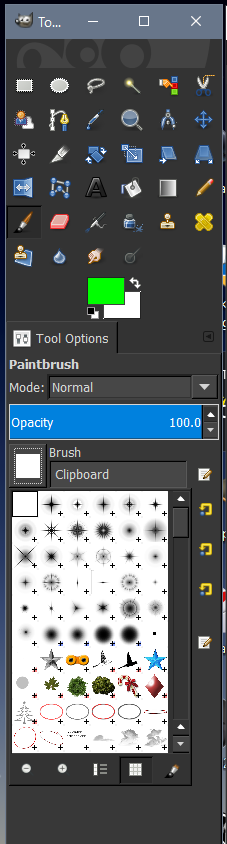
When you click the clipboard brush.
The dialog seen below should open.
Showing all the available brushes.


Image

_________________
Image
"A wise man learns more from a foolish question than a fool can learn from a wise answer"
Image


Top
 Post subject: Re: No Brushes
PostPosted: Tue Dec 26, 2017 6:30 pm  (#3) 
Offline
GimpChat Member

Joined: Sep 20, 2016
Posts: 293
You have the Brush Editor open, not the Brush Dialogue.
The Editor is for making parametric custom brushes.

Keyboardshortcut for the Brush Dialogue is Shift + Ctrl + B


Top
 Post subject: Re: No Brushes
PostPosted: Tue Dec 26, 2017 8:15 pm  (#4) 
Offline
New Member

Joined: Dec 26, 2017
Posts: 2
Thank you both. I figured it was some sort of newbie user error.

_________________
“I would rather have questions that can't be answered than answers that can't be questioned.”
Richard Feynman


Top
 Post subject: Re: No Brushes
PostPosted: Tue Dec 26, 2017 8:20 pm  (#5) 
Offline
Administrator
User avatar

Joined: Aug 10, 2012
Posts: 14078
Location: Native to NYC living in Arizona, Gimp 2.8 - 3.0, Win 11 PC.
casasemanas wrote:
Thank you both. I figured it was some sort of newbie user error.

No problem.
Image

_________________
Image
"A wise man learns more from a foolish question than a fool can learn from a wise answer"
Image


Top
Post new topic Reply to topic  [ 5 posts ] 

All times are UTC - 5 hours [ DST ]


* Login  


Powered by phpBB3 © phpBB Group