It is currently Sun Sep 20, 2026 6:10 pm


All times are UTC - 5 hours [ DST ]


Post new topic Reply to topic  [ 17 posts ] 
Author Message
 Post subject: Adding Stars to a Colour Gradient-Filled Selection
PostPosted: Mon Jul 16, 2018 9:02 pm  (#1) 
Offline
GimpChat Member

Joined: Jul 16, 2018
Posts: 8
GIMP Version: 2.8.14
Operating System: Mac OS
OS Version: 10.11.6
GIMP Experience: Basic Level


Hi,

I’m trying to create stars (randomly placed, differently-sized white and off-white dots) in a selected area of an image. The area is a sky with a colour gradient. I’ve found lots of tutorials on how to create a starry sky on a black background as an image itself, but nothing about doing it on a colour/gradient background and only on a portion of the image. I tried using the tutorials I did find (most of which used filters like HSV Noise or Hurl), but the stars it created were too small and didn’t really show up on my image. I feel like this should be relatively simple, but I’ve been Googling and trying different approaches for a few hours now with no success. Does anyone have any ideas on how to go about solving this issue?

Thanks!


Share on Facebook Share on Twitter Share on Orkut Share on Digg Share on MySpace Share on Delicious Share on Technorati
Top
 Post subject: Re: Adding Stars to a Colour Gradient-Filled Selection
PostPosted: Mon Jul 16, 2018 9:15 pm  (#2) 
Offline
Administrator
User avatar

Joined: Aug 10, 2012
Posts: 14206
Location: Native to NYC living in Arizona, Gimp 2.8 - 3.0, Win 11 PC.
carmcarm wrote:
GIMP Version: 2.8.14
Operating System: Mac OS
OS Version: 10.11.6
GIMP Experience: Basic Level


Hi,

I’m trying to create stars (randomly placed, differently-sized white and off-white dots) in a selected area of an image. The area is a sky with a colour gradient. I’ve found lots of tutorials on how to create a starry sky on a black background as an image itself, but nothing about doing it on a colour/gradient background and only on a portion of the image. I tried using the tutorials I did find (most of which used filters like HSV Noise or Hurl), but the stars it created were too small and didn’t really show up on my image. I feel like this should be relatively simple, but I’ve been Googling and trying different approaches for a few hours now with no success. Does anyone have any ideas on how to go about solving this issue?

Thanks!

Have you tried using an animated GIMP brush pipe,
such as the attachment below?

Attachment:
Animated Stars.gih [1.26 MiB]
Downloaded 225 times

_________________
Image
"A wise man learns more from a foolish question than a fool can learn from a wise answer"
Image


Top
 Post subject: Re: Adding Stars to a Colour Gradient-Filled Selection
PostPosted: Mon Jul 16, 2018 9:31 pm  (#3) 
Offline
GimpChat Member

Joined: Jul 16, 2018
Posts: 8
Ooh, no, I haven't. That is beyond what I know about GIMP so far! Any pointers on how to go about using that kind of thing?


Top
 Post subject: Re: Adding Stars to a Colour Gradient-Filled Selection
PostPosted: Mon Jul 16, 2018 9:37 pm  (#4) 
Offline
Administrator
User avatar

Joined: Aug 10, 2012
Posts: 14206
Location: Native to NYC living in Arizona, Gimp 2.8 - 3.0, Win 11 PC.
carmcarm wrote:
Ooh, no, I haven't. That is beyond what I know about GIMP so far! Any pointers on how to go about using that kind of thing?

You would first need to add the Animated Stars.gih brush to your Brushes Folder.
I'm not a Mac user,
and can't direct you to where this folder might be located.

Once you've added the brush to your brushes folder.
It should be available within gimp to use.

Find the brush within the brushes dialog.
Select it and adjust the size accordingly.
Begin to paint with it while your selection is active.

_________________
Image
"A wise man learns more from a foolish question than a fool can learn from a wise answer"
Image


Top
 Post subject: Re: Adding Stars to a Colour Gradient-Filled Selection
PostPosted: Mon Jul 16, 2018 10:20 pm  (#5) 
Offline
GimpChat Member

Joined: Jul 16, 2018
Posts: 8
Thanks, Wallace! After a bit of searching, I found the [very well-hidden] brushes folder using a tutorial by bringles on DeviantArt (for anyone having trouble finding their Brushes folder on a Mac, search up this tutorial. I tried sharing the URL but it was flagged as spam). I added Animated Stars.gih to the folder and restarted GIMP, but the brush isn't showing up. I tried finding a second Brushes folder because I read in the manual that, on PCs, there is a "system" Brushes folder (which you shouldn't alter) and a Brushes folder in one's personal GIMP directory. However, I couldn't find a second folder anywhere, so I'm guessing Macs don't work like that...


Top
 Post subject: Re: Adding Stars to a Colour Gradient-Filled Selection
PostPosted: Mon Jul 16, 2018 10:33 pm  (#6) 
Offline
Administrator
User avatar

Joined: Aug 10, 2012
Posts: 14206
Location: Native to NYC living in Arizona, Gimp 2.8 - 3.0, Win 11 PC.
carmcarm wrote:
Thanks, Wallace! After a bit of searching, I found the [very well-hidden] brushes folder using a tutorial by bringles on DeviantArt (for anyone having trouble finding their Brushes folder on a Mac, search up this tutorial. I tried sharing the URL but it was flagged as spam). I added Animated Stars.gih to the folder and restarted GIMP, but the brush isn't showing up. I tried finding a second Brushes folder because I read in the manual that, on PCs, there is a "system" Brushes folder (which you shouldn't alter) and a Brushes folder in one's personal GIMP directory. However, I couldn't find a second folder anywhere, so I'm guessing Macs don't work like that...

This is what the brush looks like in my brush dialog.
Take notice of the tiny red mark,
on the lower right-hand corner of the brush within the dialog.
This red mark,
denotes that the brush is an animated brush.

Image

Image

_________________
Image
"A wise man learns more from a foolish question than a fool can learn from a wise answer"
Image


Top
 Post subject: Re: Adding Stars to a Colour Gradient-Filled Selection
PostPosted: Mon Jul 16, 2018 11:03 pm  (#7) 
Offline
GimpChat Member

Joined: Jul 16, 2018
Posts: 8
Ah!! I'm such a dummy. I see it now. Sorry...
And IT WORKS PERFECTLY!!! Oh man, that is exactly what I needed! Thank you so much!!! Yay! :'D


Top
 Post subject: Re: Adding Stars to a Colour Gradient-Filled Selection
PostPosted: Mon Jul 16, 2018 11:06 pm  (#8) 
Offline
Administrator
User avatar

Joined: Aug 10, 2012
Posts: 14206
Location: Native to NYC living in Arizona, Gimp 2.8 - 3.0, Win 11 PC.
carmcarm wrote:
Ah!! I'm such a dummy. I see it now. Sorry...
And IT WORKS PERFECTLY!!! Oh man, that is exactly what I needed! Thank you so much!!! Yay! :'D

Great!
Image

_________________
Image
"A wise man learns more from a foolish question than a fool can learn from a wise answer"
Image


Top
 Post subject: Re: Adding Stars to a Colour Gradient-Filled Selection
PostPosted: Tue Jul 17, 2018 1:04 am  (#9) 
Offline
Global Moderator
User avatar

Joined: Oct 02, 2014
Posts: 5050
Location: Sydney Australia
Hi, for what it is worth I thought I would add another method FYI.

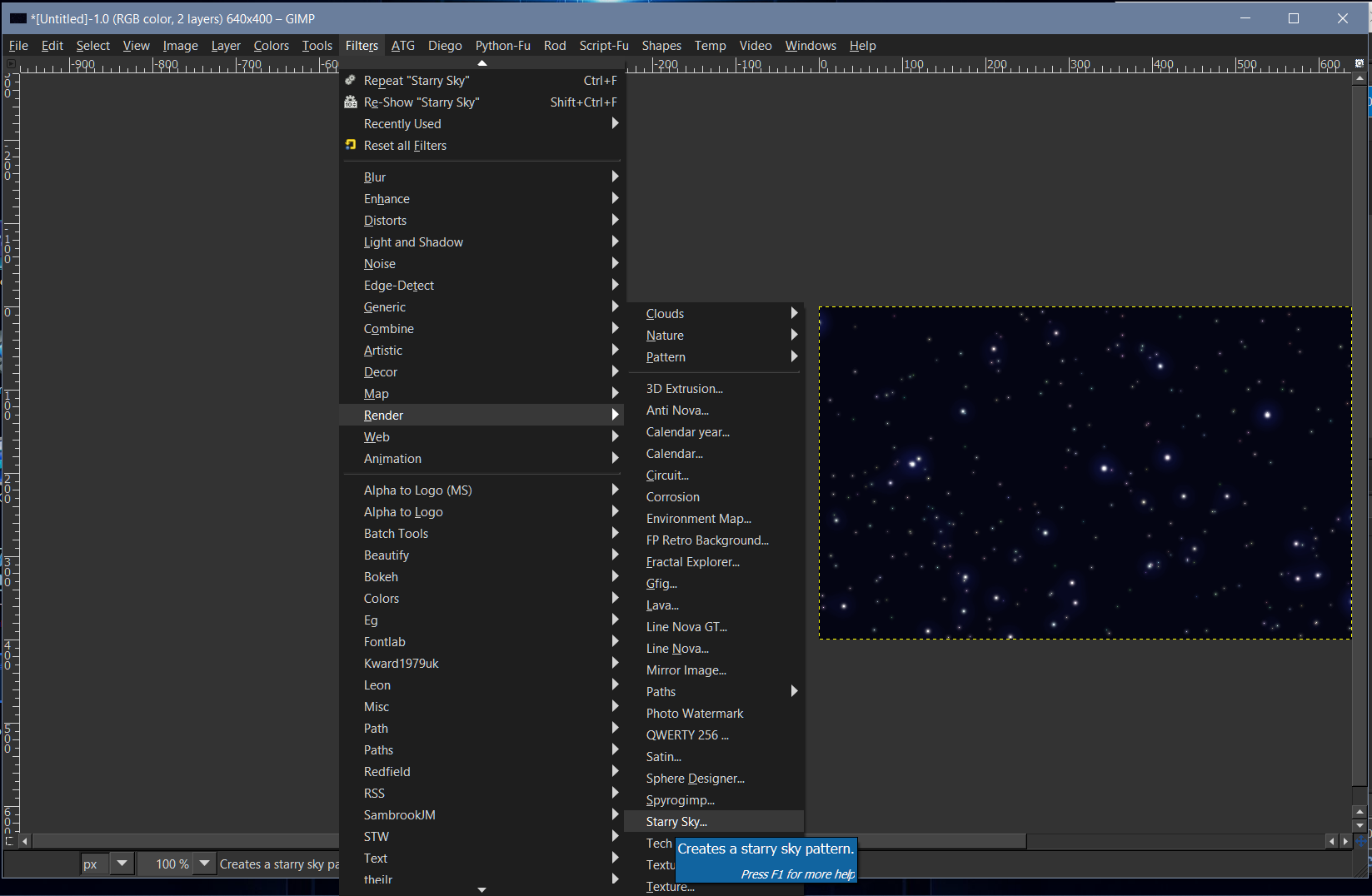
There is a filter under Filters>Render> Starry Sky that will produce a selection of stars on a black (or various dark blue shades) background.

If you create a layer using this filter you can put it above your gradient layer. Then change the starry sky layer blend mode to 'screen" and there you have it - stars on your gradient.

_________________
Image

Respect should be offered freely but hard earned


Top
 Post subject: Re: Adding Stars to a Colour Gradient-Filled Selection
PostPosted: Tue Jul 17, 2018 3:54 pm  (#10) 
Offline
GimpChat Member

Joined: May 15, 2018
Posts: 28
oldmangrumpy wrote:
Hi, for what it is worth I thought I would add another method FYI.

There is a filter under Filters>Render> Starry Sky that will produce a selection of stars on a black (or various dark blue shades) background.

If you create a layer using this filter you can put it above your gradient layer. Then change the starry sky layer blend mode to 'screen" and there you have it - stars on your gradient.

Hi,
Should this filter come with Gimp?
My Gimp does not display this filter over -> filter under Filters> Render> Starry Sky.

I'm using Gimp 2.10.1 Portable from Samj. Maybe that's why this filter is missing. :(


Top
 Post subject: Re: Adding Stars to a Colour Gradient-Filled Selection
PostPosted: Tue Jul 17, 2018 4:29 pm  (#11) 
Offline
Global Moderator
User avatar

Joined: Oct 02, 2014
Posts: 5050
Location: Sydney Australia
Tic Tac - oh forgive me, I should have remembered that Starry Sky is a script I think from Gnu Tux, but I have had it for so long now it is just part of the woodwork!

I am still using 2.8 so it may not work under 2.10, but here it is anyway --


Attachments:
starry-sky.scm [6.99 KiB]
Downloaded 102 times

_________________
Image

Respect should be offered freely but hard earned
Top
 Post subject: Re: Adding Stars to a Colour Gradient-Filled Selection
PostPosted: Tue Jul 17, 2018 4:36 pm  (#12) 
Offline
Administrator
User avatar

Joined: Aug 10, 2012
Posts: 14206
Location: Native to NYC living in Arizona, Gimp 2.8 - 3.0, Win 11 PC.
oldmangrumpy wrote:
Tic Tac - oh forgive me,
I should have remembered that Starry Sky is a script I think from Gnu Tux,
but I have had it for so long now it is just part of the woodwork!

I am still using 2.8 so it may not work under 2.10, but here it is anyway --

Thanks for posting this script OMG.

Image

_________________
Image
"A wise man learns more from a foolish question than a fool can learn from a wise answer"
Image


Top
 Post subject: Re: Adding Stars to a Colour Gradient-Filled Selection
PostPosted: Tue Jul 17, 2018 10:21 pm  (#13) 
Offline
GimpChat Member

Joined: May 15, 2018
Posts: 28
Hi Wallace and OMG, I downloaded both the Animated Stars.gih brush and the starry-sky.scm script, both running smoothly on my Gimp 2.10.1. Many thanks, you guys are awesome! :bigthup :tyspin


Top
 Post subject: Re: Adding Stars to a Colour Gradient-Filled Selection
PostPosted: Wed Jul 18, 2018 5:05 am  (#14) 
Offline
Global Moderator
User avatar

Joined: Apr 01, 2012
Posts: 8471
Location: On the other side of your screen
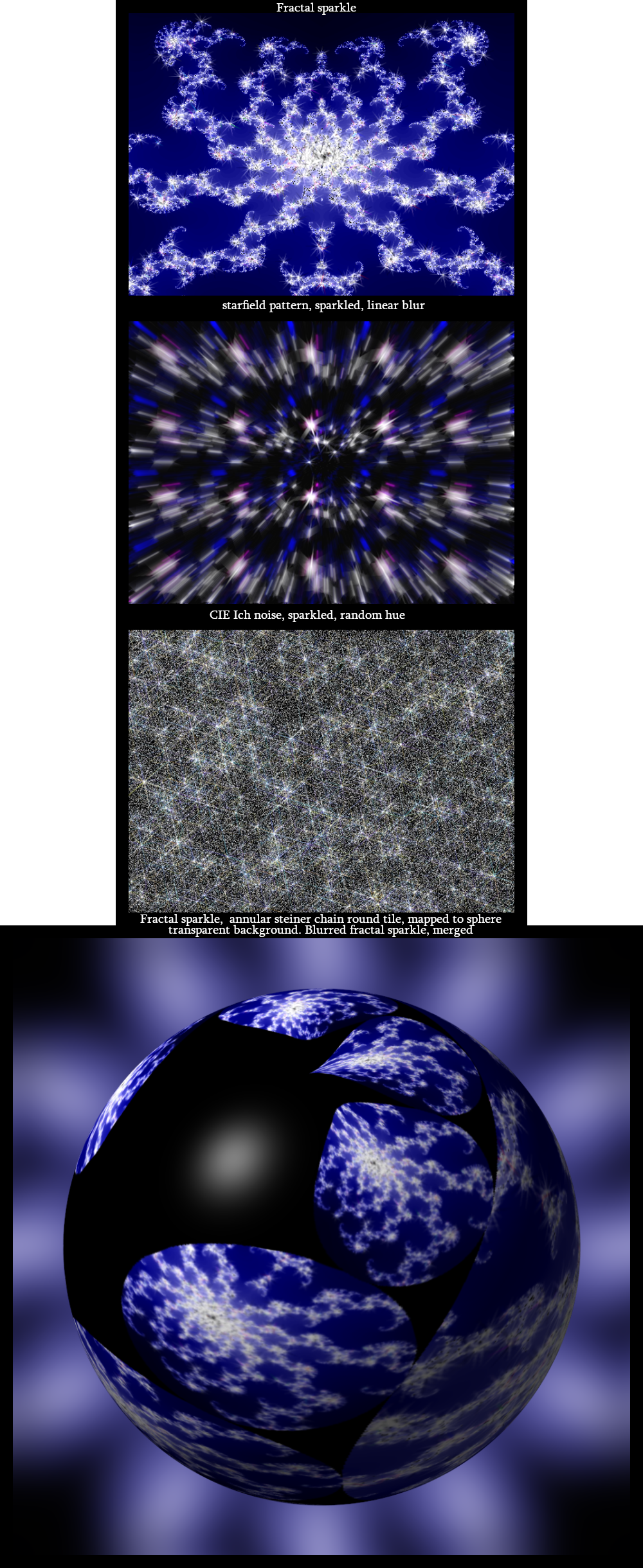
You could also try this. Do you stars with the noise then run sparkle. That should make them look bigger.
Edit: If the sparkle filter works. Mine doesn't :(

_________________
Image
Free Fun Photo Editing & resources
Poems from the Lord
Gimp Newby
Gimp version 3.2.4 and GMIC-Qt 4.0.2 OS :- Windows 10 Home 64


Top
 Post subject: Re: Adding Stars to a Colour Gradient-Filled Selection
PostPosted: Wed Jul 18, 2018 5:36 pm  (#15) 
Offline
GimpChat Member

Joined: May 15, 2018
Posts: 28
Hi Sally,
I do not know how to make stars with 'noise'. :oops:
There are several "noise" in the menu, both in the Filter-noise, and another noise in Filter-Render.

I tried and got some interesting results, but the sparkle filter does not display any modification in the preview. I do not know if it is not working right or if it is anyway.

In any case, cool your tip to use 'noise', thanks! :tyspin :)


Top
 Post subject: Re: Adding Stars to a Colour Gradient-Filled Selection
PostPosted: Wed Jul 18, 2018 5:47 pm  (#16) 
Offline
Administrator
User avatar

Joined: Aug 10, 2012
Posts: 14206
Location: Native to NYC living in Arizona, Gimp 2.8 - 3.0, Win 11 PC.
TicTac wrote:
Hi Sally,
I do not know how to make stars with 'noise'. :oops:
There are several "noise" in the menu, both in the Filter-noise, and another noise in Filter-Render.

I tried and got some interesting results, but the sparkle filter does not display any modification in the preview. I do not know if it is not working right or if it is anyway.

In any case, cool your tip to use 'noise', thanks! :tyspin :)

This method works well,
but it's difficult to get precise control,
over the size and shape of the sparkly effect.

That is why I recommended using an animated brush,
instead of applying filters.

There are numerous ways one can achieve this effect.
What we have offered/explored here,
is only a drop in the bucket.

_________________
Image
"A wise man learns more from a foolish question than a fool can learn from a wise answer"
Image


Top
 Post subject: Re: Adding Stars to a Colour Gradient-Filled Selection
PostPosted: Wed Jul 25, 2018 8:49 am  (#17) 
Offline
Global Moderator
User avatar

Joined: Apr 01, 2012
Posts: 8471
Location: On the other side of your screen
Thought I would post this here
My couple of ways to make stars
Image

_________________
Image
Free Fun Photo Editing & resources
Poems from the Lord
Gimp Newby
Gimp version 3.2.4 and GMIC-Qt 4.0.2 OS :- Windows 10 Home 64


Top
Post new topic Reply to topic  [ 17 posts ] 

All times are UTC - 5 hours [ DST ]


* Login  


Powered by phpBB3 © phpBB Group