It is currently Sun Nov 08, 2026 3:14 pm


All times are UTC - 5 hours [ DST ]


Post new topic Reply to topic  [ 4 posts ] 
Author Message
 Post subject: Changing Perspective Help
PostPosted: Tue Aug 28, 2018 11:14 am  (#1) 
Offline
New Member

Joined: Aug 28, 2018
Posts: 2
GIMP Version: 2.8.14
Operating System: Windows
OS Version: 10
GIMP Experience: New User


I'm trying to add a picture of a shed to a picture of my back yard. I've selected the shed I want, removed the background and inserted as a layer over the picture of my backyard.
My question now is, how can I change the perspective so that the shed doesn't look like it's floating in the air? I've played around with the perspective tool and I've searched forever to try and find something that addresses this specifically but cannot find what I need. I've attached a pic for reference. Any help or links that you can provide is much appreciated.
Thanks!


Attachments:
Shed example.PNG
Shed example.PNG [ 575.39 KiB | Viewed 2528 times ]
Share on Facebook Share on Twitter Share on Orkut Share on Digg Share on MySpace Share on Delicious Share on Technorati
Top
 Post subject: Re: Changing Perspective Help
PostPosted: Tue Aug 28, 2018 11:25 am  (#2) 
Offline
GimpChat Member
User avatar

Joined: Jan 20, 2013
Posts: 14835
Location: roma, italy
First change you need is:
set light and shadow of the shed according to the brush in the foreground
(light source is on the left side)
Second change is:
modify the aspect of the grass close to the shed (it's too uniform)
in front of the door place a bit of grit (a path?)

_________________
"Where am I ?"


Top
 Post subject: Re: Changing Perspective Help
PostPosted: Tue Aug 28, 2018 1:03 pm  (#3) 
Offline
Administrator
User avatar

Joined: Aug 10, 2012
Posts: 14265
Location: Native to NYC living in Arizona, Gimp 2.8 - 3.0, Win 11 PC.
dinasset wrote:
First change you need is:
set light and shadow of the shed according to the brush in the foreground
(light source is on the left side)
Second change is:
modify the aspect of the grass close to the shed (it's too uniform)
in front of the door place a bit of grit (a path?)

I agree with dinasset.
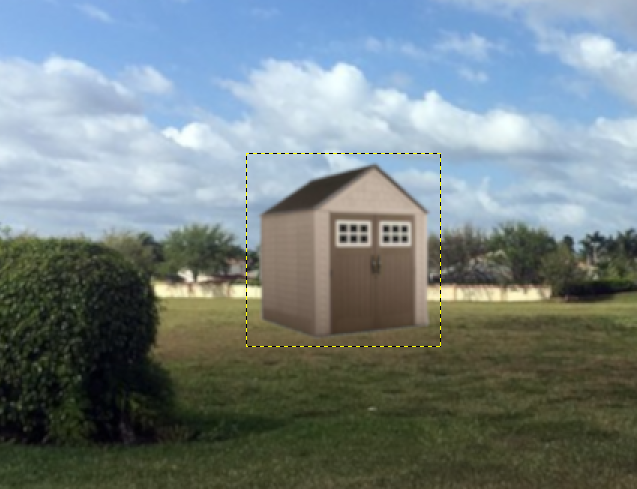
Adding shadows to an otherwise flat looking object, or in your case, an added no object.
Can give it the illusion of the perspective you want.
Strategically placing a some grass along the bottom of the shed.
Would also assist in blending it in better, so it doesn't appear out of place.

Something like this.

Before,,,,,,,,,,,,,,,,,,,,,..........................................................................After
ImageImage

_________________
Image
"A wise man learns more from a foolish question than a fool can learn from a wise answer"
Image


Top
 Post subject: Re: Changing Perspective Help
PostPosted: Tue Aug 28, 2018 3:12 pm  (#4) 
Offline
New Member

Joined: Aug 28, 2018
Posts: 2
Wallace wrote:
dinasset wrote:
First change you need is:
set light and shadow of the shed according to the brush in the foreground
(light source is on the left side)
Second change is:
modify the aspect of the grass close to the shed (it's too uniform)
in front of the door place a bit of grit (a path?)

I agree with dinasset.
Adding shadows to an otherwise flat looking object, or in your case, an added no object.
Can give it the illusion of the perspective you want.
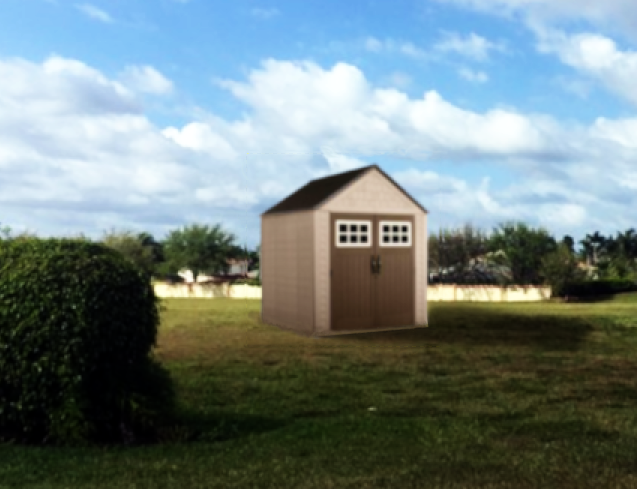
Strategically placing a some grass along the bottom of the shed.
Would also assist in blending it in better, so it doesn't appear out of place.

Something like this.

Before,,,,,,,,,,,,,,,,,,,,,..........................................................................After
[ Image ][ Image ]

Ahh. That looks so much better. I'll play around with that. Thank you so much!


Top
Post new topic Reply to topic  [ 4 posts ] 

All times are UTC - 5 hours [ DST ]


* Login  


Powered by phpBB3 © phpBB Group