It is currently Thu Sep 24, 2026 1:15 pm


All times are UTC - 5 hours [ DST ]


Post new topic Reply to topic  [ 62 posts ]  Go to page Previous  1, 2, 3, 4  Next
Author Message
 Post subject: Re: new filter "Crazy Hedcut"
PostPosted: Mon Nov 21, 2016 12:30 pm  (#21) 
Offline
GimpChat Member
User avatar

Joined: Jan 20, 2013
Posts: 14835
Location: roma, italy
Many thanks, Rod!

_________________
"Where am I ?"


Top
 Post subject: Re: new filter "Crazy Hedcut"
PostPosted: Thu Nov 24, 2016 9:51 am  (#22) 
Offline
GimpChat Member
User avatar

Joined: Apr 26, 2014
Posts: 3824
Location: belgium
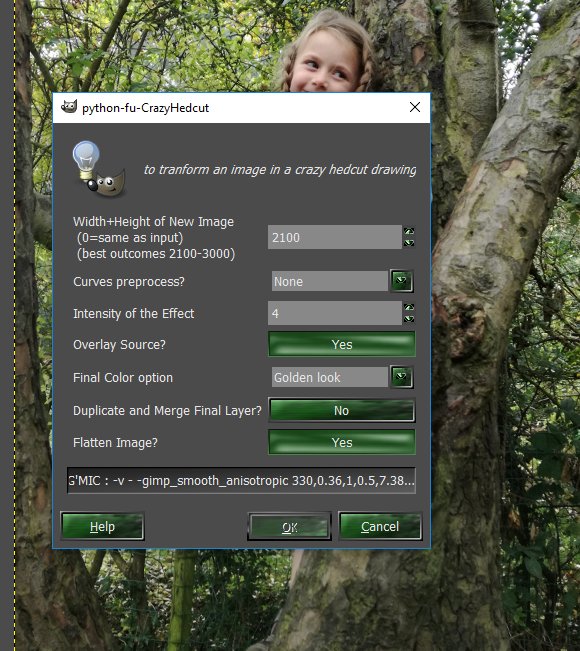
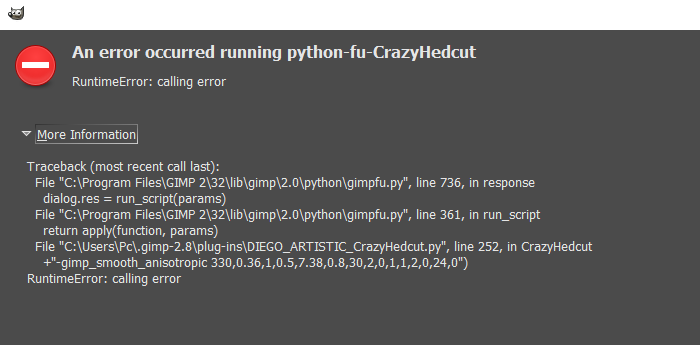
I want to try the'' Crazy Hedcut'' filter but I get this error message,perhaps I have done something wrong when installing in my folders !!??
knows someone advice
:oops:
Image
Image

thanks in advance,gimper66


Top
 Post subject: Re: new filter "Crazy Hedcut"
PostPosted: Thu Nov 24, 2016 10:40 am  (#23) 
Offline
GimpChat Member
User avatar

Joined: Jan 20, 2013
Posts: 14835
Location: roma, italy
Gimper,
there is an inconsistency between version 1.7.9 and previous one(s), in G'MIC anisotropic smoothing.
You maybe downloaded the version which was recently amended for 1.7.9 but do not have this last version of G'MIC installed?

_________________
"Where am I ?"


Top
 Post subject: Re: new filter "Crazy Hedcut"
PostPosted: Thu Nov 24, 2016 10:42 am  (#24) 
Offline
GimpChat Member
User avatar

Joined: Jan 20, 2013
Posts: 14835
Location: roma, italy
If my guess is correct
either:
- install G'MIC 1.7.9 (recommended)
or:
- re-download the original version of the filter, still available

_________________
"Where am I ?"


Top
 Post subject: Re: new filter "Crazy Hedcut"
PostPosted: Thu Nov 24, 2016 3:07 pm  (#25) 
Offline
GimpChat Member
User avatar

Joined: Apr 26, 2014
Posts: 3824
Location: belgium
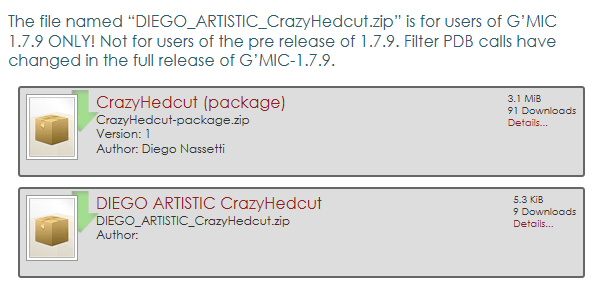
Image


this is what I have installed


Top
 Post subject: Re: new filter "Crazy Hedcut"
PostPosted: Thu Nov 24, 2016 3:38 pm  (#26) 
Offline
GimpChat Member
User avatar

Joined: Jan 20, 2013
Posts: 14835
Location: roma, italy
If you do not run G'MIC 1.7.9 (and you do not want to install it now) you should NOT have installed the program contained in the second link, which is an amendment to the program ONLY for users of 1.7.9 as it is clearly written(it replaces the original program contained in the first link (package).
Again: either you install G'MIC 1.7.9 (and leave your current Crazy Hedcut as it is) or you stay with your current G'MIC and remove the Crazy Hedcut you have and reinstall the original contaned in the package.

_________________
"Where am I ?"


Top
 Post subject: Re: new filter "Crazy Hedcut"
PostPosted: Sun Sep 09, 2018 3:40 am  (#27) 
Offline
GimpChat Member
User avatar

Joined: Jan 20, 2013
Posts: 14835
Location: roma, italy
I got a request to have this filter running again on the latest gimp+gmic releases.
This is the version ported to 2.10.6 and gmic-qt.
Attachment:
DIEGO_TEST_CrazyHedcut_QT210_test.7z [5.48 KiB]
Downloaded 87 times

and this is the replicated Golden pattern used if option chosen
Attachment:
MyGold_120.jpg
MyGold_120.jpg [ 98.88 KiB | Viewed 1408 times ]


Once installed, it goes under menu Diego/Distort.

Thanks for testing.


(Beware: results are a bit different from the original, also default parameters options)

_________________
"Where am I ?"


Top
 Post subject: Re: new filter "Crazy Hedcut"
PostPosted: Sun Sep 09, 2018 3:47 am  (#28) 
Offline
GimpChat Member
User avatar

Joined: Jan 20, 2013
Posts: 14835
Location: roma, italy
Some outcomes, from this original:
Attachment:
autumn_fairy_by_duongquocdinh-d9mf6jl.jpg
autumn_fairy_by_duongquocdinh-d9mf6jl.jpg [ 140.47 KiB | Viewed 1406 times ]


default parameters (grayscale):
Attachment:
2018-09-09 10-10-45 autumn_fairy_by_duongquocdinh-d9mf6jl, as a Crazy Hedcut Drawing (intensitry=3.0) (Source on top) (grayscale).jpg
2018-09-09 10-10-45 autumn_fairy_by_duongquocdinh-d9mf6jl, as a Crazy Hedcut Drawing (intensitry=3.0) (Source on top) (grayscale).jpg [ 251.54 KiB | Viewed 1406 times ]


source colours:
Attachment:
2018-09-09 10-11-25 autumn_fairy_by_duongquocdinh-d9mf6jl, as a Crazy Hedcut Drawing (intensitry=3.0) (Source on top).jpg
2018-09-09 10-11-25 autumn_fairy_by_duongquocdinh-d9mf6jl, as a Crazy Hedcut Drawing (intensitry=3.0) (Source on top).jpg [ 397.95 KiB | Viewed 1406 times ]

_________________
"Where am I ?"


Top
 Post subject: Re: new filter "Crazy Hedcut"
PostPosted: Sun Sep 09, 2018 3:50 am  (#29) 
Offline
GimpChat Member
User avatar

Joined: Jan 20, 2013
Posts: 14835
Location: roma, italy
inverted colours:
Attachment:
2018-09-09 10-11-56 autumn_fairy_by_duongquocdinh-d9mf6jl, as a Crazy Hedcut Drawing (intensitry=3.0) (Source on top) (inverted colours).jpg
2018-09-09 10-11-56 autumn_fairy_by_duongquocdinh-d9mf6jl, as a Crazy Hedcut Drawing (intensitry=3.0) (Source on top) (inverted colours).jpg [ 435.56 KiB | Viewed 1406 times ]


golden pattern:
Attachment:
2018-09-09 10-12-29 autumn_fairy_by_duongquocdinh-d9mf6jl, as a Crazy Hedcut Drawing (intensitry=3.0) (Source on top) (golden look).jpg
2018-09-09 10-12-29 autumn_fairy_by_duongquocdinh-d9mf6jl, as a Crazy Hedcut Drawing (intensitry=3.0) (Source on top) (golden look).jpg [ 576.94 KiB | Viewed 1406 times ]


duplicating top layer (source colours):
Attachment:
2018-09-09 10-14-18 autumn_fairy_by_duongquocdinh-d9mf6jl, as a Crazy Hedcut Drawing (intensitry=3.0) (Source on top) (Dupl&Merge, Screen).jpg
2018-09-09 10-14-18 autumn_fairy_by_duongquocdinh-d9mf6jl, as a Crazy Hedcut Drawing (intensitry=3.0) (Source on top) (Dupl&Merge, Screen).jpg [ 536.83 KiB | Viewed 1406 times ]

_________________
"Where am I ?"


Top
 Post subject: Re: new filter "Crazy Hedcut"
PostPosted: Sun Sep 09, 2018 4:01 am  (#30) 
Offline
Global Moderator
User avatar

Joined: Apr 01, 2012
Posts: 8471
Location: On the other side of your screen
I forgotten if I need to do anything to a picture first?
I just run the filter at default and got this
Crazy Hedcut (using GMIC QT - for Gimp 2.10) Warning
INFO: image lightness OK, no pre-process

GIMP Error
Plug-in crashed: "gmic_gimp_qt.exe"
(C:\Users\Sallyanne\AppData\Roaming\GIMP\2.10\plug-ins\gmic_gimp_qt\gmic_gimp_qt.exe)

The dying plug-in may have messed up GIMP's internal state. You may want to save your images and restart GIMP to be on the safe side.

GIMP Error
Calling error for procedure 'plug-in-gmic-qt':


Not sure if it is my version of GMIC but this might help?
Traceback (most recent call last):
File "C:\Program Files\GIMP 2\32\lib\gimp\2.0\python/gimpfu.py", line 740, in response
dialog.res = run_script(params)
File "C:\Program Files\GIMP 2\32\lib\gimp\2.0\python/gimpfu.py", line 361, in run_script
return apply(function, params)
File "C:\Users\Sallyanne\AppData\Roaming\GIMP\2.10\plug-ins\DIEGO_TEST_CrazyHedcut_QT210_test.py", line 228, in CrazyHedcutQT210
+"-fx_thin_edges 0.5,15,0,0 ")
RuntimeError: Procedure 'plug-in-gmic-qt' returned no return values

Procedure 'plug-in-gmic-qt' returned no return values

_________________
Image
Free Fun Photo Editing & resources
Poems from the Lord
Gimp Newby
Gimp version 3.2.4 and GMIC-Qt 4.0.2 OS :- Windows 10 Home 64


Top
 Post subject: Re: new filter "Crazy Hedcut"
PostPosted: Sun Sep 09, 2018 4:20 am  (#31) 
Offline
GimpChat Member
User avatar

Joined: Jan 20, 2013
Posts: 14835
Location: roma, italy
First one is an INFO msg which I send when "auto-adjust" is selected (which is the default); you may ignore it or -if you do not like to get the info- do yourself the selection of the preprocessing step, for instance "none".

Second one is due to the version of G'MIC, I notified this error to David and was solved on the next release. You may update.

_________________
"Where am I ?"


Top
 Post subject: Re: new filter "Crazy Hedcut"
PostPosted: Sun Sep 09, 2018 4:30 am  (#32) 
Offline
GimpChat Member
User avatar

Joined: Jan 20, 2013
Posts: 14835
Location: roma, italy
viewtopic.php?f=28&t=16770

_________________
"Where am I ?"


Top
 Post subject: Re: new filter "Crazy Hedcut"
PostPosted: Sun Sep 09, 2018 4:35 am  (#33) 
Offline
GimpChat Member
User avatar

Joined: Jan 20, 2013
Posts: 14835
Location: roma, italy
Attachment:
2018-09-09 11-32-57 7924cdbea2cacee4bc222b90d6cb8011, as a Crazy Hedcut Drawing (intensitry=3.0) (Source on top) (grayscale).jpg
2018-09-09 11-32-57 7924cdbea2cacee4bc222b90d6cb8011, as a Crazy Hedcut Drawing (intensitry=3.0) (Source on top) (grayscale).jpg [ 362.06 KiB | Viewed 1396 times ]
Another example grayscale.

_________________
"Where am I ?"


Top
 Post subject: Re: new filter "Crazy Hedcut"
PostPosted: Sun Sep 09, 2018 4:38 am  (#34) 
Offline
GimpChat Member
User avatar

Joined: Jan 20, 2013
Posts: 14835
Location: roma, italy
Another example, source colours:


Attachments:
2018-09-09 11-36-15 923d061d3a3a377c43218095ff610e52-db8k8p6, as a Crazy Hedcut Drawing (intensitry=3.0) (Source on top).jpg
2018-09-09 11-36-15 923d061d3a3a377c43218095ff610e52-db8k8p6, as a Crazy Hedcut Drawing (intensitry=3.0) (Source on top).jpg [ 574.57 KiB | Viewed 1395 times ]

_________________
"Where am I ?"
Top
 Post subject: Re: new filter "Crazy Hedcut"
PostPosted: Sun Sep 09, 2018 4:43 am  (#35) 
Offline
GimpChat Member
User avatar

Joined: Jan 20, 2013
Posts: 14835
Location: roma, italy
An other example, Golden look, duplicated:
Attachment:
2018-09-09 11-41-58 698dcc373e71002761862f006c5b0a06-d3ldq5r, as a Crazy Hedcut Drawing (intensitry=3.0) (Source on top) (golden look) (Dupl&Merge, SoftLight).jpg
2018-09-09 11-41-58 698dcc373e71002761862f006c5b0a06-d3ldq5r, as a Crazy Hedcut Drawing (intensitry=3.0) (Source on top) (golden look) (Dupl&Merge, SoftLight).jpg [ 763.41 KiB | Viewed 1394 times ]

_________________
"Where am I ?"


Top
 Post subject: Re: new filter "Crazy Hedcut"
PostPosted: Sun Sep 09, 2018 5:33 am  (#36) 
Offline
Global Moderator
User avatar

Joined: Apr 01, 2012
Posts: 8471
Location: On the other side of your screen
dinasset wrote:
http://gimpchat.com/viewtopic.php?f=28&t=16770

Thanks David.
Downloaded and installed into my Samj's portable pack.
Tested, using my same filter used for 2.3.3 and 2.3.4.
It works properly !
OK.
Very quick solution, thanks again.


I use 2.3.4

_________________
Image
Free Fun Photo Editing & resources
Poems from the Lord
Gimp Newby
Gimp version 3.2.4 and GMIC-Qt 4.0.2 OS :- Windows 10 Home 64


Top
 Post subject: Re: new filter "Crazy Hedcut"
PostPosted: Sun Sep 09, 2018 5:56 am  (#37) 
Offline
GimpChat Member
User avatar

Joined: Jan 20, 2013
Posts: 14835
Location: roma, italy
Install 2.3.5 which has the fix.

_________________
"Where am I ?"


Top
 Post subject: Re: new filter "Crazy Hedcut"
PostPosted: Mon Sep 10, 2018 11:24 pm  (#38) 
Offline
GimpChat Member
User avatar

Joined: Jan 20, 2013
Posts: 14835
Location: roma, italy
This nice NatGeo picture deserves a place also here.
Attachment:
2018-09-11 06-20-22 DmvqYsYU4AEz6TQ, as a Crazy Hedcut Drawing (intensitry=3.0) (Source on top) (grayscale).jpg
2018-09-11 06-20-22 DmvqYsYU4AEz6TQ, as a Crazy Hedcut Drawing (intensitry=3.0) (Source on top) (grayscale).jpg [ 282.65 KiB | Viewed 1315 times ]

_________________
"Where am I ?"


Top
 Post subject: Re: new filter "Crazy Hedcut"
PostPosted: Mon Sep 10, 2018 11:26 pm  (#39) 
Offline
GimpChat Member
User avatar

Joined: Jan 20, 2013
Posts: 14835
Location: roma, italy
Maintaining original colours.
Attachment:
2018-09-11 06-24-23 DmvqYsYU4AEz6TQ, as a Crazy Hedcut Drawing (intensitry=3.0) (Source on top).jpg
2018-09-11 06-24-23 DmvqYsYU4AEz6TQ, as a Crazy Hedcut Drawing (intensitry=3.0) (Source on top).jpg [ 471.99 KiB | Viewed 1315 times ]

_________________
"Where am I ?"


Top
 Post subject: Re: new filter "Crazy Hedcut"
PostPosted: Mon Sep 10, 2018 11:26 pm  (#40) 
Offline
GimpChat Member
User avatar

Joined: Jan 20, 2013
Posts: 14835
Location: roma, italy
BTW Sallyanne, did you upgrade G'MIC to test this filter?

_________________
"Where am I ?"


Top
Post new topic Reply to topic  [ 62 posts ]  Go to page Previous  1, 2, 3, 4  Next

All times are UTC - 5 hours [ DST ]


* Login  


Powered by phpBB3 © phpBB Group