It is currently Tue Jun 23, 2026 6:50 am


All times are UTC - 5 hours [ DST ]


Post new topic Reply to topic  [ 20 posts ] 
Author Message
 Post subject: Fog render is missing
PostPosted: Thu Sep 06, 2018 7:01 am  (#1) 
Offline
GimpChat Member

Joined: Sep 06, 2018
Posts: 13
GIMP Version: 2.8.20
Operating System: Windows
GIMP Experience: Intermediate Level


I'm new here so hi to everyone.

Anyway, I've only recently updated GIMP from 2.8 to 2.8.20, and now I cannot find the Fog render effect.

I use the effect very often and it's important for me when making certain textures, however I honestly cannot find it anywhere. I swear it was located in Filter > Render > Clouds > Fog, but it's no longer there, unless I am remembering this wrong, but it's an absolute disaster without this effect.

Has it been moved?

Any help will be much appreciated because it's a vital effect for texture effects I make.


Share on Facebook Share on Twitter Share on Orkut Share on Digg Share on MySpace Share on Delicious Share on Technorati
Top
 Post subject: Re: Fog render is missing
PostPosted: Thu Sep 06, 2018 8:02 am  (#2) 
Hi Iridescent. Try this location: Filters> Decor> Fog. That is where I I have mine in Gimp 2.10.6.


Attachments:
Sample.jpg
Sample.jpg [ 217.79 KiB | Viewed 6616 times ]
Top
 Post subject: Re: Fog render is missing
PostPosted: Thu Sep 06, 2018 8:18 am  (#3) 
Offline
Script Coder
User avatar

Joined: Oct 25, 2010
Posts: 4812
This usually means that your python support is non-functioning. Have you got Filters>Python-fu>Console (at the bottom of Filters)?
Are your "Colored XHTML" and "Open raster" types available in File>Export?

_________________
Image


Top
 Post subject: Re: Fog render is missing
PostPosted: Thu Sep 06, 2018 9:03 am  (#4) 
Offline
GimpChat Member

Joined: Sep 06, 2018
Posts: 13
@Pocholo, I don't have the option there:

Attachment:
32vtdsgdf.png
32vtdsgdf.png [ 207.37 KiB | Viewed 6600 times ]


Also @ofnuts, I don't have those options either. What can I do to fix this?


Top
 Post subject: Re: Fog render is missing
PostPosted: Thu Sep 06, 2018 10:13 am  (#5) 
Offline
Script Coder
User avatar

Joined: Oct 25, 2010
Posts: 4812
Iridescent wrote:
@Pocholo, I don't have the option there:

Attachment:
32vtdsgdf.png


Also @ofnuts, I don't have those options either. What can I do to fix this?


There should be a "python" subdirectry in the Gimp install tree ("C:\Program files\GIMP2\Python", I think), with a python.exe in it and many other things). If you cannot find it, then reinstall Gimp and make sure that the python support is installed if it is an option.

_________________
Image


Top
 Post subject: Re: Fog render is missing
PostPosted: Thu Sep 06, 2018 6:25 pm  (#6) 
Iridescent wrote:
@Pocholo, I don't have the option there:

Attachment:
The attachment 32vtdsgdf.png is no longer available


Sorry, I didn't read that you Version is 2.8.20. Ok if don't have it in: Filters> Render, just download the i just post it and place it on your personal directory C:\Users\YourName\.gimp-2.8\plug-ins . Start gimp and you will have it in the location: Filters> Render> Fog. I hope this help you.


Also @ofnuts, I don't have those options either. What can I do to fix this?


Attachments:
foggify.py.zip [913 Bytes]
Downloaded 253 times
Top
 Post subject: Re: Fog render is missing
PostPosted: Fri Sep 07, 2018 5:20 am  (#7) 
Offline
GimpChat Member

Joined: Sep 06, 2018
Posts: 13
I have Python installed (At least it appears in my GIMP folder as you stated). I can't find any option for Python" support, but it seems to be doing it's thing as far as I can tell.

@Pocholo, where do I put that file? I checked my lib > GIMP > 2.0 > Plug-ins, and the file is in there, but it doesn't seem to be loading upon starting GIMP.


Top
 Post subject: Re: Fog render is missing
PostPosted: Fri Sep 07, 2018 7:29 am  (#8) 
Offline
Script Coder
User avatar

Joined: Oct 25, 2010
Posts: 4812
Iridescent wrote:
I have Python installed (At least it appears in my GIMP folder as you stated). I can't find any option for Python" support, but it seems to be doing it's thing as far as I can tell.

@Pocholo, where do I put that file? I checked my lib > GIMP > 2.0 > Plug-ins, and the file is in there, but it doesn't seem to be loading upon starting GIMP.


There could still be something wrong with it, so do you have any of:

* Filters>Python-fu>Console (at the bottom of Filters)
* "Colored XHTML" and "Open raster" types available in File>Export

If these are missing your python support is hosed.

_________________
Image


Top
 Post subject: Re: Fog render is missing
PostPosted: Fri Sep 07, 2018 11:43 pm  (#9) 
Iridescent wrote:
I have Python installed (At least it appears in my GIMP folder as you stated). I can't find any option for Python" support, but it seems to be doing it's thing as far as I can tell.

@Pocholo, where do I put that file? I checked my lib > GIMP > 2.0 > Plug-ins, and the file is in there, but it doesn't seem to be loading upon starting GIMP.


As I mentioned before, place it in your Personal folder C:\Users\Yourname\.gimp-2.8\plug-ins.


Top
 Post subject: Re: Fog render is missing
PostPosted: Sat Sep 08, 2018 12:48 am  (#10) 
Offline
Script Coder
User avatar

Joined: Oct 25, 2010
Posts: 4812
Pocholo wrote:
Iridescent wrote:
I have Python installed (At least it appears in my GIMP folder as you stated). I can't find any option for Python" support, but it seems to be doing it's thing as far as I can tell.

@Pocholo, where do I put that file? I checked my lib > GIMP > 2.0 > Plug-ins, and the file is in there, but it doesn't seem to be loading upon starting GIMP.


As I mentioned before, place it in your Personal folder C:\Users\Yourname\.gimp-2.8\plug-ins.


As I mentioned before, in all likeliness the files are present, but Python is broken :)

_________________
Image


Top
 Post subject: Re: Fog render is missing
PostPosted: Sat Sep 08, 2018 2:06 am  (#11) 
Offline
GimpChat Member

Joined: Sep 06, 2018
Posts: 13
I think ofnuts is right about my issue. I don't have XHTML or Open Raster exporting options, and here's what I have instead in filters

Attachment:
4tvseyty.png
4tvseyty.png [ 28.08 KiB | Viewed 2688 times ]


Is there any way to fix Python?


Top
 Post subject: Re: Fog render is missing
PostPosted: Sat Sep 08, 2018 1:49 pm  (#12) 
Offline
GimpChat Member

Joined: Sep 23, 2016
Posts: 317
Iridescent wrote:
Is there any way to fix Python?

See reply from Ofnuts on previous page (post #5)


Top
 Post subject: Re: Fog render is missing
PostPosted: Tue Sep 11, 2018 11:02 am  (#13) 
Offline
GimpChat Member

Joined: Sep 06, 2018
Posts: 13
Sorry for taking so long to reply. I reinstalled as was suggested and it fixed everything :D

GIMP looks very different so it's going to take time getting used to this; Fog is there, though.

Only issue is where has iWarp gone?


Top
 Post subject: Re: Fog render is missing
PostPosted: Tue Sep 11, 2018 11:25 am  (#14) 
Offline
GimpChat Member

Joined: Sep 23, 2016
Posts: 317
Iridescent wrote:
Only issue is where has iWarp gone?

It has been upgraded, and has a new name and new location. It is now called Warp Transform and is in the Tool Box (with the Text Tool, etc).


Top
 Post subject: Re: Fog render is missing
PostPosted: Tue Sep 11, 2018 11:31 am  (#15) 
Offline
GimpChat Member

Joined: Sep 06, 2018
Posts: 13
oooh actually that is much better. No more straining my eyes at a tiny preview screen.

Sorry again for having to ask for help. I'm not good at techy stuff or if something breaks :P Thanks for all the help, though; Much appreciated.


Top
 Post subject: Re: Fog render is missing
PostPosted: Tue Sep 11, 2018 11:44 am  (#16) 
Iridescent, the new version 2.10 don't have the "Iwarp" plugin any longer, it was replaced a new tool "Warp Transform tool". But you can still use the Iwarp from the 2.8 version. Go to where Gimp is installed on your PC (If you have Windows) : C:\Program Files\GIMP 2\lib\gimp\2.0\plug-ins and Copy the Iwarp plugin. Then go to you personal folder preference: C:\Users\YournName\AppData\Roaming\GIMP\2.10\plug-ins and it will appear in the same location once you stat Gimp, Filters> Distorts> IWarp. I hope this can answer your question.


Top
 Post subject: Re: Fog render is missing
PostPosted: Tue Sep 11, 2018 11:47 am  (#17) 
Offline
GimpChat Member

Joined: Sep 06, 2018
Posts: 13
Thanks for letting me know, although the updated version of iWarp is far better.

I have run into a new issue with the Fog, though. When I put the turbulence too high, the plug-in crashes and fails to render the fog effect. It works fine from 1 - 5 turbulence, but it seems anything higher and it just doesn't work.

It's not a great deal as I almost never put turbulence up that high, but it would be nice if it worked fully.

Edit: It also crashes when I try to change it's color.


Top
 Post subject: Re: Fog render is missing
PostPosted: Tue Sep 11, 2018 12:00 pm  (#18) 
Offline
GimpChat Member

Joined: Sep 23, 2016
Posts: 317
Iridescent wrote:
It also crashes when I try to change it's color.

Windows + .py + colour selector = known problem

Workaround: Set the foreground colour; then right click the colour selector and select foreground colour.


Top
 Post subject: Re: Fog render is missing
PostPosted: Tue Sep 11, 2018 12:06 pm  (#19) 
Offline
GimpChat Member

Joined: Sep 06, 2018
Posts: 13
That works, thanks again.

As for the the turbulence issue, the highest I can put it is 7. 8+ causes it to fail. It says the value is out of range. Here's a screenshot of the error message if anyone can help me resolve this:

Attachment:
r3v5gvtrgsrtg.png
r3v5gvtrgsrtg.png [ 30.07 KiB | Viewed 2563 times ]


Top
 Post subject: Re: Fog render is missing
PostPosted: Wed Sep 12, 2018 12:34 am  (#20) 
Iridescent wrote:
That works, thanks again.

As for the the turbulence issue, the highest I can put it is 7. 8+ causes it to fail. It says the value is out of range. Here's a screenshot of the error message if anyone can help me resolve this:

Attachment:
The attachment r3v5gvtrgsrtg.png is no longer available


I have the same filter on a .scm file created by a Coder: “kward1979ukin” deviantart.com, then was last modified/tested by Paul Sherman [gimphelp.org] for Gimp 2.10. But he still didn’t change the command line (changes on red);
“SF-ADJUSTMENT "Turbulance" '(1.0 0 10 0.1 1 1 0) to '(1.0 0 7 0.1 1 1 0) when you go higher than 7, it will crash also.
I modified this line from 10 to 7, the level go as high as 7 and it work great!, By the way, the color picker on this script works with the newer version Gimp 2.10, no crash at all.

Attachment:
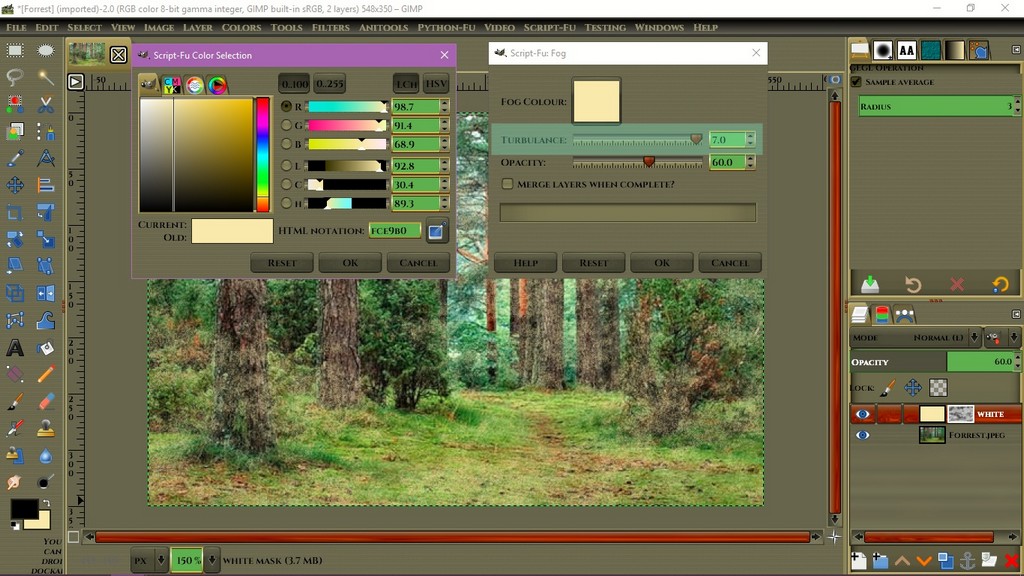
Example 1.jpg
Example 1.jpg [ 166.89 KiB | Viewed 2556 times ]


Place the fog.scm on the same place you have the 3rd party scripts in you personal Gimp directory: C:\Users\YourName\AppData\Roaming\GIMP\2.10\scripts and start Gimp and you can find it in the same location you had it in Gimp 2.8: Filters> Renders> Clouds> Fog. I hope this settle for you.


Attachments:
fog.scm [2.93 KiB]
Downloaded 73 times
Top
Post new topic Reply to topic  [ 20 posts ] 

All times are UTC - 5 hours [ DST ]


* Login  


Powered by phpBB3 © phpBB Group