It is currently Wed Nov 18, 2026 11:30 pm


All times are UTC - 5 hours [ DST ]


Post new topic Reply to topic  [ 48 posts ]  Go to page Previous  1, 2, 3  Next
Author Message
 Post subject: Re: Windows 10 October 1809 Update [SAFE]
PostPosted: Wed Oct 10, 2018 3:02 pm  (#21) 
Offline
GimpChat Member
User avatar

Joined: Jul 06, 2013
Posts: 2667
Location: California
Other files attached


Attachments:
Screenshot (2).png
Screenshot (2).png [ 4.21 KiB | Viewed 4070 times ]
Screenshot (2)_LI.jpg
Screenshot (2)_LI.jpg [ 793.86 KiB | Viewed 4070 times ]
Top
 Post subject: Re: Windows 10 October 1809 Update [SAFE]
PostPosted: Wed Oct 10, 2018 3:08 pm  (#22) 
Offline
Administrator
User avatar

Joined: Aug 10, 2012
Posts: 14278
Location: Native to NYC living in Arizona, Gimp 2.8 - 3.0, Win 11 PC.
mackenzieh wrote:
I am now experiencing sound issues with Windows 1809. I updated it today and now I hear nothing.

Did you try using the Windows Troubleshooter?

Go to,
Setting>System>Sound>Troubleshoot...


Image

_________________
Image
"A wise man learns more from a foolish question than a fool can learn from a wise answer"
Image


Top
 Post subject: Re: Windows 10 October 1809 Update [SAFE]
PostPosted: Wed Oct 10, 2018 3:16 pm  (#23) 
Offline
GimpChat Member
User avatar

Joined: Jul 06, 2013
Posts: 2667
Location: California
Wallace wrote:
mackenzieh wrote:
I am now experiencing sound issues with Windows 1809. I updated it today and now I hear nothing.

Did you try using the Windows Troubleshooter?

Go to,
Setting>System>Sound>Troubleshoot...


[ Image ]


Wallace, I just checked that and this is what I have:


Attachments:
Screenshot (4).png
Screenshot (4).png [ 644.37 KiB | Viewed 4070 times ]
Top
 Post subject: Re: Windows 10 October 1809 Update [SAFE]
PostPosted: Wed Oct 10, 2018 7:23 pm  (#24) 
Offline
GimpChat Member
User avatar

Joined: Sep 24, 2010
Posts: 12863
Heard that µ$ had a fix for the supposed file delete bug. They are using the Window's Insiders (guinea pigs) to make sure the fix works before releasing the updates to the masses. Glad I'm not a WI. lol

:)

_________________
Lyle

Psalm 109:8

Image


Top
 Post subject: Re: Windows 10 October 1809 Update [SAFE]
PostPosted: Thu Oct 11, 2018 1:28 pm  (#25) 
Offline
GimpChat Member
User avatar

Joined: Jul 06, 2013
Posts: 2667
Location: California
I had to revert back to Windows 10 version 1803.. OS Build 17134.345 thanks and to Wallace's help, I now have my audio back which was lost several times during the process of trying to get it back. Still not happy that my mute button doesn't light up, but I'll live. HP says that Microsoft has made them aware of the 1809 build issues that there is a solution in place to have the issue resolved.. I don't trust that as far as I can throw it.


Top
 Post subject: Re: Windows 10 October 1809 Update [SAFE]
PostPosted: Thu Oct 11, 2018 6:07 pm  (#26) 
Offline
Administrator
User avatar

Joined: Aug 10, 2012
Posts: 14278
Location: Native to NYC living in Arizona, Gimp 2.8 - 3.0, Win 11 PC.
mackenzieh wrote:
I had to revert back to Windows 10 version 1803.. OS Build 17134.345 thanks and to Wallace's help, I now have my audio back which was lost several times during the process of trying to get it back. Still not happy that my mute button doesn't light up, but I'll live. HP says that Microsoft has made them aware of the 1809 build issues that there is a solution in place to have the issue resolved.. I don't trust that as far as I can throw it.

You're not alone mackenzieh.
Many have had,
and are still having issues with this update.
I'm happy that I could help,
with restoring whatever audio it is that you have now.

_________________
Image
"A wise man learns more from a foolish question than a fool can learn from a wise answer"
Image


Top
 Post subject: Re: Windows 10 October 1809 Update [SAFE]
PostPosted: Fri Oct 12, 2018 2:51 am  (#27) 
Offline
GimpChat Member
User avatar

Joined: Jul 06, 2013
Posts: 2667
Location: California
Wallace wrote:
mackenzieh wrote:
I had to revert back to Windows 10 version 1803.. OS Build 17134.345 thanks and to Wallace's help, I now have my audio back which was lost several times during the process of trying to get it back. Still not happy that my mute button doesn't light up, but I'll live. HP says that Microsoft has made them aware of the 1809 build issues that there is a solution in place to have the issue resolved.. I don't trust that as far as I can throw it.

You're not alone mackenzieh.
Many have had,
and are still having issues with this update.
I'm happy that I could help,
with restoring whatever audio it is that you have now.


I was hoping this update wouldn't have issues.
Thanks again, Wallace.


Top
 Post subject: Re: Windows 10 October 1809 Update [SAFE]
PostPosted: Fri Oct 12, 2018 3:41 am  (#28) 
Offline
Global Moderator
User avatar

Joined: Apr 01, 2012
Posts: 8508
Location: On the other side of your screen
Only way I could get out of the update last night was to put my computer on hibernate instead of updating and turning off. I also turned my modem off. Well I thought that would do it but it was updating when I got home this afternoon. Thankfully everything is ok EXCEPT...
everytime I get an update my screen seems to go brighter. I check the night light settings again and it seems ok . what have I missed. The white still is unbearably bright.

_________________
Image
Free Fun Photo Editing & resources
Poems from the Lord
Gimp Newby
Gimp version 3.2.8 and GMIC-Qt 4.0.2 OS :- Windows 10 Home 64


Top
 Post subject: Re: Windows 10 October 1809 Update [SAFE]
PostPosted: Fri Oct 12, 2018 9:14 am  (#29) 
Offline
Administrator
User avatar

Joined: Aug 10, 2012
Posts: 14278
Location: Native to NYC living in Arizona, Gimp 2.8 - 3.0, Win 11 PC.
sallyanne wrote:
Only way I could get out of the update last night was to put my computer on hibernate instead of updating and turning off. I also turned my modem off. Well I thought that would do it but it was updating when I got home this afternoon. Thankfully everything is ok EXCEPT...
everytime I get an update my screen seems to go brighter. I check the night light settings again and it seems ok . what have I missed. The white still is unbearably bright.

There's probably options on the display itself.
Is this a desktop or a laptop?
A make and model of the screen would also be helpful.

_________________
Image
"A wise man learns more from a foolish question than a fool can learn from a wise answer"
Image


Top
 Post subject: Re: Windows 10 October 1809 Update [SAFE]
PostPosted: Fri Oct 12, 2018 9:31 am  (#30) 
Offline
Global Moderator
User avatar

Joined: Apr 01, 2012
Posts: 8508
Location: On the other side of your screen
It a HP All in one - desktop
All other info is in my signature


If you mean on the display - On the monitor which is a (PnP generic Monitor)? As far as I can see there is nothing there to change brightness etc.

_________________
Image
Free Fun Photo Editing & resources
Poems from the Lord
Gimp Newby
Gimp version 3.2.8 and GMIC-Qt 4.0.2 OS :- Windows 10 Home 64


Top
 Post subject: Re: Windows 10 October 1809 Update [SAFE]
PostPosted: Fri Oct 12, 2018 9:43 am  (#31) 
Offline
Administrator
User avatar

Joined: Aug 10, 2012
Posts: 14278
Location: Native to NYC living in Arizona, Gimp 2.8 - 3.0, Win 11 PC.
sallyanne wrote:
It a HP All in one
All other info is in my signature


If you mean on the display - On the monitor?
As far as I can see there is nothing there to change brightness etc.


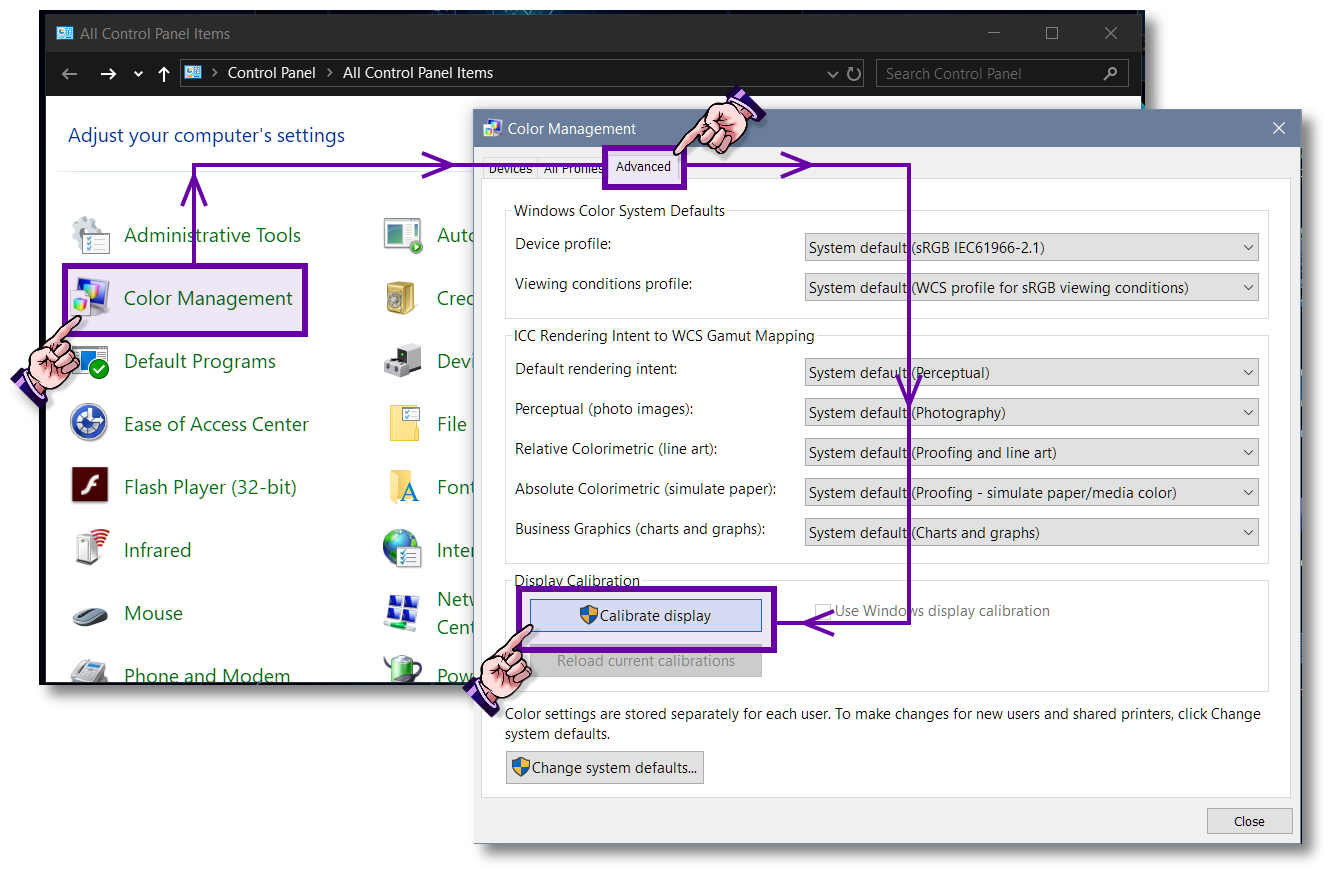
You could also try re-calibrating your display.
To see if this helps with the brightness.

Go to:
Control Panel (Icon View)> Color Management> Advanced> Calibrate Display.

Image

Follow the onscreen dialog to adjust the display.
I believe that the Gama Adjustment phase of the calibration,
can effect the brightness of your display.
There's also a brightness and contrast adjustment phase as well.

_________________
Image
"A wise man learns more from a foolish question than a fool can learn from a wise answer"
Image


Top
 Post subject: Re: Windows 10 October 1809 Update [SAFE]
PostPosted: Sat Oct 13, 2018 8:10 am  (#32) 
Offline
Global Moderator
User avatar

Joined: Apr 01, 2012
Posts: 8508
Location: On the other side of your screen
Thank you again Wallace. I initially couldn't find it but I eventually did. Will see what happens next time I have an update

_________________
Image
Free Fun Photo Editing & resources
Poems from the Lord
Gimp Newby
Gimp version 3.2.8 and GMIC-Qt 4.0.2 OS :- Windows 10 Home 64


Top
 Post subject: Re: Windows 10 October 1809 Update [SAFE]
PostPosted: Sat Oct 13, 2018 9:42 am  (#33) 
Offline
Administrator
User avatar

Joined: Aug 10, 2012
Posts: 14278
Location: Native to NYC living in Arizona, Gimp 2.8 - 3.0, Win 11 PC.
sallyanne wrote:
Thank you again Wallace.
I initially couldn't find it but I eventually did.
Will see what happens next time I have an update

Did you go through the calibration and did it help with the brightness?

_________________
Image
"A wise man learns more from a foolish question than a fool can learn from a wise answer"
Image


Top
 Post subject: Re: Windows 10 October 1809 Update [SAFE]
PostPosted: Mon Oct 15, 2018 1:21 am  (#34) 
Offline
GimpChat Member
User avatar

Joined: Jul 06, 2013
Posts: 2667
Location: California
Now my mute button light works. Started working today. Also instead of RelTek, my audio now says Audio Control by HP. Still running on Windows 10 version 1803 OS Build 17134.345


Top
 Post subject: Re: Windows 10 October 1809 Update [SAFE]
PostPosted: Mon Oct 15, 2018 1:39 am  (#35) 
Offline
Administrator
User avatar

Joined: Aug 10, 2012
Posts: 14278
Location: Native to NYC living in Arizona, Gimp 2.8 - 3.0, Win 11 PC.
mackenzieh wrote:
Now my mute button light works. Started working today. Also instead of RelTek, my audio now says Audio Control by HP. Still running on Windows 10 version 1803 OS Build 17134.345

That's good news mackenzieh!
Great!
:yes

_________________
Image
"A wise man learns more from a foolish question than a fool can learn from a wise answer"
Image


Top
 Post subject: Re: Windows 10 October 1809 Update [SAFE]
PostPosted: Mon Oct 15, 2018 1:53 am  (#36) 
Offline
GimpChat Member
User avatar

Joined: Jul 06, 2013
Posts: 2667
Location: California
Wallace wrote:
mackenzieh wrote:
Now my mute button light works. Started working today. Also instead of RelTek, my audio now says Audio Control by HP. Still running on Windows 10 version 1803 OS Build 17134.345

That's good news mackenzieh!
Great!
:yes


:bigthup


Top
 Post subject: Re: Windows 10 October 1809 Update [SAFE]
PostPosted: Wed Jan 09, 2019 2:29 am  (#37) 
Offline
GimpChat Member
User avatar

Joined: Jul 06, 2013
Posts: 2667
Location: California
It looks like my laptop is automatically updating to Windows 10 version 1809. I just hope it doesn't freeze like the last time. I hated having to do the clean install.

Update: I have updated to 1809 per the automatic update. The volume works with the Realtek Audio but it's not like it was.The audio quality isn't like it was. I also lost the mute button light function, however the caplock button lights up. I also deleted the HP Support Assistant.. that was earlier before the update though.

Have I mentioned that I can't stand HP?


Attachments:
Screenshot (46).png
Screenshot (46).png [ 353.45 KiB | Viewed 3947 times ]
Screenshot (45).png
Screenshot (45).png [ 642.28 KiB | Viewed 3949 times ]


Last edited by mackenzieh on Wed Jan 09, 2019 2:52 pm, edited 1 time in total.
Top
 Post subject: Re: Windows 10 October 1809 Update [SAFE]
PostPosted: Wed Jan 09, 2019 10:33 am  (#38) 
Offline
GimpChat Member
User avatar

Joined: Sep 24, 2010
Posts: 12863
So far I've not received the update nor am I in a hurry to get it. When it comes, I just hope my files don't get deleted. :)

_________________
Lyle

Psalm 109:8

Image


Top
 Post subject: Re: Windows 10 October 1809 Update [SAFE]
PostPosted: Wed Jan 09, 2019 11:20 am  (#39) 
Offline
Administrator
User avatar

Joined: Aug 10, 2012
Posts: 14278
Location: Native to NYC living in Arizona, Gimp 2.8 - 3.0, Win 11 PC.
lylejk wrote:
So far I've not received the update nor am I in a hurry to get it. When it comes, I just hope my files don't get deleted. :)

[font=Georgia]The file deletion issue has been corrected.
Right now,
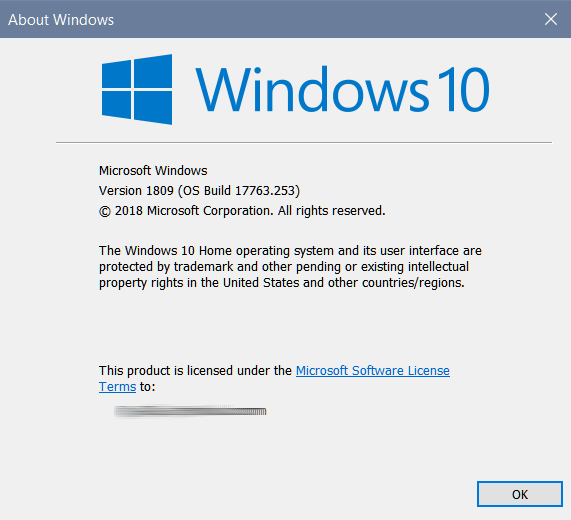
Windows version 1809 is up to OS Build 17763.253.
As of the of most recent updates,
which were added yesterday.

If anyone want's to check what version of Windows they're running.
Type winver into the Run Box.
This will bring up this display below.

Image

_________________
Image
"A wise man learns more from a foolish question than a fool can learn from a wise answer"
Image


Top
 Post subject: Re: Windows 10 October 1809 Update [SAFE]
PostPosted: Wed Jan 09, 2019 1:36 pm  (#40) 
Offline
GimpChat Member
User avatar

Joined: Sep 24, 2010
Posts: 12863
Yup; ol' winver or at DOS prompt, use ver. :)

_________________
Lyle

Psalm 109:8

Image


Top
Post new topic Reply to topic  [ 48 posts ]  Go to page Previous  1, 2, 3  Next

All times are UTC - 5 hours [ DST ]


* Login  


Powered by phpBB3 © phpBB Group