It is currently Mon Sep 14, 2026 10:24 pm


All times are UTC - 5 hours [ DST ]


Post new topic Reply to topic  [ 13 posts ] 
Author Message
 Post subject: Extracting images from movie clips
PostPosted: Fri May 27, 2011 4:35 pm  (#1) 
Offline
GimpChat Member
User avatar

Joined: Apr 30, 2010
Posts: 1937
Location: Missouri
Does anyone know of some linux software that will allow me to extract images from a video clip? My cam corder has a still shot option on it that I use a lot. I can't find any way to do it in KDEnlive or openshot, which forces me to go back to Windows and I don't want to do that. Unfortunately Corel's (and you know how I feel about them) Video studio will do it. I had counted on KDEnlive replacing Video Studio but it looks like that might not be possible.

_________________
Image
The last time I kept an open mind,
my brain fell out and the dog grabbed it.
Now it's full of dirt, toothmarks, and dog slobber.
No more open minds or dogs for me.


Share on Facebook Share on Twitter Share on Orkut Share on Digg Share on MySpace Share on Delicious Share on Technorati
Top
 Post subject: Re: Extracting images from movie clips
PostPosted: Fri May 27, 2011 4:44 pm  (#2) 
Offline
GimpChat Member
User avatar

Joined: Mar 02, 2011
Posts: 1850
Location: Michigan
Virtual Box, windows then install program you need and then do what you need close Virtual Box, move on
Only if you can't find another solution as I understand this may not be 100% desirable

_________________
Image
I'm back I think


Top
 Post subject: Re: Extracting images from movie clips
PostPosted: Fri May 27, 2011 4:57 pm  (#3) 
Offline
GimpChat Member
User avatar

Joined: Oct 06, 2010
Posts: 4050
Use mplayer via command line:

-ss <timepos> Seek to given (seconds or hh:mm:ss) position
-frames <number> Play/convert only first <number> frames, then quit.
-vo <gif89a,jpeg,pnm,png,tga>

_________________
"In order to attain the impossible, one must attempt the absurd."
~ Miguel de Cervantes


Top
 Post subject: Re: Extracting images from movie clips
PostPosted: Fri May 27, 2011 5:00 pm  (#4) 
Offline
GimpChat Member
User avatar

Joined: Apr 30, 2010
Posts: 1937
Location: Missouri
Willy wrote:
Virtual Box, windows then install program you need and then do what you need close Virtual Box, move on
Only if you can't find another solution as I understand this may not be 100% desirable

Well, I can still do it in windows but I was hoping to not use Corel's software. My goal is to be completely Microsoft free and Corel free and only use Linux for everything.

_________________
Image
The last time I kept an open mind,
my brain fell out and the dog grabbed it.
Now it's full of dirt, toothmarks, and dog slobber.
No more open minds or dogs for me.


Top
 Post subject: Re: Extracting images from movie clips
PostPosted: Fri May 27, 2011 5:03 pm  (#5) 
Offline
Script Coder
User avatar

Joined: Oct 25, 2010
Posts: 4812
On my Ubuntu, VLC media player does frame-by-frame and snapshot...

_________________
Image


Top
 Post subject: Re: Extracting images from movie clips
PostPosted: Fri May 27, 2011 5:17 pm  (#6) 
Offline
GimpChat Member
User avatar

Joined: Apr 30, 2010
Posts: 1937
Location: Missouri
mahvin wrote:
Use mplayer via command line:

-ss <timepos> Seek to given (seconds or hh:mm:ss) position
-frames <number> Play/convert only first <number> frames, then quit.
-vo <gif89a,jpeg,pnm,png,tga>

I'll try that too, thanks.

_________________
Image
The last time I kept an open mind,
my brain fell out and the dog grabbed it.
Now it's full of dirt, toothmarks, and dog slobber.
No more open minds or dogs for me.


Top
 Post subject: Re: Extracting images from movie clips
PostPosted: Fri May 27, 2011 5:22 pm  (#7) 
Offline
GimpChat Founder
User avatar

Joined: May 22, 2008
Posts: 5241
Location: Gimpville
Install Kino from your repository. Import your video. You can export a single frame or a range of frames from the export tab.

A couple of notes about Kino..

1) You might have to run Kino using this command: padsp kino
(padsp allows kino to run properly with pulse audio.)

2) Kino converts videos to raw digital video format (.dv) before loading so be aware of that.

3) If kino can't import your video, you may need to manually convert it to .dv format using ffmpeg.

example: converts .avi to .dv (works with most other video formats as well)

ffmpeg -i yourvideo.avi -target ntsc-dv yourvideo.dv

_________________
“If you reach for the stars, you just might land on a decently sized hill.” - Stuart Hill


Top
 Post subject: Re: Extracting images from movie clips
PostPosted: Fri May 27, 2011 5:42 pm  (#8) 
Offline
Script Coder
User avatar

Joined: Apr 23, 2010
Posts: 1553
Location: not from Guildford after all
mahvin wrote:
Use mplayer via command line:

-ss <timepos> Seek to given (seconds or hh:mm:ss) position
-frames <number> Play/convert only first <number> frames, then quit.
-vo <gif89a,jpeg,pnm,png,tga>


If you start mplayer with the "-vf screenshot" option, then you can watch the movie interactively and press the "s" key whenever you want to create a PNG image (saved automatically using the name "shot####.png"). Alternately, you can press "S" (SHIFT+s) and start saving all frames (using same filenaming scheme) until you press "S" again. This works whether you are viewing in realtime, slow-motion, or single-frame.

A few useful keys when navigating with mplayer:
    SPACE = pause movie
    PERIOD = step single frame forward (while paused)
    ] = Increase speed
    [ = Decrease speed
    LEFT/RIGHT cursors = skip backward or forward 10 seconds
    UP/DOWN cursors = skip backward or forward 60 seconds[/list]

_________________
Any sufficiently primitive technology is indistinguishable from a rock.


Top
 Post subject: Re: Extracting images from movie clips
PostPosted: Fri May 27, 2011 8:29 pm  (#9) 
Offline
Script Coder
User avatar

Joined: Apr 23, 2010
Posts: 1553
Location: not from Guildford after all
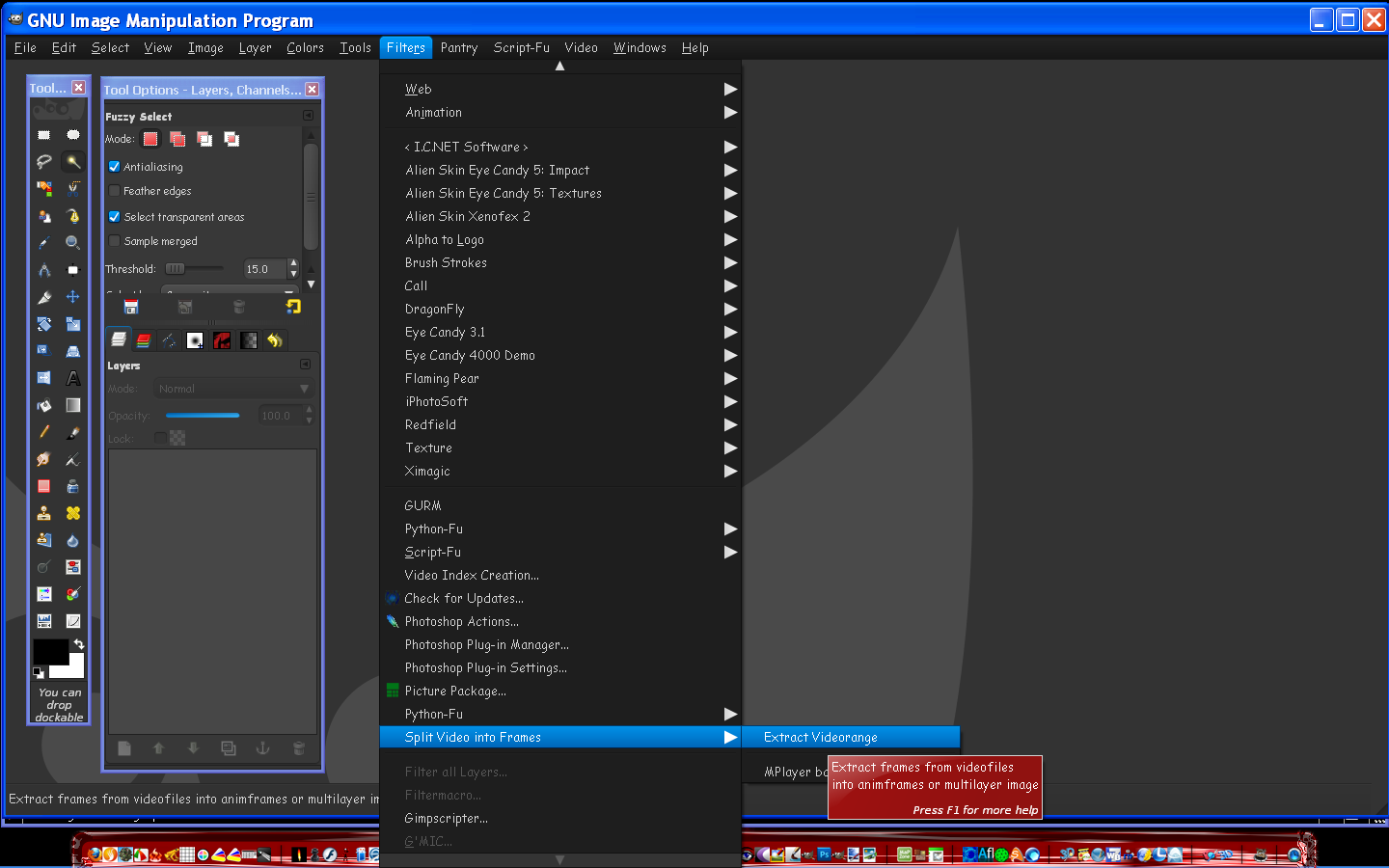
Oh, and considering this is a GIMP forum, it should probably be mentioned that the GAP (GIMP Animation Package) has a pretty decent interface for extracting frames (found under "Video->Split Video into Frames->Extract Videorange").

Attachment:
GAP-videoextract.png
GAP-videoextract.png [ 52.24 KiB | Viewed 9709 times ]

_________________
Any sufficiently primitive technology is indistinguishable from a rock.


Top
 Post subject: Re: Extracting images from movie clips
PostPosted: Fri May 27, 2011 8:52 pm  (#10) 
Offline
GimpChat Member
User avatar

Joined: Apr 30, 2010
Posts: 1937
Location: Missouri
ofnuts wrote:
On my Ubuntu, VLC media player does frame-by-frame and snapshot...

I have VLC player, I forgot it would do that although i've never done it. I think KMPlayer will do it too. So one of them should work, thanks

_________________
Image
The last time I kept an open mind,
my brain fell out and the dog grabbed it.
Now it's full of dirt, toothmarks, and dog slobber.
No more open minds or dogs for me.


Top
 Post subject: Re: Extracting images from movie clips
PostPosted: Fri May 27, 2011 8:54 pm  (#11) 
Offline
GimpChat Member
User avatar

Joined: Apr 30, 2010
Posts: 1937
Location: Missouri
GnuTux wrote:
Install Kino from your repository. Import your video. You can export a single frame or a range of frames from the export tab.

A couple of notes about Kino..

1) You might have to run Kino using this command: padsp kino
(padsp allows kino to run properly with pulse audio.)

2) Kino converts videos to raw digital video format (.dv) before loading so be aware of that.

3) If kino can't import your video, you may need to manually convert it to .dv format using ffmpeg.

example: converts .avi to .dv (works with most other video formats as well)

ffmpeg -i yourvideo.avi -target ntsc-dv yourvideo.dv

I'll try that too, and see which is the easiest and gets the best results.

_________________
Image
The last time I kept an open mind,
my brain fell out and the dog grabbed it.
Now it's full of dirt, toothmarks, and dog slobber.
No more open minds or dogs for me.


Top
 Post subject: Re: Extracting images from movie clips
PostPosted: Fri May 27, 2011 10:19 pm  (#12) 
Offline
Global Moderator
User avatar

Joined: May 16, 2010
Posts: 16173
I was also going to mention utilizing the Gimp Animation Package. :)
There is also another filter that works well for this.I can not remember where i got it though.
Searching the registry should reveal its download link though.

Image

_________________
Image


Top
 Post subject: Re: Extracting images from movie clips
PostPosted: Tue Jun 02, 2015 4:13 am  (#13) 
Offline
New Member

Joined: Jun 02, 2015
Posts: 1
Macgo Mac Blu-ray Player could make a screenshot when the movie playback.


Top
Post new topic Reply to topic  [ 13 posts ] 

All times are UTC - 5 hours [ DST ]


* Login  


Powered by phpBB3 © phpBB Group