It is currently Mon Jul 27, 2026 12:05 pm


All times are UTC - 5 hours [ DST ]


Post new topic Reply to topic  [ 8 posts ] 
Author Message
 Post subject: Translucency - removing colors in a background graphic
PostPosted: Mon Jan 21, 2019 2:56 pm  (#1) 
Offline
GimpChat Member

Joined: Feb 26, 2014
Posts: 248
GIMP Version: 2.8.14
Operating System: Windows
GIMP Experience: Basic Level


Hi esteemed mates,

My apologies but ...

1. Can you pls share again which format a file must be in to upload and share on GimpChat?

PDF doesn't seem to upload.

2. Is Gimp the easiest program to use to change the background color he bind characters (text-like) to white so I can edit the graphics by typing in new characters?

I’m not sure how this task is described.

It’s best explained via the file I have which can be posted here.

Or would MS Publisher or Libre Draw be easier to use to effect these changes?

Thank you.


Attachments:
Library Dewey Decimal - Subject Listing by Numbers.pdf [382.36 KiB]
Downloaded 113 times
Library Dewey Decimal - Subject Listing by Numbers.pdf [382.36 KiB]
Downloaded 111 times
Share on Facebook Share on Twitter Share on Orkut Share on Digg Share on MySpace Share on Delicious Share on Technorati
Top
 Post subject: Re: Translucency - removing colors in a background graphic
PostPosted: Mon Jan 21, 2019 3:39 pm  (#2) 
Offline
Administrator
User avatar

Joined: Aug 10, 2012
Posts: 14136
Location: Native to NYC living in Arizona, Gimp 2.8 - 3.0, Win 11 PC.
eagertolearn wrote:
GIMP Version: 2.8.14
Operating System: Windows
GIMP Experience: Basic Level


Hi esteemed mates,

My apologies but ...

1. Can you pls share again which format a file must be in to upload and share on GimpChat?

PDF doesn't seem to upload.

2. Is Gimp the easiest program to use to change the background color he bind characters (text-like) to white so I can edit the graphics by typing in new characters?

I’m not sure how this task is described.

It’s best explained via the file I have which can be posted here.

Or would MS Publisher or Libre Draw be easier to use to effect these changes?

Thank you.

It's best to upload Png or Jpg images.
I also highly recommend,
not using special characters (like "&") in file names,
which can cause lots of problems displaying URLs properly in phpBB.
I also suggest not useing spaces in file names.
Instead,
replacing spaces with a "-" dashes or "_" under_score.
You can also upload zip folders,
for files which can't be directly uploaded,
such as Doc files or other types of text files.
Script files (.scm) can be uploaded using the attachment dialog.
Other Gimp resource files,
should be placed in a zip folder for uploading.
PDF files can also be uploaded using the attachment dialog.
Gif, Png and Jpg files can be directly uploaded using the upload file link Image.

You can recreate all the text,
in you example pdf file.
Then add any kind of background that you wish.
Along with any graphics as seen in you pdf's.
You would need to know how to work with layers,
as well as the text editor.

Below is an example png image,
with transparency,
that I quickly put together.


Image

_________________
Image
"A wise man learns more from a foolish question than a fool can learn from a wise answer"
Image


Top
 Post subject: Re: Translucency - removing colors in a background graphic
PostPosted: Mon Jan 21, 2019 7:37 pm  (#3) 
Offline
GimpChat Member
User avatar

Joined: Nov 04, 2015
Posts: 1459
Wallace did a pretty good job on '000 General Works'. I've found trying to 'reverse engineer' a previously published document is a bit of a waste of time.
Using it as a template is fine as far as box sizes etc, but you will get a cleaner look starting a new document/image. Publisher and Libre Writer are probably better suited because you can save in their formats if the document ever needs re-editing. With Writer you can export as PDF.


Top
 Post subject: Re: Translucency - removing colors in a background graphic
PostPosted: Tue Jan 22, 2019 12:26 pm  (#4) 
Offline
GimpChat Member

Joined: Feb 26, 2014
Posts: 248
Thank you!

Can you pls. share the GIMP Layers steps to re-create that translucent file you shared?

That's exactly what I'm looking for.

Also, I'm not as sure as I'd like to be re: using the "the attachment dialog."

I see at the bottom of the screen where you can Choose File and then Add File (which I'm guessing works wel with jpgs and pngs) but I'm not sure where to migrate on the GIMP forum if I wanted to upload a PDF.

Thank you for your help and patience.


Top
 Post subject: Re: Translucency - removing colors in a background graphic
PostPosted: Tue Jan 22, 2019 12:39 pm  (#5) 
Offline
GimpChat Member

Joined: Feb 26, 2014
Posts: 248
Hi Tas_mania,

Thank you for sharing your thoughts.

I had a printed copy of library subjects.

I wanted to remove the background colors and to add my own text.

I scanned the printed brochure and saved as a PDF.

My other option scanning was a TIFF.

Which format would be better to save the scanned brochure as so Libre Writer would be used to edit it + remove the background colors?

My thanks again.


Top
 Post subject: Re: Translucency - removing colors in a background graphic
PostPosted: Tue Jan 22, 2019 1:04 pm  (#6) 
Offline
Administrator
User avatar

Joined: Aug 10, 2012
Posts: 14136
Location: Native to NYC living in Arizona, Gimp 2.8 - 3.0, Win 11 PC.
eagertolearn wrote:
Thank you!

Can you pls. share the GIMP Layers steps to re-create that translucent file you shared?

That's exactly what I'm looking for.

Also, I'm not as sure as I'd like to be re: using the "the attachment dialog."

I see at the bottom of the screen where you can Choose File and then Add File (which I'm guessing works wel with jpgs and pngs) but I'm not sure where to migrate on the GIMP forum if I wanted to upload a PDF.

Thank you for your help and patience.

If you want to upload a PDF file.
Use the File Uploading Attachment Dialog at the bottom.
Image

I put this image together (seen below) for you.
Image

You can open your PDF within Gimp.
Create a new layers above the pdf layer,
to place your graphics on.
Select the Text Tool :text and begin to type some text.

_________________
Image
"A wise man learns more from a foolish question than a fool can learn from a wise answer"
Image


Top
 Post subject: Re: Translucency - removing colors in a background graphic
PostPosted: Tue Jan 22, 2019 1:21 pm  (#7) 
Offline
GimpChat Member

Joined: Feb 26, 2014
Posts: 248
Hi Wallace,

I've seen that Choose File > then Upload... but when I press the Choose File and find the PDF and highlight it and then click upload I guess it must have uploaded as you were able to modify its layer(s). I don't get any kind of "You've successfully uploaded" message or anything similar so that's why I ended up uploading that file twice - I couldn't see it was ever uploaded. My apologies.

As for editing layers... I'm not clear how you "removed the background color" and replaced it with white?
Ex. Step 1: Open or Insert>Picture>From File and highlight and click on the chosen PDF
Step 2: Open the Layers (tab)???
Step 3: ???? replace background with translucency???
Step 4: Export file as a .png or .jpg

Thanks so much.


Top
 Post subject: Re: Translucency - removing colors in a background graphic
PostPosted: Tue Jan 22, 2019 1:59 pm  (#8) 
Offline
Administrator
User avatar

Joined: Aug 10, 2012
Posts: 14136
Location: Native to NYC living in Arizona, Gimp 2.8 - 3.0, Win 11 PC.
eagertolearn wrote:
Hi Wallace,

I've seen that Choose File > then Upload... but when I press the Choose File and find the PDF and highlight it and then click upload I guess it must have uploaded as you were able to modify its layer(s). I don't get any kind of "You've successfully uploaded" message or anything similar so that's why I ended up uploading that file twice - I couldn't see it was ever uploaded. My apologies.

As for editing layers... I'm not clear how you "removed the background color" and replaced it with white?
Ex. Step 1: Open or Insert>Picture>From File and highlight and click on the chosen PDF
Step 2: Open the Layers (tab)???
Step 3: ???? replace background with translucency???
Step 4: Export file as a .png or .jpg

Thanks so much.

The PDF and the images contained therein,
are of low quality and not in good shape.
It would seem batter/easier to create an entirely new brochure.

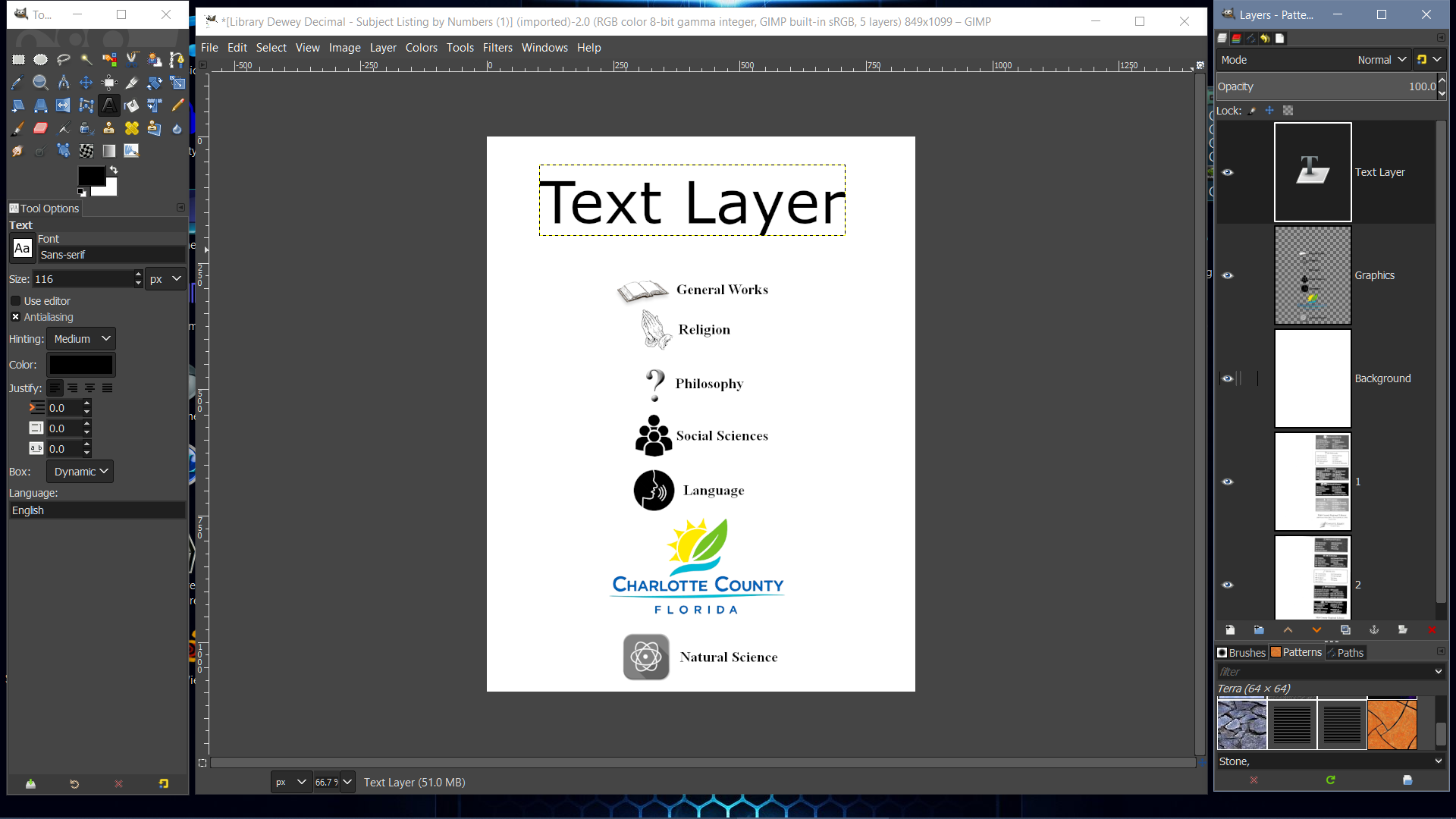
1. Open the PDF file in gimp.

2. Right-Click on layer 1 and select New Layer.
This will create a new Transparent layers above all layers.

3. Fill this new layer with white and name this layer Background.

4. While still on the Background layer,
select the Text Tool :text and begin to type within the text box.
This will create a text layer above the white background layer.

5. Add another layer for your graphics to be placed on.
Move Graphics layer below the text layer,
if required.

The layers containing the PDF information can be use for reference,
or they can be deleted, because the're no longer needed.

With these layers added.
The image should look something like this below.

Image

Export the finished file as JPG,
because transparency is not needed.
Exporting the file as a PNG image,
can retain the transparency.
However,
your image will have a white background,
so transparency isn't required.

_________________
Image
"A wise man learns more from a foolish question than a fool can learn from a wise answer"
Image


Top
Post new topic Reply to topic  [ 8 posts ] 

All times are UTC - 5 hours [ DST ]


cron

* Login  


Powered by phpBB3 © phpBB Group