It is currently Sun Sep 20, 2026 6:06 pm


All times are UTC - 5 hours [ DST ]


Post new topic Reply to topic  [ 8 posts ] 
Author Message
 Post subject: simple drawing/layers question
PostPosted: Fri Jan 25, 2019 12:33 am  (#1) 
Offline
New Member

Joined: Jan 25, 2019
Posts: 3
GIMP Version: 2.8.14
Operating System: Windows
GIMP Experience: New User


Hello, I am new to the program and digital artwork and I am trying to figure it all out on my own. I have an issue I really need help with ASAP, it only just happened and I'm not sure if I did something to cause it. If I try to draw on a layer that is over top of a background i created or an image i added as a layer instead of giving me a solid coloured line it just creates a transparent line that shows the layer underneath. I am unable to figure out what is going on, any help would be greatly appreciated as I am unable to do the work I was trying to do now.


Share on Facebook Share on Twitter Share on Orkut Share on Digg Share on MySpace Share on Delicious Share on Technorati
Top
 Post subject: Re: simple drawing/layers question
PostPosted: Fri Jan 25, 2019 4:20 am  (#2) 
Offline
Administrator
User avatar

Joined: Aug 10, 2012
Posts: 14206
Location: Native to NYC living in Arizona, Gimp 2.8 - 3.0, Win 11 PC.
From what you have described.
This sounds like you may have the Quick Mask turned on.
However,
when the Quick Mask is turned on.
The layer will show with a noticeable Red color.

Could you try and provide.
A more detailed description of the issue you're having?

_________________
Image
"A wise man learns more from a foolish question than a fool can learn from a wise answer"
Image


Top
 Post subject: Re: simple drawing/layers question
PostPosted: Sat Jan 26, 2019 12:25 pm  (#3) 
Offline
GimpChat Member
User avatar

Joined: Mar 23, 2012
Posts: 7388
Location: Göteborg at last!
If you are using a graphics tablet, it could be pressure sensitivity.


Top
 Post subject: Re: simple drawing/layers question
PostPosted: Sat Jan 26, 2019 12:43 pm  (#4) 
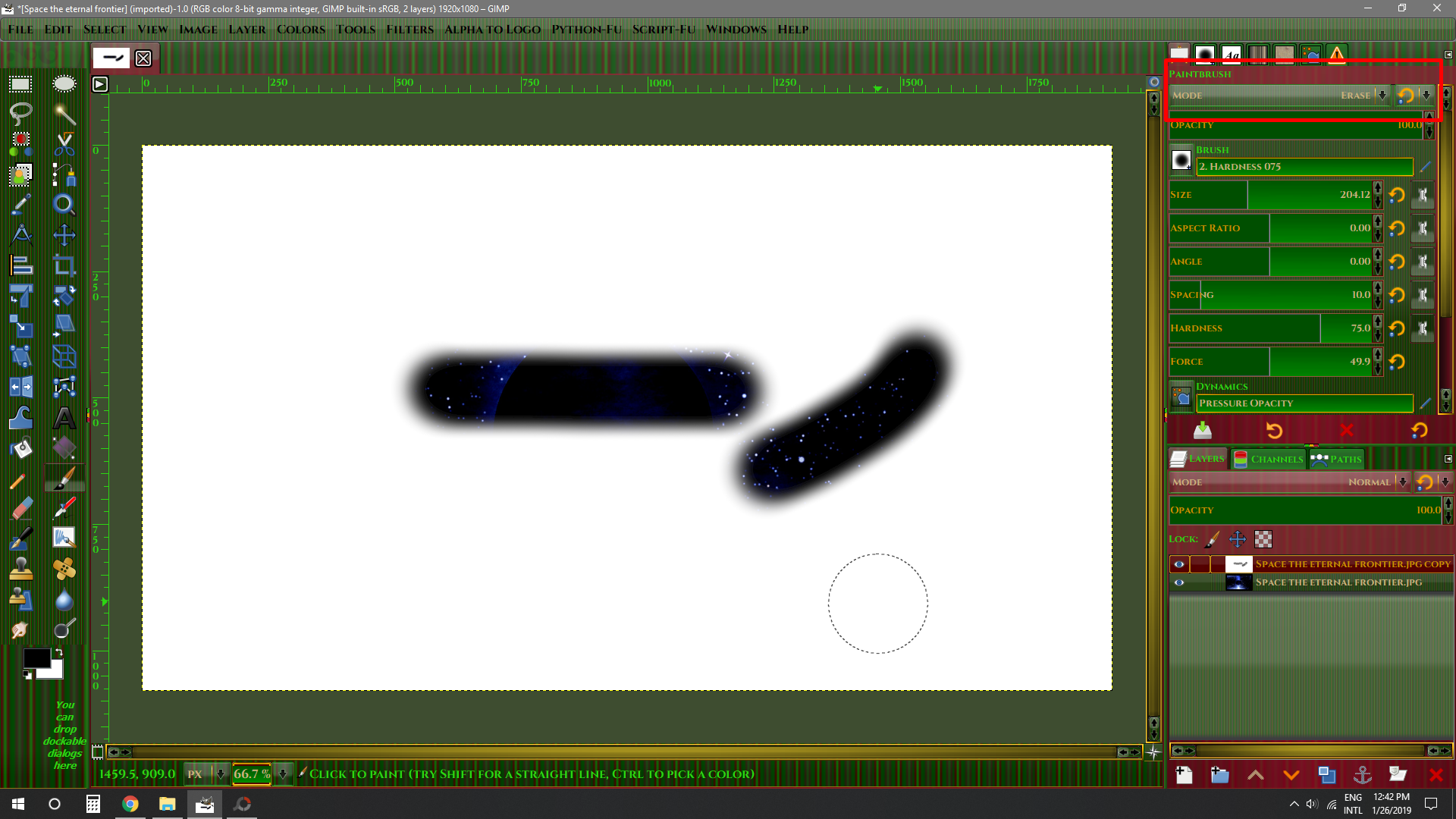
Hi GW92. I'm trying to recreate what you did. Check the on the Brush option "Mode" if is in "Normal". When you have this Mode option on "Erase" it will give you a transparent line.
Image


Top
 Post subject: Re: simple drawing/layers question
PostPosted: Sat Jan 26, 2019 12:52 pm  (#5) 
Pocholo wrote:
Hi GW92. I'm trying to recreate what you did. Check the on the Brush option "Mode" if is in "Normal". When you have this Mode option on "Erase" it will give you a transparent line.
[ Image ]


Top
 Post subject: Re: simple drawing/layers question
PostPosted: Sat Jan 26, 2019 7:27 pm  (#6) 
Offline
New Member

Joined: Jan 25, 2019
Posts: 3
Pocholo wrote:
Hi GW92. I'm trying to recreate what you did. Check the on the Brush option "Mode" if is in "Normal". When you have this Mode option on "Erase" it will give you a transparent line.
[ Image ]

That is EXACTLY the problem!!


Top
 Post subject: Re: simple drawing/layers question
PostPosted: Sat Jan 26, 2019 7:28 pm  (#7) 
Offline
New Member

Joined: Jan 25, 2019
Posts: 3
Wallace wrote:
From what you have described.
This sounds like you may have the Quick Mask turned on.
However,
when the Quick Mask is turned on.
The layer will show with a noticeable Red color.

Could you try and provide.
A more detailed description of the issue you're having?

The other commenter posted a photo and described the exact issue I'm having :) it's just below your comment on my screen


Top
 Post subject: Re: simple drawing/layers question
PostPosted: Sat Jan 26, 2019 7:43 pm  (#8) 
Offline
Administrator
User avatar

Joined: Aug 10, 2012
Posts: 14206
Location: Native to NYC living in Arizona, Gimp 2.8 - 3.0, Win 11 PC.
GW92 wrote:
Wallace wrote:
From what you have described.
This sounds like you may have the Quick Mask turned on.
However,
when the Quick Mask is turned on.
The layer will show with a noticeable Red color.

Could you try and provide.
A more detailed description of the issue you're having?

The other commenter posted a photo and described the exact issue I'm having :) it's just below your comment on my screen

Yes I see it.
Thanks and I'm glade your issues was solved.

Thank you Pocholo.
You're the best.

:bigthup

_________________
Image
"A wise man learns more from a foolish question than a fool can learn from a wise answer"
Image


Top
Post new topic Reply to topic  [ 8 posts ] 

All times are UTC - 5 hours [ DST ]


* Login  


Powered by phpBB3 © phpBB Group