It is currently Sun Sep 20, 2026 5:11 pm


All times are UTC - 5 hours [ DST ]


Post new topic Reply to topic  [ 9 posts ] 
Author Message
 Post subject: How to Compress My .Xcf files
PostPosted: Tue Feb 12, 2019 7:54 pm  (#1) 
Offline
GimpChat Member
User avatar

Joined: Nov 22, 2018
Posts: 83
GIMP Version: 2.10.8
Operating System: Windows
GIMP Experience: New User


Windows 10

Hello,
Another day, another newbie question... :) ...

My question today is, How do I compress my .xcf files?

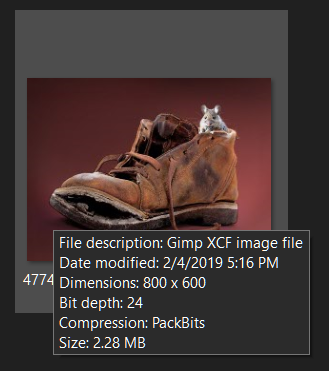
The reason I am asking, is, I downloaded a .xcf file & just happened to rest my pointer on the icon thumbnail & saw that it was compressed...
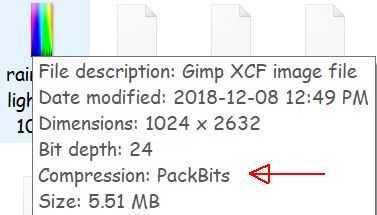
Image

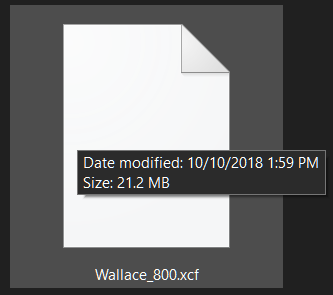
Then I put my pointer on a .xcf file that I had created, & there was no compression...

Image

So obviously I'm missing a step in my saving.....

I've been using File, Save As (to change my Save location) Save....

Putting an x by "Save this xcf file with better but slower compression" doesn't seem to make any difference, my files are still uncompressed....

Do your .xcf files automatically compress when you save them?....do they show PackBits when you put your pointer on them or uncompressed?

I appreciate your help...

_________________
Image


Share on Facebook Share on Twitter Share on Orkut Share on Digg Share on MySpace Share on Delicious Share on Technorati
Top
 Post subject: Re: How to Compress My .Xcf files
PostPosted: Tue Feb 12, 2019 9:30 pm  (#2) 
Offline
Administrator
User avatar

Joined: Aug 10, 2012
Posts: 14206
Location: Native to NYC living in Arizona, Gimp 2.8 - 3.0, Win 11 PC.
I found this link.
It's about xcf file compression.
Hopefully this will help.

"disabling compression won't make the XCF readable" message is confusing

_________________
Image
"A wise man learns more from a foolish question than a fool can learn from a wise answer"
Image


Top
 Post subject: Re: How to Compress My .Xcf files
PostPosted: Wed Feb 13, 2019 4:08 am  (#3) 
Offline
GimpChat Member

Joined: Mar 04, 2011
Posts: 2615
Quote:
..I downloaded a .xcf file & just happened to rest my pointer on the icon thumbnail & saw that it was compressed...


...but.. what application are you using for that information? All gimps use compression to some extent, export that 'white' (no compression) xcf file in some uncompressed format, say uncompressed tiff, and compare file size. I suspect some miss-information there.

Gimp 2.8 and earlier uses a simple run-length-encoding (RLE) compression internally, while Gimp 2.10 uses Zlib compression algorithms internally, which is why Gimp 2.8 will not read a 'new' format file. If you want backward compatibility, you need everything in legacy modes.

There is a second stage of compression available, where the xcf file is compressed again, much the same as getting a text file and compressing to a zip file.
For Gimp 2.8: filename.xcf.gz or filename.xcf.bz2 and for Gimp 2.10: those two plus an additiona format filename.xcf.xz Same as before, if you need backward compatibility, do not use the new formats.


Top
 Post subject: Re: How to Compress My .Xcf files
PostPosted: Wed Feb 13, 2019 11:54 am  (#4) 
Offline
GimpChat Member
User avatar

Joined: Nov 22, 2018
Posts: 83
Thank you both, Wallace & rich2005.... :) ....

Gimp 2.10.8 is my 1st introduction to Gimp although I have used other graphic programs...

My questions started when I was wondering why I had no thumbnail image on my .xcf files that I had in a document folder, even though I have SageThumbs installed. Wallace had posted a.xcf example, I downloaded it & it showed compressed & gave me a thumbnail image in my folder.

Then last week, Tim at gimplearn, posted a plugin for the Mandala tutorial. I downloaded & ran it. I then saved the results as a .xcf & surprisingly, my .xcf was compressed & I had a thumbnail image on the file.

So I saved another .xcf file, without running the plugin, & I'm back to uncompressed & no thumbnail image on the file.

Because I'm new to Gimp, I guess I'm wondering if this is how other people's 2.10.8 handle .xcf files. I thought maybe I was missing a step in my saving process, especially when both files (the plugin/no plugin files) were saved exactly the same way but different results...

_________________
Image


Top
 Post subject: Re: How to Compress My .Xcf files
PostPosted: Wed Feb 13, 2019 3:40 pm  (#5) 
Offline
GimpChat Member

Joined: Jul 11, 2010
Posts: 349
I think what you are looking for is in the Save pop-up. When you save an xcf there is a box to allow greater compression. I have attached a screenshot.


Attachments:
Gimp-2.10.jpg
Gimp-2.10.jpg [ 113.33 KiB | Viewed 6630 times ]
Top
 Post subject: Re: How to Compress My .Xcf files
PostPosted: Wed Feb 13, 2019 8:20 pm  (#6) 
Offline
GimpChat Member
User avatar

Joined: Nov 22, 2018
Posts: 83
Thanks for the reply bilbo9955, I think that ties right in with Wallace's suggestion... :) ....

When you put your pointer on one of your saved .xcf files, does your compression say PackBits or Uncompressed?

_________________
Image


Top
 Post subject: Re: How to Compress My .Xcf files
PostPosted: Wed Feb 13, 2019 8:35 pm  (#7) 
Offline
Administrator
User avatar

Joined: Aug 10, 2012
Posts: 14206
Location: Native to NYC living in Arizona, Gimp 2.8 - 3.0, Win 11 PC.
FlutteringBy wrote:
Thanks for the reply bilbo9955, I think that ties right in with Wallace's suggestion... :) ....

When you put your pointer on one of your saved .xcf files, does your compression say PackBits or Uncompressed?

Below is a screenshot,
of an xcf file saved in Gimp 2.8.18.

Image

* * *

This xcf file here,
was saved using Gimp 2.10.6 and doesn't show any compression.

Image

I also use the SageThumbs Shell Extension,
to view thumbnails of xcf files.
However,
the xcf files saved using Gimp 2.10,
don't show thumbnails in Windows File Explorer.

_________________
Image
"A wise man learns more from a foolish question than a fool can learn from a wise answer"
Image


Top
 Post subject: Re: How to Compress My .Xcf files
PostPosted: Thu Feb 14, 2019 6:34 am  (#8) 
Offline
GimpChat Member

Joined: Mar 04, 2011
Posts: 2615
Please, please, stop calling that image uncompressed. It is only that in Sage thumbnail viewer. If you used something else it would report differently.

Image

That image is 762KB only because of the Gimp 2.10 'better, slower' compression is used. Using backward compatible (RLE compression) the xcf file size is 1.1 MB

If you really do need to know an uncompressed size use a format that permits 'uncompressed' png or tif and you get a file size of 1.5 MB

Image

Why the move from Gimp 2.8 RLE It has been around since the start, BMP images can be RLE compressed (often used for Windows 3 desktop backgrounds) but anything goes wrong and the image is unrecoverable. Large multi-layer images in particular, where the image is prematurely closed during saving. Usually accompanied by the cry "I lost (enter time here) hours work - help" The solution, be more careful next time.


Top
 Post subject: Re: How to Compress My .Xcf files
PostPosted: Thu Feb 14, 2019 2:19 pm  (#9) 
Offline
GimpChat Member
User avatar

Joined: Nov 22, 2018
Posts: 83
Thank you so much bilbo9955, Wallace & rich2005...

No amount of googling explained .xcf files in 2.10.8 as clearly as you did...

This info will definitely be added to my "Gimp Tidbits" folder for reference...

I do appreciate the time that you have taken with your responses.... :tyspin ....

_________________
Image


Top
Post new topic Reply to topic  [ 9 posts ] 

All times are UTC - 5 hours [ DST ]


* Login  


Powered by phpBB3 © phpBB Group