It is currently Sun Nov 08, 2026 2:52 am


All times are UTC - 5 hours [ DST ]


Post new topic Reply to topic  [ 11 posts ] 
Author Message
 Post subject: Clean a pattern
PostPosted: Mon Feb 18, 2019 2:01 am  (#1) 
Offline
GimpChat Member

Joined: Apr 09, 2018
Posts: 1888
Location: France
GIMP Version: 2.8.9
Operating System: Windows
GIMP Experience: New User


:wvy
I wanted to use the 2 patterns offered by nzdawghaus here (#99):
http://gimpchat.com/viewtopic.php?p=103225#p103225
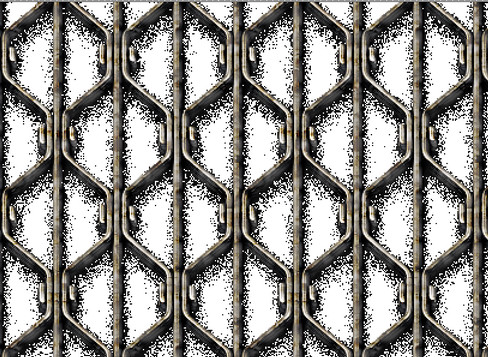
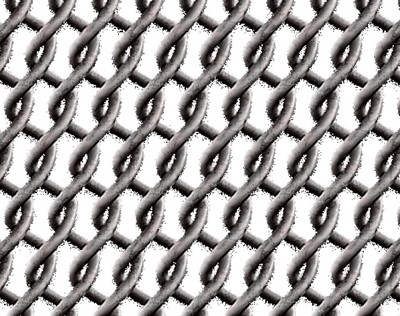
but it gives a dirty result :
ImageImage
and I tried several filters G'Mic (repair) but to no avail.
Is it possible to improve these patterns?

_________________
Les parfums, les couleurs et les sons se répondent.Baudelaire (Les fleurs du mal)
2.10.36/(Samj) Gimp 2.10.38 OS Windows 10 Home 64 bits


Share on Facebook Share on Twitter Share on Orkut Share on Digg Share on MySpace Share on Delicious Share on Technorati
Top
 Post subject: Re: Clean a pattern
PostPosted: Mon Feb 18, 2019 2:38 am  (#2) 
Offline
Script Coder
User avatar

Joined: Oct 25, 2010
Posts: 4812
The pattern works OK, I think you get the "dirty" result because your are in a color-indexed image so you have a "binary" alpha-channel and can't use the partial transparency that makes the shadows...

_________________
Image


Top
 Post subject: Re: Clean a pattern
PostPosted: Mon Feb 18, 2019 3:04 am  (#3) 
Offline
GimpChat Member
User avatar

Joined: Sep 24, 2010
Posts: 12854
Works for me, level_0. :)


Attachments:
wfm.jpg
wfm.jpg [ 547.91 KiB | Viewed 4837 times ]

_________________
Lyle

Psalm 109:8

Image
Top
 Post subject: Re: Clean a pattern
PostPosted: Mon Feb 18, 2019 3:06 am  (#4) 
Offline
GimpChat Member

Joined: Apr 09, 2018
Posts: 1888
Location: France
ofnuts :wvy

I just used the filling tool on a white background
Image

_________________
Les parfums, les couleurs et les sons se répondent.Baudelaire (Les fleurs du mal)
2.10.36/(Samj) Gimp 2.10.38 OS Windows 10 Home 64 bits


Top
 Post subject: Re: Clean a pattern
PostPosted: Mon Feb 18, 2019 3:28 am  (#5) 
Offline
GimpChat Member

Joined: Apr 09, 2018
Posts: 1888
Location: France
lylejk
not seen your answer...Image but have you tried on a white background?

_________________
Les parfums, les couleurs et les sons se répondent.Baudelaire (Les fleurs du mal)
2.10.36/(Samj) Gimp 2.10.38 OS Windows 10 Home 64 bits


Top
 Post subject: Re: Clean a pattern
PostPosted: Mon Feb 18, 2019 5:11 am  (#6) 
Offline
GimpChat Member

Joined: Apr 09, 2018
Posts: 1888
Location: France
thank you both for going over the topic to tell me that the pattern was clean but still being at level_0, it did not tell me what I had to do to not have the black grains ... :(

_________________
Les parfums, les couleurs et les sons se répondent.Baudelaire (Les fleurs du mal)
2.10.36/(Samj) Gimp 2.10.38 OS Windows 10 Home 64 bits


Top
 Post subject: Re: Clean a pattern
PostPosted: Mon Feb 18, 2019 5:44 am  (#7) 
Offline
GimpChat Member

Joined: Sep 23, 2016
Posts: 317
level_0 wrote:
GIMP Version: 2.8.9
Is it possible to improve these patterns?


How are these 2?

What I did:
Add Layer Mask - Transfer layer's alpha channel.
Show layer mask.
Then played around with contrast, levels, curves until the shadows were eliminated.
Exported as png.


Attachments:
Nz_Link_modified.png
Nz_Link_modified.png [ 42.11 KiB | Viewed 4804 times ]
Nz_Grate_modified.png
Nz_Grate_modified.png [ 83.13 KiB | Viewed 4804 times ]
Top
 Post subject: Re: Clean a pattern
PostPosted: Mon Feb 18, 2019 5:51 am  (#8) 
Offline
Administrator
User avatar

Joined: Aug 10, 2012
Posts: 14265
Location: Native to NYC living in Arizona, Gimp 2.8 - 3.0, Win 11 PC.
level_0 wrote:
thank you both for going over the topic to tell me that the pattern was clean but still being at level_0, it did not tell me what I had to do to not have the black grains ... :(

Have you tried downloading the patterns again,
and replacing the old patterns with the new?

_________________
Image
"A wise man learns more from a foolish question than a fool can learn from a wise answer"
Image


Top
 Post subject: Re: Clean a pattern
PostPosted: Mon Feb 18, 2019 5:54 am  (#9) 
Offline
GimpChat Member

Joined: Mar 04, 2011
Posts: 2629
level_0 wrote:
thank you both for going over the topic to tell me that the pattern was clean but still being at level_0, it did not tell me what I had to do to not have the black grains ... :(


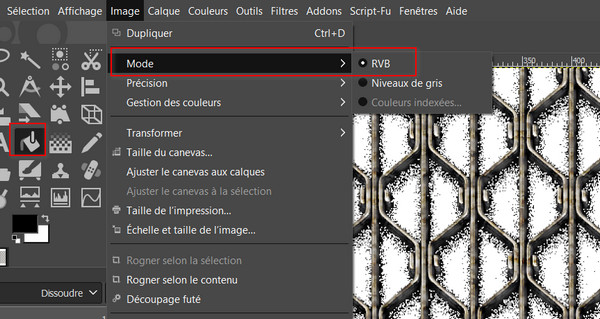
It is as Ofnuts pointed out, in an Indexed mode image the drop-shadow is dithered. Why? Indexed does not support partial transparency, either all or nothing, so the shadow is replaced by spaced solid dots. (dithering)

When converting to indexed Image -> Mode -> Indexed there is an option to turn that off. The semi-transparent then becomes solid.

Image

To fix it for Indexed, remove the drop shadow. Fortunately not too difficult with those patterns.

Right click on the pattern in the patterns dialogue and open as an image.
Use the colour select tool with a large threshold

Image

Cut the selection.
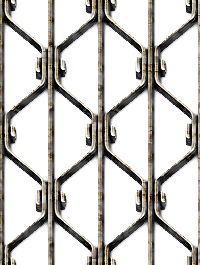
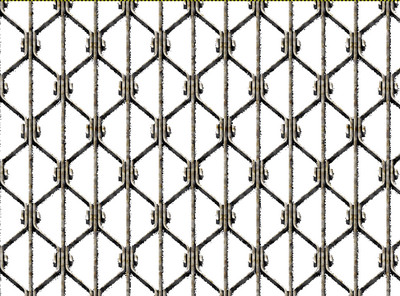
Export that as a png and put the file in your Gimp patterns folder. Gimp can use pngs and jpegs as pattern files without converting to a Gimp.pat file That one attached, I will let you practice on the other one.

EDIT: No - still produces a rubbish result. Needs a degree of cleaning. Try as described by Blighty.

Hate to be beat, this time cut-outs using a path, since there is symmetry, only had to make one then much duplicating, moving and flipping


Attachments:
Nz_Grate.png
Nz_Grate.png [ 63.96 KiB | Viewed 4790 times ]
Top
 Post subject: Re: Clean a pattern
PostPosted: Mon Feb 18, 2019 7:52 am  (#10) 
Offline
GimpChat Member

Joined: Apr 09, 2018
Posts: 1888
Location: France
Thanks for these latest new answers (Blighty, Wallace, rich2005, I love you Image )
I will come back after studying all this! :)
Thanks to you, I'm learning a lot!

_________________
Les parfums, les couleurs et les sons se répondent.Baudelaire (Les fleurs du mal)
2.10.36/(Samj) Gimp 2.10.38 OS Windows 10 Home 64 bits


Top
 Post subject: Re: Clean a pattern
PostPosted: Mon Feb 18, 2019 9:02 am  (#11) 
Offline
GimpChat Member

Joined: Apr 09, 2018
Posts: 1888
Location: France
Using all your advice, I thought I finally got it:
Image
but the result is not great:
Image
I do not know if I'll do it today because I'm starting to tire! :)

_________________
Les parfums, les couleurs et les sons se répondent.Baudelaire (Les fleurs du mal)
2.10.36/(Samj) Gimp 2.10.38 OS Windows 10 Home 64 bits


Top
Post new topic Reply to topic  [ 11 posts ] 

All times are UTC - 5 hours [ DST ]


* Login  


Powered by phpBB3 © phpBB Group