It is currently Tue Sep 22, 2026 5:12 pm


All times are UTC - 5 hours [ DST ]


Post new topic Reply to topic  [ 13 posts ] 
Author Message
 Post subject: Slow when working on large pictures
PostPosted: Mon Feb 25, 2019 10:22 pm  (#1) 
Offline
Global Moderator
User avatar

Joined: Apr 01, 2012
Posts: 8471
Location: On the other side of your screen
GIMP Version: 2.10.8
Operating System: Windows
OS Version: 10 Home
GIMP Experience: New User


I do not have any trouble when working with smaller pictures (up to 3000 pixels)
If a picture has been scanned at 600 ppi or higher and is larger in pixels the Healing brush especially takes awhile to respond. And can even crash gimp.
Is it my gimp or my Computer
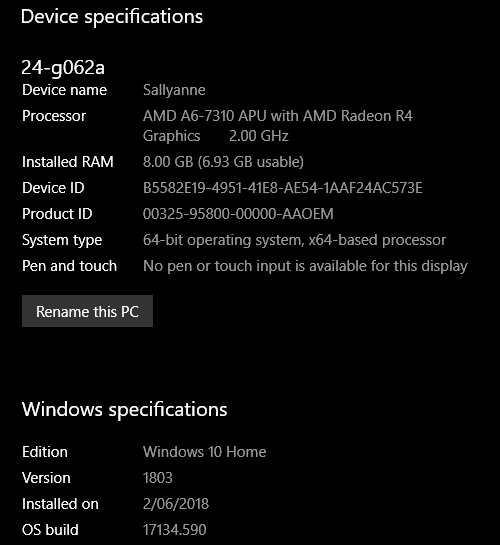
Here are my computer specs.
Image

_________________
Image
Free Fun Photo Editing & resources
Poems from the Lord
Gimp Newby
Gimp version 3.2.4 and GMIC-Qt 4.0.2 OS :- Windows 10 Home 64


Share on Facebook Share on Twitter Share on Orkut Share on Digg Share on MySpace Share on Delicious Share on Technorati
Top
 Post subject: Re: Slow when working on large pictures
PostPosted: Mon Feb 25, 2019 11:02 pm  (#2) 
Offline
Administrator
User avatar

Joined: Aug 10, 2012
Posts: 14207
Location: Native to NYC living in Arizona, Gimp 2.8 - 3.0, Win 11 PC.
Your available/usable memory/RAM is at 6.93GB.
When you open a very large image.
This available memory will become less.
As you woke on the image,
this too will reduce it even further.

You could open Task Manager while a large image is open.
To see the amount memory being used.
Once your installed memory reaches it's limit.
You begin to use the the virtual memory,
which actually exists on your hard drive,
rather than as memory modules on your motherboard.
Virtual memory is much slower then actual installed RAM modules.

The OS needs memory,
Gimp uses some.
Other processes running on your computer,
also us some of that available memory.

Stopping some background processes,
my help to alleviate this,
but given the limited amount of memory your system has.
This balancing act may become futile.

_________________
Image
"A wise man learns more from a foolish question than a fool can learn from a wise answer"
Image


Top
 Post subject: Re: Slow when working on large pictures
PostPosted: Mon Feb 25, 2019 11:05 pm  (#3) 
Offline
Global Moderator
User avatar

Joined: Apr 01, 2012
Posts: 8471
Location: On the other side of your screen
Thank you Wallace

_________________
Image
Free Fun Photo Editing & resources
Poems from the Lord
Gimp Newby
Gimp version 3.2.4 and GMIC-Qt 4.0.2 OS :- Windows 10 Home 64


Top
 Post subject: Re: Slow when working on large pictures
PostPosted: Mon Feb 25, 2019 11:07 pm  (#4) 
Offline
Administrator
User avatar

Joined: Aug 10, 2012
Posts: 14207
Location: Native to NYC living in Arizona, Gimp 2.8 - 3.0, Win 11 PC.
sallyanne wrote:
Thank you Wallace

I hope I helped.
Sorry for being so long winded.

:oops:

_________________
Image
"A wise man learns more from a foolish question than a fool can learn from a wise answer"
Image


Top
 Post subject: Re: Slow when working on large pictures
PostPosted: Tue Feb 26, 2019 5:04 am  (#5) 
Offline
Script Coder
User avatar

Joined: Oct 25, 2010
Posts: 4812
It is possible that Gimp isn't using all the available RAM and goes to disk. See Edit>Preferences>System resources>Tile cache size. With your 8GB RAM you can set it as hight as 6GB. What is the current calue?

_________________
Image


Top
 Post subject: Re: Slow when working on large pictures
PostPosted: Tue Feb 26, 2019 5:05 am  (#6) 
Offline
Global Moderator
User avatar

Joined: Apr 01, 2012
Posts: 8471
Location: On the other side of your screen
I didn't think you were long winded at all. I like the way you explain things. Keep it up!
I did miss something though - That I have limited resources. I thought my pc was close to a gaming pc.
I have a couple of programs which I could delete - would that help? I download stuff which I don't use. :oops:

_________________
Image
Free Fun Photo Editing & resources
Poems from the Lord
Gimp Newby
Gimp version 3.2.4 and GMIC-Qt 4.0.2 OS :- Windows 10 Home 64


Top
 Post subject: Re: Slow when working on large pictures
PostPosted: Tue Feb 26, 2019 5:07 am  (#7) 
Offline
Global Moderator
User avatar

Joined: Apr 01, 2012
Posts: 8471
Location: On the other side of your screen
So that was it (I think)....Tile cache was only set at 3GB
Thanks ofnuts :)

EDIT: Brush still takes a couple seconds to catch up. Used to be straight away. Although that is better than ten or more minutes.
I am not sure if my AMD processor is to blame. I had an Intel 5 on my laptop.

_________________
Image
Free Fun Photo Editing & resources
Poems from the Lord
Gimp Newby
Gimp version 3.2.4 and GMIC-Qt 4.0.2 OS :- Windows 10 Home 64


Top
 Post subject: Re: Slow when working on large pictures
PostPosted: Tue Feb 26, 2019 7:40 am  (#8) 
Offline
Script Coder
User avatar

Joined: Oct 25, 2010
Posts: 4812
sallyanne wrote:
I thought my pc was close to a gaming pc.


Games don't need a lot of CPU. Their bottleneck is mostly the GPU (which for Gimp is quite unnecessary).

_________________
Image


Top
 Post subject: Re: Slow when working on large pictures
PostPosted: Tue Feb 26, 2019 7:56 am  (#9) 
Offline
GimpChat Member
User avatar

Joined: Nov 15, 2014
Posts: 875
Just a thought - is GIMP set to use all 4 cores of your processor? (Settings/System resources)

david.


Top
 Post subject: Re: Slow when working on large pictures
PostPosted: Tue Feb 26, 2019 9:01 am  (#10) 
Offline
GimpChat Member

Joined: Mar 04, 2011
Posts: 2615
It looks like there might be some performance improvements when Gimp 2.10.10 is released.

https://gitlab.gnome.org/GNOME/gimp/issues/3012

.....2.10.10 will have many other optimizations that should benefit large images....

Was looking like February, some delays? Should not be too long.


Top
 Post subject: Re: Slow when working on large pictures
PostPosted: Wed Feb 27, 2019 9:19 am  (#11) 
Offline
Global Moderator
User avatar

Joined: Apr 01, 2012
Posts: 8471
Location: On the other side of your screen
Where do I find that david?
I found system resources in Gimp > edit > preferences but no settings
In windows I found settings but no system resources.

_________________
Image
Free Fun Photo Editing & resources
Poems from the Lord
Gimp Newby
Gimp version 3.2.4 and GMIC-Qt 4.0.2 OS :- Windows 10 Home 64


Top
 Post subject: Re: Slow when working on large pictures
PostPosted: Wed Feb 27, 2019 10:33 am  (#12) 
Offline
GimpChat Member
User avatar

Joined: Nov 15, 2014
Posts: 875
Screenshot of my GIMP preferences.

david.


Attachments:
Screenshot.png
Screenshot.png [ 114.95 KiB | Viewed 3881 times ]
Top
 Post subject: Re: Slow when working on large pictures
PostPosted: Thu Feb 28, 2019 12:13 am  (#13) 
Offline
Global Moderator
User avatar

Joined: Apr 01, 2012
Posts: 8471
Location: On the other side of your screen
:tyspin

_________________
Image
Free Fun Photo Editing & resources
Poems from the Lord
Gimp Newby
Gimp version 3.2.4 and GMIC-Qt 4.0.2 OS :- Windows 10 Home 64


Top
Post new topic Reply to topic  [ 13 posts ] 

All times are UTC - 5 hours [ DST ]


* Login  


Powered by phpBB3 © phpBB Group