It is currently Wed Sep 23, 2026 11:55 am


All times are UTC - 5 hours [ DST ]


Post new topic Reply to topic  [ 7 posts ] 
Author Message
 Post subject: Am I the only person this does not work for?
PostPosted: Fri Mar 01, 2019 10:13 pm  (#1) 
Offline
Global Moderator
User avatar

Joined: Apr 01, 2012
Posts: 8471
Location: On the other side of your screen
GIMP Version: 2.10.8
Operating System: Windows
OS Version: 10 Home
GIMP Experience: New User


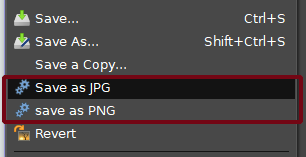
I haven't seen these before so assume they are new to the 2.10 version. (in the file menu just above export)
Image
I prefer to use the 'export as' any how or have just got used to using it. Tried to use this way to save something once and it didn't work for me. Is it a bug or?

Edit: Just tried it again. saving an already saved picture works - a new picture however doesn't - to either jpg or png

_________________
Image
Free Fun Photo Editing & resources
Poems from the Lord
Gimp Newby
Gimp version 3.2.4 and GMIC-Qt 4.0.2 OS :- Windows 10 Home 64


Share on Facebook Share on Twitter Share on Orkut Share on Digg Share on MySpace Share on Delicious Share on Technorati
Top
 Post subject: Re: Am I the only person this does not work for?
PostPosted: Sat Mar 02, 2019 12:21 am  (#2) 
Offline
GimpChat Member
User avatar

Joined: Jan 13, 2011
Posts: 2648
Location: Poland
I can not check in GIMP 2.10.8 (I have only 2.10.5) but in my opinion it is additional python plugins (Save as PNG, Save as JPG).
This comes from GIMP 2.8 (but works fine for me in GIMP 2.10).


Attachments:
Save as.png
Save as.png [ 180.84 KiB | Viewed 5020 times ]

_________________
Image
Top
 Post subject: Re: Am I the only person this does not work for?
PostPosted: Sat Mar 02, 2019 4:37 am  (#3) 
Offline
Script Coder
User avatar

Joined: Oct 25, 2010
Posts: 4812
No part of standard Gimp AFAIK.

_________________
Image


Top
 Post subject: Re: Am I the only person this does not work for?
PostPosted: Sat Mar 02, 2019 7:29 am  (#4) 
Offline
GimpChat Member
User avatar

Joined: Oct 10, 2018
Posts: 191
Location: Charlottesville Virginia
Sallyanne, I have presumably the same setup [a recently reinstalled 2.10.8 and Windows 10 Home] but the jpg and png save options do not appear in the menu.


Top
 Post subject: Re: Am I the only person this does not work for?
PostPosted: Sat Mar 02, 2019 7:51 am  (#5) 
Offline
GimpChat Member

Joined: Mar 04, 2011
Posts: 2615
Paul Sherman scripts from http://www.gimphelp.org/script210.html
about halfway down the list: 210_save-as-jpg.scm / 210_save-as-png.scm

Quote:
..Edit: Just tried it again. saving an already saved picture works - a new picture however doesn't - to either jpg or png


New image, probably find it in C:\Users\'yourname' The png as untitled.png and the jpeg as jpg (no extension)

Very flaky, best removed.


Top
 Post subject: Re: Am I the only person this does not work for?
PostPosted: Sat Mar 02, 2019 8:16 am  (#6) 
Offline
Global Moderator
User avatar

Joined: Apr 01, 2012
Posts: 8471
Location: On the other side of your screen
Thanks for the information :)

_________________
Image
Free Fun Photo Editing & resources
Poems from the Lord
Gimp Newby
Gimp version 3.2.4 and GMIC-Qt 4.0.2 OS :- Windows 10 Home 64


Top
 Post subject: Re: Am I the only person this does not work for?
PostPosted: Mon Mar 04, 2019 2:31 pm  (#7) 
Offline
GimpChat Member
User avatar

Joined: Jul 06, 2013
Posts: 2663
Location: California
Save for PNG works for me. The only problem with that option is, it doesn't give you a chance to place the file somewhere that you can easily access it. The files with that option end up going to the recent files folder on your pc.

This is where the files end up for me when using save for PNG in gimp:

Image


Top
Post new topic Reply to topic  [ 7 posts ] 

All times are UTC - 5 hours [ DST ]


* Login  


Powered by phpBB3 © phpBB Group