It is currently Wed Jun 03, 2026 11:50 pm


All times are UTC - 5 hours [ DST ]


Post new topic Reply to topic  [ 22 posts ]  Go to page 1, 2  Next
Author Message
 Post subject: Easy and fast 3D text in GIMP-2.10.8
PostPosted: Wed Mar 20, 2019 7:07 am  (#1) 
Offline
Global Moderator
User avatar

Joined: May 16, 2010
Posts: 16008
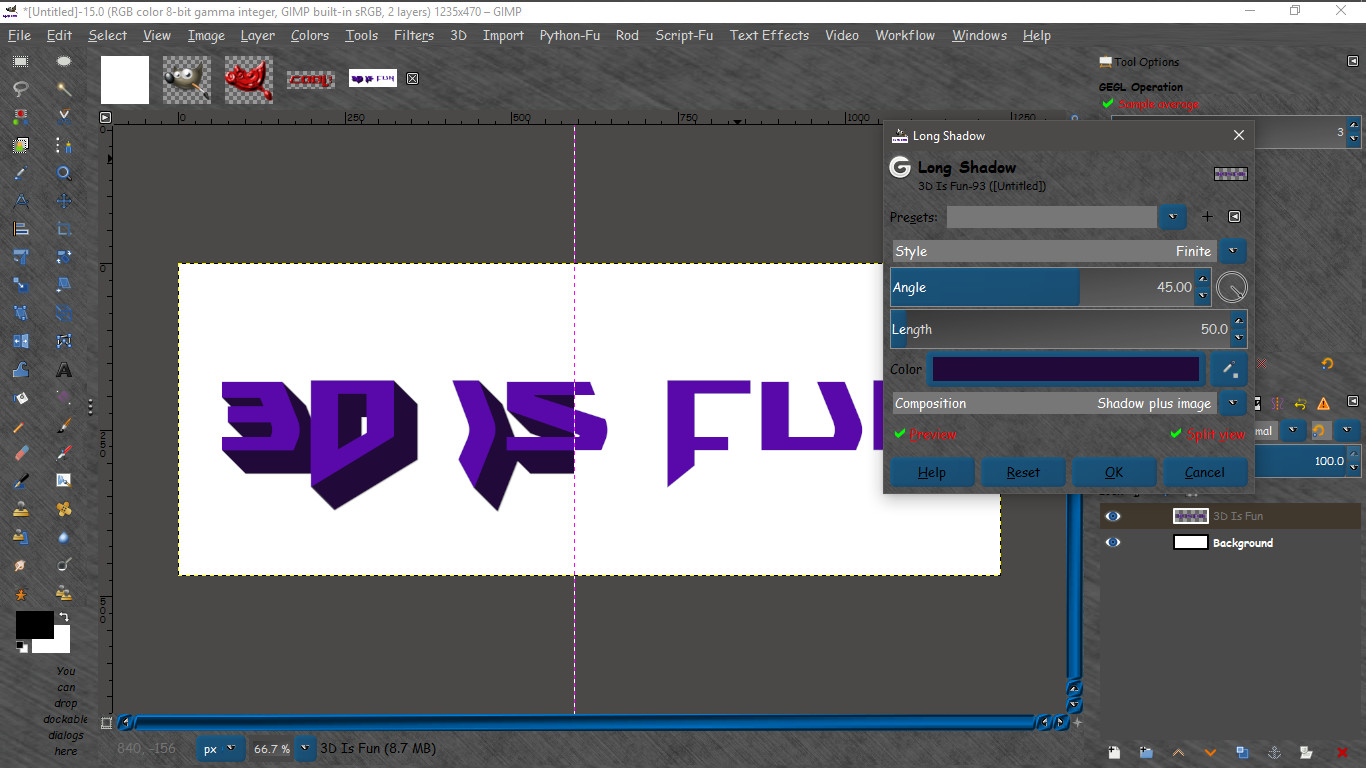
Utilizing the Filters>Light and Shadow GEGL filter "Long Shadows" It is a breeze to create quick and pretty decent looking 3D text.
1) Create new image (any size you want).
2) Create your text layer
3) Right click the text layer and select "Layer To Image Size"
4) Go to Filters>Light and Shadow>Long Shadows and open the filter dialog.
5) Be sure and set the "Style" to Finite.
6) Select and angle
7) Select a length of depth
8) Select a color. I used the dropper to select my original FG color and made it darker.
Click "OK"


Just add your shadows and corner highlights on new layers.


Image

Image

This is how i made my signature image. :hehe :bigthup

_________________
Image


Share on Facebook Share on Twitter Share on Orkut Share on Digg Share on MySpace Share on Delicious Share on Technorati
Top
 Post subject: Re: Easy and fast 3D text in GIMP-2.10.8
PostPosted: Wed Mar 20, 2019 7:07 am  (#2) 
Offline
Global Moderator
User avatar

Joined: May 16, 2010
Posts: 16008
Actually it would be pretty easy to script this. :)

_________________
Image


Top
 Post subject: Re: Easy and fast 3D text in GIMP-2.10.8
PostPosted: Wed Mar 20, 2019 9:18 am  (#3) 
Offline
GimpChat Member
User avatar

Joined: Sep 24, 2010
Posts: 12775
Like the result, Rod. Looks akin if not better than a motion blur trick I sometimes do. :)

_________________
Lyle

Psalm 109:8

Image


Top
 Post subject: Re: Easy and fast 3D text in GIMP-2.10.8
PostPosted: Wed Mar 20, 2019 10:11 am  (#4) 
Offline
Global Moderator
User avatar

Joined: Apr 01, 2012
Posts: 8358
Location: On the other side of your screen
Easy peasy. Thanks :)
Image

_________________
Image
Free Fun Photo Editing & resources
Poems from the Lord
Gimp Newby
Gimp version 3.2.0 and GMIC-Qt 3.7.5 OS :- Windows 10 Home 64


Top
 Post subject: Re: Easy and fast 3D text in GIMP-2.10.8
PostPosted: Wed Mar 20, 2019 10:11 am  (#5) 
Offline
Global Moderator
User avatar

Joined: May 16, 2010
Posts: 16008
lylejk wrote:
Like the result, Rod. Looks akin if not better than a motion blur trick I sometimes do. :)

This seems to be so much faster though. :) I didn't even realize they added an "on canvas" long shadow plugin.

_________________
Image


Top
 Post subject: Re: Easy and fast 3D text in GIMP-2.10.8
PostPosted: Wed Mar 20, 2019 10:12 am  (#6) 
Offline
Global Moderator
User avatar

Joined: May 16, 2010
Posts: 16008
sallyanne wrote:
Easy peasy. Thanks :)
[ Image ]

Isn't it though. It's like having a 3D plugin in GIMP now. Nice clean lines too.

_________________
Image


Top
 Post subject: Re: Easy and fast 3D text in GIMP-2.10.8
PostPosted: Wed Mar 20, 2019 10:14 am  (#7) 
Offline
GimpChat Member
User avatar

Joined: May 10, 2013
Posts: 1430
Location: FInland
Yep, fast and easy. Looks like there's still tons to explore in 2.10, had no idea about long shadow.
Quick test run with duplicated text layer, used the fading fixed length on the upper layer.
Thank you Rod.

Image


Top
 Post subject: Re: Easy and fast 3D text in GIMP-2.10.8
PostPosted: Wed Mar 20, 2019 10:35 am  (#8) 
Offline
Global Moderator
User avatar

Joined: Apr 01, 2012
Posts: 8358
Location: On the other side of your screen
Thought I'd try with different fonts
Image

_________________
Image
Free Fun Photo Editing & resources
Poems from the Lord
Gimp Newby
Gimp version 3.2.0 and GMIC-Qt 3.7.5 OS :- Windows 10 Home 64


Top
 Post subject: Re: Easy and fast 3D text in GIMP-2.10.8
PostPosted: Wed Mar 20, 2019 11:14 am  (#9) 
Offline
Global Moderator
User avatar

Joined: May 16, 2010
Posts: 16008
What i really enjoy is the on canvas ability to move the text around until you get precisely what you want by using the angle adjustment slider or dial. This on canvas editing is so nice to have now.

_________________
Image


Top
 Post subject: Re: Easy and fast 3D text in GIMP-2.10.8
PostPosted: Wed Mar 20, 2019 12:14 pm  (#10) 
Offline
Administrator
User avatar

Joined: Aug 10, 2012
Posts: 14011
Location: Native to NYC living in Arizona, Gimp 2.8 - 3.0, Win 11 PC.
Thanks for the tutorial Rod.

:clap

It's been added to your tutorial list,
within the
Image

_________________
Image
"A wise man learns more from a foolish question than a fool can learn from a wise answer"
Image


Top
 Post subject: Re: Easy and fast 3D text in GIMP-2.10.8
PostPosted: Wed Mar 20, 2019 1:16 pm  (#11) 
Offline
GimpChat Member

Joined: May 12, 2015
Posts: 4693
Really neat, Rod! Thank you.


Top
 Post subject: Re: Easy and fast 3D text in GIMP-2.10.8
PostPosted: Wed Mar 20, 2019 1:17 pm  (#12) 
Offline
GimpChat Member

Joined: Mar 06, 2015
Posts: 308
Cool, I like it !!!!

Chromebook will be my next computer.

Thanks


Attachments:
Chromebook os.jpg
Chromebook os.jpg [ 173.56 KiB | Viewed 22384 times ]
Top
 Post subject: Re: Easy and fast 3D text in GIMP-2.10.8
PostPosted: Wed Mar 20, 2019 5:18 pm  (#13) 
Offline
GimpChat Member
User avatar

Joined: Apr 15, 2017
Posts: 1837
Yes, I discovered that back when Long Shadows first came out. I believe v2.10.6, maybe? I posted a few examples back then, If I remember correctly. It does make good results and I often use Long shadows for various effects.


Top
 Post subject: Re: Easy and fast 3D text in GIMP-2.10.8
PostPosted: Wed Mar 20, 2019 6:41 pm  (#14) 
Offline
Global Moderator
User avatar

Joined: May 16, 2010
Posts: 16008
Wallace wrote:
Thanks for the tutorial Rod.

:clap

It's been added to your tutorial list,
within the
[ Image ]

Thank you Wallace.

_________________
Image


Top
 Post subject: Re: Easy and fast 3D text in GIMP-2.10.8
PostPosted: Wed Mar 20, 2019 6:44 pm  (#15) 
Offline
Global Moderator
User avatar

Joined: May 16, 2010
Posts: 16008
racer-x wrote:
Yes, I discovered that back when Long Shadows first came out. I believe v2.10.6, maybe? I posted a few examples back then, If I remember correctly. It does make good results and I often use Long shadows for various effects.

My apologies racer-x. I hadn't realized anyone had posted about it already.

_________________
Image


Top
 Post subject: Re: Easy and fast 3D text in GIMP-2.10.8
PostPosted: Thu Mar 21, 2019 3:50 am  (#16) 
Offline
GimpChat Member
User avatar

Joined: Apr 15, 2017
Posts: 1837
No worries. You took the time to write a tutorial, I didn't bother to. Great that you did that for people interested in this...


Top
 Post subject: Re: Easy and fast 3D text in GIMP-2.10.8
PostPosted: Fri Mar 22, 2019 7:35 am  (#17) 
Offline
GimpChat Member

Joined: Mar 06, 2015
Posts: 308
One more 3D text

Doron.


Attachments:
Linux Mint Screenshot from 2019-03-22 14-22-32.png
Linux Mint Screenshot from 2019-03-22 14-22-32.png [ 635.57 KiB | Viewed 22327 times ]
Top
 Post subject: Re: Easy and fast 3D text in GIMP-2.10.8
PostPosted: Fri Mar 22, 2019 3:32 pm  (#18) 
Offline
Administrator
User avatar

Joined: Aug 10, 2012
Posts: 14011
Location: Native to NYC living in Arizona, Gimp 2.8 - 3.0, Win 11 PC.
Image

_________________
Image
"A wise man learns more from a foolish question than a fool can learn from a wise answer"
Image


Top
 Post subject: Re: Easy and fast 3D text in GIMP-2.10.8
PostPosted: Thu Mar 28, 2019 5:59 am  (#19) 
Offline
Global Moderator
User avatar

Joined: Apr 01, 2012
Posts: 8358
Location: On the other side of your screen
Image

_________________
Image
Free Fun Photo Editing & resources
Poems from the Lord
Gimp Newby
Gimp version 3.2.0 and GMIC-Qt 3.7.5 OS :- Windows 10 Home 64


Top
 Post subject: Re: Easy and fast 3D text in GIMP-2.10.8
PostPosted: Thu Aug 06, 2020 9:42 am  (#20) 
Offline
GimpChat Member
User avatar

Joined: Oct 06, 2010
Posts: 4050
I love the ability to use gradients on the fly, with long shadows. It's loads of fun.

Image

_________________
"In order to attain the impossible, one must attempt the absurd."
~ Miguel de Cervantes


Top
Post new topic Reply to topic  [ 22 posts ]  Go to page 1, 2  Next

All times are UTC - 5 hours [ DST ]


* Login  


Powered by phpBB3 © phpBB Group