It is currently Tue Sep 01, 2026 5:13 am


All times are UTC - 5 hours [ DST ]


Post new topic Reply to topic  [ 9 posts ] 
Author Message
 Post subject: Grayscale Mason Jar Brush
PostPosted: Sat Oct 08, 2016 5:56 pm  (#1) 
Offline
Administrator
User avatar

Joined: Aug 10, 2012
Posts: 14187
Location: Native to NYC living in Arizona, Gimp 2.8 - 3.0, Win 11 PC.
Here's a Mason Jar brush,
that will paint in any selected color.

There are a few tricks I employed,
which may be applied to this brush to get the most favorable results.

There are a few layers that need to be added.
First paint with a single click,
onto a transparent layer of your canvas with the brush.
Using your color of choice.
In my screenshot below.
I use an Orange Hue for my jar.
This is the first layer named "normal".

Image

Next using the Fuzzy Select Tool :fuzzsel .
Click the outer portion of the canvas.
Creating a selection on the outside of the jar.

Now add a new layer for the white background.
Invert the selection,
(select>invert) and fill this inverted selection with white.
To create the background layer.
I named this layer "white bg" and moved it to the bottom.

Next make a duplication of your colored jar layer and set the layer mode to Multiply.
This layer is named "Multiply".

Duplicate this layer and lower it's opacity to about 80,
or until you're happy with the color.

Last step,
is to go back to the white background layer and feather it's edges.
Use the fuzzy selection tool to create a selection,
on the out side of the white background.
Once this selection is made.
Go to Select>Feather and feather the selection by 5.
While this selection is still active.
Go to Edit>Clear.
To clear and feather the edges of the white background.

You may need to repeat the feathering again,
by 2 or 3.

When complete.
Your jar should look something like the image below.
Image

Attachment:
grayscale mason jar brush.zip [73.34 KiB]
Downloaded 420 times


Attachment:
File comment: Mason Jar XCF file
mj ex image.xcf [372.8 KiB]
Downloaded 355 times


Feel free to download this brush and use it as you wish.
Free to use, no applicable usage restrictions apply.

_________________
Image
"A wise man learns more from a foolish question than a fool can learn from a wise answer"
Image


Share on Facebook Share on Twitter Share on Orkut Share on Digg Share on MySpace Share on Delicious Share on Technorati
Top
 Post subject: Re: Grayscale Mason Jar Brush
PostPosted: Sat Oct 08, 2016 7:01 pm  (#2) 
Offline
GimpChat Member

Joined: Oct 07, 2016
Posts: 5
THANK YOU
Thank you very much. I did it!
Now I can have my students choose their colors and we can move on. The jars are supposed to be the main point of their design and we can't put anything else on the page til we get them completed and in position. I just couldn't figure out how to do it.

I really appreciate your helpfulness.
Becky

Attachment:
greenjar.png
greenjar.png [ 103.12 KiB | Viewed 7504 times ]


Top
 Post subject: Re: Grayscale Mason Jar Brush
PostPosted: Sun Oct 09, 2016 1:44 am  (#3) 
Offline
Administrator
User avatar

Joined: Aug 10, 2012
Posts: 14187
Location: Native to NYC living in Arizona, Gimp 2.8 - 3.0, Win 11 PC.
florsca wrote:
THANK YOU
Thank you very much. I did it!
Now I can have my students choose their colors and we can move on. The jars are supposed to be the main point of their design and we can't put anything else on the page til we get them completed and in position. I just couldn't figure out how to do it.

I really appreciate your helpfulness.
Becky

Great, glad to hear that.
:hi5

_________________
Image
"A wise man learns more from a foolish question than a fool can learn from a wise answer"
Image


Top
 Post subject: Re: Grayscale Mason Jar Brush
PostPosted: Mon May 20, 2019 11:47 pm  (#4) 
Offline
Global Moderator
User avatar

Joined: Oct 02, 2014
Posts: 5032
Location: Sydney Australia
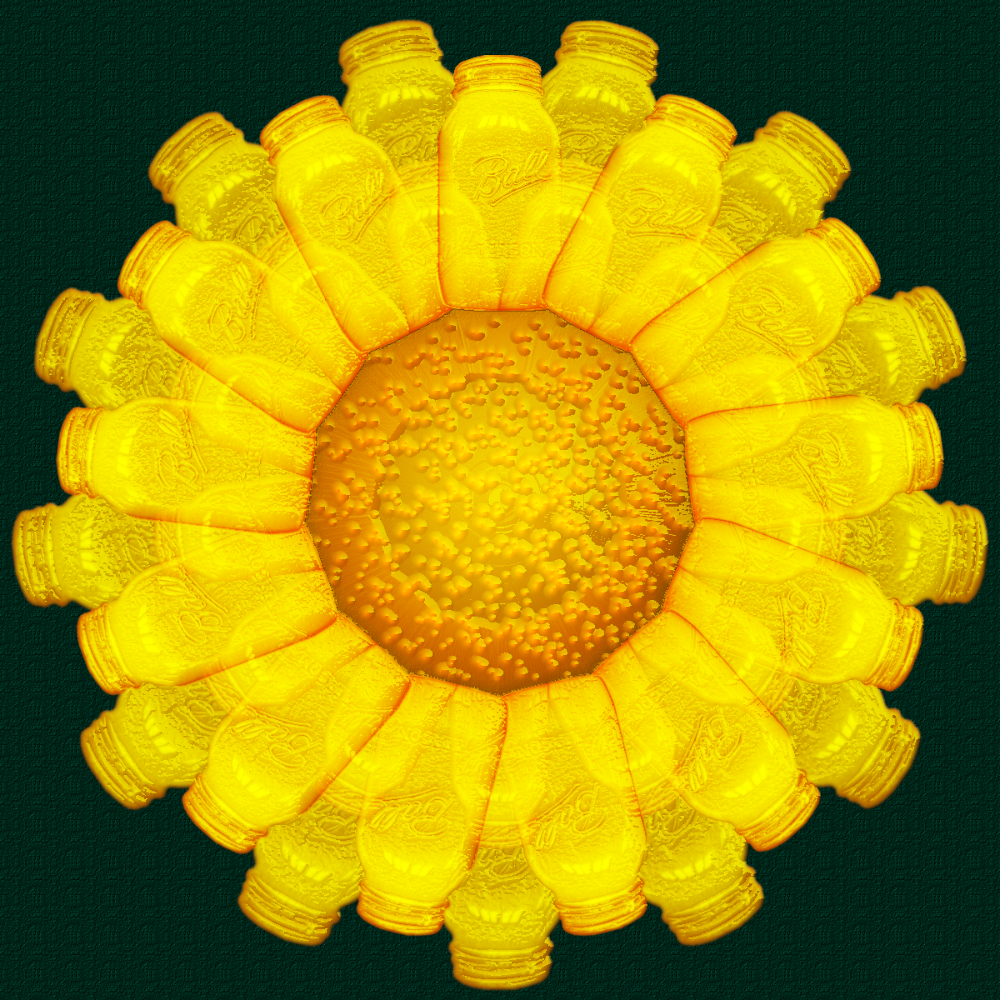
Before I go 'bush', here's one for Wallace. A gold ring or a daisy using his mason jar brush.


Attachments:
gold_rings_mason_jar_wallace.png
gold_rings_mason_jar_wallace.png [ 1.06 MiB | Viewed 7506 times ]

_________________
Image

Respect should be offered freely but hard earned
Top
 Post subject: Re: Grayscale Mason Jar Brush
PostPosted: Mon May 20, 2019 11:58 pm  (#5) 
Offline
Administrator
User avatar

Joined: Aug 10, 2012
Posts: 14187
Location: Native to NYC living in Arizona, Gimp 2.8 - 3.0, Win 11 PC.
oldmangrumpy wrote:
Before I go 'bush',
here's one for Wallace.
A gold ring or a daisy using his mason jar brush.
Image

Thanks OMG!
I love it!
:jumpclap . :jumpclap . :jumpclap

_________________
Image
"A wise man learns more from a foolish question than a fool can learn from a wise answer"
Image


Top
 Post subject: Re: Grayscale Mason Jar Brush
PostPosted: Wed May 22, 2019 11:43 pm  (#6) 
Offline
GimpChat Member
User avatar

Joined: Mar 16, 2015
Posts: 613
Location: On Earth,specifically Queensland,Australia
I had forgotten the Mason Jar brush. I got it and an education as I had to look it up in google. Thanks Wallace and OMG. Great work OMG.

_________________
Image


Top
 Post subject: Re: Grayscale Mason Jar Brush
PostPosted: Wed May 22, 2019 11:46 pm  (#7) 
Offline
Administrator
User avatar

Joined: Aug 10, 2012
Posts: 14187
Location: Native to NYC living in Arizona, Gimp 2.8 - 3.0, Win 11 PC.
Kimba wrote:
I had forgotten the Mason Jar brush.
I got it and an education as I had to look it up in google.
Thanks Wallace and OMG. Great work OMG.

:bigthup

_________________
Image
"A wise man learns more from a foolish question than a fool can learn from a wise answer"
Image


Top
 Post subject: Re: Grayscale Mason Jar Brush
PostPosted: Wed May 22, 2019 11:51 pm  (#8) 
Offline
GimpChat Member
User avatar

Joined: Jul 06, 2013
Posts: 2662
Location: California
I really like the mason jar brush.


Top
 Post subject: Re: Grayscale Mason Jar Brush
PostPosted: Wed May 22, 2019 11:56 pm  (#9) 
Offline
Administrator
User avatar

Joined: Aug 10, 2012
Posts: 14187
Location: Native to NYC living in Arizona, Gimp 2.8 - 3.0, Win 11 PC.
mackenzieh wrote:
I really like the mason jar brush.

Thanks mackenzieh.

_________________
Image
"A wise man learns more from a foolish question than a fool can learn from a wise answer"
Image


Top
Post new topic Reply to topic  [ 9 posts ] 

All times are UTC - 5 hours [ DST ]


* Login  


Powered by phpBB3 © phpBB Group