It is currently Thu Sep 24, 2026 7:51 am


All times are UTC - 5 hours [ DST ]


Post new topic Reply to topic  [ 5 posts ] 
Author Message
 Post subject: export an image
PostPosted: Mon May 27, 2019 2:48 am  (#1) 
Offline
GimpChat Member

Joined: Apr 09, 2018
Posts: 1888
Location: France
GIMP Version: 2.10
Operating System: Windows
GIMP Experience: New User


:wvy
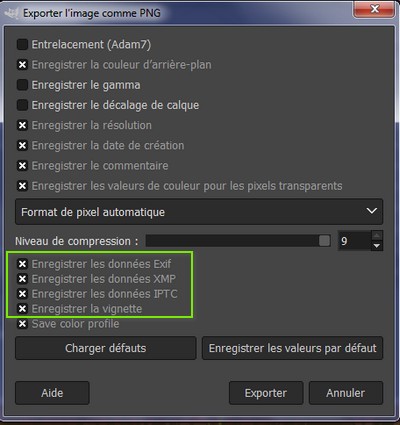
When exporting an image, Gimp proposes this:
Image
I unchecked those surrounded in green but for boxes 1 and 2 I do not understand:
Image

_________________
Les parfums, les couleurs et les sons se répondent.Baudelaire (Les fleurs du mal)
2.10.36/(Samj) Gimp 2.10.38 OS Windows 10 Home 64 bits


Share on Facebook Share on Twitter Share on Orkut Share on Digg Share on MySpace Share on Delicious Share on Technorati
Top
 Post subject: Re: export an image
PostPosted: Mon May 27, 2019 4:02 am  (#2) 
Offline
GimpChat Member
User avatar

Joined: May 10, 2013
Posts: 1442
Location: Finland
1. Save background color.
If your image has many transparency levels, the Internet browsers that recognize only two levels, will use the background color of your Toolbox instead.

2. Save color values from transparent pixels.
When this option is checked, the color values are saved even if the pixels are completely transparent. But this is possible only with a single layer, not with a merged composition. When a multi-layer image gets exported to a single-layer file format, there is no way GIMP could preserve the color values in the transparent pixels.

https://docs.gimp.org/en/gimp-images-out.html#gimp-using-fileformats-export-dialog


Top
 Post subject: Re: export an image
PostPosted: Mon May 27, 2019 6:50 am  (#3) 
Offline
GimpChat Member

Joined: Apr 09, 2018
Posts: 1888
Location: France
thank you Nidhogg, but precisely it does not speak to me (as often on docs.gimp.org and that's why I ask on GC :) ).

I would understand if I saw with screenshots the differences, boxes checked or not.

_________________
Les parfums, les couleurs et les sons se répondent.Baudelaire (Les fleurs du mal)
2.10.36/(Samj) Gimp 2.10.38 OS Windows 10 Home 64 bits


Top
 Post subject: Re: export an image
PostPosted: Mon May 27, 2019 9:18 am  (#4) 
Offline
GimpChat Member

Joined: Mar 04, 2011
Posts: 2615
It does what it says and normally only makes a difference with some image applications, some games, maybe old web browers and of course some gmic filters.

If Save colour pixels ... is on then you might get the top image.

If Save colour pixels ... is off then the coloured pixels are thrown away and you get the bottom image.

Attachment:
transparency.jpg
transparency.jpg [ 319.88 KiB | Viewed 3799 times ]


I would not worry about the Save Backbround colour, it is about how old web browsers work


Top
 Post subject: Re: export an image
PostPosted: Mon May 27, 2019 11:09 am  (#5) 
Offline
GimpChat Member

Joined: Apr 09, 2018
Posts: 1888
Location: France
Thank you rich2005,Image I understood!

_________________
Les parfums, les couleurs et les sons se répondent.Baudelaire (Les fleurs du mal)
2.10.36/(Samj) Gimp 2.10.38 OS Windows 10 Home 64 bits


Top
Post new topic Reply to topic  [ 5 posts ] 

All times are UTC - 5 hours [ DST ]


* Login  


Powered by phpBB3 © phpBB Group