It is currently Thu Sep 24, 2026 2:32 pm


All times are UTC - 5 hours [ DST ]


Post new topic Reply to topic  [ 6 posts ] 
Author Message
 Post subject: can I delete these folders?
PostPosted: Wed May 29, 2019 12:35 pm  (#1) 
Offline
GimpChat Member

Joined: Apr 09, 2018
Posts: 1888
Location: France
GIMP Version: 2.10
Operating System: Windows
GIMP Experience: New User


:wvy
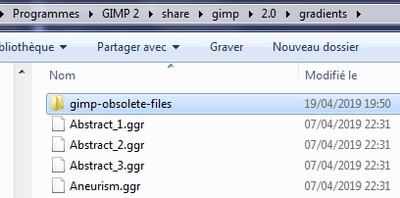
can I delete these folders "gimp-obsolete-files"

in: C: \ Program Files \ GIMP 2 \ share \ gimp \ 2.0 \ gradients
Image

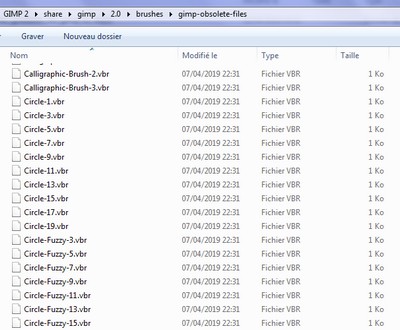
and also in: C: \ Program Files \ Gimp 2 \ share \ gimp \ 2.0 \ brushes \ gimp-obsolete-files

_________________
Les parfums, les couleurs et les sons se répondent.Baudelaire (Les fleurs du mal)
2.10.36/(Samj) Gimp 2.10.38 OS Windows 10 Home 64 bits


Share on Facebook Share on Twitter Share on Orkut Share on Digg Share on MySpace Share on Delicious Share on Technorati
Top
 Post subject: Re: can I delete these folders?
PostPosted: Wed May 29, 2019 12:44 pm  (#2) 
Offline
Script Coder
User avatar

Joined: May 07, 2014
Posts: 4554
Location: Canada
Not sure, I'd look at the files in them to see what they are first though.

_________________
Image
Visualize your and others dreams coming true.


Top
 Post subject: Re: can I delete these folders?
PostPosted: Wed May 29, 2019 1:09 pm  (#3) 
Offline
GimpChat Member

Joined: Mar 04, 2011
Posts: 2615
You can delete if you want.

The brushes in particular are a legacy from Gimp 2.6.x where brush size was not easily changed and standard brushes came in several increasing sizes.

Gimp filters out the gimp-obsolete-files name. If you want to see / use the files, rename that folder and the brushes will appear, and can be filtered according to the folder name.

Attachment:
obsolete.jpg
obsolete.jpg [ 84.91 KiB | Viewed 5392 times ]


Top
 Post subject: Re: can I delete these folders?
PostPosted: Wed May 29, 2019 2:43 pm  (#4) 
Offline
GimpChat Member

Joined: Apr 09, 2018
Posts: 1888
Location: France
thank you trandoductin and rich2005
I looked in the folders but the names did not tell me anything and I think I'll delete, unless you want some to be interesting.
Overview of the contents of the files:

Image

Image

_________________
Les parfums, les couleurs et les sons se répondent.Baudelaire (Les fleurs du mal)
2.10.36/(Samj) Gimp 2.10.38 OS Windows 10 Home 64 bits


Top
 Post subject: Re: can I delete these folders?
PostPosted: Tue Jun 04, 2019 8:35 am  (#5) 
Offline
Global Moderator
User avatar

Joined: May 16, 2010
Posts: 16174
The only problem i can think of is if you have a script file that looks for one of those particular older obsolete files to run.


Top
 Post subject: Re: can I delete these folders?
PostPosted: Tue Jun 04, 2019 11:38 am  (#6) 
Offline
GimpChat Member

Joined: Apr 09, 2018
Posts: 1888
Location: France
Rod wrote:
The only problem i can think of is if you have a script file that looks for one of those particular older obsolete files to run.

Rod :wvy
I left because I use this PC temporarily, the time of the most recent repair. :)

_________________
Les parfums, les couleurs et les sons se répondent.Baudelaire (Les fleurs du mal)
2.10.36/(Samj) Gimp 2.10.38 OS Windows 10 Home 64 bits


Top
Post new topic Reply to topic  [ 6 posts ] 

All times are UTC - 5 hours [ DST ]


* Login  


Powered by phpBB3 © phpBB Group