It is currently Tue Nov 03, 2026 9:26 am


All times are UTC - 5 hours [ DST ]


Post new topic Reply to topic  [ 12 posts ] 
Author Message
 Post subject: Hello, I've been using Gimp for about 2 months.
PostPosted: Thu Jun 20, 2019 11:18 pm  (#1) 
Offline
GimpChat Member

Joined: Jun 20, 2019
Posts: 8
Hello everyone, I found this page by trying to find some help topics on Gimp. I have been using for about 2 months now, learning how to recolor black and white photos. I'm finally at the working with Masks stage. I keep having a problem with my brush changing shape/size during the strokes. I haven't figured out how to stop it from doing it yet, so If anyone has advice I would appreciate any help or advice you can give. :paint


Share on Facebook Share on Twitter Share on Orkut Share on Digg Share on MySpace Share on Delicious Share on Technorati
Top
 Post subject: Re: Hello, I've been using Gimp for about 2 months.
PostPosted: Thu Jun 20, 2019 11:48 pm  (#2) 
Offline
GimpChat Member
User avatar

Joined: Jan 20, 2013
Posts: 14835
Location: roma, italy
Maybe some Dynamics option is active (look at the left bottom side in the panel)?
Set Dynamics Off and retry.

_________________
"Where am I ?"


Top
 Post subject: Re: Hello, I've been using Gimp for about 2 months.
PostPosted: Fri Jun 21, 2019 12:39 am  (#3) 
Offline
GimpChat Member
User avatar

Joined: Mar 01, 2014
Posts: 14221
Location: Spain, Aragón
Welcome, BipolarQueen to Gimp Chat. :)


Attachments:
Welcome BipolarQueen.jpg
Welcome BipolarQueen.jpg [ 764.52 KiB | Viewed 5191 times ]

_________________
Image

Gimp 2.10.36 (samj) portable _ OS Windows 10 Home_ 64bits
Don’t be afraid to start over. It’s a new chance to rebuild what you want.
Top
 Post subject: Re: Hello, I've been using Gimp for about 2 months.
PostPosted: Fri Jun 21, 2019 4:34 am  (#4) 
Offline
Global Moderator
User avatar

Joined: Apr 01, 2012
Posts: 8495
Location: On the other side of your screen
Image :)

Nice back ground Issabella

_________________
Image
Free Fun Photo Editing & resources
Poems from the Lord
Gimp Newby
Gimp version 3.2.6 and GMIC-Qt 4.0.2 OS :- Windows 10 Home 64


Top
 Post subject: Re: Hello, I've been using Gimp for about 2 months.
PostPosted: Fri Jun 21, 2019 4:43 am  (#5) 
Offline
GimpChat Member
User avatar

Joined: Nov 04, 2015
Posts: 1484
Image


[the first part was made with Gimp]


Top
 Post subject: Re: Hello, I've been using Gimp for about 2 months.
PostPosted: Fri Jun 21, 2019 5:37 am  (#6) 
Offline
GimpChat Member
User avatar

Joined: Oct 12, 2016
Posts: 377
Image

_________________
Image


Top
 Post subject: Re: Hello, I've been using Gimp for about 2 months.
PostPosted: Fri Jun 21, 2019 5:50 am  (#7) 
Offline
GimpChat Member
User avatar

Joined: Aug 07, 2011
Posts: 69
Welcome, BipolarQueen to Gimp Chat.
Try to disable dynamics from the tool option Tab
Image


Top
 Post subject: Re: Hello, I've been using Gimp for about 2 months.
PostPosted: Fri Jun 21, 2019 7:33 am  (#8) 
Offline
GimpChat Member
User avatar

Joined: Mar 23, 2012
Posts: 7388
Location: Göteborg at last!
Welcome to the family BipolarQueen. I believe the same as the others - try turning off dynamics in your tool options.


Top
 Post subject: Re: Hello, I've been using Gimp for about 2 months.
PostPosted: Fri Jun 21, 2019 10:42 am  (#9) 
Offline
GimpChat Member

Joined: Jun 20, 2019
Posts: 8
WOW such a warm welcome from you all! Thank you!!!

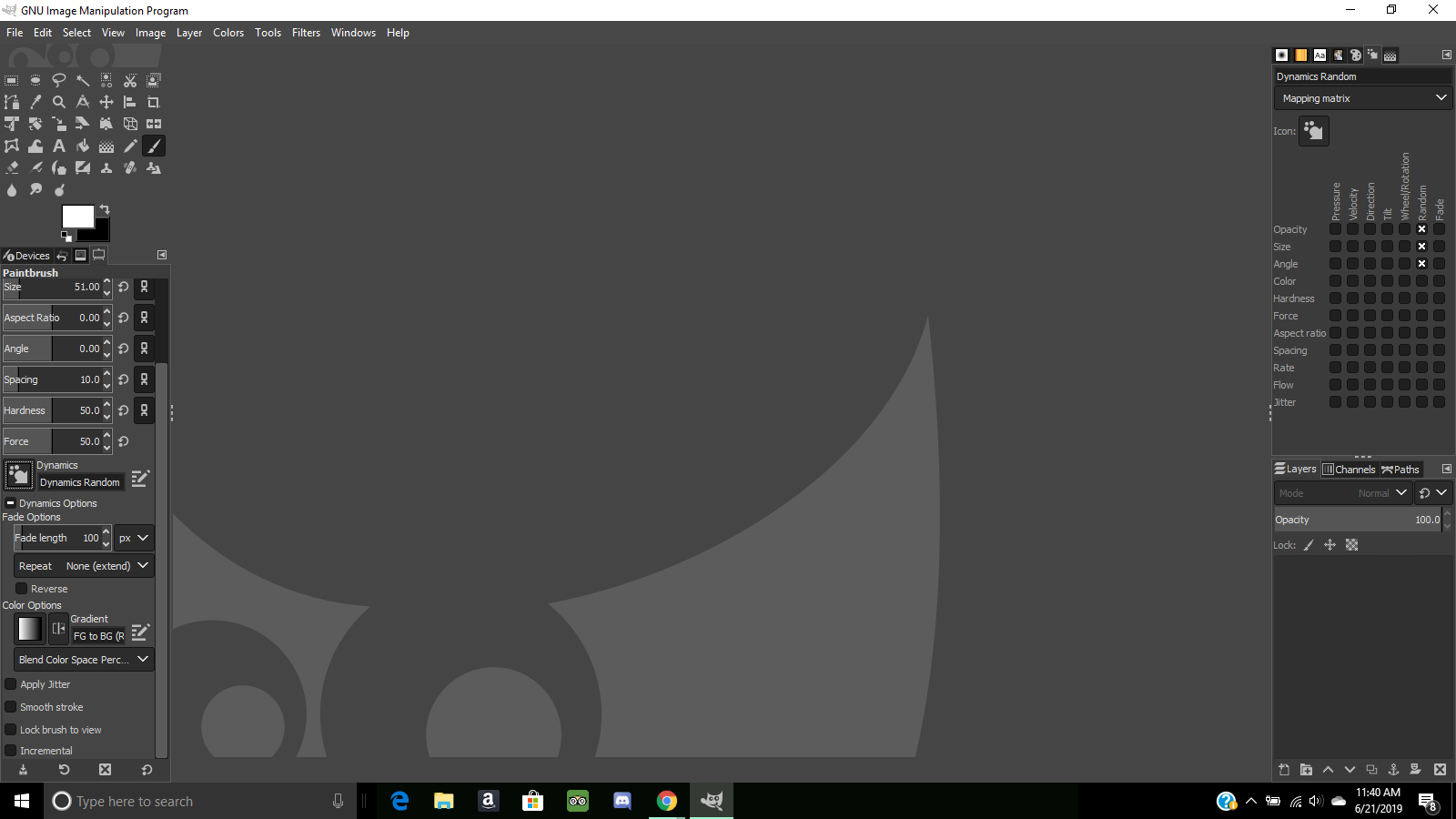
I thought the dynamics tool may be causing my problem. I found it is set to random, but I haven't been successful at shutting it off yet. I have tried to reset the tool bar to defaults, but it's not turning it off. This is what my version is showing.


Image


Top
 Post subject: Re: Hello, I've been using Gimp for about 2 months.
PostPosted: Fri Jun 21, 2019 10:48 am  (#10) 
Offline
GimpChat Member
User avatar

Joined: Mar 23, 2012
Posts: 7388
Location: Göteborg at last!
Click on the symbol to the left of where it says "Dynamics Random" and a menu should come up. Scroll through the menu and there should be an option "Dynamics Off". Hope this helps.


Top
 Post subject: Re: Hello, I've been using Gimp for about 2 months.
PostPosted: Fri Jun 21, 2019 11:03 am  (#11) 
Offline
GimpChat Member

Joined: Jun 20, 2019
Posts: 8
I found it! Thank you so very much!!


Top
 Post subject: Re: Hello, I've been using Gimp for about 2 months.
PostPosted: Fri Jun 21, 2019 12:06 pm  (#12) 
Offline
Global Moderator
User avatar

Joined: Apr 01, 2012
Posts: 8495
Location: On the other side of your screen
If you are still having trouble and are not using brush dynamics try resetting to default values. Also found in tool options down the bottom (Backward yellow arrow / opposite direction of refresh). You may need to put your brush back to desired size, spacing etc. after.

_________________
Image
Free Fun Photo Editing & resources
Poems from the Lord
Gimp Newby
Gimp version 3.2.6 and GMIC-Qt 4.0.2 OS :- Windows 10 Home 64


Top
Post new topic Reply to topic  [ 12 posts ] 

All times are UTC - 5 hours [ DST ]


* Login  


Powered by phpBB3 © phpBB Group