It is currently Sun Sep 20, 2026 11:01 am


All times are UTC - 5 hours [ DST ]


Post new topic Reply to topic  [ 17 posts ] 
Author Message
 Post subject: you guys are great,already helped me before,need more help
PostPosted: Tue May 31, 2011 5:08 pm  (#1) 
Offline
GimpChat Member
User avatar

Joined: May 27, 2011
Posts: 707
GIMP Version: 2.6.11
Operating System: Windows
OS Version: XP - SP3
GIMP Experience: Beginner Level


How do i turn a black and white human skin and clothes picture into colors?
I have old photos of my grandparents in B/W that i want to color


Thank You for helping again :)


Share on Facebook Share on Twitter Share on Orkut Share on Digg Share on MySpace Share on Delicious Share on Technorati
Top
 Post subject: Re: you guys are great,already helped me before,need more help
PostPosted: Tue May 31, 2011 5:16 pm  (#2) 
Offline
GimpChat Member
User avatar

Joined: Oct 06, 2010
Posts: 4050
viewtopic.php?f=9&t=1625&hilit=colorize

_________________
"In order to attain the impossible, one must attempt the absurd."
~ Miguel de Cervantes


Top
 Post subject: Re: you guys are great,already helped me before,need more help
PostPosted: Tue May 31, 2011 5:49 pm  (#3) 
Offline
GimpChat Member
User avatar

Joined: May 27, 2011
Posts: 707
Mahvin,
Thank you
:) i tried to do a search but I didn't find anything.


Top
 Post subject: Re: you guys are great,already helped me before,need more help
PostPosted: Tue May 31, 2011 5:52 pm  (#4) 
Offline
GimpChat Member
User avatar

Joined: May 27, 2011
Posts: 707
oops,where do i place the unzipped file?


Top
 Post subject: Re: you guys are great,already helped me before,need more help
PostPosted: Tue May 31, 2011 5:56 pm  (#5) 
Offline
GimpChat Member
User avatar

Joined: Oct 06, 2010
Posts: 4050
In your .gimp-2.6/plug-ins folder

_________________
"In order to attain the impossible, one must attempt the absurd."
~ Miguel de Cervantes


Top
 Post subject: Re: you guys are great,already helped me before,need more help
PostPosted: Tue May 31, 2011 5:58 pm  (#6) 
Offline
GimpChat Member
User avatar

Joined: May 27, 2011
Posts: 707
with the brushes?


Top
 Post subject: Re: you guys are great,already helped me before,need more help
PostPosted: Tue May 31, 2011 6:25 pm  (#7) 
Offline
GimpChat Member
User avatar

Joined: Oct 06, 2010
Posts: 4050
No, not with the brushes, it goes in the plug-ins folder, but yes, the brushes folder is in the same .gimp-2.6 folder.

_________________
"In order to attain the impossible, one must attempt the absurd."
~ Miguel de Cervantes


Top
 Post subject: Re: you guys are great,already helped me before,need more help
PostPosted: Tue May 31, 2011 6:31 pm  (#8) 
Offline
GimpChat Member
User avatar

Joined: May 27, 2011
Posts: 707
i think i got it :)
Thank You for your patience


Top
 Post subject: Re: you guys are great,already helped me before,need more help
PostPosted: Tue May 31, 2011 6:40 pm  (#9) 
Offline
GimpChat Member
User avatar

Joined: Oct 06, 2010
Posts: 4050
Read more about this plug-in here: http://www.cs.huji.ac.il/~yweiss/Colorization/

Also, follow the original link I posted to read about issues (how to use it), etc.

Also the original thread I started can be found here (more examples of its use for BW photos recolored): viewtopic.php?f=9&t=839&hilit=colorize

Here is a PDF file of the same:


Attachments:
colorization-siggraph04.pdf [3.37 MiB]
Downloaded 226 times

_________________
"In order to attain the impossible, one must attempt the absurd."
~ Miguel de Cervantes
Top
 Post subject: Re: you guys are great,already helped me before,need more help
PostPosted: Tue May 31, 2011 10:01 pm  (#10) 
Offline
GimpChat Member
User avatar

Joined: May 27, 2011
Posts: 707
Mahvin

When I open colorization,it gives me this:

Calling error for procedure 'gimp-drawable-height':
Procedure 'gimp-drawable-height' has been called with an invalid ID for argument 'drawable'. Most likely a plug-in is trying to work on a layer that doesn't exist any longer
and it won't let me open the black and white pic
what am I doing wrong?


Top
 Post subject: Re: you guys are great,already helped me before,need more help
PostPosted: Tue May 31, 2011 11:56 pm  (#11) 
Offline
GimpChat Member
User avatar

Joined: Oct 06, 2010
Posts: 4050
What steps are you taking? Explain the process of how you are trying to use this plug-in.

_________________
"In order to attain the impossible, one must attempt the absurd."
~ Miguel de Cervantes


Top
 Post subject: Re: you guys are great,already helped me before,need more help
PostPosted: Wed Jun 01, 2011 6:45 am  (#12) 
Offline
Global Moderator
User avatar

Joined: May 16, 2010
Posts: 16173
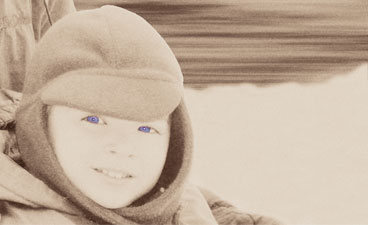
You said you wanted a color focal point.I assume you mean a color used only on one or two areas?
If the results you want are something like a color pop image like this -
Image

It's very simple to just take your selection tool (free select), and select the area you want colored.
Feather that selection by 2-3
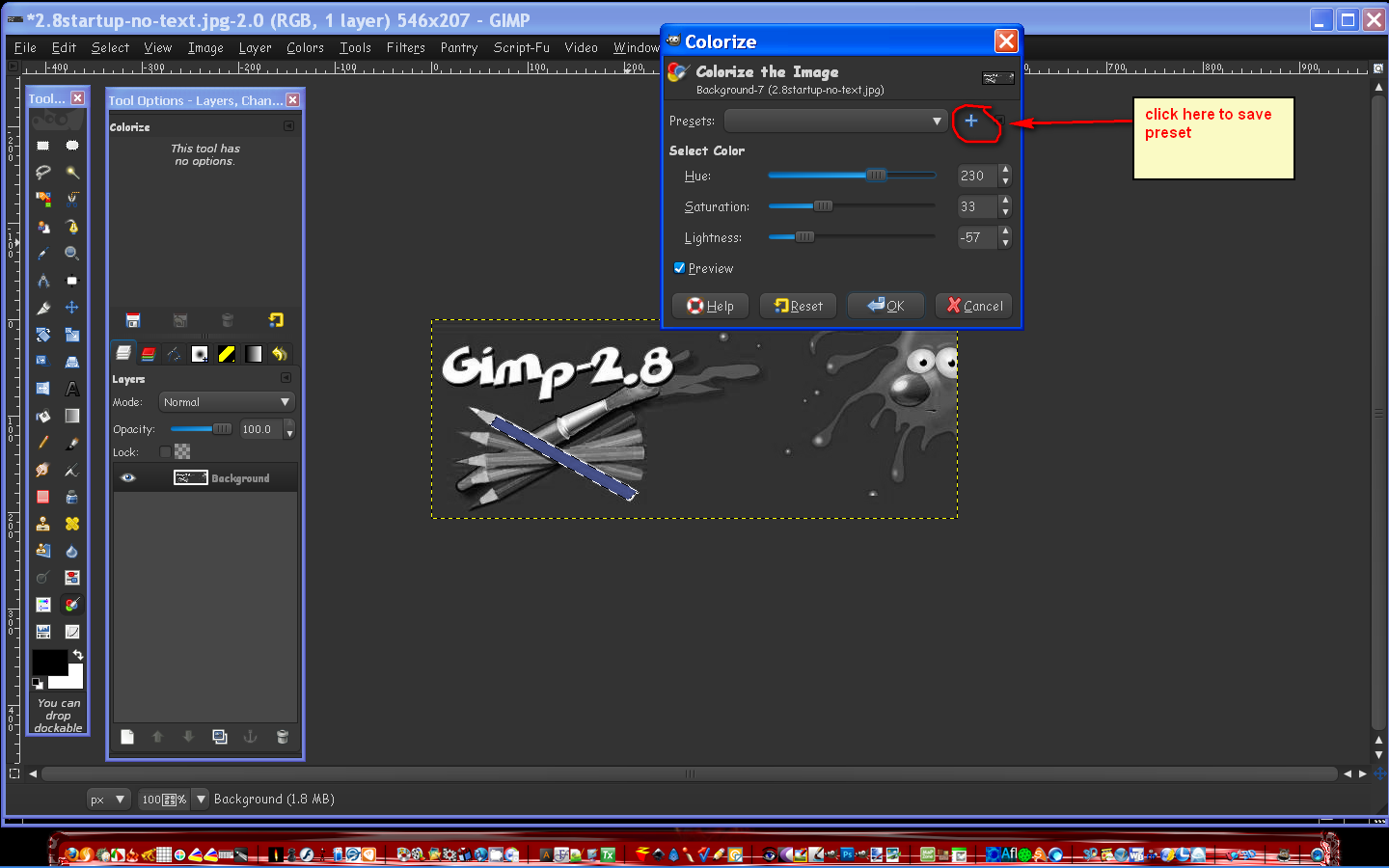
Go to Colors/Colorize and play with the 3 settings until you get the color you like.

Then if you want to re-use that setting save it as a preset in that same colorize dialog.

Image

Image

_________________
Image


Top
 Post subject: Re: you guys are great,already helped me before,need more help
PostPosted: Wed Jun 01, 2011 2:28 pm  (#13) 
Offline
GimpChat Member
User avatar

Joined: Oct 06, 2010
Posts: 4050
Quote:
How do i turn a black and white human skin and clothes picture into colors?
I have old photos of my grandparents in B/W that i want to color


Were you referring to the post at the Registry, Rod?

_________________
"In order to attain the impossible, one must attempt the absurd."
~ Miguel de Cervantes


Top
 Post subject: Re: you guys are great,already helped me before,need more help
PostPosted: Wed Jun 01, 2011 2:44 pm  (#14) 
Offline
GimpChat Member
User avatar

Joined: Oct 06, 2010
Posts: 4050
pirate541, you might want to PM JamesH about the error. I have no idea what to say to help you. Just don't give up.

When I first compiled this plug-in for GIMP, it only allowed me to use it on one image at a time (I had to reboot GIMP to use it on a different image). But I just recently used JamesH's fix and recompiled it for Linux, but you're using a Windows binary.

The usage is pretty straightforward, when you get the plug-in working correctly. Open a BW image, create a transparent layer on top and use it to "color". (You don't need to cover the entire canvas). Run Colorization and choose that transparent layer with the coloring and run it with default settings. Now, the last I read about this, there were file size limits (maybe that has since changed with the updated binary - something you might ask JamesH about, as well). The first link I posted should have been for that updated plug-in, but it sounds like (from your error) that it isn't.

_________________
"In order to attain the impossible, one must attempt the absurd."
~ Miguel de Cervantes


Top
 Post subject: Re: you guys are great,already helped me before,need more help
PostPosted: Wed Jun 01, 2011 8:41 pm  (#15) 
Offline
GimpChat Member
User avatar

Joined: May 27, 2011
Posts: 707
Mahvin,before creating the transparent layer,i desaturated,but otherwise,I did what you just mentionned but as soon as i click on colorization,it gave me that message.
I will message JamesH too :)
Thank you


Top
 Post subject: Re: you guys are great,already helped me before,need more help
PostPosted: Wed Jun 01, 2011 8:45 pm  (#16) 
Offline
GimpChat Member
User avatar

Joined: Oct 06, 2010
Posts: 4050
Is the image RGB mode? If not, change the Image - Mode to RGB.

_________________
"In order to attain the impossible, one must attempt the absurd."
~ Miguel de Cervantes


Top
 Post subject: Re: you guys are great,already helped me before,need more help
PostPosted: Fri Jun 03, 2011 1:45 pm  (#17) 
Offline
GimpChat Member
User avatar

Joined: May 27, 2011
Posts: 707
yes it is rgb
sorry about answering late but i have been working a lot lately


Top
Post new topic Reply to topic  [ 17 posts ] 

All times are UTC - 5 hours [ DST ]


* Login  


Powered by phpBB3 © phpBB Group