It is currently Sun Nov 08, 2026 1:15 am


All times are UTC - 5 hours [ DST ]


Post new topic Reply to topic  [ 3 posts ] 
Author Message
 Post subject: [ solved ] Presetting a filter
PostPosted: Mon Jul 29, 2019 6:51 am  (#1) 
Offline
GimpChat Member

Joined: Apr 09, 2018
Posts: 1888
Location: France
GIMP Version: 2.10.12
Operating System: Windows
GIMP Experience: New User


:wvy

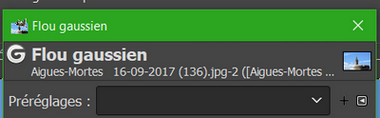
How to save and rename a setting when I'm doing it because I only found the method of reusing the filter immediately after and rename the "last used setting"?

_________________
Les parfums, les couleurs et les sons se répondent.Baudelaire (Les fleurs du mal)
2.10.36/(Samj) Gimp 2.10.38 OS Windows 10 Home 64 bits


Last edited by level_0 on Mon Jul 29, 2019 10:56 am, edited 1 time in total.

Share on Facebook Share on Twitter Share on Orkut Share on Digg Share on MySpace Share on Delicious Share on Technorati
Top
 Post subject: Re: Presetting a filter
PostPosted: Mon Jul 29, 2019 9:16 am  (#2) 
Offline
GimpChat Member

Joined: Mar 04, 2011
Posts: 2629
Quote:
How to save and rename a setting when I'm doing it because I only found the method of reusing the filter immediately after and rename the "last used setting"?


While using the filter, click on the "+" and give it a name.

Attachment:
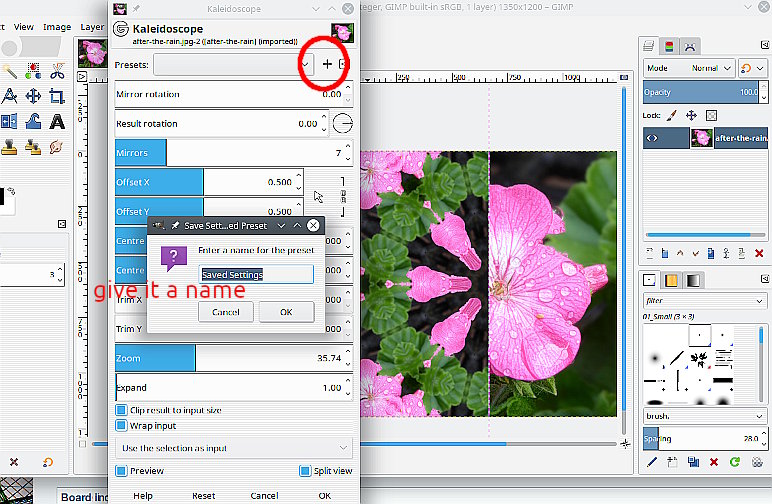
01-filter.jpg
01-filter.jpg [ 131.5 KiB | Viewed 2008 times ]


Recall anytime using the drop down menu.

Attachment:
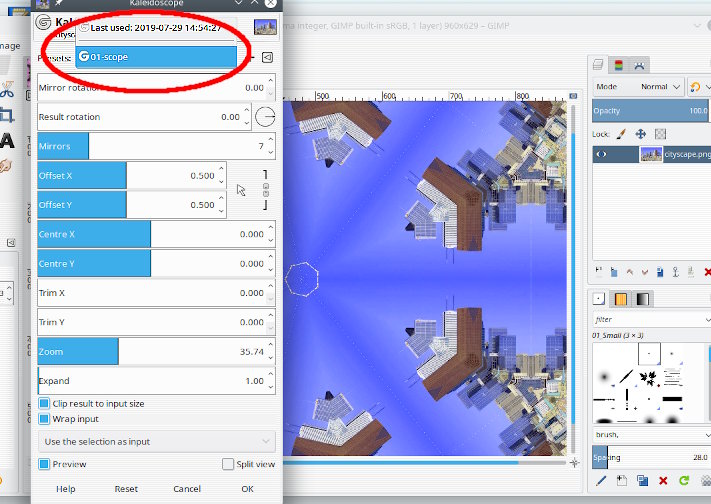
02-filter.jpg
02-filter.jpg [ 96.07 KiB | Viewed 2008 times ]


( Sure to come up sooner or later. The settings are held in .settings text files in your Gimp profile filters folder. example: https://i.imgur.com/Qwy9eOp.jpg )


Top
 Post subject: Re: Presetting a filter
PostPosted: Mon Jul 29, 2019 10:56 am  (#3) 
Offline
GimpChat Member

Joined: Apr 09, 2018
Posts: 1888
Location: France
Thank you rich2005 because I clicked on the drop-down menu and not on the + but the + is not very visible in black on black theme! ;)

Image

_________________
Les parfums, les couleurs et les sons se répondent.Baudelaire (Les fleurs du mal)
2.10.36/(Samj) Gimp 2.10.38 OS Windows 10 Home 64 bits


Top
Post new topic Reply to topic  [ 3 posts ] 

All times are UTC - 5 hours [ DST ]


* Login  


Powered by phpBB3 © phpBB Group