GIMP Version: 2.8.14
Operating System: Mac OS
OS Version: Catalina
GIMP Experience: New User
Hello y'all!
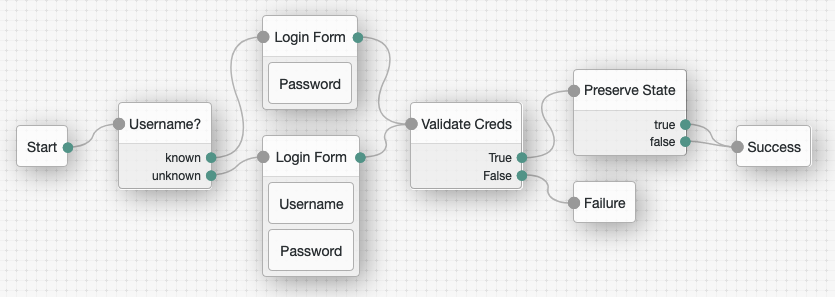
I feel rather humbled having to ask this but here goes: I work with hundreds of screenshots of a graphical design tool the company I work for created and I would like to modify these screenshots and make the background transparent.
I have done similar things many times but our design tool seems to be using gray tones everywhere and also some drop shadows, which makes this usually quite simple task pretty involved and a manual process.
I wonder if any of you can help me automate this through a custom filter or plugin or any other means that GIMP supports, because I spend roughly 1h on a medium screenshot and I have potentially hundreds to deal with in the future.
Here is an example original and unmodified screenshot:
Here is where I want to get to (just better, the lines don't look good and I deleted some of borders by mistake):
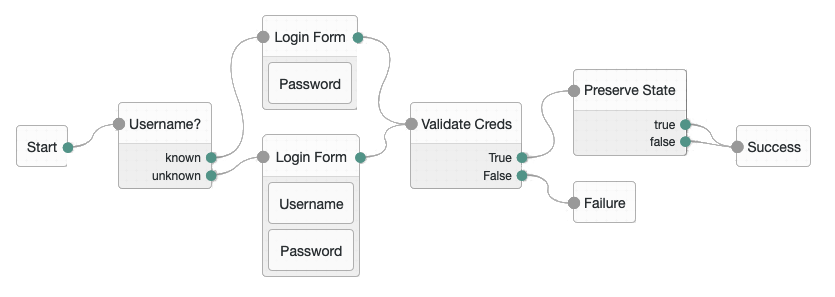
The challenge is that our design tool creates this grid and the drop shadows and overall uses a not very high-contrast color scheme. I am creating technical content (blogs, documents, etc.) where I want to use those flows but not the ugly background.
So far, I have done this:
1. Used the fuzzy select tool to make 90%+ of the background transparent
2. Use the eraser tool to finish up the rest.
Thank you so much for any hints or tips to point me in the right direction!
Cheers.
Volker
 Login
Login Register
 Tweets
 FAQ
FAQ Advanced Search









