It is currently Sat Sep 19, 2026 11:27 am


All times are UTC - 5 hours [ DST ]


Post new topic Reply to topic  [ 23 posts ]  Go to page 1, 2  Next
Author Message
 Post subject: GFIG
PostPosted: Tue Jun 14, 2011 3:32 pm  (#1) 
Offline
GimpChat Member
User avatar

Joined: Apr 09, 2011
Posts: 1764
GIMP Version: 2.6.11
Operating System: Mac OS
OS Version: OS X 10.6.7
GIMP Experience: Basic Level


Can somebody tell me the purpose of GFIG and how to use it please...I see this in the filters but have no clue as to its rhyme or reason.


Share on Facebook Share on Twitter Share on Orkut Share on Digg Share on MySpace Share on Delicious Share on Technorati
Top
 Post subject: Re: GFIG
PostPosted: Tue Jun 14, 2011 3:52 pm  (#2) 
Offline
GimpChat Member
User avatar

Joined: Sep 24, 2010
Posts: 12845
You can make cool stars with it. I've only passingly used it, but I'm not a drawer person (I'm a simulator; everybody has their passion). :)


Attachments:
star.png
star.png [ 24.84 KiB | Viewed 3281 times ]

_________________
Lyle

Psalm 109:8

Image
Top
 Post subject: Re: GFIG
PostPosted: Tue Jun 14, 2011 4:17 pm  (#3) 
Offline
GimpChat Member
User avatar

Joined: Sep 24, 2010
Posts: 12845
What the hey; thought I would have some fun with my star (using n-rotate Script-fu). :)


Attachments:
star.png
star.png [ 599.85 KiB | Viewed 3270 times ]

_________________
Lyle

Psalm 109:8

Image
Top
 Post subject: Re: GFIG
PostPosted: Tue Jun 14, 2011 4:20 pm  (#4) 
Offline
GimpChat Member

Joined: Mar 29, 2011
Posts: 346
Location: Wisconsin
akky wrote:
Can somebody tell me the purpose of GFIG and how to use it please...I see this in the filters but have no clue as to its rhyme or reason.

The GIMP User's Manual describes most of the standard plug-ins and scripts.

Here is the page for GFIG

_________________
Image


Top
 Post subject: Re: GFIG
PostPosted: Tue Jun 14, 2011 4:31 pm  (#5) 
Offline
GimpChat Member
User avatar

Joined: Oct 06, 2010
Posts: 4050
For the life of me, I cannot understand why such a fantastic set of tools is absent anti-aliasing. It's like throwing a party and not inviting anyone. I'd use it extensively, but not like it is in its current state.

Or at least make it Paths adaptable.

_________________
"In order to attain the impossible, one must attempt the absurd."
~ Miguel de Cervantes


Top
 Post subject: Re: GFIG
PostPosted: Tue Jun 14, 2011 4:32 pm  (#6) 
Offline
GimpChat Member
User avatar

Joined: Sep 24, 2010
Posts: 12845
Forgot to add that it uses whatever your current brush is and that can also be an issue. I just used my default (hence it sort of looks like cr@p; lol). Here's one using a butterfly gih brush. :)


Attachments:
bstar.jpg
bstar.jpg [ 161.64 KiB | Viewed 3262 times ]

_________________
Lyle

Psalm 109:8

Image
Top
 Post subject: Re: GFIG
PostPosted: Tue Jun 14, 2011 5:46 pm  (#7) 
Offline
Retired Staff
User avatar

Joined: May 22, 2008
Posts: 6946
Location: Somewhere in GIMP
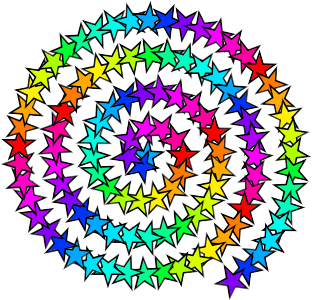
I don't think I've used gfig before. The shapes kind of look familiar in the dialog. Anyway, I messed around with it some and made this spiral with my star brush.

It clearly shows a path when it forms the shape. Unfortunately there's no way to save the path. In the dialog under File you can save it and it goes to gimp-2.6 > gfig without an extension. It can be opened from gfig. GIMP doesn't recognize the file.

Image

_________________
Image
World War IV will be fought with sticks and stones. - Albert Einstein


Top
 Post subject: Re: GFIG
PostPosted: Tue Jun 14, 2011 6:08 pm  (#8) 
Offline
Retired Staff
User avatar

Joined: May 22, 2008
Posts: 6946
Location: Somewhere in GIMP
Here's the options dialog which is under Edit > Preferences in gfig. There is an antialiasing and a feathering option there.

Image

_________________
Image
World War IV will be fought with sticks and stones. - Albert Einstein


Top
 Post subject: Re: GFIG
PostPosted: Tue Jun 14, 2011 7:36 pm  (#9) 
Offline
GimpChat Member
User avatar

Joined: Oct 06, 2010
Posts: 4050
O:

Yes, that option exists, but it doesn't smooth out the brush stroke. Maybe its another issue altogether, but brush strokes are in jagged steps, and selecting anti-aliasing in options doesn't resolve it.

I admit, that with the right brush, you can get some very interesting effects. But, for the most part, all I am asking for are straight stroke lines.

_________________
"In order to attain the impossible, one must attempt the absurd."
~ Miguel de Cervantes


Top
 Post subject: Re: GFIG
PostPosted: Tue Jun 14, 2011 9:07 pm  (#10) 
Offline
Global Moderator
User avatar

Joined: May 16, 2010
Posts: 16173
Saulgoode uses it quite well.
I am referring to his Bottle-cap tutorial. :)

_________________
Image


Top
 Post subject: Re: GFIG
PostPosted: Tue Jun 14, 2011 9:37 pm  (#11) 
Offline
GimpChat Member
User avatar

Joined: Oct 06, 2010
Posts: 4050
Still jagged, GFIG does not make straight angled line strokes. It can fill, but it can't stroke worth a damn.

Gfig Fill (works great), you're almost better off just using fill and then converting the fill selection to a path:

Image

Strokes on the other hand (what's up with this? and this is with anti-aliasing selected):

Image

You can even use your image brushes, etc. They turn out great. Just not the simple stroke angled lines on any shape.

_________________
"In order to attain the impossible, one must attempt the absurd."
~ Miguel de Cervantes


Top
 Post subject: Re: GFIG
PostPosted: Tue Jun 14, 2011 11:24 pm  (#12) 
Offline
GimpChat Member
User avatar

Joined: Apr 09, 2011
Posts: 1764
well I guess I have a few different points of view there... thanks...


Top
 Post subject: Re: GFIG
PostPosted: Tue Jun 14, 2011 11:32 pm  (#13) 
Offline
GimpChat Member
User avatar

Joined: Oct 06, 2010
Posts: 4050
Don't mind me, I'm just ranting (in the wrong place).

Like Lyle says, to each their own.

If it does what you want it to and that makes you happy, that's all that matters.

_________________
"In order to attain the impossible, one must attempt the absurd."
~ Miguel de Cervantes


Top
 Post subject: Re: GFIG
PostPosted: Wed Jun 15, 2011 1:07 am  (#14) 
Offline
GimpChat Member
User avatar

Joined: Oct 06, 2010
Posts: 4050
I got to thinking, that since most of the image brushes (especially the animated brushes) work so well with Gfig, why not just make specific animated brushes to work solely with Gfig. So, that's what I did, and I have to admit, those strokes are looking a lot better now.

Image

_________________
"In order to attain the impossible, one must attempt the absurd."
~ Miguel de Cervantes


Top
 Post subject: Re: GFIG
PostPosted: Wed Jun 15, 2011 7:58 am  (#15) 
Offline
GimpChat Member

Joined: Mar 29, 2011
Posts: 346
Location: Wisconsin
Mahvin, that's looking great! :bigthup
Does it work with narrower brushes?
What does the brush pipe look like? Is it just a single animated dot?

_________________
Image


Top
 Post subject: Re: GFIG
PostPosted: Wed Jun 15, 2011 8:37 am  (#16) 
Offline
Script Coder
User avatar

Joined: Oct 25, 2010
Posts: 4812
GFIG is a failure IMHO. It should have an option to not stroke the thing and leave the path.

There is however a script to generate many geometric paths. The interface isn't WYSIWIG but since it produces paths, these can be rotated/scaled/translated later with no ill effects. So, meet shape-paths: http://registry.gimp.org/node/59

_________________
Image


Top
 Post subject: Re: GFIG
PostPosted: Wed Jun 15, 2011 8:49 am  (#17) 
Offline
GimpChat Member
User avatar

Joined: Apr 08, 2010
Posts: 5420
Location: Northwest Ohio
Tried out both stroke and fill....both were pretty aliased for me.


Top
 Post subject: Re: GFIG
PostPosted: Wed Jun 15, 2011 9:38 am  (#18) 
Offline
GimpChat Member
User avatar

Joined: Sep 24, 2010
Posts: 12845
ofnuts wrote:
GFIG is a failure IMHO. It should have an option to not stroke the thing and leave the path.

There is however a script to generate many geometric paths. The interface isn't WYSIWIG but since it produces paths, these can be rotated/scaled/translated later with no ill effects. So, meet shape-paths: http://registry.gimp.org/node/59


Had fun with the gears a while back as I recall. Shape paths is a cool script. I think if GFIG were to get an upgrade, paths export definitely would be a plus. I like WYSIWIG whenever possible. Just can't beat a good preview of what you are doing imo. :)

_________________
Lyle

Psalm 109:8

Image


Top
 Post subject: Re: GFIG
PostPosted: Wed Jun 15, 2011 10:16 am  (#19) 
Offline
Retired Staff
User avatar

Joined: May 22, 2008
Posts: 6946
Location: Somewhere in GIMP
I'm still trying to figure out how to do a bezier. Think making a path in gimp and stroking it is a much easier way to go. Says to press Shift and click to end it, but don't see how to continue it from point to point. :puzzled

_________________
Image
World War IV will be fought with sticks and stones. - Albert Einstein


Top
 Post subject: Re: GFIG
PostPosted: Wed Jun 15, 2011 10:43 am  (#20) 
Offline
GimpChat Member

Joined: Mar 29, 2011
Posts: 346
Location: Wisconsin
Very strange. :gaah
I clicked multiple points before doing the shift-click.
The points I clicked are the squares - they are not on the path.
But when I move them, it changes the shape of the curve. :hoh

Image

I like regulars paths a lot better.

_________________
Image


Top
Post new topic Reply to topic  [ 23 posts ]  Go to page 1, 2  Next

All times are UTC - 5 hours [ DST ]


* Login  


Powered by phpBB3 © phpBB Group