It is currently Wed Sep 23, 2026 2:46 am


All times are UTC - 5 hours [ DST ]


Post new topic Reply to topic  [ 11 posts ] 
Author Message
 Post subject: Military Ribbon
PostPosted: Wed Sep 02, 2020 9:27 pm  (#1) 
Offline
GimpChat Member

Joined: Sep 02, 2020
Posts: 6
GIMP Version: 2.8.14
Operating System: Windows
OS Version: 10
GIMP Experience: Basic Level

List any relevant plug-ins or scripts:
N/A

List any ERROR messages you received:
N/A


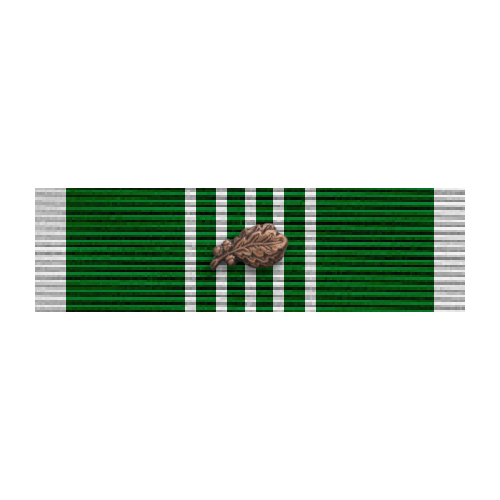
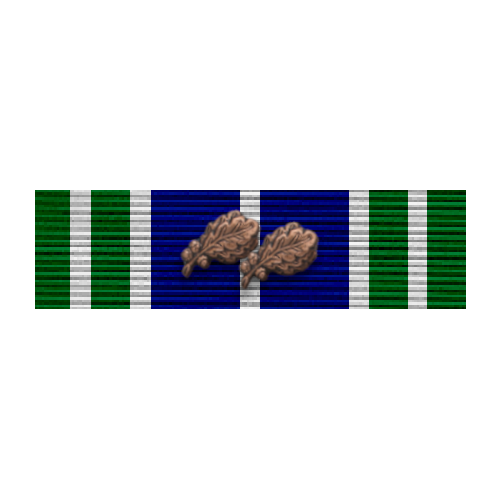
Hey, I'd like to make a few military ribbons. During my drunk time I managed to make one/two, though I'm failing at recreating it. I've attached a few examples. I've also read another thread about a similar topic but that's way too tech for me to understand.


Attachments:
ribbon1.png
ribbon1.png [ 234 Bytes | Viewed 4410 times ]
ribbon2.png
ribbon2.png [ 239 Bytes | Viewed 4410 times ]
Share on Facebook Share on Twitter Share on Orkut Share on Digg Share on MySpace Share on Delicious Share on Technorati
Top
 Post subject: Re: Military Ribbon
PostPosted: Wed Sep 02, 2020 10:12 pm  (#2) 
Offline
GimpChat Member
User avatar

Joined: Oct 06, 2010
Posts: 4050
Any particular military ribbons in mind?

_________________
"In order to attain the impossible, one must attempt the absurd."
~ Miguel de Cervantes


Top
 Post subject: Re: Military Ribbon
PostPosted: Wed Sep 02, 2020 10:35 pm  (#3) 
Offline
GimpChat Member

Joined: Sep 02, 2020
Posts: 6
Nothing in particular, just struggling to find the whole process, how to get the filters right and whatnot. I don’t even remember how I did the ones I’ve attached lol. Thanks for quick response, by the way!!


Top
 Post subject: Re: Military Ribbon
PostPosted: Wed Sep 02, 2020 11:17 pm  (#4) 
There is a quick tutorial by our latest Oregonian here: viewtopic.php?f=8&t=2295&start=10

Post #16


Top
 Post subject: Re: Military Ribbon
PostPosted: Thu Sep 03, 2020 5:50 am  (#5) 
Offline
GimpChat Member

Joined: Sep 02, 2020
Posts: 6
Thank you! Although I did try that and it’s really confusing as is. Like I’d be drawing with black and the whole thing appears as red, etc. Do you know what I did wrong?


Top
 Post subject: Re: Military Ribbon
PostPosted: Thu Sep 03, 2020 8:11 am  (#6) 
Offline
GimpChat Member

Joined: Sep 02, 2020
Posts: 6
Ah alright, now that I have taken a short nap, I finally found out how to do it. Burner layer above the layer of the ribbon template. Thank you everyone!


Top
 Post subject: Re: Military Ribbon
PostPosted: Thu Sep 03, 2020 8:23 am  (#7) 
Offline
GimpChat Member

Joined: Sep 02, 2020
Posts: 6
Okay, a new problem arose. When I try to use burn with black colour, it.. looks very off. I've attached what I get and what I'd like to get. Any ideas?


Attachments:
ChwIopV.png
ChwIopV.png [ 1.1 KiB | Viewed 4314 times ]
8f3K9DA.png
8f3K9DA.png [ 9.47 KiB | Viewed 4314 times ]
Top
 Post subject: Re: Military Ribbon
PostPosted: Thu Sep 03, 2020 9:03 am  (#8) 
OK H04X, this is what you have to do.
1. Once you create the colors of the ribbon, place the "Cotton faille" at the top
2. Change the Layer's Mode to> Linear Burn and you get the result you want
3. Go to: Colors/Brightness and Contrast and play around with it until you satisfy with the color


I'm an Army Infantry veteran myself and these are two of my medals I created with the little tut I wrote above

Image

Image


Ps I used Layerfx.py for the Faille texture.


Top
 Post subject: Re: Military Ribbon
PostPosted: Thu Sep 03, 2020 9:57 am  (#9) 
Offline
GimpChat Member
User avatar

Joined: Oct 06, 2010
Posts: 4050
I grabbed Lyle's image at viewtopic.php?f=8&t=2295#p29883 and using top layers with various layer modes, was able to produce this:

Image

Like Rich, I prefer simplicity and GIMP exploration. You can always scale the image to a smaller size, if necessary.

Image

I've attached my xcf file for browsing.
Attachment:
militaryribbon.xcf [439.46 KiB]
Downloaded 176 times

_________________
"In order to attain the impossible, one must attempt the absurd."
~ Miguel de Cervantes


Top
 Post subject: Re: Military Ribbon
PostPosted: Thu Sep 03, 2020 10:56 am  (#10) 
Offline
GimpChat Member

Joined: Sep 02, 2020
Posts: 6
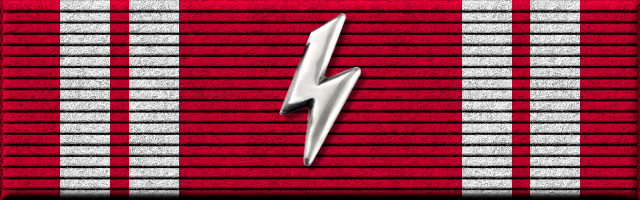
I love all of you. Thank you all for the help, I finally managed to get it all together. Here's something I threw together as a simple first attempt, but I just need to experiment some more. Thanks again! <3


Attachments:
843a1f86-efa8-448d-95fd-7d01091512a9.png
843a1f86-efa8-448d-95fd-7d01091512a9.png [ 13.41 KiB | Viewed 4287 times ]
Top
 Post subject: Re: Military Ribbon
PostPosted: Fri Sep 04, 2020 4:04 am  (#11) 
Offline
New Member

Joined: Sep 04, 2020
Posts: 1
The service ribbon for a specific medal is usually identical to the suspension ribbon on the medal. ... However, a ribbon bar representing the Order of Victory was worn on a military field uniform.

_________________
descargar adobe photoshop gratis


Top
Post new topic Reply to topic  [ 11 posts ] 

All times are UTC - 5 hours [ DST ]


* Login  


Powered by phpBB3 © phpBB Group