It is currently Tue Sep 08, 2026 7:19 am


All times are UTC - 5 hours [ DST ]


Post new topic Reply to topic  [ 10 posts ] 
Author Message
 Post subject: LAYERFX
PostPosted: Sun Nov 15, 2020 6:37 am  (#1) 
Offline
GimpChat Member
User avatar

Joined: Apr 26, 2014
Posts: 3823
Location: belgium
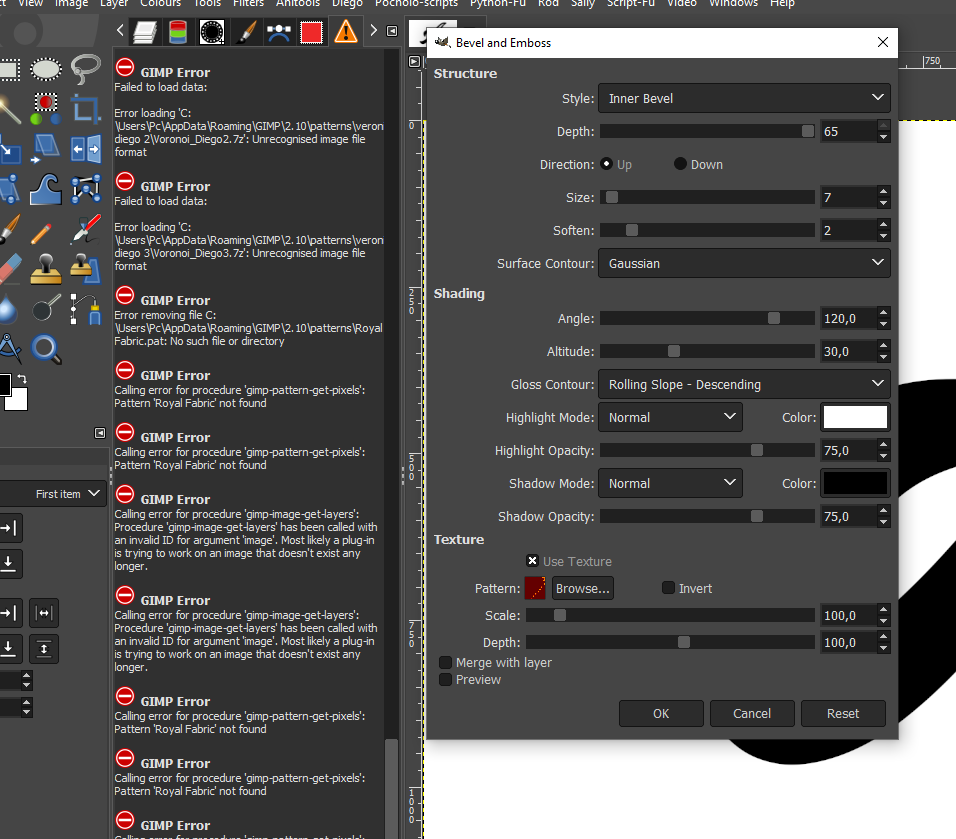
can anyone get me the LAYERFX plugin
I keep getting an error with bevel and emboss


Image


Share on Facebook Share on Twitter Share on Orkut Share on Digg Share on MySpace Share on Delicious Share on Technorati
Top
 Post subject: Re: LAYERFX
PostPosted: Sun Nov 15, 2020 6:43 am  (#2) 
Offline
GimpChat Member
User avatar

Joined: Apr 15, 2017
Posts: 1837
Looks like you are trying to load a pattern from a 7zip file. You'll need to extract that pattern before you can use it.


Top
 Post subject: Re: LAYERFX
PostPosted: Sun Nov 15, 2020 7:16 am  (#3) 
Offline
GimpChat Member
User avatar

Joined: Apr 26, 2014
Posts: 3823
Location: belgium
racer-x wrote:
Looks like you are trying to load a pattern from a 7zip file. You'll need to extract that pattern before you can use it.


Image

I use texture, as you can see the texture 1- has a green color but the result gives 2-the texture but not the color

i dont know why that is i never had the problem before it suddenly happened today


Top
 Post subject: Re: LAYERFX
PostPosted: Sun Nov 15, 2020 9:26 am  (#4) 
Hi Gimper! Go to: Image/Mode, and make sure GIMP is set to RGB.


Top
 Post subject: Re: LAYERFX
PostPosted: Sun Nov 15, 2020 10:01 am  (#5) 
Offline
GimpChat Member
User avatar

Joined: Apr 26, 2014
Posts: 3823
Location: belgium
Image


mode was on rgb

Image


the problem remains the same, the texture emerges but without the color of the patern


Top
 Post subject: Re: LAYERFX
PostPosted: Sun Nov 15, 2020 10:21 am  (#6) 
Offline
GimpChat Member

Joined: May 12, 2015
Posts: 4693
Gimper, please read this post. It may depend on whether you are using English or non English program.

viewtopic.php?f=9&t=18682


Top
 Post subject: Re: LAYERFX
PostPosted: Sun Nov 15, 2020 10:22 am  (#7) 
Oh, OK. I think that is the color its suppose to have I get it the same way. Remember, you're using Bevel and Emboss. it's like using the GIMP version "Emboss" that makes the image Black and white. You can use the Layerfx filter "Pattern Overlay" with the Texture you used on the Bevel and Emboss, and the image will have the effect you want.


Top
 Post subject: Re: LAYERFX
PostPosted: Sun Nov 15, 2020 10:24 am  (#8) 
Offline
GimpChat Member

Joined: Sep 20, 2016
Posts: 293
Im with Pocholo.
The behaviour you experience is the same in Gimp 2.8.
If you want the Pattern, use Pattern Overlay.
The Bevel & Emboss uses the Pattern to bumpmap a texture into the text.


Top
 Post subject: Re: LAYERFX
PostPosted: Sun Nov 15, 2020 10:50 am  (#9) 
Offline
GimpChat Member
User avatar

Joined: Apr 26, 2014
Posts: 3823
Location: belgium
Pat625 wrote:
Gimper, please read this post. It may depend on whether you are using English or non English program.

viewtopic.php?f=9&t=18682


I only use the english version


Top
 Post subject: Re: LAYERFX
PostPosted: Sun Nov 15, 2020 11:07 am  (#10) 
Offline
GimpChat Member
User avatar

Joined: Apr 26, 2014
Posts: 3823
Location: belgium
Image


Image


I did the bevel and emboss, selected the letter and filled a new layer with the color patern and put this layer under the highlight and shadow layer.


Attachments:
G.xcf [2.48 MiB]
Downloaded 184 times
Top
Post new topic Reply to topic  [ 10 posts ] 

All times are UTC - 5 hours [ DST ]


* Login  


Powered by phpBB3 © phpBB Group