It is currently Mon Aug 17, 2026 11:42 am


All times are UTC - 5 hours [ DST ]


Post new topic Reply to topic  [ 15 posts ] 
Author Message
 Post subject: [Solved] How to identify the new filters?
PostPosted: Sun Jan 17, 2021 12:01 am  (#1) 
Offline
GimpChat Member

Joined: Apr 09, 2018
Posts: 1888
Location: France
:wvy
2 days ago I had 548 filters and today 550.
How do I identify the 2 new ones? :gaah

_________________
Les parfums, les couleurs et les sons se répondent.Baudelaire (Les fleurs du mal)
2.10.36/(Samj) Gimp 2.10.38 OS Windows 10 Home 64 bits


Last edited by level_0 on Fri Jan 22, 2021 4:00 am, edited 1 time in total.

Share on Facebook Share on Twitter Share on Orkut Share on Digg Share on MySpace Share on Delicious Share on Technorati
Top
 Post subject: Re: How to identify the new filters?
PostPosted: Sun Jan 17, 2021 12:39 am  (#2) 
Offline
GimpChat Member
User avatar

Joined: Jan 20, 2013
Posts: 14831
Location: roma, italy
I don't know either.
Hope someone more "inside" G'mic can answer.

_________________
"Where am I ?"


Top
 Post subject: Re: How to identify the new filters?
PostPosted: Sun Jan 17, 2021 1:23 am  (#3) 
Offline
Global Moderator
User avatar

Joined: Apr 01, 2012
Posts: 8457
Location: On the other side of your screen
best place to goto find out would be
GMIC Community

_________________
Image
Free Fun Photo Editing & resources
Poems from the Lord
Gimp Newby
Gimp version 3.2.4 and GMIC-Qt 4.0.2 OS :- Windows 10 Home 64


Top
 Post subject: Re: How to identify the new filters?
PostPosted: Sun Jan 17, 2021 2:43 am  (#4) 
Offline
GimpChat Member

Joined: Apr 09, 2018
Posts: 1888
Location: France
sallyanne, I think that here on GC some should know ....

_________________
Les parfums, les couleurs et les sons se répondent.Baudelaire (Les fleurs du mal)
2.10.36/(Samj) Gimp 2.10.38 OS Windows 10 Home 64 bits


Top
 Post subject: Re: How to identify the new filters?
PostPosted: Sun Jan 17, 2021 3:01 am  (#5) 
Offline
GimpChat Member
User avatar

Joined: Jan 20, 2013
Posts: 14831
Location: roma, italy
@level_0
I posted your question on the GMIC Community as suggested by Sallyanne.
Let's see if I get the answer.

_________________
"Where am I ?"


Top
 Post subject: Re: How to identify the new filters?
PostPosted: Sun Jan 17, 2021 3:19 am  (#6) 
Offline
Global Moderator
User avatar

Joined: Apr 01, 2012
Posts: 8457
Location: On the other side of your screen
level_0 wrote:
sallyanne, I think that here on GC some should know ....

Maybe, but in that link I gave it is the same link as on the GMIC page and the people on that page who go there are the contributors to GMIC (some of them anyway)

_________________
Image
Free Fun Photo Editing & resources
Poems from the Lord
Gimp Newby
Gimp version 3.2.4 and GMIC-Qt 4.0.2 OS :- Windows 10 Home 64


Top
 Post subject: Re: How to identify the new filters?
PostPosted: Sun Jan 17, 2021 5:07 am  (#7) 
Offline
GimpChat Member
User avatar

Joined: Jan 20, 2013
Posts: 14831
Location: roma, italy
@level_0
First answer received:
"No, but the authors usually add the updated date in the description."

_________________
"Where am I ?"


Top
 Post subject: Re: How to identify the new filters?
PostPosted: Sun Jan 17, 2021 5:25 am  (#8) 
Offline
GimpChat Member

Joined: Mar 04, 2011
Posts: 2612
For some time I have thought too many filters, mostly appear in the testing section and most frequently from reptorian, afre, sometimes joan rake.

from 547 to 550 filters comparing updatexxx.gmic files.
The latest three are all reptorian: dynamic contrast / reverse engineer gradient map / reverse engineer color map

For info, the list of filters is here: https://gmic.eu/gui_filters.txt but it is the current list and unless you keep a record of old versions nothing to compare.


Top
 Post subject: Re: How to identify the new filters?
PostPosted: Sun Jan 17, 2021 12:59 pm  (#9) 
Offline
GimpChat Member
User avatar

Joined: Jan 20, 2013
Posts: 14831
Location: roma, italy
I received additional replies from G'mic experts, but the answer is still "no" (there is currently no way to ask about what is new after an internet update).

_________________
"Where am I ?"


Top
 Post subject: Re: How to identify the new filters?
PostPosted: Sun Jan 17, 2021 2:43 pm  (#10) 
Offline
GimpChat Member
User avatar

Joined: Jan 20, 2013
Posts: 14831
Location: roma, italy
@level_0
good news, David T. (the "boss" of G'mic) is saying that it could be created a new filter to show what's new after an update.

_________________
"Where am I ?"


Top
 Post subject: Re: How to identify the new filters?
PostPosted: Mon Jan 18, 2021 9:05 am  (#11) 
Offline
GimpChat Member

Joined: Apr 09, 2018
Posts: 1888
Location: France
Thank you all for your responses. :)

dinasset wrote:
@level_0
I posted your question on the GMIC Community as suggested by Sallyanne.
Let's see if I get the answer.


dinasset wrote:
@level_0
good news, David T. (the "boss" of G'mic) is saying that it could be created a new filter to show what's new after an update.


Thank you dinasset
Image

_________________
Les parfums, les couleurs et les sons se répondent.Baudelaire (Les fleurs du mal)
2.10.36/(Samj) Gimp 2.10.38 OS Windows 10 Home 64 bits


Top
 Post subject: Re: How to identify the new filters?
PostPosted: Mon Jan 18, 2021 10:13 am  (#12) 
Offline
GimpChat Member
User avatar

Joined: Jan 20, 2013
Posts: 14831
Location: roma, italy
Pas de quoi, Madame

_________________
"Where am I ?"


Top
 Post subject: Re: How to identify the new filters?
PostPosted: Mon Jan 18, 2021 10:27 am  (#13) 
Offline
GimpChat Member
User avatar

Joined: Jan 20, 2013
Posts: 14831
Location: roma, italy
...and David just did it!
Received :
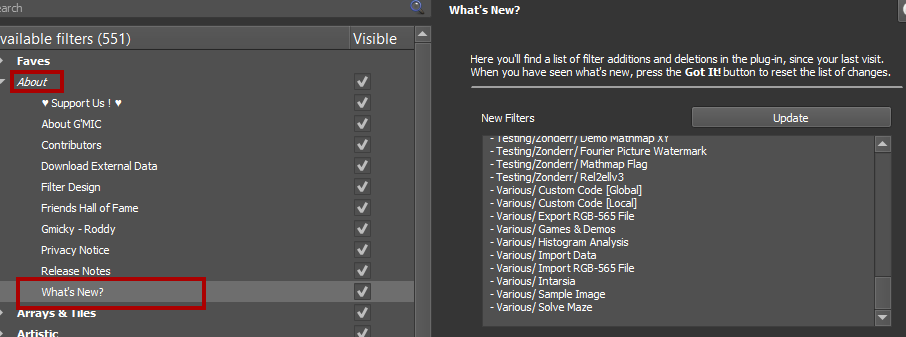
New filter About / What’s New? has been added.
It will list the added and deleted filters from your last visit (to the filter).

_________________
"Where am I ?"


Top
 Post subject: Re: How to identify the new filters?
PostPosted: Mon Jan 18, 2021 11:03 am  (#14) 
Offline
Global Moderator
User avatar

Joined: Apr 01, 2012
Posts: 8457
Location: On the other side of your screen
That was done quickly

You beat me to it dinasset
Here's a pic
Image

_________________
Image
Free Fun Photo Editing & resources
Poems from the Lord
Gimp Newby
Gimp version 3.2.4 and GMIC-Qt 4.0.2 OS :- Windows 10 Home 64


Top
 Post subject: Re: How to identify the new filters?
PostPosted: Fri Jan 22, 2021 3:59 am  (#15) 
Offline
GimpChat Member

Joined: Apr 09, 2018
Posts: 1888
Location: France
:wvy
I only see today that the problem is solved!Image
Thanks to dinasset and thanks to David Tschumperlé for his responsiveness! :clap

_________________
Les parfums, les couleurs et les sons se répondent.Baudelaire (Les fleurs du mal)
2.10.36/(Samj) Gimp 2.10.38 OS Windows 10 Home 64 bits


Top
Post new topic Reply to topic  [ 15 posts ] 

All times are UTC - 5 hours [ DST ]


* Login  


Powered by phpBB3 © phpBB Group