It is currently Tue Aug 04, 2026 10:57 am


All times are UTC - 5 hours [ DST ]


Post new topic Reply to topic  [ 5 posts ] 
Author Message
 Post subject: Someone Please Help Me Understand Why Is the Gimp Image Size Bigger
PostPosted: Sun Jul 25, 2021 1:31 pm  (#1) 
Offline
New Member

Joined: Jul 25, 2021
Posts: 3
GIMP Version: 2.10.22
Operating System: Windows
GIMP Experience: New User


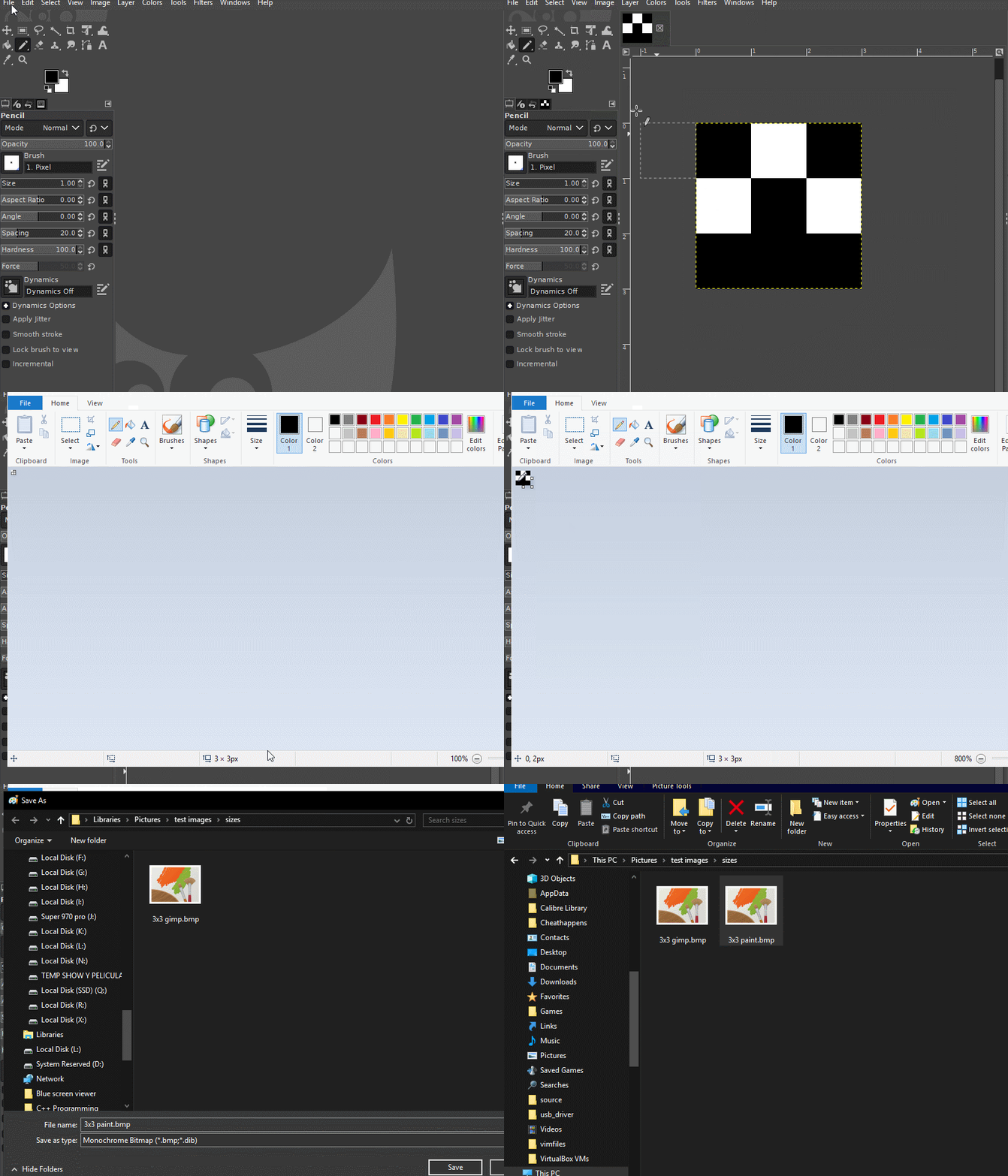
I Created a Monochrome Bitmap image 3x3 pixel on GIMP, I also created the same 3x3 pixel image on MSpaint aswell, same monochrome bitmap as gimp. but the gimp one is 46% Bigger than the mspaint one. why is it occuring?, and also is there any way for me to reduce the size?

example below
Image


Share on Facebook Share on Twitter Share on Orkut Share on Digg Share on MySpace Share on Delicious Share on Technorati
Top
 Post subject: Re: Someone Please Help Me Understand Why Is the Gimp Image Size Bigge
PostPosted: Sun Jul 25, 2021 2:02 pm  (#2) 
Offline
GimpChat Member

Joined: Mar 04, 2011
Posts: 2610
When you come to export the Gimp bmp image, open the Compatibility Options and tick the "Do not write colorspace information" button. That is your extra size.

Attachment:
bmp-options.jpg
bmp-options.jpg [ 35.24 KiB | Viewed 4724 times ]


Top
 Post subject: Re: Someone Please Help Me Understand Why Is the Gimp Image Size Bigge
PostPosted: Sun Jul 25, 2021 2:15 pm  (#3) 
Offline
New Member

Joined: Jul 25, 2021
Posts: 3
rich2005 wrote:
When you come to export the Gimp bmp image, open the Compatibility Options and tick the "Do not write colorspace information" button. That is your extra size.

Attachment:
bmp-options.jpg

Hi, thank you. the compatibility option is not poping up for me when is in mode"image/mode/indexed/use black and white 1 bit pallete"

does it work for you?


Top
 Post subject: Re: Someone Please Help Me Understand Why Is the Gimp Image Size Bigge
PostPosted: Sun Jul 25, 2021 3:12 pm  (#4) 
Offline
GimpChat Member

Joined: Mar 04, 2011
Posts: 2610
You only get that dialogue with a RGB image.

Just a comment about your test.
You are using a 3 x 3 pix image, so any 'overhead' such as colour space info or a color-map for an indexed version will be very noticeable. That overhead is not as noticeable on a larger images, and usually makes an indexed image file size, smaller than a RGB image.
A comparison: The Win Paint & Gimp (no info) images = 90 B
Gimp (with colorspace info) = 174 B
Gimp 2.10 indexed = 158 B This was broken in Gimp 2.10.22 and fixed for Gimp 2.10.24 however a Gimp 2.8 smaller at 142 B, so something changed for the worse.

You using Gimp 2.10.22 ? Do you get an Unrecognised or invalid BMP compression format. error ?
You need to update to Gimp 2.10.24 see: https://gitlab.gnome.org/GNOME/gimp/-/issues/6114


Top
 Post subject: Re: Someone Please Help Me Understand Why Is the Gimp Image Size Bigge
PostPosted: Sun Jul 25, 2021 3:47 pm  (#5) 
Offline
New Member

Joined: Jul 25, 2021
Posts: 3
rich2005 wrote:
You only get that dialogue with a RGB image.

Just a comment about your test.
You are using a 3 x 3 pix image, so any 'overhead' such as colour space info or a color-map for an indexed version will be very noticeable. That overhead is not as noticeable on a larger images, and usually makes an indexed image file size, smaller than a RGB image.
A comparison: The Win Paint & Gimp (no info) images = 90 B
Gimp (with colorspace info) = 174 B
Gimp 2.10 indexed = 158 B This was broken in Gimp 2.10.22 and fixed for Gimp 2.10.24 however a Gimp 2.8 smaller at 142 B, so something changed for the worse.

You using Gimp 2.10.22 ? Do you get an Unrecognised or invalid BMP compression format. error ?


Got it, Went ahead and updated to the newest version. is there any way i can do the 1bit color monochrome bmp and remove the whitespace so as it acts like MSpaint version?


Top
Post new topic Reply to topic  [ 5 posts ] 

All times are UTC - 5 hours [ DST ]


* Login  


Powered by phpBB3 © phpBB Group