It is currently Sun Jul 26, 2026 10:14 am


All times are UTC - 5 hours [ DST ]


Post new topic Reply to topic  [ 150 posts ]  Go to page Previous  1, 2, 3, 4, 5 ... 8  Next
Author Message
 Post subject: Re: The return of the revenge on the son of Slinky, reloaded
PostPosted: Wed Jun 29, 2011 11:23 am  (#21) 
Offline
Global Moderator
User avatar

Joined: May 16, 2010
Posts: 16133
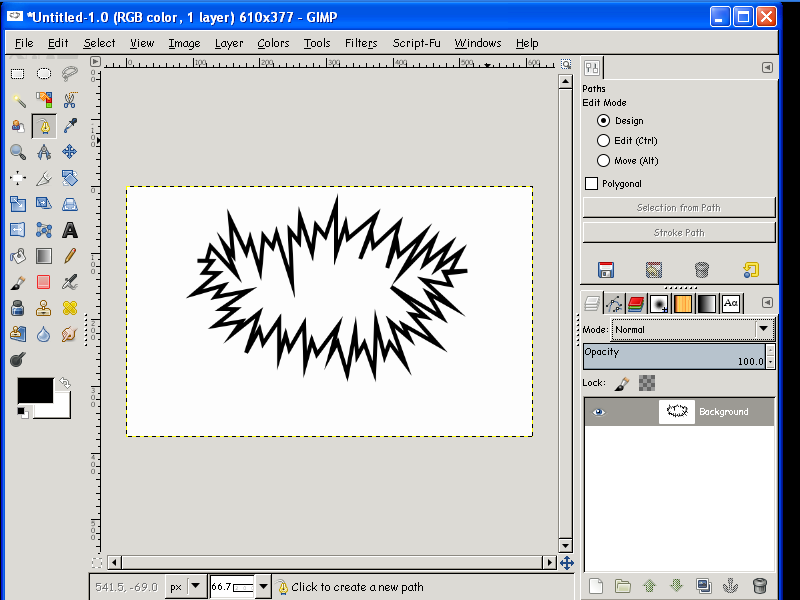
Here is something strange.I can get the plug-in to work in Gimp-2.7.3 but not in Gimp-2.6.11.
Weird, as i have them both in their respective plug-in folders.

Image

_________________
Image


Top
 Post subject: Re: The return of the revenge on the son of Slinky, reloaded
PostPosted: Wed Jun 29, 2011 12:08 pm  (#22) 
Offline
Retired Staff
User avatar

Joined: May 22, 2008
Posts: 6946
Location: Somewhere in GIMP
Rod, did you by some chance stroke the resulting path instead of activating it and filling it?

I'm using gimp v2.6.11.

_________________
Image
World War IV will be fought with sticks and stones. - Albert Einstein


Top
 Post subject: Re: The return of the revenge on the son of Slinky, reloaded
PostPosted: Wed Jun 29, 2011 1:11 pm  (#23) 
Offline
Global Moderator
User avatar

Joined: May 16, 2010
Posts: 16133
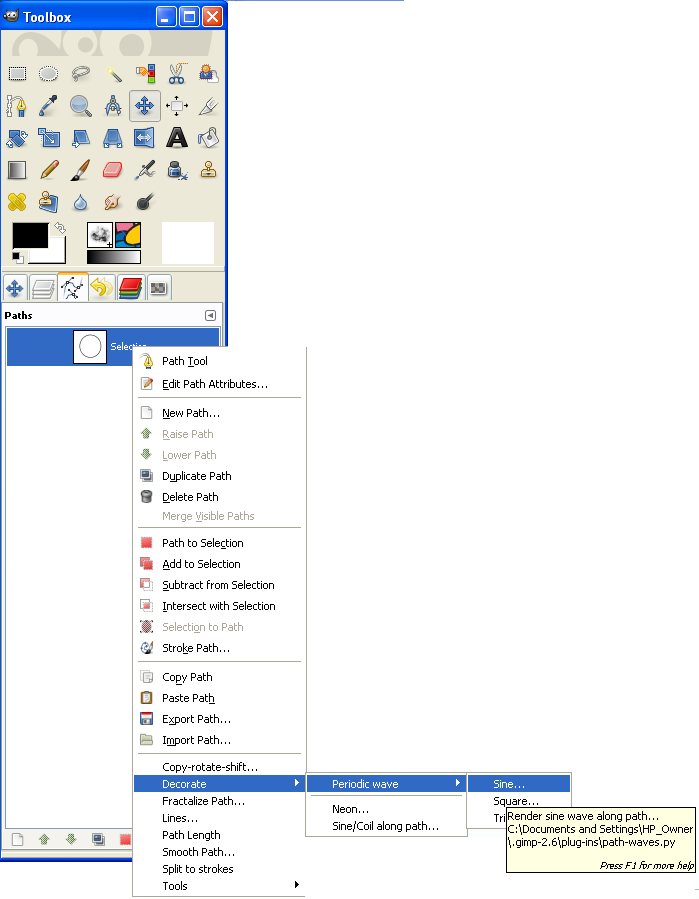
My problem is that i can not get the plug-in to show on right click in the paths dialog but i can in gimp-2.7.3 :)

_________________
Image


Top
 Post subject: Re: The return of the revenge on the son of Slinky, reloaded
PostPosted: Wed Jun 29, 2011 1:41 pm  (#24) 
Offline
Retired Staff
User avatar

Joined: May 22, 2008
Posts: 6946
Location: Somewhere in GIMP
I don't know if you have to do anything in Windows to make a plug-in executable. In Linux I have to right-click the plug-in, Permissions tab, and check the box to make it show up and work.

Image

_________________
Image
World War IV will be fought with sticks and stones. - Albert Einstein


Top
 Post subject: Re: The return of the revenge on the son of Slinky, reloaded
PostPosted: Wed Jun 29, 2011 1:58 pm  (#25) 
Offline
GimpChat Member

Joined: Mar 29, 2011
Posts: 346
Location: Wisconsin
Rod wrote:
My problem is that i can not get the plug-in to show on right click in the paths dialog but i can in gimp-2.7.3 :)

Works fine for me: GIMP 2.6.11 and Windows-XP SP3.
Now I just need to find some time to play with it.

O, Rod runs Windows-XP and you don't need to set permissions in XP.
Don't know about Vista or Windows 7.

_________________
Image


Top
 Post subject: Re: The return of the revenge on the son of Slinky, reloaded
PostPosted: Wed Jun 29, 2011 2:05 pm  (#26) 
Offline
Retired Staff
User avatar

Joined: May 22, 2008
Posts: 6946
Location: Somewhere in GIMP
bkh1914 wrote:
O, Rod runs Windows-XP and you don't need to set permissions in XP.
Don't know about Vista or Windows 7.
OK, that's good to know. Thanks!

In case someone else is having trouble having it show up, there must be a path in the Paths window.

_________________
Image
World War IV will be fought with sticks and stones. - Albert Einstein


Top
 Post subject: Re: The return of the revenge on the son of Slinky, reloaded
PostPosted: Wed Jun 29, 2011 2:11 pm  (#27) 
Offline
GimpChat Member
User avatar

Joined: Apr 07, 2010
Posts: 14182
I have put the path script into plugins and taken it out and download a new one several times. I made an elipse, saved it to path, unselected, activated the path selection, right clicked it and there is no decorate Periodic wave in the menu. I also rebooted Gimp 3 times and my pc once. still doesn't show. grrrrrrr :gaah :cry

_________________
Image


Top
 Post subject: Re: The return of the revenge on the son of Slinky, reloaded
PostPosted: Wed Jun 29, 2011 2:38 pm  (#28) 
Offline
GimpChat Member

Joined: Mar 29, 2011
Posts: 346
Location: Wisconsin
molly wrote:
I have put the path script into plugins and taken it out and download a new one several times. I made an elipse, saved it to path, unselected, activated the path selection, right clicked it and there is no decorate Periodic wave in the menu. I also rebooted Gimp 3 times and my pc once. still doesn't show. grrrrrrr :gaah :cry

I made and ellipse, saved it as a path and right clicked on the path:
Image

_________________
Image


Top
 Post subject: Re: The return of the revenge on the son of Slinky, reloaded
PostPosted: Wed Jun 29, 2011 2:38 pm  (#29) 
Offline
Script Coder
User avatar

Joined: Oct 25, 2010
Posts: 4812
molly wrote:
I have put the path script into plugins and taken it out and download a new one several times. I made an elipse, saved it to path, unselected, activated the path selection, right clicked it and there is no decorate Periodic wave in the menu. I also rebooted Gimp 3 times and my pc once. still doesn't show. grrrrrrr :gaah :cry
Do you have the python-fu support? (best way to check: there is a python-fu item in the Filters menu, right next to script-fu). And remember that Python scripts are really *plugins*, so they must be in the "plugins" directory, not in the "scripts" one.

_________________
Image


Top
 Post subject: Re: The return of the revenge on the son of Slinky, reloaded
PostPosted: Wed Jun 29, 2011 2:51 pm  (#30) 
Offline
GimpChat Member
User avatar

Joined: Apr 07, 2010
Posts: 14182
Yes I have all my python scripts in the plugin folder. I do have python-fu. several other scripts work in it, including fog etc......

_________________
Image


Top
 Post subject: Re: The return of the revenge on the son of Slinky, reloaded
PostPosted: Wed Jun 29, 2011 3:07 pm  (#31) 
Offline
Script Coder
User avatar

Joined: Oct 25, 2010
Posts: 4812
molly wrote:
Yes I have all my python scripts in the plugin folder. I do have python-fu. several other scripts work in it, including fog etc......
Start gimp-console and see if you get any error messages on startup. Or download the file again but don't open it in any editor, since this can mess the indenting and the python interpreter is very picky about it.

_________________
Image


Top
 Post subject: Re: The return of the revenge on the son of Slinky, reloaded
PostPosted: Wed Jun 29, 2011 3:17 pm  (#32) 
Offline
GimpChat Member
User avatar

Joined: Apr 07, 2010
Posts: 14182
I closed Gimp, reopened it, no errors. I put the script in without using editor. still no luck.....

Gimp 2.6.11 in Windows 7 64 bit

_________________
Image


Top
 Post subject: Re: The return of the revenge on the son of Slinky, reloaded
PostPosted: Wed Jun 29, 2011 3:34 pm  (#33) 
Offline
GimpChat Member
User avatar

Joined: Apr 09, 2011
Posts: 1764
ok I am on a mission now...I have never been sure that anything I have in the python world is working and now I dont really think they are, even though I think they are in the right place...this one is definitely not working...


Top
 Post subject: Re: The return of the revenge on the son of Slinky, reloaded
PostPosted: Wed Jun 29, 2011 3:49 pm  (#34) 
Offline
GimpChat Member
User avatar

Joined: Sep 24, 2010
Posts: 12814
Only played a little with it, but it works fine in 32-bit GIMP 2.6.11 (in Win7). Have not tried it in 64-bit GIMP 2.7.3 yet. Anyway, thanks Ofnuts. :)

_________________
Lyle

Psalm 109:8

Image


Top
 Post subject: Re: The return of the revenge on the son of Slinky, reloaded
PostPosted: Wed Jun 29, 2011 5:06 pm  (#35) 
Offline
Script Coder
User avatar

Joined: Oct 25, 2010
Posts: 4812
Since some of you seem to have a lot of fun with it, I uploaded a version 0.1 to Sourceforge. It adds ellipse and circle arcs. Circles remain circular, the "width" has no effect on them, but the asymmetry setting behaves somewhat differently from other shapes.

I've also added a print statement that confirms that registration is OK (have to use Gimp-console or start from a command prompt in Linux to see it).

Has any Windows-er tried to see if Gimp will output its messages to file (ie, from a command prompt, use:
gimp >/some/file.log 2>&1
... and see of there is something in /some/file.log after Gimp ends?

Philosophical question: what is best:
  • the current scheme when several menu entries are registered.
    • Pros:
      • Options dialogs can be differents
      • Options are saved per shape
    • Cons:
      • Menu structure complexity
      • Common options have their use when creating several
        paths to combine them.
  • the opposite scheme with only a "Periodic wave..." in the menu (no submenu) and a "Shape" choice in the options dialog.

Any more suggestions before I make it a bit more public (Gimp registry)?

_________________
Image


Top
 Post subject: Re: The return of the revenge on the son of Slinky, reloaded
PostPosted: Wed Jun 29, 2011 5:33 pm  (#36) 
Offline
Script Coder
User avatar

Joined: Oct 25, 2010
Posts: 4812
Makes interesting bumpmaps...
Attachment:
Path-waves-composite-2.jpg
Path-waves-composite-2.jpg [ 264.04 KiB | Viewed 1741 times ]

_________________
Image


Top
 Post subject: Re: The return of the revenge on the son of Slinky, reloaded
PostPosted: Wed Jun 29, 2011 5:39 pm  (#37) 
Offline
GimpChat Member

Joined: Mar 29, 2011
Posts: 346
Location: Wisconsin
ofnuts wrote:
Has any Windows-er tried to see if Gimp will output its messages to file

Loaded the new version, here is the log file.
Windows XP, Gimp 2.6.11
(gimp-2.6.exe:1832): LibGimpBase-WARNING **: gimp-2.6.exe: gimp_wire_read(): error

C:\Documents and Settings\HP_Owner\.gimp-2.6\plug-ins\path-waves-0.1.py: registration OK
######################################################################
Running for stroke 1
Stroke: 1401.293 requested pitch: 50.000, adjusted to 50.046 for 28 periods
Starting: Point<(460.0000,174.8324),5.710>, ending: Point<(460.0000,174.8324),5.710>
Stroke process time: 1.031

C:\Documents and Settings\HP_Owner\.gimp-2.6\plug-ins\path-waves-0.1.py: registration OK
C:\Program Files\GIMP-2.0\lib\gimp\2.0\python\gimpfu.py:645: DeprecationWarning: Use the new widget gtk.Tooltip
  tooltips = gtk.Tooltips()
C:\Program Files\GIMP-2.0\lib\gimp\2.0\python\gimpfu.py:725: DeprecationWarning: Use the new widget gtk.Tooltip
  tooltips.set_tip(wid, desc, None)
C:\Program Files\GIMP-2.0\lib\gimp\2.0\python\gimpfu.py:753: DeprecationWarning: Use the new widget gtk.Tooltip
  tooltips.enable()

The log file for the previous/initial version of path-waves was virtually empty.

I like the current scheme of multiple menu entries IF the dialogs are different.

_________________
Image


Top
 Post subject: Re: The return of the revenge on the son of Slinky, reloaded
PostPosted: Wed Jun 29, 2011 6:05 pm  (#38) 
Offline
GimpChat Member
User avatar

Joined: Apr 09, 2011
Posts: 1764
does anyone think it will run in Mac OS??? because I am at a loss with this one atm


Top
 Post subject: Re: The return of the revenge on the son of Slinky, reloaded
PostPosted: Wed Jun 29, 2011 6:32 pm  (#39) 
Offline
GimpChat Member

Joined: Apr 12, 2010
Posts: 5870
Quote:
In case someone else is having trouble having it show up, there must be a path in the Paths window.


I believe Oregonian found why for many the script doesn't show up:
usually there is no any path in the path window, and is not expected have to create a path for a script to show up in the menu

So Akky and Molly, FIRST create a path, than the script should become visible

@ Ofnuts
Obviously your script script strictly require a path,but would be better if the script would be visible anyway in the menu, even if grayed out, or popping out error messages as " the script require a path, create a path and try again" or something alike

PS
ofnuts in general don't like much working with path but i really like the results i seen from your scripts,

_________________
My 3D Gallery on Deviantart http://photocomix2.deviantart.com/
Main gallery http://www.flickriver.com/photos/photocomix-mandala/
Mandala and simmetry http://www.flickriver.com/photos/photocomix_mandala/

Image

Mrs Wilbress


Top
 Post subject: Re: The return of the revenge on the son of Slinky, reloaded
PostPosted: Wed Jun 29, 2011 7:01 pm  (#40) 
Offline
Script Coder
User avatar

Joined: Oct 25, 2010
Posts: 4812
PhotoComix wrote:
@ Ofnuts
Obviously your script script strictly require a path,but would be better if the script would be visible anyway in the menu, even if grayed out, or popping out error messages as " the script require a path, create a path and try again" or something alike
I have no control over that. If the script is registered in the <Vectors> menu, it is under the control of that menu, and, by the way, on my 2.6.8/Linux, the menu entry shows up even id there are no paths...
And this is really where the script belongs.
PhotoComix wrote:
in general don't like much working with path but i really like the results i seen from your scripts,
Paths are quite fun to work with, and the key to a more professional look in many cases. But they obviously get less care from the average Gimp developer than other more visible bitmap processing.

_________________
Image


Top
Post new topic Reply to topic  [ 150 posts ]  Go to page Previous  1, 2, 3, 4, 5 ... 8  Next

All times are UTC - 5 hours [ DST ]


* Login  


Powered by phpBB3 © phpBB Group