It is currently Mon Nov 09, 2026 2:27 am


All times are UTC - 5 hours [ DST ]


Post new topic Reply to topic  [ 3 posts ] 
Author Message
 Post subject: Despeckle
PostPosted: Fri Dec 03, 2021 8:27 pm  (#1) 
Offline
Global Moderator
User avatar

Joined: Apr 01, 2012
Posts: 8500
Location: On the other side of your screen
GIMP Version: 2.10.22
Operating System: Windows
OS Version: 10 64 bit
GIMP Experience: New User


Used to use this filter alot to get rid of fine black or white spots. Now (I think since 2.10 came out) it always seems to make things worse - example when I run it the specks become big blobs. Is there something I am missing, am I the only one having this problem now?

_________________
Image
Free Fun Photo Editing & resources
Poems from the Lord
Gimp Newby
Gimp version 3.2.6 and GMIC-Qt 4.0.2 OS :- Windows 10 Home 64


Share on Facebook Share on Twitter Share on Orkut Share on Digg Share on MySpace Share on Delicious Share on Technorati
Top
 Post subject: Despeckle: get rid of fine black or white spots
PostPosted: Sat Dec 04, 2021 7:24 am  (#2) 
Offline
GimpChat Member
User avatar

Joined: Oct 23, 2021
Posts: 67
Hello Sallyanne

Sallyanne wrote:
since 2.10 came out (...) it always seems to make things worse - example when I run it the specks become big blobs.


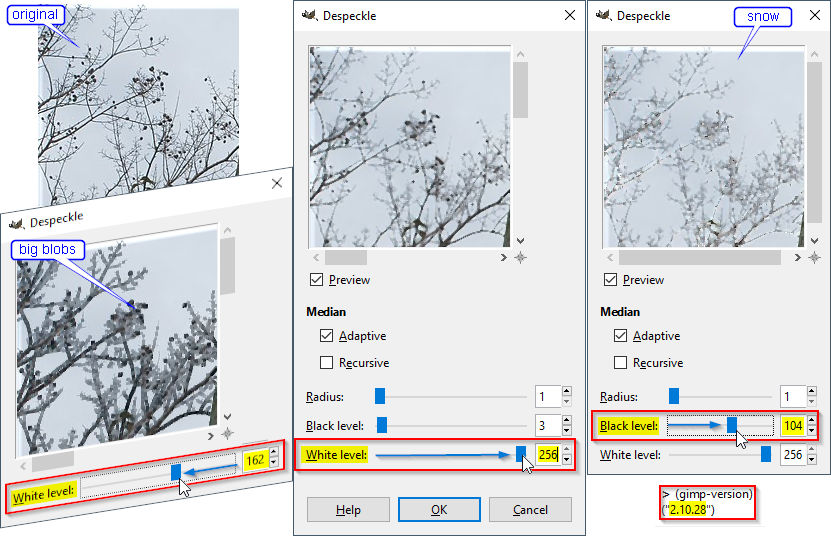
AlSchemist did not select isolated defects before applying Filters → Enhance :shock: → Despeckle….

Attachment:
Despeckle.jpg
Despeckle.jpg [ 121.78 KiB | Viewed 2154 times ]

Hence some not necessary wanted changes in other areas of the tree.

So each pixel has been replaced with the median value of the pixels within the minimal radius = 1.
  • On the left, below the original picture, big blobs appear reducing the White level to 162 to include darker pixels in the histogram. The size of branches increases.
  • In the middle, White level is at the maximum of the interval of the histogram. The effect is a little bit fuzzy.
  • On the right, increasing the Black level gives a snow effect. :paint


Top
 Post subject: Re: Despeckle
PostPosted: Sat Dec 04, 2021 8:17 am  (#3) 
Offline
Global Moderator
User avatar

Joined: Apr 01, 2012
Posts: 8500
Location: On the other side of your screen
I use to run it at the default. Used to give a good result. Now I rarely use the filter but would come in handy for big areas of dust etc in a photo. Would take some of the annoying particles out at least but not now....just makes more work.

_________________
Image
Free Fun Photo Editing & resources
Poems from the Lord
Gimp Newby
Gimp version 3.2.6 and GMIC-Qt 4.0.2 OS :- Windows 10 Home 64


Top
Post new topic Reply to topic  [ 3 posts ] 

All times are UTC - 5 hours [ DST ]


* Login  


Powered by phpBB3 © phpBB Group