It is currently Sat Sep 05, 2026 3:09 am


All times are UTC - 5 hours [ DST ]


Post new topic Reply to topic  [ 10 posts ] 
Author Message
 Post subject: SCROLLING SCRIPT-FU dialog modification
PostPosted: Fri Feb 18, 2022 8:15 am  (#1) 
Offline
GimpChat Member
User avatar

Joined: Apr 26, 2014
Posts: 3823
Location: belgium
can someone give me the SCROLLING SCRIPT-FU dialog modification

I'm supposed to be able to make the window smaller so that I can reach the ok button


Image

thanks in advance,gimper66


Share on Facebook Share on Twitter Share on Orkut Share on Digg Share on MySpace Share on Delicious Share on Technorati
Top
 Post subject: Re: SCROLLING SCRIPT-FU dialog modification
PostPosted: Fri Feb 18, 2022 8:35 am  (#2) 
Offline
GimpChat Member
User avatar

Joined: Jan 06, 2020
Posts: 401
Location: The Netherlands
https://www.gimpscripts.net/search?q=scrolling


Top
 Post subject: Re: SCROLLING SCRIPT-FU dialog modification
PostPosted: Fri Feb 18, 2022 10:44 am  (#3) 
Offline
GimpChat Member
User avatar

Joined: Apr 26, 2014
Posts: 3823
Location: belgium
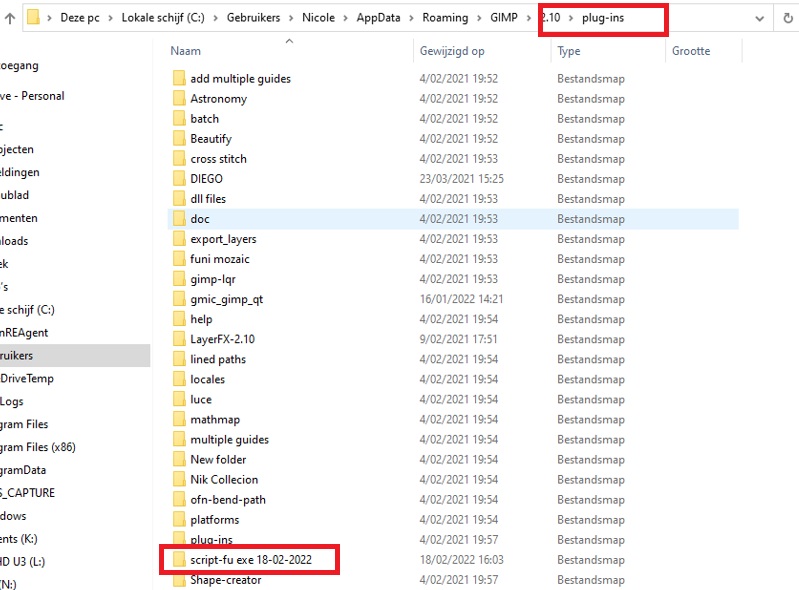
i downloaded script-fu scrolling interface and put it in my plugin folder, but it still doesn't work

Image

jappaloe63,Thanks for the quick response


Top
 Post subject: Re: SCROLLING SCRIPT-FU dialog modification
PostPosted: Fri Feb 18, 2022 12:11 pm  (#4) 
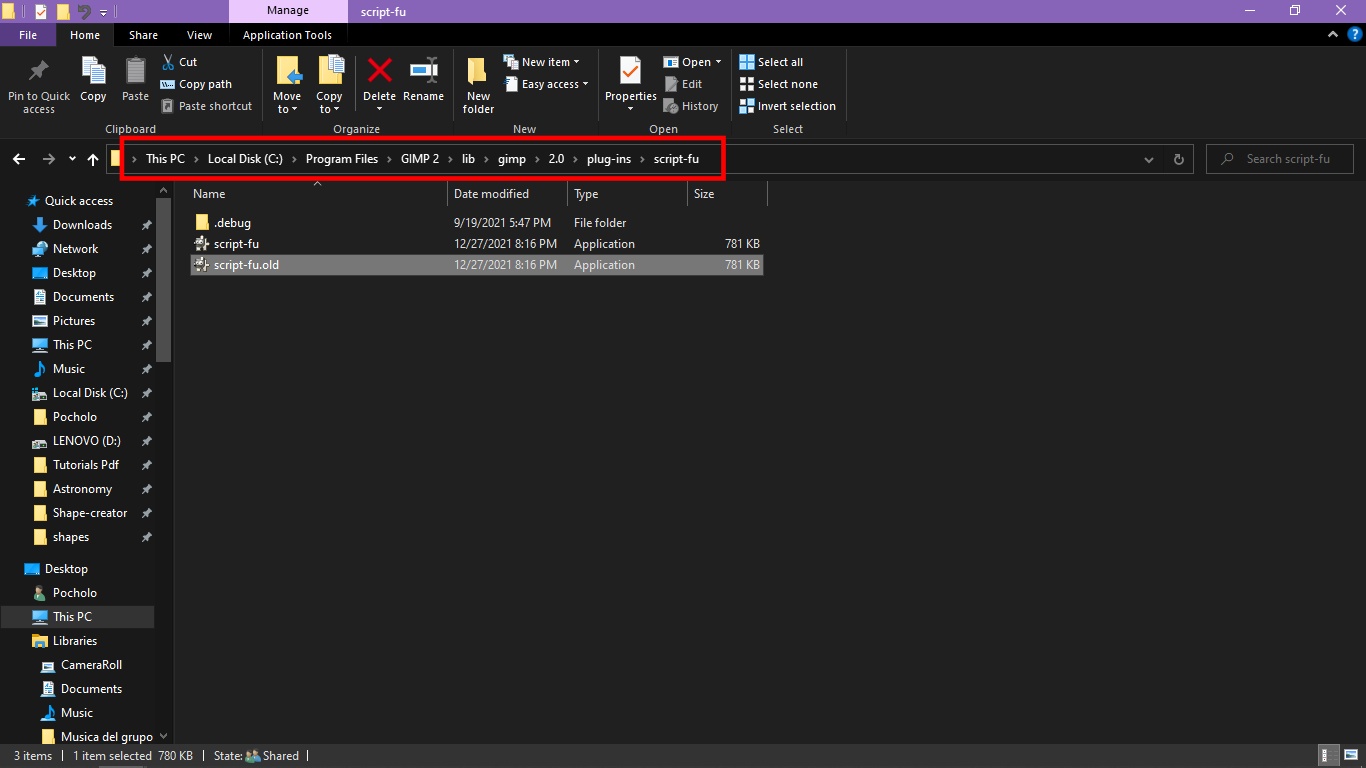
Wrong directory my friend! You need to place it in your main GIMP 2 in
C:\Program Files\GIMP 2\lib\gimp\2.0\plug-ins\script-fu

1. Before you place it in the right directory:
Delete the one you have in you User GIMP 2.10 profile folder:
C:\Users\YourName or User\AppData\Roaming\GIMP\2.10\plug-ins

2. Rename existing extension to ".old" then place the "Script-Fu Scrolling Interface" in the directory show bellow:
Image

Click on the link and you will get an explanation of it by MareroQ.
https://www.gimpscripts.net/search?q=script-fu


Last edited by Pocholo on Fri Feb 18, 2022 12:33 pm, edited 2 times in total.

Top
 Post subject: Re: SCROLLING SCRIPT-FU dialog modification
PostPosted: Fri Feb 18, 2022 12:12 pm  (#5) 
Offline
GimpChat Member

Joined: Mar 04, 2011
Posts: 2613
gimper66 wrote:
can someone give me the SCROLLING SCRIPT-FU dialog modification

I'm supposed to be able to make the window smaller so that I can reach the ok button


[ Image ]

thanks in advance,gimper66


To be correct, put the plugin in C:\Program Files\GIMP 2\lib\gimp\2.0\plug-ins\script-fu (rename the existing file to save it)

Attachment:
replacement.jpg
replacement.jpg [ 66.73 KiB | Viewed 3105 times ]


However, your installation seems ok, I can see the scroll bar. Leave it as it is.
All you have to do is resize the window to show the bottom with the OK button.
example: https://i.imgur.com/AJSpWhE.mp4


Top
 Post subject: Re: SCROLLING SCRIPT-FU dialog modification
PostPosted: Fri Feb 18, 2022 12:32 pm  (#6) 
rich2005 wrote:
gimper66 wrote:
can someone give me the SCROLLING SCRIPT-FU dialog modification

I'm supposed to be able to make the window smaller so that I can reach the ok button


[ Image ]

thanks in advance,gimper66


To be correct, put the plugin in C:\Program Files\GIMP 2\lib\gimp\2.0\plug-ins\script-fu (rename the existing file to save it)

Attachment:
replacement.jpg


However, your installation seems ok, I can see the scroll bar. Leave it as it is.
All you have to do is resize the window to show the bottom with the OK button.
example: https://i.imgur.com/AJSpWhE.mp4


Yes need to "rename" the existing file. That is what I meant rich2005, thank you.


Top
 Post subject: Re: SCROLLING SCRIPT-FU dialog modification
PostPosted: Fri Feb 18, 2022 2:03 pm  (#7) 
Offline
GimpChat Member
User avatar

Joined: Jan 06, 2020
Posts: 401
Location: The Netherlands
https://stefansundin.github.io/altdrag/

I use Altdrag... I like it


Top
 Post subject: Re: SCROLLING SCRIPT-FU dialog modification
PostPosted: Fri Feb 18, 2022 4:19 pm  (#8) 
Offline
GimpChat Member
User avatar

Joined: Jan 13, 2011
Posts: 2648
Location: Poland
If two versions are installed (very bad practice), the higher one (the first one on the list) in Preferences will be loaded.


Attachments:
Loading order.jpg
Loading order.jpg [ 71.41 KiB | Viewed 3066 times ]

_________________
Image
Top
 Post subject: Re: SCROLLING SCRIPT-FU dialog modification
PostPosted: Sat Feb 19, 2022 3:48 am  (#9) 
Offline
GimpChat Member

Joined: Mar 04, 2011
Posts: 2613
I also think the problem is along those lines. A existing modified script-fu.exe is already installed (somewhere). gimper66's first screenshot shows the dialogue with a scroll bar. All that is needed is re-size the dialogue window.

More worrying is the second gimper66 screenshot. All those folders in user plugins and what looks like a non-understanding of how that works ;)
The folder name must be the same as the plugin and in Windows without the extension.
script-fu.exe goes in a folder script-fu
ofn-bend-path.py goes in a folder ofn-bend-path
script-fu.exe in a folder "script-fu exe 18-02-2022" is not going to work.

This is still not mandatory for Gimp 2.10 but will be for Gimp 3 (when it comes) Makes sense in Windows where there might be lots of dependencies like the gimp_gmic_qt plugin but there are not many like that. Looking at gimper66's screenshot maybe a case for a cleanup ;) A doc folder ? is there a doc.exe or doc.py plugin ?


Top
 Post subject: Re: SCROLLING SCRIPT-FU dialog modification
PostPosted: Sat Feb 19, 2022 10:09 am  (#10) 
Offline
GimpChat Member
User avatar

Joined: Apr 26, 2014
Posts: 3823
Location: belgium
the computer isn't mine, it's a friend who also started gimp together with me.

I don't like going into someone else's computer, but what we did do is < reset plug-in-folders > and it works, problem solved.


Thanks everyone for the comments,gimper66


Top
Post new topic Reply to topic  [ 10 posts ] 

All times are UTC - 5 hours [ DST ]


* Login  


Powered by phpBB3 © phpBB Group