It is currently Sat Jul 11, 2026 8:47 pm


All times are UTC - 5 hours [ DST ]


Post new topic Reply to topic  [ 194 posts ]  Go to page Previous  1 ... 3, 4, 5, 6, 7, 8, 9, 10  Next
Author Message
 Post subject: Re: GEGL Layer Effects and Text Styling filter
PostPosted: Fri Sep 23, 2022 4:49 pm  (#101) 
Offline
Global Moderator
User avatar

Joined: May 16, 2010
Posts: 16099
No more errors after re-running gegl effects. :) :bigthup

Attachment:
No-Error_RD-2022-09-23_174515.jpg
No-Error_RD-2022-09-23_174515.jpg [ 302.05 KiB | Viewed 23035 times ]

_________________
Image


Top
 Post subject: Re: GEGL Layer Effects and Text Styling filter
PostPosted: Fri Sep 23, 2022 4:58 pm  (#102) 
Offline
Global Moderator
User avatar

Joined: May 16, 2010
Posts: 16099
Final results. :bigthup

Attachment:
GEGLEffects_2-RD.png
GEGLEffects_2-RD.png [ 191.2 KiB | Viewed 23033 times ]

_________________
Image


Top
 Post subject: Re: GEGL Layer Effects and Text Styling filter
PostPosted: Fri Sep 23, 2022 8:22 pm  (#103) 
Offline
GimpChat Member
User avatar

Joined: Oct 31, 2020
Posts: 2012
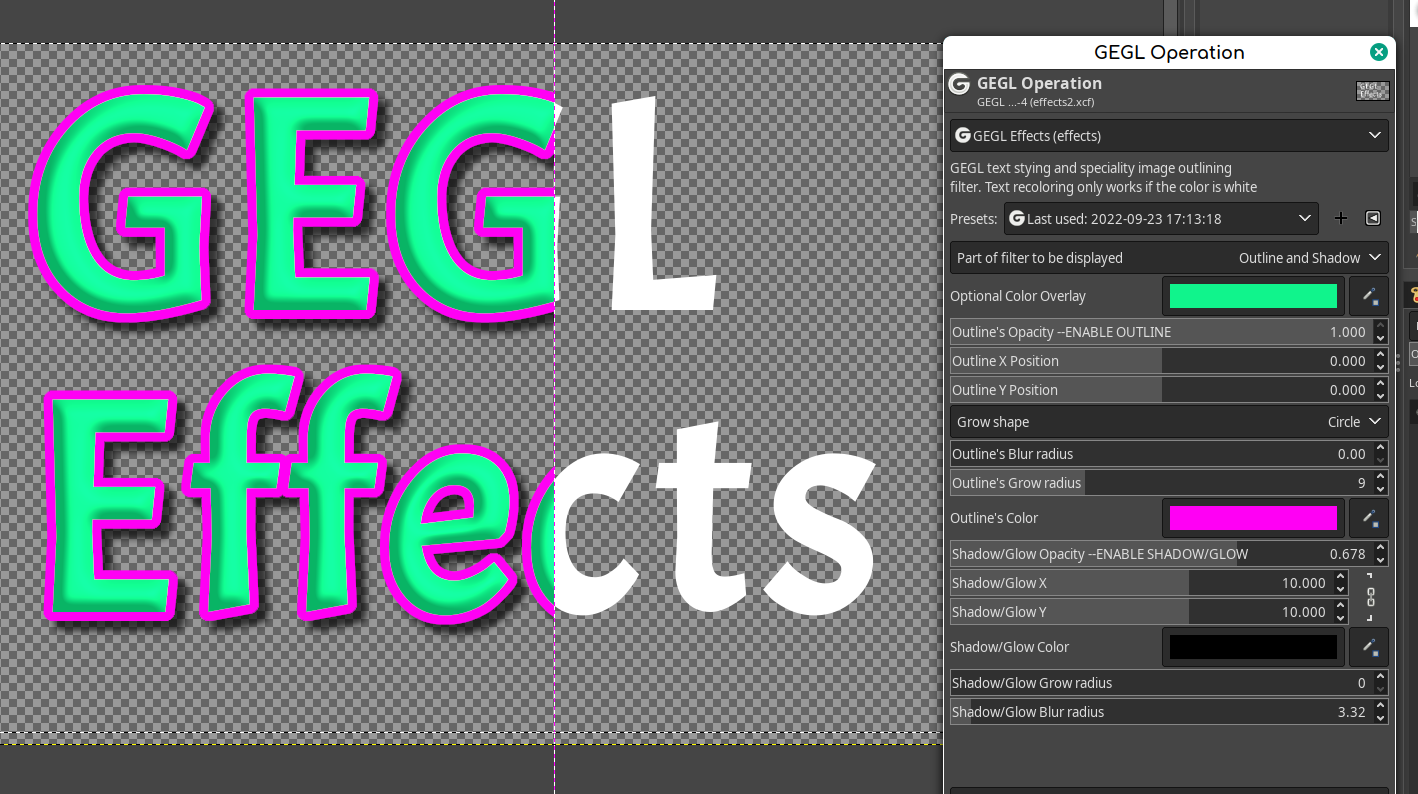
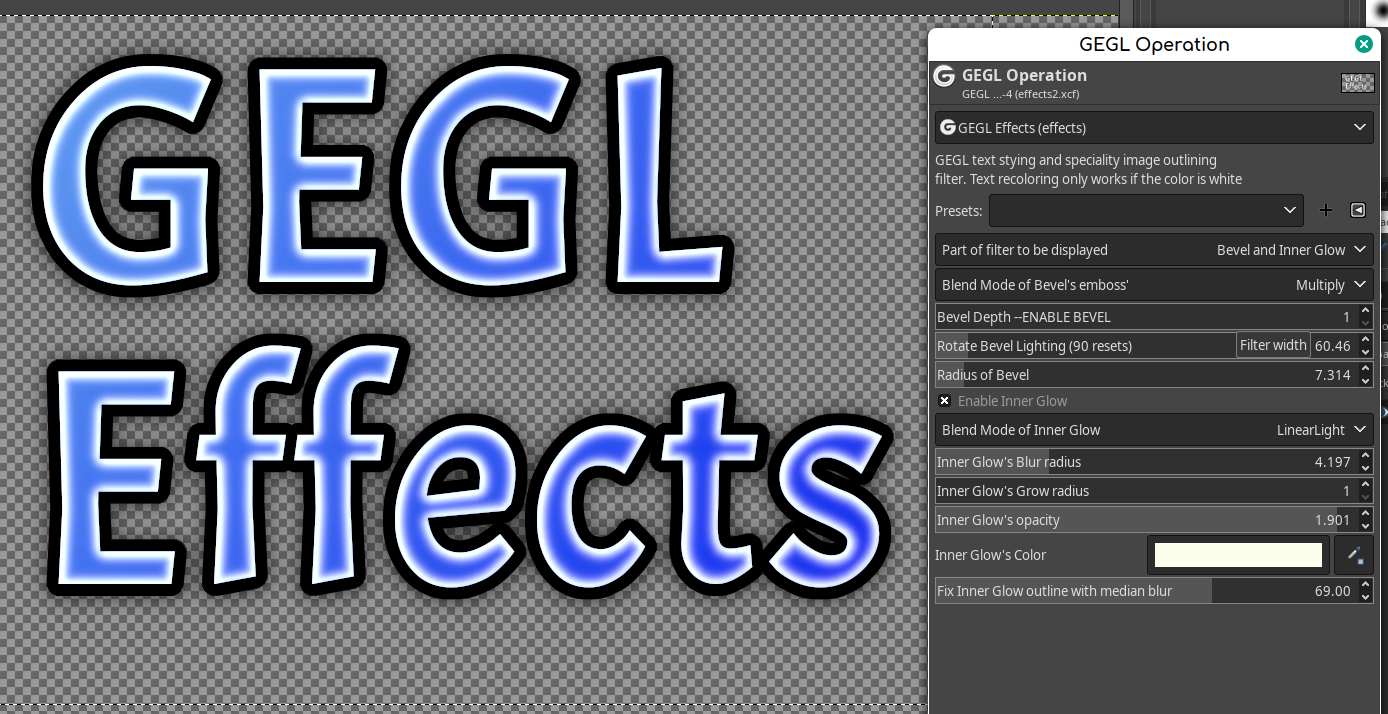
The new GEGL Effects is done and on Github!
https://github.com/LinuxBeaver/GEGL-Eff ... using-GEGL

gegl:effects has been renamed to gegl:layereffects because every time I update the blend mode list it gets an error that will infinitely reoccur unless I run
rm -r /home/contrast/.config/GIMP/2.10/filters/GimpGegl-gegl-effects-config.settings


Anyhow here is a list of changes for this update. This only applies to GEGL Effects. Bevel and Inner Glow as stand alone filters have no changes.

Filter is fragmented into three parts "Outline and Shadow" "Bevel and InnerGlow" "Image and Gradient"
Bevel can switch blend modes
Inner Glow can switch blend modes. You have many blend modes to choose from
Gradient can switch blend modes. You have many blend modes to choose from
Stroke has limited horizontal and vertical movement to create an opaque dropshadow effect
Image File overlay has an opacity slider and a built in hue chroma
Bevel has its native radius option
Inner Glow has its median option
GEGL Effects syntax name has changed from "effects" to "layereffects"
Preset compatibility has broke with earlier versions. Users can still use "legacy effects" to solve this

My final work is complete -- Enjoy!
Image

Image

Image

Image

Image


Last edited by contrast_ on Fri Sep 23, 2022 11:59 pm, edited 1 time in total.

Top
 Post subject: Re: GEGL Layer Effects and Text Styling filter
PostPosted: Fri Sep 23, 2022 11:58 pm  (#104) 
Offline
GimpChat Member
User avatar

Joined: Oct 31, 2020
Posts: 2012
GEGL Effects is ready and I just solved a major bug before anyone showed up!

delete effects.dll/so from your plugins folder. Only have layereffects.dll/so (along with bevel and innerglow) inside GEGL plugins.


Top
 Post subject: Re: GEGL Layer Effects and Text Styling filter
PostPosted: Sat Sep 24, 2022 12:12 pm  (#105) 
Offline
Global Moderator
User avatar

Joined: May 16, 2010
Posts: 16099
Wasn't sure what to compile here so i only compiled the legacy folder.
I removed the bevel.dll, inner-glow.dll, and the gegleffcts.dll and replaced them with these three.

Attachment:
gegl-legacy-effects_RD-2022-09-24_130014.jpg
gegl-legacy-effects_RD-2022-09-24_130014.jpg [ 180.52 KiB | Viewed 23006 times ]


Seems to be working ok. :bigthup :yes :hi5

No crashes on Windows.

Attachment:
gegl-legacy-effects-TEST_RD-2022-09-24_130014.jpg
gegl-legacy-effects-TEST_RD-2022-09-24_130014.jpg [ 306.61 KiB | Viewed 23006 times ]

_________________
Image


Top
 Post subject: Re: GEGL Layer Effects and Text Styling filter
PostPosted: Mon Sep 26, 2022 8:33 am  (#106) 
Offline
GimpChat Member
User avatar

Joined: Oct 31, 2020
Posts: 2012
Everything is good. This will likely be the final version of GEGL Effects unless something new happens to Gimp.


Top
 Post subject: Re: GEGL Layer Effects and Text Styling filter
PostPosted: Mon Sep 26, 2022 3:45 pm  (#107) 
Offline
Global Moderator
User avatar

Joined: May 16, 2010
Posts: 16099
New compiles with lists here.
viewtopic.php?f=9&t=20128&p=276804#p276804

_________________
Image


Top
 Post subject: Re: GEGL Layer Effects and Text Styling filter
PostPosted: Mon Oct 03, 2022 4:52 pm  (#108) 
Offline
GimpChat Member
User avatar

Joined: Oct 31, 2020
Posts: 2012
I know how to make a gradient stroke, bevel stroke, gradient shadow/glow and random seed for shadow/glow noise. But that would require one new operation. Said new operation would be an advance stroke/shadow/glow filter.

I don't want to do this personally but if a few people show interest I will. This will give GEGL Effects the ability to customize its stroke and shadow even more.


Top
 Post subject: Re: GEGL Layer Effects and Text Styling filter
PostPosted: Mon Oct 03, 2022 5:06 pm  (#109) 
Offline
GimpChat Member
User avatar

Joined: Oct 31, 2020
Posts: 2012
I changed my mind. I am not going to do said change to GEGL Effects. In example; I could give GEGL Effects the ability to add a long shadow, extra drop shadow stroke, blended edge detect or more things that would vastly improve its quality but the ultimate answer is not to make GEGL Effects longer and more complicated. The ultimate answer is for Gimp's team (or anyone) to implement something like Smart Objects. Which would be an active GEGL Graph that certain layers have.

GEGL Effects and Custom Bevel are the most complicated text styling filters Gimp has ever had. Nothing even comes close. (Fact!) Controversially, IMO they succeed the use of hundreds of alpha to logos the community has made over the past two decades. But in doing this they have showed me something. They (Effects and Custom Bevel) made me realize that Adobe's method was right all along. I do not need to give my filters the extra ability to cast a dropshadow + blend mode gradient or anything else. Adding those features will just make them clunky and slower. The answer is for Gimp to implement a non-destructive GEGL Graph that chains filters. That way I can have a "GEGL Layer" that has an active custom bevel, gradient and drop shadow that can be copied and pasted to other layers. All you are doing is copying and reloading a GEGL Graph.

That is the way Adobe has been doing things since the early 2000s. And we are just starting to realize they did it the right way all along.


Top
 Post subject: Re: GEGL Layer Effects and Text Styling filter
PostPosted: Thu Oct 13, 2022 9:13 pm  (#110) 
Offline
GimpChat Member
User avatar

Joined: Oct 31, 2020
Posts: 2012
Effects and InnerGlow got a update that changes Inner Glow's xy to 0 instead of 1. This allows a better "inner stroke" for GEGL Effects.

This is trivial for Inner Glow as it is just a different default preset but for GEGL Effects this gives it the ability to make a true inner stroke if the opacity is set to 100% and there is no blur radius. Before it could also do this but at horizontal=1 vertical=1 it would slightly be off. This mostly benefits GEGL Effects inner glow on small text. I made this update for myself months ago but lost the file and forgot to update it for myself and everyone else it. Oh well better late then never.


I hope I don't have to update GEGL Effects again. I considered this to be the last version and final. Yes, There are many more things I could add but it is more important for Gimp to get non-destructive editing then to keep chaining existing filters. This was just an minor correction


Top
 Post subject: Re: GEGL Layer Effects and Text Styling filter
PostPosted: Fri Oct 14, 2022 1:55 am  (#111) 
Offline
Global Moderator
User avatar

Joined: May 16, 2010
Posts: 16099
Thank you for the update contrast. :bigthup

Attachment:
2022-10-14_024934.jpg
2022-10-14_024934.jpg [ 336.76 KiB | Viewed 23058 times ]

_________________
Image


Top
 Post subject: Re: GEGL Layer Effects and Text Styling filter
PostPosted: Fri Nov 04, 2022 12:53 am  (#112) 
Offline
GimpChat Member
User avatar

Joined: Oct 31, 2020
Posts: 2012
Rod wrote:
Thank you for the update contrast. :bigthup

Attachment:
2022-10-14_024934.jpg

You are welcome.


Update has been made. Very minor.

Inner Glow's blur radius now goes up to 40. It previously stopped at 30.

This is only noticeable if you are applying it to a giant image in a niche workflow.


Top
 Post subject: Re: GEGL Layer Effects and Text Styling filter
PostPosted: Mon Nov 07, 2022 3:07 pm  (#113) 
Offline
GimpChat Member
User avatar

Joined: Oct 31, 2020
Posts: 2012
GEGL Effects has an official Guide.

https://docdro.id/gbBD72H


Top
 Post subject: Re: GEGL Layer Effects and Text Styling filter
PostPosted: Thu Nov 24, 2022 7:54 am  (#114) 
Offline
GimpChat Member
User avatar

Joined: Oct 31, 2020
Posts: 2012
GEGL Effects got an update that makes the blend modes of Inner Glow orders of magnitude more likely to produce a cool glow effect.

GEGL Effects Inner Glow and Gradient now have their Grain Merge and Multiply blend mode set to "rgb-perceptual" which makes them have a glow effect. Before they still could have a glow effect, but it was far more dependent on a image file overlay or certain color. Now virtually any color will glow.


Top
 Post subject: Re: GEGL Layer Effects and Text Styling filter
PostPosted: Sat Nov 26, 2022 10:48 am  (#115) 
Offline
GimpChat Member
User avatar

Joined: Oct 31, 2020
Posts: 2012
GEGL Inner Glow got a reworking of its graph that solves the border glitch it had. This is very important from my perspective.

Here is a preview of the Nov 24 Update that allows GEGL Effects Grain Merge and Linear Light to Glow.
Image

Nov 26 Update removes this unwanted border glitch.
Image

Nov 27 Update allows Inner Glow to work on Small Text

Image

Download Here that goes in
C:\Users<YOUR NAME>\AppData\Local\gegl-0.4\plug-ins

https://cdn.discordapp.com/attachments/ ... ILTERS.zip

Overwrite any duplicates


Last edited by contrast_ on Fri Feb 23, 2024 12:33 am, edited 5 times in total.

Top
 Post subject: Re: GEGL Layer Effects and Text Styling filter
PostPosted: Sat Nov 26, 2022 3:11 pm  (#116) 
Offline
New Member

Joined: Nov 26, 2022
Posts: 1
Thank you LinuxBeaver for this work and everyone else. I am not a power Linux user but usually can muddle through with online searches. While it worked, FXFoundry on Gimp was a necessity for me. Now that it doesn't, I am trying to put your files into Gimp but (and I apologize for being ignorant) I don't get which or how many of the files go into the gegl-4.0/plug-ins folder with the exception of gegleffects.so and inner-glow.so. I just updated to Ubuntu 22.04 and have Gimp 2.10.32. I have installed libgegl-dev through synaptic.

Anyones help would be appreciated? I have been to the github regarding LinuxBeaver GEGL-Effects-etc but I am a bit lost.


Top
 Post subject: Re: GEGL Layer Effects and Text Styling filter
PostPosted: Sat Nov 26, 2022 8:35 pm  (#117) 
Offline
GimpChat Member
User avatar

Joined: Oct 31, 2020
Posts: 2012
Bdavinc1 wrote:
Thank you LinuxBeaver for this work and everyone else. I am not a power Linux user but usually can muddle through with online searches. While it worked, FXFoundry on Gimp was a necessity for me. Now that it doesn't, I am trying to put your files into Gimp but (and I apologize for being ignorant) I don't get which or how many of the files go into the gegl-4.0/plug-ins folder with the exception of gegleffects.so and inner-glow.so. I just updated to Ubuntu 22.04 and have Gimp 2.10.32. I have installed libgegl-dev through synaptic.

Anyones help would be appreciated? I have been to the github regarding LinuxBeaver GEGL-Effects-etc but I am a bit lost.


You need gegleffects.so inner-glow.so and bevel.so for GEGL Effects to work. They should all be included in the download. You don't need lib-gegl-dev. That is only if you are compiling GEGL.


Top
 Post subject: Re: GEGL Layer Effects and Text Styling filter
PostPosted: Sun Jan 29, 2023 8:28 am  (#118) 
Offline
GimpChat Member

Joined: Nov 19, 2019
Posts: 209
Hi, can someone link to the latest version for Ubuntu 22.04 please? Not sure which to use. Thanks.


Top
 Post subject: Re: GEGL Layer Effects and Text Styling filter
PostPosted: Sun Jan 29, 2023 10:19 am  (#119) 
Offline
GimpChat Member
User avatar

Joined: Oct 31, 2020
Posts: 2012
meetdilip wrote:
Hi, can someone link to the latest version for Ubuntu 22.04 please? Not sure which to use. Thanks.

Download the three .so files
https://github.com/LinuxBeaver/GEGL-Eff ... L/releases

Put all .so files in
/home/(USERNAME)/.local/share/gegl-0.4/plug-ins

If you use Flatpak
/home/(USERNAME)/.var/app/org.gimp.GIMP/data/gegl-0.4/plug-ins


Top
 Post subject: Re: GEGL Layer Effects and Text Styling filter
PostPosted: Sun Jan 29, 2023 11:47 am  (#120) 
Offline
GimpChat Member

Joined: Nov 19, 2019
Posts: 209
Thanks :)


Top
Post new topic Reply to topic  [ 194 posts ]  Go to page Previous  1 ... 3, 4, 5, 6, 7, 8, 9, 10  Next

All times are UTC - 5 hours [ DST ]


* Login  


Powered by phpBB3 © phpBB Group