It is currently Wed Jul 22, 2026 8:55 am


All times are UTC - 5 hours [ DST ]


Post new topic Reply to topic  [ 50 posts ]  Go to page Previous  1, 2, 3  Next
Author Message
 Post subject: Re: AI Remove image background(use rembg)
PostPosted: Sun Jul 31, 2022 12:23 pm  (#21) 
Offline
GimpChat Member
User avatar

Joined: Oct 06, 2010
Posts: 4050
Pocholo wrote:
wirra wrote:
Thanks Pocholo for the Windows version. It is amazing.

You're welcome, wirra! It's so much simpler the one I posted for simple Windows users.


Is this file only using the preview mode? The reason I am asking is because in order to get full resolution images, after so many previews within a month, the AI becomes fee based. Kind of strange though how they base their fees on high number usage and their smaller usage is non-commercial. Heh.

_________________
"In order to attain the impossible, one must attempt the absurd."
~ Miguel de Cervantes


Top
 Post subject: Re: AI Remove image background(use rembg)
PostPosted: Sun Jul 31, 2022 1:31 pm  (#22) 
I really don't know Mahvin. I been using this for months so far and no fees. I do not know.


Top
 Post subject: Re: AI Remove image background(use rembg)
PostPosted: Sun Jul 31, 2022 2:35 pm  (#23) 
Offline
GimpChat Member
User avatar

Joined: Sep 27, 2016
Posts: 345
Location: Germany, BW
mahvin wrote:
Is this file only using the preview mode?


I looked into the script and I think it uses the preview mode of that tool,
copies it to the image, scales the copy to the image size, takes a selection of the scaled layer and cuts from the original layer.

_________________
Regards
nelo

(Gimp 2.10 on Linux Mint MATE 20.1)


Top
 Post subject: Re: AI Remove image background(use rembg)
PostPosted: Sun Jul 31, 2022 5:46 pm  (#24) 
Offline
GimpChat Member

Joined: Oct 29, 2012
Posts: 33
Location: Brisbane, Australia
I found Pocholo's script stopped working so I signed up and got my own API key which I then added to Pocholo's script and it started working again. Seems you are allowed 50 previews per month. See attached image of my account. I have 47 left to use until it resets on 29 August. Perhaps Pocholo's key has been used 50 times.


Attachments:
Image 001.jpg
Image 001.jpg [ 332.75 KiB | Viewed 31109 times ]
Top
 Post subject: Re: AI Remove image background(use rembg)
PostPosted: Mon Aug 01, 2022 8:07 pm  (#25) 
Offline
GimpChat Member
User avatar

Joined: Nov 04, 2015
Posts: 1459
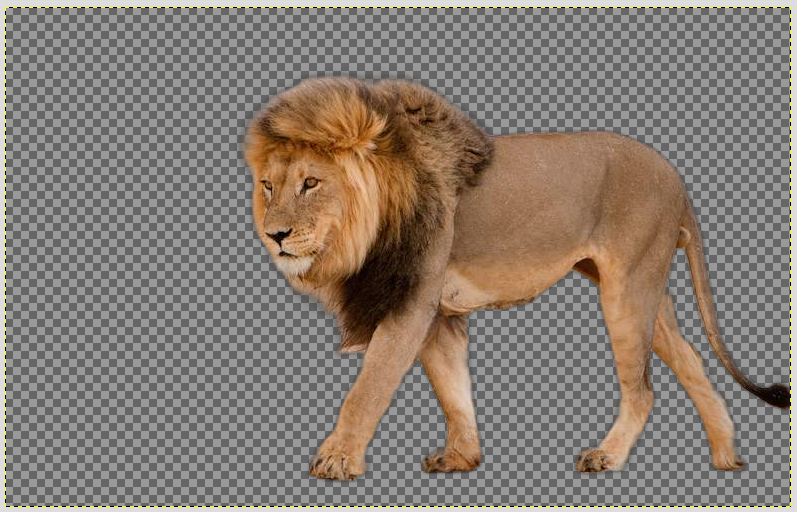
I got another background remover working this one called 'backgroundremover'. :)

It was quite hard to install. It uses pytorch and cuda so I guess only nvidia cards. I learned something about anaconda - rather than just a base environment you can create subfolders with their own python version in them. This app uses python3.6. I used the latest version of anaconda. Big advantage is it's in the user folder and can just be deleted - no impact on the system.

Image

lion test image screengrab from Gimp

This looks like the first project from Jonathan Nader so its nice it works. It can remove backgrounds from video clips which is a good goal (uses all the resources on my test system).


Top
 Post subject: Re: AI Remove image background(use rembg)
PostPosted: Tue Dec 13, 2022 8:08 pm  (#26) 
Offline
New Member

Joined: Dec 13, 2022
Posts: 4
I would like to use the methods posted to You Tube today by Pix Cores. However, I find the instructions confusing. For example, we are told to download a copy of RemoveBG.py, edit the USER and copy it to the plug-ins folder within GIMP. I am not sure which of the two folders I should be trying to copy the file RemoveBG.py to as they are both listed in GIMP:

C:\Users\Owner\AppData\Roaming\GIMP\2.10\plug-ins
C:\Users\Owner\AppData\Local\Programs\GIMP 2\lib\gimp\2.0\plug-ins

I looked for those same folders on my computer and the closest I could find was at
:bump C:\Program Files\GIMP 2\share\gimp\2.0\rebgd

Furthermore, I found I lacked admin rights to copy any thing into the rebgd folder. I ran the Windows Power Shell as admin per the PixCores instructions.


Attachments:
File comment: Screen shot from GIMP preferences regarding plug-ins
AI Remove.JPG
AI Remove.JPG [ 65.59 KiB | Viewed 30956 times ]
Top
 Post subject: Re: AI Remove image background(use rembg)
PostPosted: Wed Dec 14, 2022 4:19 am  (#27) 
Offline
Script Coder
User avatar

Joined: Oct 25, 2010
Posts: 4812
In a standard Gimp installation you should see two folders:

- one somewhere in "C:\Program files\GIMP\..." which is where the standards plugins are installed. Adding things here may require admin rights
- One in your user files, normally under "C:\Users\{your_id}\AppData\Roaming\...", which is where you can install your "personal" plug-ins. Adding things there shouldn't require admin rights (Gimp keeps other data such as your user preferences in sibling directories).

If necessary look at the other folder groups in the preferences, they all have the same structure, one in "C:\Program files\GIMP\..." and one in "C:\Users\{your_id}\AppData\Roaming\..." and these latter are all under the same parent directory.

_________________
Image


Top
 Post subject: Re: AI Remove image background(use rembg)
PostPosted: Wed Dec 14, 2022 10:21 am  (#28) 
Offline
New Member

Joined: Dec 13, 2022
Posts: 4
Yes, that worked when I put it into C:\Users\Owner\AppData\Roaming\GIMP\2.10\plug-ins :tyspin
Now I hope to hear from the author as the script does not work as expected and some of the code is in Chinese


Top
 Post subject: Re: AI Remove image background(use rembg)
PostPosted: Wed Dec 14, 2022 2:05 pm  (#29) 
Can anybody with knowledge about this plugin please.... explain how to install this plugin in Windows. I want to install it but I don't know how :gaah

I will thank you in advanced! :tyspin


Top
 Post subject: Re: AI Remove image background(use rembg)
PostPosted: Fri Dec 16, 2022 11:17 am  (#30) 
Offline
New Member

Joined: Dec 13, 2022
Posts: 4
Pocholo,
Well I got it working but I was disappointed with the result. Attached are some notes I made, the original file and the background removed file.
Hope that helps,
Colin


Attachments:
File comment: Notes on the install
Remove-Backgroun-Notes.pdf [162.57 KiB]
Downloaded 274 times
File comment: The result
my62-mod1.png
my62-mod1.png [ 4.56 MiB | Viewed 30854 times ]
File comment: The original image
my62.png
my62.png [ 5.58 MiB | Viewed 30854 times ]
Top
 Post subject: Re: AI Remove image background(use rembg)
PostPosted: Fri Dec 16, 2022 11:44 am  (#31) 
Offline
New Member

Joined: Dec 13, 2022
Posts: 4
Thank you JamesH


Attachments:
File comment: This is the result I expected
my62-mod2.png
my62-mod2.png [ 688.1 KiB | Viewed 32185 times ]
Top
 Post subject: Re: AI Remove image background(use rembg)
PostPosted: Fri Dec 23, 2022 7:47 am  (#32) 
Offline
GimpChat Member

Joined: Nov 19, 2019
Posts: 209
Hi, I am able to remove the background using rembg CLI. But not through GIMP 2.10.25 AppImage using this plugin in Ubuntu 22.04.

The plugin works but nothing changes in the canvas. And, when I removed the part where it deletes the tmp folder entry I am able to see the input picture as-is in the tmp folder.

My guess is the rembg is not applied at all due to some reason.

Adding the plugin code I have. I modified it a bit to add my rembg entry and use the AppImage from /usr/bin


#!/usr/bin/env python
# -*- coding: utf-8 -*-

# James Huang <[email protected]>
# https://elastic192.blogspot.com/

from gimpfu import *
import os, sys, string, tempfile
import platform

def python_fu_RemoveBG(image, drawable, asMask, AlphaMatting, aeValue):
   
   osName = platform.system()
   exportSep = str(os.sep)
   tdir = tempfile.gettempdir()
   #tdir = "./"
   print(tdir)
   jpgFile = "%s%sTemp-gimp-0000.jpg" % (tdir, exportSep)
   pngFile = "%s%sTemp-gimp-0000.png" % (tdir, exportSep)
   x1 = 0
   y1 = 0
   option = ""

   image.undo_group_start()
   curLayer = pdb.gimp_image_get_active_layer(image)

   if pdb.gimp_selection_is_empty(image):
      pdb.file_jpeg_save(image, drawable, jpgFile, jpgFile, 0.95, 0, 1, 0, "", 0, 1, 0, 0)
   else:
      pdb.gimp_edit_copy(drawable)
      non_empty, x1, y1, x2, y2 = pdb.gimp_selection_bounds(image)
      tmpImage = gimp.Image(x2-x1, y2-y1, 0)
      tmpDrawable = gimp.Layer(tmpImage, "Temp", tmpImage.width, tmpImage.height, RGB_IMAGE, 100, NORMAL_MODE)
      pdb.gimp_image_add_layer(tmpImage, tmpDrawable, 0)
      pat = pdb.gimp_context_get_pattern()
      pdb.gimp_context_set_pattern("Leopard")
      pdb.gimp_drawable_fill(tmpDrawable, 4)
      pdb.gimp_context_set_pattern(pat)
      pdb.gimp_floating_sel_anchor(pdb.gimp_edit_paste(tmpDrawable,TRUE))
      pdb.file_jpeg_save(tmpImage, tmpDrawable, jpgFile, jpgFile, 0.95, 0, 1, 0, "", 0, 1, 0, 0)
      pdb.gimp_image_delete(tmpImage)
   
   aiExe = "/home/demo/.local/bin/rembg"
   if AlphaMatting:
      option = "-a -ae %d" % (aeValue)
   cmd = "gimp25.AppImage --host %s i %s %s %s" % (aiExe, option, jpgFile, pngFile)
   os.system(cmd)

   file_exists = os.path.exists(pngFile)
   if file_exists:
      newlayer = pdb.gimp_file_load_layer(image, pngFile)
         image.add_layer(newlayer, -1)
         pdb.gimp_layer_set_offsets(newlayer, x1, y1)
         if asMask:
            pdb.gimp_image_select_item(image, CHANNEL_OP_REPLACE, newlayer)
            image.remove_layer(newlayer)
         copyLayer = pdb.gimp_layer_copy(curLayer, TRUE)
         image.add_layer(copyLayer, -1)
         mask=copyLayer.create_mask(ADD_SELECTION_MASK)
         copyLayer.add_mask(mask)
         pdb.gimp_selection_none(image)

      image.undo_group_end()
      gimp.displays_flush()


register(
    "python_fu_RemoveBG",
    "AI移除影像背景, AI Remove image background",
    "AI移除影像背景, AI Remove image background",
    "JamesH, <[email protected]>",
    "JamesH, https://elastic192.blogspot.com",
    "2022/6/4",
    "<Image>/Python-Fu/AI移除影像背景(AI Remove background) ...",
    "RGB*",
    [
       (PF_TOGGLE, "asMask", ("當作圖層遮罩(as Mask)"), True),
       (PF_TOGGLE, "AlphaMatting", ("alpha matting"), False),
       (PF_SPINNER,"aeValue", ("ALPHA_MATTING_ERODE_SIZE"), 15, (15,100,1))
    ],
    [],
    python_fu_RemoveBG,
    domain=("gimp20-python", gimp.locale_directory))

main()


Top
 Post subject: Re: AI Remove image background(use rembg)
PostPosted: Fri Dec 23, 2022 7:48 am  (#33) 
Offline
GimpChat Member

Joined: Nov 19, 2019
Posts: 209
Hi, I am able to remove the background using rembg CLI. But not through GIMP 2.10.25 AppImage using this plugin in Ubuntu 22.04.

The plugin works but nothing changes in the canvas. And, when I removed the part where it deletes the tmp folder entry I am able to see the input picture as-is in the tmp folder.

My guess is the rembg is not applied at all due to some reason.

Adding the plugin code I have. I modified it a bit to add my rembg entry and use the AppImage from /usr/bin

Any help will be great.


Attachments:
RemoveBG.zip [1.42 KiB]
Downloaded 278 times
Top
 Post subject: Re: AI Remove image background(use rembg)
PostPosted: Tue Jan 17, 2023 3:35 am  (#34) 
Offline
GimpChat Member
User avatar

Joined: Apr 25, 2011
Posts: 121
Location: Taiwan
meetdilip wrote:
Hi, I am able to remove the background using rembg CLI. But not through GIMP 2.10.25 AppImage using this plugin in Ubuntu 22.04.

The plugin works but nothing changes in the canvas. And, when I removed the part where it deletes the tmp folder entry I am able to see the input picture as-is in the tmp folder.

My guess is the rembg is not applied at all due to some reason.


for linux AppImage gimp
RemoveBG-AppImage.zip
find
aiExe = "/home/jamesh/.local/bin/rembg"
Replace with your own rembg path

Test successful on ubuntu 22.04 GIMP_AppImage-git-2.10.25-20210610-withplugins-x86_64.AppImage

_________________
Sorry for my poor English, I use Google Translate.
There may be something wrong, Please understand.

GIMP 2.10.38 rev1 portable+GAP+G'MIC+nufraw+Beautify+MathMap+...


Top
 Post subject: Re: AI Remove image background(use rembg)
PostPosted: Tue Jan 17, 2023 5:11 pm  (#35) 
Offline
GimpChat Member
User avatar

Joined: Apr 15, 2017
Posts: 1837
Finally a RemBG plugin for Gimp that actually works. It works great in PPA installed Gimp, the other ones wouldn't work. I like the option of using Mask, much more useful that way.

Thanks JamesH for posting the last one.


Top
 Post subject: Re: AI Remove image background(use rembg)
PostPosted: Sun Jan 22, 2023 6:06 pm  (#36) 
Offline
New Member

Joined: Jan 22, 2023
Posts: 1
This is pretty cool, thanks! I'll have to check out backgroundremover too.

In case anyone is still having trouble installing this on Windows, I wrote up a small guide as it took me a little while to figure out.

First make sure you have Python installed. You may need Python 3, I don't know.
Make sure you installed pip with it, added to PATH, etc.

Install rembg. Open a console window (Win+R, type "cmd" without quotes, hit enter) then type: "pip install rembg", without quotes.
It will download rembg and I assume dependencies.
Or follow instructions here: (github)/danielgatis/rembg
Sorry, not allowed to post urls...but if you can't find github, you need more help than I can give :)

Then, download RemoveBG.zip file attached from the first post. Unzip it and find the RemoveBG.py file.
Open this file with a text editor, like notepad.
Around line 42, or somewhere, you'll find something like this:
aiExe = "C:\\Users\\USER\\AppData\\Local\\Programs\\Python\\Python39\\Scripts\\rembg.exe"
As stated in the first post, change this to fit your path. You have to locate the rembg.exe executable. Mine was:
C:\Users\YOUR_USERNAME\AppData\Roaming\Python\Python310\Scripts\rembg.exe
But remember to add the extra backslashes.
C:\\Users\\SomeRando\\AppData\\Roaming\\Python\\Python310\\Scripts\\rembg.exe
Don't forget to save your changes.

Now you have to put RemoveBG.py in the plugins directory. You can try:
C:\Users\USERNAME\AppData\Roaming\GIMP\2.10\plug-ins
If you can't find it, Open GIMP, Click Edit --> Preferences, expand the Folders section, click Plugins.
You should see at least one folder where you can put plugins. Select one, then find the button on the right which will open that folder in your file manager.
Move the RemoveBG.py file into the plugins directory. You may need to restart GIMP.

Now you're done, right? Eh, not quite. Open an image in GIMP and run this plugin. On first run, rembg.exe will need to download u2net.onxx, around 180MB file; let it do its thing, then you're done.
If for whatever reason you want to do this step manually, the file should be at:
(github)/danielgatis/rembg/releases/download/v0.0.0/u2net.onnx
Place it here: C:\Users\YOUR_USERNAME\.u2net\u2net.onnx

Hope this helped!


Top
 Post subject: Re: AI Remove image background(use rembg)
PostPosted: Sat Feb 18, 2023 3:47 pm  (#37) 
Offline
GimpChat Member

Joined: Nov 19, 2019
Posts: 209
Hi, I added the .py file in plugin folder for both AppImage and Flatpak (and run as instructed). But I do not see any option to use rembg inside GIMP. Where can I find it? Thanks.

Edit 1:

Tried CLI, it is working. I am on Ubuntu 22.04


Top
 Post subject: Re: AI Remove image background(use rembg)
PostPosted: Fri May 19, 2023 7:40 am  (#38) 
Offline
GimpChat Member
User avatar

Joined: Jan 06, 2020
Posts: 401
Location: The Netherlands
I was so happy with remove background, but somehow he doesn't do it anymore. Can it still be repaired?


Top
 Post subject: Re: AI Remove image background(use rembg)
PostPosted: Mon Sep 11, 2023 4:33 am  (#39) 
Offline
GimpChat Member

Joined: Nov 19, 2019
Posts: 209
Hi, I tried rembg install on a new Ubuntu. Sadly, it is giving the following error

$ rembg --help
Traceback (most recent call last):
  File "/home/myPC/.local/bin/rembg", line 5, in <module>
    from rembg.cli import main
  File "/home/myPC/.local/lib/python3.10/site-packages/rembg/__init__.py", line 5, in <module>
    from .bg import remove
  File "/home/myPC/.local/lib/python3.10/site-packages/rembg/bg.py", line 6, in <module>
    from cv2 import (
ImportError: cannot import name 'BORDER_DEFAULT' from 'cv2' (unknown location)


Not sure what is wrong.

Started a bug report as well

https://github.com/danielgatis/rembg/issues/515

Any help will be great. Thanks


Top
 Post subject: Re: AI Remove image background(use rembg)
PostPosted: Mon Sep 11, 2023 5:12 am  (#40) 
Offline
GimpChat Member
User avatar

Joined: Nov 04, 2015
Posts: 1459
Looks like you need opencv-python. You may have to trick it into believing it's installed :)


Top
Post new topic Reply to topic  [ 50 posts ]  Go to page Previous  1, 2, 3  Next

All times are UTC - 5 hours [ DST ]


* Login  


Powered by phpBB3 © phpBB Group