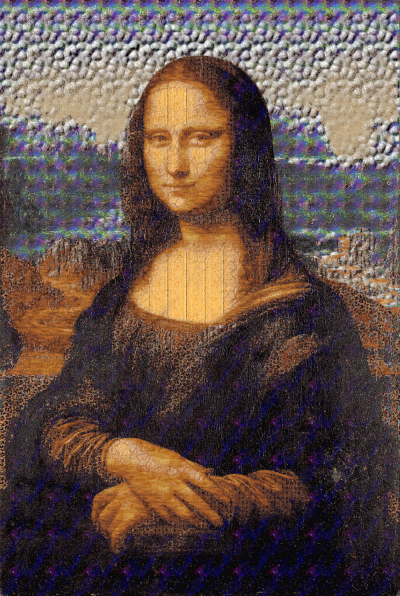
Here's an example of the Mona Lisa, retextured with All the available patterns in your GIMP (excluding the clipboard pattern).
It'll be under /Python-Fu/GIMP Pattern...
run it on an active layer (will alter your existing layer by creating a new layer as well).
Choose number of colors and method (either "Closest Gray Scale" or "Closest colors").
Example above used 24 colors and "Closest Colors".
Save below code as a .py file (ie. gimp-pattern.py)
#!/usr/bin/env python
# gimp-pattern.py
# Created by TT
#
# License: GPLv3
# This program is free software: you can redistribute it and/or modify
# it under the terms of the GNU General Public License as published by
# the Free Software Foundation, either version 3 of the License, or
# (at your option) any later version.
#
# This program is distributed in the hope that it will be useful,
# but WITHOUT ANY WARRANTY# without even the implied warranty of
# MERCHANTABILITY or FITNESS FOR A PARTICULAR PURPOSE. See the
# GNU General Public License for more details.
#
# To view a copy of the GNU General Public License
# visit: http://www.gnu.org/licenses/gpl.html
#
#
# ------------
#| Change Log |
# ------------
# Rel 1: Initial release

from gimpfu import *
import random
def python_gimp_pattern(image, layer, colors, method):
   # pdb.gimp_image_undo_group_start(image)
   # pdb.gimp_context_push()
   #YOUR CODE BEGINS=======================
   method = int(method)
   #if we're doing grayscale then we convert grayscale first
   if (method == 0):
      pdb.gimp_image_convert_grayscale(image)
   #reduce it down to colors
   pdb.gimp_image_convert_indexed(image,0,0,int(colors),FALSE,FALSE,"IGNORE PALETTE TYPE")
   num_bytes,colormap = pdb.gimp_image_get_colormap(image)
   #back to rgb
   pdb.gimp_image_convert_rgb(image)

   cols = []
   num_patterns,patterns_list = pdb.gimp_patterns_list("")
   for i in range(1,len(patterns_list)):
      pdb.gimp_progress_update(float(i)/len(patterns_list))
      width,height,bpp,num_color_bytes,color_bytes = pdb.gimp_pattern_get_pixels(patterns_list[i])
      totalr = totalg = totalb = 0
      pixels = 0.0;
      for j in range(0,num_color_bytes/bpp):
         zeroi = bpp*j
         pixels += 1;
         if (bpp >=3):
            r = color_bytes[zeroi]
            g = color_bytes[zeroi+1]
            b = color_bytes[zeroi+2]
         else:
            r = g = b = color_bytes[zeroi] #gray scale
         totalr += r;
         totalg += g;
         totalb += b;
      cols.append([[totalr/pixels,totalg/pixels,totalb/pixels],patterns_list[i],0])
   #Here we have the patterns data
   new_layer = pdb.gimp_layer_new(image,layer.width,layer.height,RGBA_IMAGE,"GIMP Pattern Layer",100,LAYER_MODE_NORMAL)
   pdb.gimp_image_insert_layer(image,new_layer,None,0)
   #num_bytes,colormap = pdb.gimp_image_get_colormap(image)
   bpp = num_bytes/int(colors);
   for i in range(0,int(colors)):
      zeroi = bpp*i;
      r = colormap[zeroi];
      g = colormap[zeroi+1];
      b = colormap[zeroi+2];
      color = (r,g,b);
      pdb.gimp_by_color_select(layer,color,0,CHANNEL_OP_REPLACE,TRUE,FALSE,0,FALSE)
      #now get the pattern that matches closest
      for j in range(0,len(cols)):
         if (method==0):
            grayvalue = (cols[j][0][0]+cols[j][0][1]+cols[j][0][2])/3.0
            diff = ((r-grayvalue)*0.3)**2 + ((g-grayvalue)*0.59)**2 + ((b-grayvalue)*0.11)**2;
         else:
            diff = ((r-cols[j][0][0])*0.3)**2 + ((g-cols[j][0][1])*0.59)**2 + ((b-cols[j][0][2])*0.11)**2;
         cols[j][2] = diff
      #sort by index 2 with is diff values
      cols.sort(key=lambda x: x[2])
      pdb.gimp_context_set_pattern(cols[0][1])
      pdb.gimp_edit_fill(new_layer,FILL_PATTERN)
   pdb.gimp_selection_none(image)


   #YOUR CODE ENDS ========================
   # pdb.gimp_context_pop()
   # pdb.gimp_image_undo_group_end(image)
   pdb.gimp_displays_flush()
    #return

register(
   "python_fu_gimp_pattern",
   "Uses GIMP Patterns to recolor layer image",
   "Uses GIMP Patterns to recolor layer image",
   "TT",
   "TT",
   "March 29, 2023",
   "<Image>/Python-Fu/GIMP Pattern...",
   "*",      # Create a new image, don't work on an existing one
   [
   #INPUT BEGINS
   (PF_INT, "colors", "Colors:", 8),
   (PF_OPTION, "method", "Method:", 0, ["Closest Gray Scale","Closest Color"]),
   #(PF_TOGGLE, "method",   "Gray/Method:", 1), # initially True, checked.  Alias PF_BOOL
   # (PF_SPINNER, "colors", "Number of Maximum Colors (randomly):", 16, (1, 32, 1)),
   # (PF_TOGGLE, "varysize",   "Vary up sizes:", 1), # initially True, checked.  Alias PF_BOOL
   # (PF_TOGGLE, "colorbackground",   "Color background randomly:", 0), # initially True, checked.  Alias PF_BOOL
   #(PF_SPINNER, "inc", "Increments (pixels):", 15, (1, 1000, 1)),
   #(PF_SPINNER, "outof", "Best out of:", 100, (1, 1000, 1)),
   #(PF_OPTION, "arrow_side", "Arrows Ends:", SIDE_END, SIDE_NAMES),
   #(PF_TOGGLE, "arrow_close", "Arrows Close:", 0),
   #(PF_SPINNER, "ignorelayers", "Ignore first (no of layers):", 2, (0, 200, 1)),
   #(PF_SPINNER, "shadow_offset_x", "Shadow Offset X:", 6, (-4096,4096,1)),
   #(PF_SPINNER, "shadow_offset_y", "Shadow Offset Y:", 6, (-4096,4096,1)),
   #(PF_SPINNER, "shadow_blur_radius", "Shadow Blur Radius:", 15, (0,1024,1)),
   #(PF_SPINNER, "shadow_opacity", "Shadow Opacity:", 100, (0,100,1)),
   #INPUT ENDS
   ],
   [],
   python_gimp_pattern)

main()

#           (PF_INT, "p0", "_INT:", 0), # PF_INT8, PF_INT16, PF_INT32  similar but no difference in Python.
#           (PF_FLOAT, "p02", "_FLOAT:", 3.141),
#           (PF_STRING, "p03", "_STRING:", "foo"),  # alias PF_VALUE
#           (PF_TEXT, "p04", "TEXT:", "bar"),
#           # PF_VALUE
#           # Pick one from set of choices
#           (PF_OPTION,"p1",   "OPTION:", 0, ["0th","1st","2nd"]), # initially 0th is choice
#           (PF_RADIO, "p16", "RADIO:", 0, (("0th", 1),("1st",0))), # note bool indicates initial setting of buttons
#           # PF_RADIO is usually called a radio button group.
#           # SLIDER, ADJUSTMENT types require the extra parameter of the form (min, max, step).
#           (PF_TOGGLE, "p2",   "TOGGLE:", 1), # initially True, checked.  Alias PF_BOOL
#           # PF_TOGGLE is usually called a checkbox.
#           (PF_SLIDER, "p3", "SLIDER:", 0, (0, 100, 10)),
#           (PF_SPINNER, "p4", "SPINNER:", 21, (1, 1000, 50)),  # alias PF_ADJUSTMENT
#           # Pickers ie combo boxes ie choosers from lists of existing Gimp objects
#           (PF_COLOR, "p14", "_COLOR:", (100, 21, 40) ), # extra param is RGB triple
#           # PF_COLOUR is an alias by aussie PyGimp author lol
#           (PF_IMAGE, "p15", "IMAGE:", None), # should be type gimp.image, but None works
#           (PF_FONT, "p17", "FONT:", 0),
#           (PF_FILE, "p18", "FILE:", 0),
#           (PF_BRUSH, "p19", "BRUSH:", 0),
#           (PF_PATTERN, "p20", "PATTERN:", 0),
#           (PF_GRADIENT, "p21", "GRADIENT:", 0),
#           (PF_PALETTE, "p22", "PALETTE:", 0),
#           (PF_LAYER, "p23", "LAYER:", None),
#           (PF_CHANNEL, "p24", "CHANNEL:", None),  # ??? Usually empty, I don't know why.
#           (PF_DRAWABLE, "p25", "DRAWABLE:", None),
#           # Mostly undocumented, but work
#           (PF_VECTORS, "p26", "VECTORS:", None),
#           (PF_FILENAME, "p27", "FILENAME:", 0),
#           (PF_DIRNAME, "p28", "DIRNAME:", 0)
#           # PF_REGION might work but probably of little use.  See gimpfu.py.
 Login
Login Register
 Tweets
 FAQ
FAQ Advanced Search