It is currently Sat Jun 13, 2026 4:06 pm


All times are UTC - 5 hours [ DST ]


Post new topic Reply to topic  [ 56 posts ]  Go to page Previous  1, 2, 3
Author Message
 Post subject: Re: Create border step by step.py
PostPosted: Sun Dec 26, 2021 2:22 pm  (#41) 
Offline
GimpChat Member
User avatar

Joined: Jan 13, 2011
Posts: 2639
Location: Poland
Check if it's better now?


Attachments:
MBB-DE.jpg
MBB-DE.jpg [ 170.17 KiB | Viewed 1996 times ]
MrQ BorderBox_1.5_De.zip [23.77 KiB]
Downloaded 133 times

_________________
Image
Top
 Post subject: Re: Create border step by step.py
PostPosted: Sun Dec 26, 2021 3:30 pm  (#42) 
Offline
GimpChat Member
User avatar

Joined: Sep 27, 2016
Posts: 345
Location: Germany, BW
Yes, much better now.
Thanks a heap MareroQ

Now I can go find the missing plugins for linux.
Mainly voronoi.

Edit:
Finally found a linux binary of voronoi here: https://software.opensuse.org/download. ... mp-voronoi
Not specially made for Linux Mint but works.

_________________
Regards
nelo

(Gimp 2.10 on Linux Mint MATE 20.1)


Top
 Post subject: Re: Create border step by step.py
PostPosted: Mon Dec 27, 2021 5:07 am  (#43) 
Offline
GimpChat Member
User avatar

Joined: Sep 27, 2016
Posts: 345
Location: Germany, BW
anybody in need of linux plugins needed for this plug-in?
Attachment:
linux-plugins-for-MrQ-borderbox.zip

to be put in personal plug-ins folder and made executable. Felimage folder goes into plug-ins as well.

works for me on Linux Mint 20, GIMP 2.10.28

_________________
Regards
nelo

(Gimp 2.10 on Linux Mint MATE 20.1)


Top
 Post subject: Re: Create border step by step.py
PostPosted: Fri Feb 18, 2022 10:14 am  (#44) 
Offline
GimpChat Member
User avatar

Joined: Sep 27, 2016
Posts: 345
Location: Germany, BW
As there is an issue with the preview when resizing or moving the window of this plug-in on Windows-systems
and the workaround is to disable the preview before dragging it....
Is there a way to disable the preview on start of the plug-in and enable it when ready?

_________________
Regards
nelo

(Gimp 2.10 on Linux Mint MATE 20.1)


Top
 Post subject: Re: Create border step by step.py
PostPosted: Fri Feb 18, 2022 4:19 pm  (#45) 
Offline
GimpChat Member
User avatar

Joined: Jan 13, 2011
Posts: 2639
Location: Poland
Unfortunately, I don't know how.

_________________
Image


Top
 Post subject: Re: Create border step by step.py
PostPosted: Sat Feb 19, 2022 4:07 am  (#46) 
Offline
GimpChat Member
User avatar

Joined: Sep 27, 2016
Posts: 345
Location: Germany, BW
Maybe @cli345 knows?
I'll ask him

_________________
Regards
nelo

(Gimp 2.10 on Linux Mint MATE 20.1)


Top
 Post subject: Re: Create border step by step.py
PostPosted: Mon Apr 04, 2022 11:05 am  (#47) 
Offline
GimpChat Member

Joined: Apr 19, 2021
Posts: 138
Location: France
Hello! :)

I suggest this method:

In the file "fu_preview.py", write "dialog.la_previ.set_update(False)"
  • just after the line containing "dialog.la_previ = gimpui.DrawablePreview(start_params[1])"
  • and just before the line containing "gtk.main_quit()".

(It unchecks the "preview" box for all plugins).

Hope this helps!

_________________
Photo to cartoon : https://github.com/cl4cnam/gimp_cartoon_plugin


Top
 Post subject: Re: Create border step by step.py
PostPosted: Mon Apr 04, 2022 12:25 pm  (#48) 
Offline
GimpChat Member
User avatar

Joined: Sep 27, 2016
Posts: 345
Location: Germany, BW
Thanks Claude,
works fine ... and probably helps on windows systems.

_________________
Regards
nelo

(Gimp 2.10 on Linux Mint MATE 20.1)


Top
 Post subject: Re: Create border step by step.py
PostPosted: Wed Jul 20, 2022 2:46 am  (#49) 
Offline
GimpChat Member
User avatar

Joined: Jan 13, 2011
Posts: 2639
Location: Poland
Borderbox Ver.1.6
By default, 'Preview' is disabled at startup.


Attachments:
BB16.jpg
BB16.jpg [ 174.19 KiB | Viewed 1701 times ]

_________________
Image


Last edited by MareroQ on Sun Dec 22, 2024 4:12 am, edited 1 time in total.
Top
 Post subject: Re: Create border step by step.py
PostPosted: Wed Jul 20, 2022 4:41 am  (#50) 
Offline
GimpChat Member
User avatar

Joined: Mar 01, 2014
Posts: 14023
Location: Spain, Aragón
Great job!!! Thank you so much for this update creation, MareroQ, Contributors; Claude and J.F. García. :clap :yes
The results are really quick and beautiful. :tyspin


Attachments:
Resultado_BorderBox.jpg
Resultado_BorderBox.jpg [ 311.02 KiB | Viewed 1676 times ]

_________________
Image

Gimp 2.10.30(samj) portable _ OS Windows 10 Home_ 64bits
Don’t be afraid to start over. It’s a new chance to rebuild what you want.
Top
 Post subject: Re: Create border step by step.py
PostPosted: Sun Dec 22, 2024 4:16 am  (#51) 
Offline
GimpChat Member
User avatar

Joined: Jan 13, 2011
Posts: 2639
Location: Poland
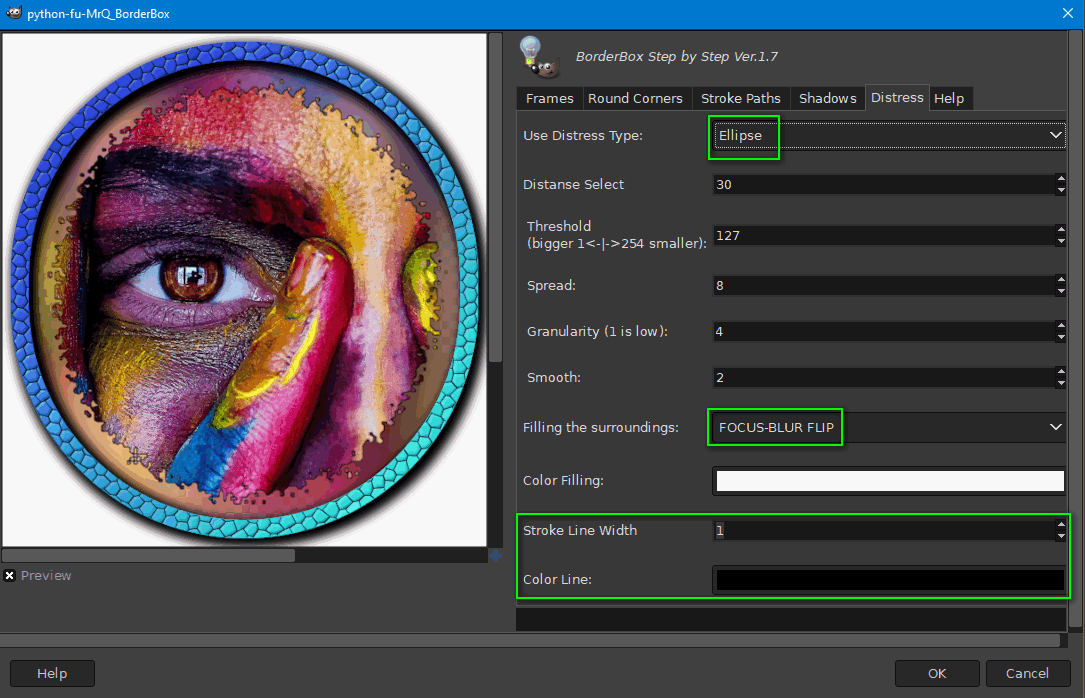
BorderBox Rel 1.7.

Change:
- added for Distress: type Ellipse; filing COLOR CANVAS and FOCUS-BLUR FLIP"; stroke,
- for 'Add effect' replaced Gimp-2.8 plugins with gegl-python operations (although they were better than GEGL because of the possibility of invoking interactively).

Image

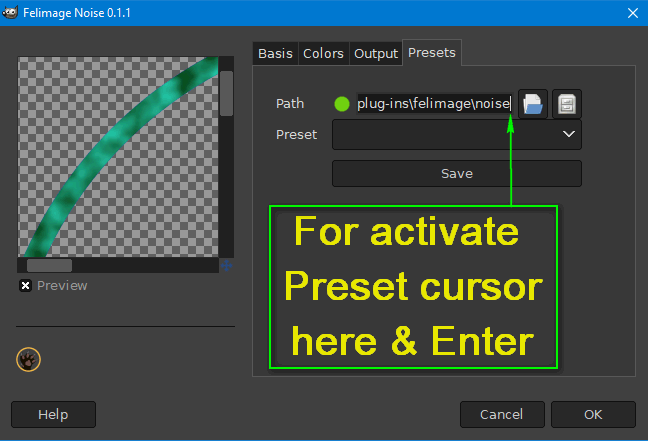
A word about Felimage - it provides unlimited pattern combinations with the ability to save and load presets.
viewtopic.php?f=9&t=17775&p=244851&hilit=FelimageNoise#p244851

In the menu:
Filters ➤ Render ➤ Pattern ➤ FelimageNoise...

Image


Attachments:
Example BB sample_colorful.png
Example BB sample_colorful.png [ 812.6 KiB | Viewed 1036 times ]
MrQ BorderBox Ver.1.7..zip [23.89 KiB]
Downloaded 55 times

_________________
Image
Top
 Post subject: Re: BorderBox - create border step by step
PostPosted: Sun Dec 22, 2024 5:15 am  (#52) 
Offline
Global Moderator
User avatar

Joined: Apr 01, 2012
Posts: 8364
Location: On the other side of your screen
Can this be used in vs 3 ?

_________________
Image
Free Fun Photo Editing & resources
Poems from the Lord
Gimp Newby
Gimp version 3.2.0 and GMIC-Qt 3.7.5 OS :- Windows 10 Home 64


Top
 Post subject: Re: BorderBox - create border step by step
PostPosted: Sun Dec 22, 2024 6:03 am  (#53) 
Offline
GimpChat Member
User avatar

Joined: Jan 13, 2011
Posts: 2639
Location: Poland
Are You asking about Gimp-3.xx?
No, and probably never.
BorderBox includes an extended gimp-fu (not planned for Gimp-3) where I combined Claude Lion's [cli345] "Preview" with J.F. Garcia's [arakne] "Bookmarks" and Kevin Payne's gegl_command.

Felimage requires a code rewrite and recompile.

_________________
Image


Top
 Post subject: Re: BorderBox - create border step by step
PostPosted: Sun Dec 22, 2024 6:35 pm  (#54) 
Offline
Global Moderator
User avatar

Joined: Apr 01, 2012
Posts: 8364
Location: On the other side of your screen
Oh, ok. I have seen people mention 2.8 which I don't have anymore. What about 2.10.x? I will be keeping mine at least until there is a GMIC for vs 3

_________________
Image
Free Fun Photo Editing & resources
Poems from the Lord
Gimp Newby
Gimp version 3.2.0 and GMIC-Qt 3.7.5 OS :- Windows 10 Home 64


Top
 Post subject: Re: BorderBox - create border step by step
PostPosted: Sun Dec 22, 2024 8:13 pm  (#55) 
Offline
GimpChat Member
User avatar

Joined: Jan 13, 2011
Posts: 2639
Location: Poland
Hi Sallyanne

G'MIC (3.5 pre) for Gimp 3RC1 has been available for over a month now for Win (compiled by Samj) and Linux (compiled by Rich2005) - and for most filters in Win it works faster than in Gimp 2.10.38. :yes
viewtopic.php?f=28&t=21449
I will not give my opinion on the current state of Gimp-3 because I could offend the developers and they deserve praise and thanks for their hard work. Preserving older versions of Gimp (portable conversions) is a normal rule for me.

_________________
Image


Top
 Post subject: Re: BorderBox - create border step by step
PostPosted: Mon Dec 23, 2024 12:10 am  (#56) 
Offline
Global Moderator
User avatar

Joined: Apr 01, 2012
Posts: 8364
Location: On the other side of your screen
Thank you for that information Mr Q. Last couple of gimp versions I thought you had to delete all gimp files before adding new.
I think I am using 3.5 with 2.10.38 so will just copy the file into 3's plugins folder
Error. I am using 3.3.5. Will check the Samj's blog. Yeh! She has updated it on the 4th this month.

_________________
Image
Free Fun Photo Editing & resources
Poems from the Lord
Gimp Newby
Gimp version 3.2.0 and GMIC-Qt 3.7.5 OS :- Windows 10 Home 64


Top
Post new topic Reply to topic  [ 56 posts ]  Go to page Previous  1, 2, 3

All times are UTC - 5 hours [ DST ]


* Login  


Powered by phpBB3 © phpBB Group