It is currently Sat Aug 01, 2026 11:09 pm


All times are UTC - 5 hours [ DST ]


Post new topic Reply to topic  [ 4 posts ] 
Author Message
 Post subject: Solved Help in Use G'mic INPAINT Tool
PostPosted: Tue Jan 07, 2025 2:57 pm  (#1) 
Offline
GimpChat Member

Joined: Mar 06, 2015
Posts: 308
GIMP Version: 2.10.36
Operating System: Windows
OS Version: WIn 11
GIMP Experience: Basic Level

List any relevant plug-ins or scripts:
GMIC


Hi Gimp users

I need help
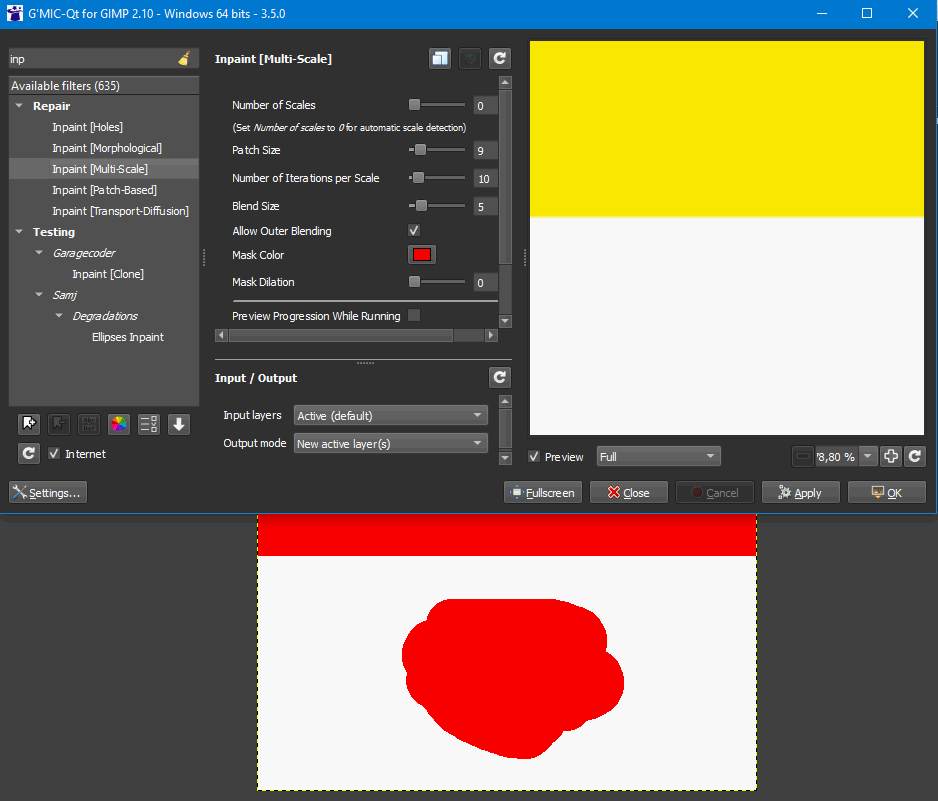
How do I use GMIQ Inpaint tool to clean an area in a picture?

Thanks
Doron


Attachments:
Gmiq Inpaint.png
Gmiq Inpaint.png [ 842.71 KiB | Viewed 1932 times ]


Last edited by doronf2 on Tue Jan 07, 2025 3:15 pm, edited 2 times in total.
Share on Facebook Share on Twitter Share on Orkut Share on Digg Share on MySpace Share on Delicious Share on Technorati
Top
 Post subject: Re: Help in Use G'mic INPAINT Tool
PostPosted: Tue Jan 07, 2025 3:07 pm  (#2) 
Offline
GimpChat Member
User avatar

Joined: Oct 31, 2020
Posts: 2013
Paint content you want with GIMP's pencil tool as color "#ff0000" then run the GMIC inpaint filters


Top
 Post subject: Re: Help in Use G'mic INPAINT Tool
PostPosted: Tue Jan 07, 2025 3:14 pm  (#3) 
Offline
GimpChat Member

Joined: Mar 06, 2015
Posts: 308
Thanks you

I did it and it is working fine

Doron.


Top
 Post subject: Re: Solved Help in Use G'mic INPAINT Tool
PostPosted: Tue Jan 07, 2025 6:00 pm  (#4) 
Offline
GimpChat Member
User avatar

Joined: Jan 13, 2011
Posts: 2648
Location: Poland
I don't know why the theory is widespread that it has to be red. :roll:

See a simple extreme example:

remove the black circle from the image

Image

when you use red
Image

when you use a color that doesn't exist in the image:
Image

One condition must be met:
the color of the painted area must match (be identical) the one selected in G'MIC!
You can simply specify it using "Pick screen Color" and you will get the desired effect.

result
Image


And work on a copy of the image because Inpaint G'MIC is destructive according to some (they don't use Edit ➤ Undo or Ctrl+z shortcut). :mrgreen:

_________________
Image


Top
Post new topic Reply to topic  [ 4 posts ] 

All times are UTC - 5 hours [ DST ]


* Login  


Powered by phpBB3 © phpBB Group