It is currently Wed Sep 16, 2026 12:59 pm


All times are UTC - 5 hours [ DST ]


Post new topic Reply to topic  [ 21 posts ]  Go to page 1, 2  Next
Author Message
 Post subject: How to move pixels from curved image to straight line?
PostPosted: Mon Feb 03, 2025 7:56 am  (#1) 
Offline
New Member

Joined: Feb 03, 2025
Posts: 3
GIMP Version: 2.10.34
Operating System: Windows
OS Version: 10
GIMP Experience: New User


Hi to all.

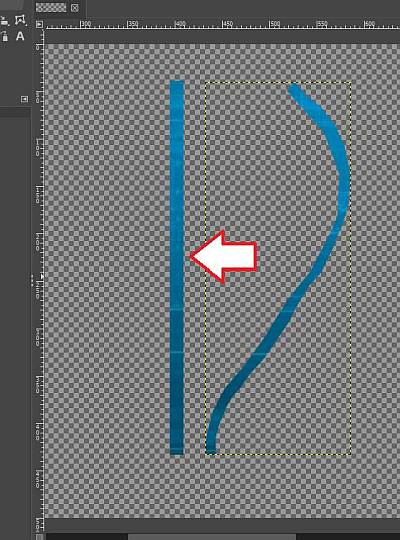
Maybe I didn't formulate the title of my question correctly, but here's what I'm trying to do: There is curved line in layer, that layer has transparency. I want to move all pixels from this line hoziontally or vertically, so that line become straight. Something like this:

Image

Is there way to do this?


Share on Facebook Share on Twitter Share on Orkut Share on Digg Share on MySpace Share on Delicious Share on Technorati
Top
 Post subject: Re: How to move pixels from curved image to straight line?
PostPosted: Mon Feb 03, 2025 4:26 pm  (#2) 
Offline
GimpChat Member
User avatar

Joined: Nov 04, 2015
Posts: 1477
Image

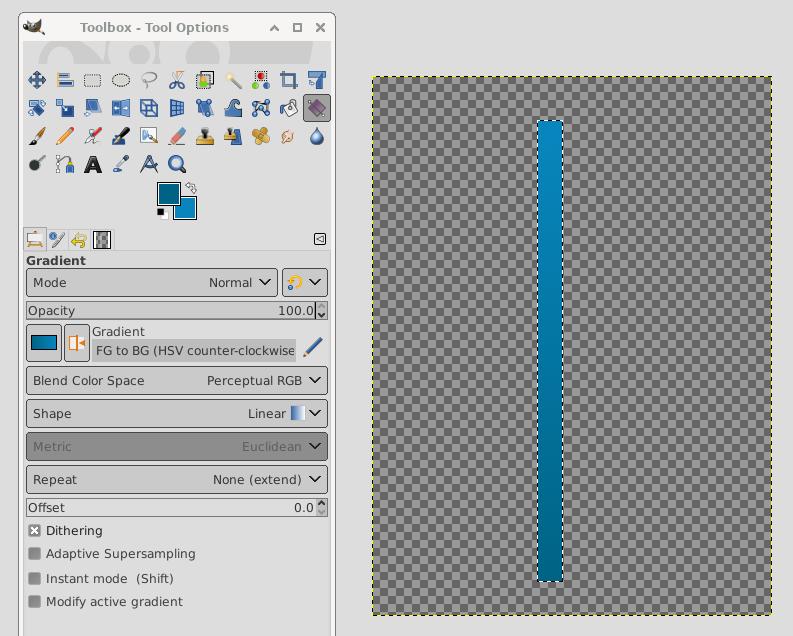
I used the 'color chooser' to sample the top and then swapped the active color and used the chooser to select bottom of your curved line. You'll notice where these colors are in the tools menu.
Then I used rectangle select to make a new virtual line. Then went to the gradient tool with FG to BG. I went from bottom up. (forget the HSV counter- clockwise, just use FG to BG)


Top
 Post subject: Re: How to move pixels from curved image to straight line?
PostPosted: Tue Feb 04, 2025 1:07 am  (#3) 
Offline
New Member

Joined: Feb 03, 2025
Posts: 3
Tas_mania - Thank you for the fast response.

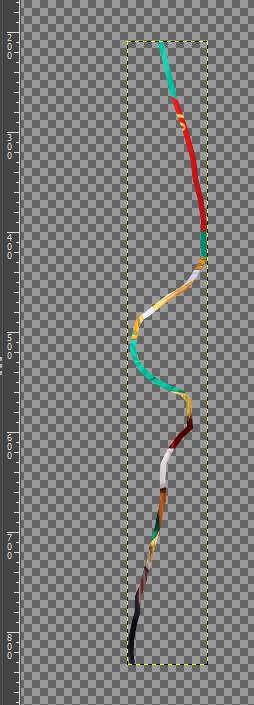
But if the curved line looks like the example below is there way to acheive what in the first post is shown?

Image

Have a nice and sunny day :)


Top
 Post subject: Re: How to move pixels from curved image to straight line?
PostPosted: Tue Feb 04, 2025 1:28 am  (#4) 
Offline
Global Moderator
User avatar

Joined: May 16, 2010
Posts: 16173
That would be possible with many gradient stops. :)

_________________
Image


Top
 Post subject: Re: How to move pixels from curved image to straight line?
PostPosted: Tue Feb 04, 2025 1:35 am  (#5) 
Offline
Global Moderator
User avatar

Joined: May 16, 2010
Posts: 16173
Not sure if there is a plug-in out there that creates a straight line or rectangle from image colors.
Not even sure if its possible.
Maybe ask one of the scripters here.

Good luck with everything. And welcome to Gimp Chat!

_________________
Image


Last edited by Rod on Tue Feb 04, 2025 1:41 am, edited 1 time in total.

Top
 Post subject: Re: How to move pixels from curved image to straight line?
PostPosted: Tue Feb 04, 2025 1:40 am  (#6) 
Offline
GimpChat Member
User avatar

Joined: Feb 12, 2021
Posts: 39
Probably doable with G'MIC. Could you post the original image here so I can try something with it ?


Top
 Post subject: Re: How to move pixels from curved image to straight line?
PostPosted: Tue Feb 04, 2025 1:42 am  (#7) 
Offline
Global Moderator
User avatar

Joined: May 16, 2010
Posts: 16173
Would it be possible with sample colors?

_________________
Image


Top
 Post subject: Re: How to move pixels from curved image to straight line?
PostPosted: Tue Feb 04, 2025 4:59 am  (#8) 
Offline
GimpChat Member
User avatar

Joined: Feb 12, 2021
Posts: 39
Tried with a custom-made sample :

Image

G'MIC plug-in, filter 'Custom Code' :

Image

Result in GIMP:

Image

Not sure that helps, but at least I've tried :hehe


Top
 Post subject: Re: How to move pixels from curved image to straight line?
PostPosted: Tue Feb 04, 2025 8:05 am  (#9) 
Offline
GimpChat Member

Joined: Mar 04, 2011
Posts: 2614
Just a possibility,

Divide the image up strips using guides. I use that old essential guides-grid.scm and a compiled plugin guillotine into layers to get a stack of strips. samj does a Windows version of that or ofnuts has a python plugin (+ align tool after)

Attachment:
strip.jpg
strip.jpg [ 168.13 KiB | Viewed 6540 times ]


Top
 Post subject: Re: How to move pixels from curved image to straight line?
PostPosted: Tue Feb 04, 2025 11:01 am  (#10) 
Offline
Script Coder
User avatar

Joined: Oct 25, 2010
Posts: 4812
Duplicate/shift laterally/merge your layer so that you have a complete vertical slice. Since you double the width each time this doesn't require so many iterations.

Attachment:
Slice1.png
Slice1.png [ 187.9 KiB | Viewed 6522 times ]


If necessary you can apply a horizontal Gaussian blur (I had to do this because working from your image my erasure of your background wasn't perfect).

Attachment:
Slice2.png
Slice2.png [ 182.21 KiB | Viewed 6522 times ]


Then cut a vertical slice

Attachment:
Slice3.png
Slice3.png [ 157.65 KiB | Viewed 6522 times ]

_________________
Image


Top
 Post subject: Re: How to move pixels from curved image to straight line?
PostPosted: Tue Feb 04, 2025 11:29 am  (#11) 
Offline
GimpChat Member

Joined: Mar 04, 2011
Posts: 2614
Another possibility
Filters -> Blur -> Linear Motion Blur extended out of the canvas
the pixels vanish, recover with
Layer -> Transparency -> Threshold Alpha and reduce value slider.

40 second example https://i.imgur.com/QNhDaMT.mp4


Top
 Post subject: Re: How to move pixels from curved image to straight line?
PostPosted: Tue Feb 04, 2025 5:14 pm  (#12) 
Offline
GimpChat Member
User avatar

Joined: Nov 04, 2015
Posts: 1477
My solution could be similar to ofnuts.

Image

I used the original image and I've called it 'The Snake' :)

Here's how I made it.

Image

I used PhotoComix Smoothing from G'MIC also.

BTW. Why are we doing this why not just start with a straight line?


Top
 Post subject: Re: How to move pixels from curved image to straight line?
PostPosted: Tue Feb 04, 2025 10:42 pm  (#13) 
Offline
Global Moderator
User avatar

Joined: Apr 01, 2012
Posts: 8471
Location: On the other side of your screen
Could it be done using the filter in GMIC under deformations 'Distort [RBF]'

Best I could do is using the GMIC filter 'Gradient from line'
Image

_________________
Image
Free Fun Photo Editing & resources
Poems from the Lord
Gimp Newby
Gimp version 3.2.4 and GMIC-Qt 4.0.2 OS :- Windows 10 Home 64


Top
 Post subject: Re: How to move pixels from curved image to straight line?
PostPosted: Wed Feb 05, 2025 2:02 am  (#14) 
Offline
New Member

Joined: Feb 03, 2025
Posts: 3
Thank you all for your cooperation and help!

Maybe I should have started by explaining the final goal. By making a vertical straight line containing part of the image and then stretching that line left or right, I want to get the example shown below.

Image

In the example shown, this effect was created by making straight vertikal line copy of image and it looks good.

Image

But it doesn't work so well with other images. For this reason, it is better when I make a copy of the end, (the edge) of the image. Thus, the stretch of the copy will look much better together with the image.

I will try with Tas_mania's 'The snake' solution and share the results as soon as I can.

Thank you, guys :)

P.S. As I looking for PhotoComix Smoothing from G'MIC I have found G'MIC Online (https://gmicol.greyc.fr/) - a web service to allow users applying image processing algorithms on their images, directly from a web browser. There's a "Pixel Sort" plugin out there that did the job for me.


Last edited by luoo on Wed Feb 05, 2025 2:56 am, edited 1 time in total.

Top
 Post subject: Re: How to move pixels from curved image to straight line?
PostPosted: Wed Feb 05, 2025 2:55 am  (#15) 
Offline
Global Moderator
User avatar

Joined: May 16, 2010
Posts: 16173
Yeah it's called pixel stretch.

www.youtube.com Video from : www.youtube.com


Hey David is it possible to add more moveable points in the gradient from line code?

Image

_________________
Image


Top
 Post subject: Re: How to move pixels from curved image to straight line?
PostPosted: Wed Feb 05, 2025 3:02 am  (#16) 
Offline
GimpChat Member
User avatar

Joined: Nov 04, 2015
Posts: 1477
It was fun doing this. Gradient from curve looks interesting, pity the Debian version has not been updated :(


Last edited by Tas_mania on Thu Feb 06, 2025 4:42 am, edited 2 times in total.

Top
 Post subject: Re: How to move pixels from curved image to straight line?
PostPosted: Wed Feb 05, 2025 3:17 am  (#17) 
Offline
Global Moderator
User avatar

Joined: May 16, 2010
Posts: 16173
You could also select rectangular regions from each part of the curve and align them to the image horizontally.
Then merge the rectangular regions together in one layer then just scale them using the shift key.
Another way to do a pixel stretch.

www.youtube.com Video from : www.youtube.com

_________________
Image


Top
 Post subject: Re: How to move pixels from curved image to straight line?
PostPosted: Wed Feb 05, 2025 12:51 pm  (#18) 
Offline
GimpChat Member
User avatar

Joined: Feb 12, 2021
Posts: 39
Quote:
Hey David is it possible to add more moveable points in the gradient from line code?


That's a good idea indeed. The current filter was only able to extract a gradient from a straight line.
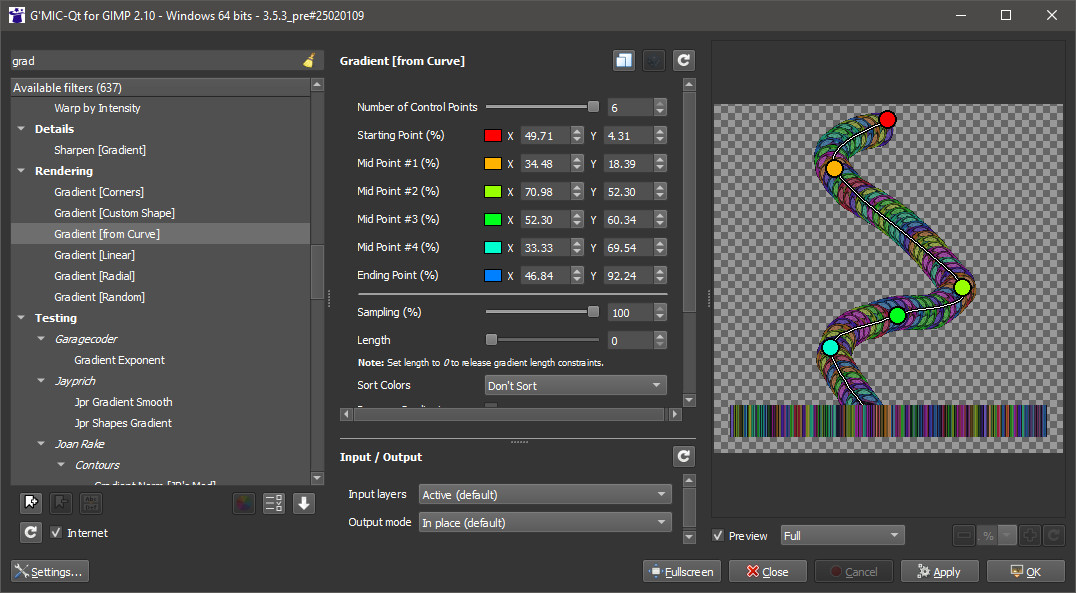
So after recoding some parts of this filter, here we are:

Image

(available if you use G'MIC 3.5.1+, after a filter update).

Another example:

Image


Top
 Post subject: Re: How to move pixels from curved image to straight line?
PostPosted: Thu Feb 06, 2025 2:18 am  (#19) 
Offline
Global Moderator
User avatar

Joined: May 16, 2010
Posts: 16173
Nice David. Thank you very much. :)

_________________
Image


Top
 Post subject: Re: How to move pixels from curved image to straight line?
PostPosted: Thu Feb 06, 2025 2:40 am  (#20) 
Offline
Global Moderator
User avatar

Joined: May 16, 2010
Posts: 16173
Pixel stretch images with ease now! :bigthup :clap

Image

Probably only needed 5 points though.

_________________
Image


Top
Post new topic Reply to topic  [ 21 posts ]  Go to page 1, 2  Next

All times are UTC - 5 hours [ DST ]


* Login  


Powered by phpBB3 © phpBB Group