It is currently Mon Aug 31, 2026 3:16 am


All times are UTC - 5 hours [ DST ]


Post new topic Reply to topic  [ 10 posts ] 
Author Message
 Post subject: Wool thread brush
PostPosted: Thu Feb 06, 2025 11:11 am  (#1) 
Offline
GimpChat Member
User avatar

Joined: Jan 06, 2020
Posts: 401
Location: The Netherlands
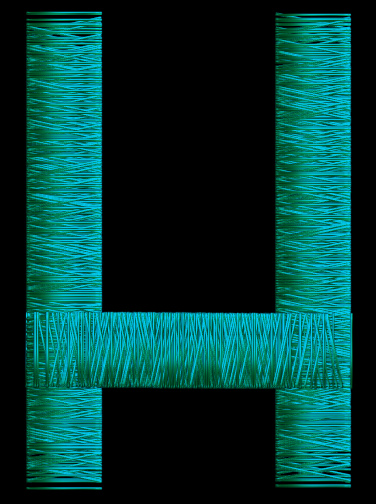
I came across this and I want to make a brush or a pattern that looks like the wool around the letters. I have tried a few things but I haven't really succeeded yet. Does anyone have any tips for me?


Attachments:
example.png.jpg
example.png.jpg [ 581.99 KiB | Viewed 4921 times ]
Share on Facebook Share on Twitter Share on Orkut Share on Digg Share on MySpace Share on Delicious Share on Technorati
Top
 Post subject: Re: Wool thread brush
PostPosted: Thu Feb 06, 2025 5:14 pm  (#2) 
Hi Jappaloe63. Use this pattern I created out of a yarn roll. Depending of the size of the text you're creating you can use the LayerFx plugin.

This is a sample using LayerFx. (Maybe you can create this effect more realistic than mine)

Image


Attachments:
Thread_(yarn).jpg
Thread_(yarn).jpg [ 143.08 KiB | Viewed 4878 times ]
Top
 Post subject: Re: Wool thread brush
PostPosted: Fri Feb 07, 2025 1:50 am  (#3) 
Offline
GimpChat Member
User avatar

Joined: Jan 06, 2020
Posts: 401
Location: The Netherlands
Thank you Pocholo.. have been looking for a long time


Top
 Post subject: Re: Wool thread brush
PostPosted: Fri Feb 07, 2025 4:00 am  (#4) 
Offline
GimpChat Member
User avatar

Joined: Aug 08, 2016
Posts: 2862
Location: East Midlands of England
Hi Jappaloe...

I have an animated brush that could possibly be edited to produce the sort of effect you want.

Currently it is intended to produce golden threads so colour is applied using mode and desaturation but it would be easy enough to create a greyscale version (perhaps add a bit of blur to soften the outline) to paint in the current colour.

If you use appropriate dynamics and spacing you could achieve something like your desired effect.

Image

The brush...

Attachment:
wisp.gih [1.68 MiB]
Downloaded 309 times

_________________
Image
"Let no one steal your dreams."
Paul Cookson

Custom Font Links
2.10 Tools
Character Paths
White Bases


Top
 Post subject: Re: Wool thread brush
PostPosted: Fri Feb 07, 2025 6:35 am  (#5) 
Offline
GimpChat Member
User avatar

Joined: Jan 06, 2020
Posts: 401
Location: The Netherlands
Thank you Skinnyhouse ... I'm definitely going to try it!


Top
 Post subject: Re: Wool thread brush
PostPosted: Fri Feb 07, 2025 12:34 pm  (#6) 
Offline
GimpChat Member
User avatar

Joined: Aug 08, 2016
Posts: 2862
Location: East Midlands of England
Image

_________________
Image
"Let no one steal your dreams."
Paul Cookson

Custom Font Links
2.10 Tools
Character Paths
White Bases


Top
 Post subject: Re: Wool thread brush
PostPosted: Fri Feb 07, 2025 12:36 pm  (#7) 
Offline
GimpChat Member
User avatar

Joined: Aug 08, 2016
Posts: 2862
Location: East Midlands of England
A greyscale brush ...

Attachment:
wisp-greyscale-compressed.gih [232.57 KiB]
Downloaded 133 times

_________________
Image
"Let no one steal your dreams."
Paul Cookson

Custom Font Links
2.10 Tools
Character Paths
White Bases


Top
 Post subject: Re: Wool thread brush
PostPosted: Fri Feb 07, 2025 1:13 pm  (#8) 
Offline
Global Moderator
User avatar

Joined: May 16, 2010
Posts: 16168
Here is a pattern i created in Filter Forge Pro 14. - Not seamless but big enough for smaller text i believe. Just rotate and re colorize to your liking. :bigthup

Image

I tried to make it bigger but Gimp Chat won't allow images that large.

_________________
Image


Top
 Post subject: Re: Wool thread brush
PostPosted: Mon Feb 10, 2025 11:30 am  (#9) 
Offline
GimpChat Member
User avatar

Joined: Jan 06, 2020
Posts: 401
Location: The Netherlands
Tried them all. I also did some searching myself and it was a satisfying result.


Attachments:
roos.png
roos.png [ 3.1 MiB | Viewed 4718 times ]
Top
 Post subject: Re: Wool thread brush
PostPosted: Mon Feb 10, 2025 2:38 pm  (#10) 
Offline
GimpChat Member
User avatar

Joined: Dec 09, 2018
Posts: 736
Jappaloe63, Very nice outcome :coolthup


Top
Post new topic Reply to topic  [ 10 posts ] 

All times are UTC - 5 hours [ DST ]


* Login  


Powered by phpBB3 © phpBB Group