It is currently Thu Aug 27, 2026 8:24 am


All times are UTC - 5 hours [ DST ]


Post new topic Reply to topic  [ 18 posts ] 
Author Message
 Post subject: Smooth text
PostPosted: Sun Jul 24, 2011 6:34 am  (#1) 
Offline
GimpChat Member
User avatar

Joined: Jul 24, 2011
Posts: 6
Location: France
GIMP Version: 2.6.11
Operating System: Windows
OS Version: XP - SP3
GIMP Experience: Basic Level


Hello.
I'm new here and have to admit to having a fairly basic level.
The problem I have is with the quality of the text that GIMP is giving me for an application form I'm trying to create.
All the text is either 'squared off',... or 'blurred', if I use the 'antialiasing'.
Any suggestions???


Share on Facebook Share on Twitter Share on Orkut Share on Digg Share on MySpace Share on Delicious Share on Technorati
Top
 Post subject: Re: Smooth text
PostPosted: Sun Jul 24, 2011 7:14 am  (#2) 
Offline
Script Coder
User avatar

Joined: Apr 23, 2010
Posts: 1553
Location: not from Guildford after all
Just a quick check, make sure your image is not in Indexed mode. Use "Image->Mode->RGB" if necessary.

If that doesn't resolve you difficulty, perhaps you could post a sample of the problem you are experiencing.

_________________
Any sufficiently primitive technology is indistinguishable from a rock.


Top
 Post subject: Re: Smooth text
PostPosted: Sun Jul 24, 2011 9:33 am  (#3) 
Offline
GimpChat Member
User avatar

Joined: Jul 24, 2011
Posts: 6
Location: France
Thanks Saulgoode, but......
it was indeed in Index mode but changing it to RGB doesn't seemed to have improved matters.
I'd love to show you an exemple but I've no idea how.
Screen cap and paste etc doesn't work........!!??
p.s. Good to meet a fellow Douglas Adams fan


Top
 Post subject: Re: Smooth text
PostPosted: Sun Jul 24, 2011 9:47 am  (#4) 
Offline
Script Coder
User avatar

Joined: Oct 25, 2010
Posts: 4812
bersabal wrote:
Thanks Saulgoode, but......
it was indeed in Index mode but changing it to RGB doesn't seemed to have improved matters.
I'd love to show you an exemple but I've no idea how.
Screen cap and paste etc doesn't work........!!??
p.s. Good to meet a fellow Douglas Adams fan

Save screen cap to disk using PNG format (you may want to crop to the actual trouble zone). Then upload attachment using the controls in the forums (you won't see them in quick reply mode, you have to go in full edit mode (if already "in quick reply", use "preview").

_________________
Image


Top
 Post subject: Re: Smooth text
PostPosted: Sun Jul 24, 2011 10:12 am  (#5) 
Offline
GimpChat Member
User avatar

Joined: Jul 24, 2011
Posts: 6
Location: France
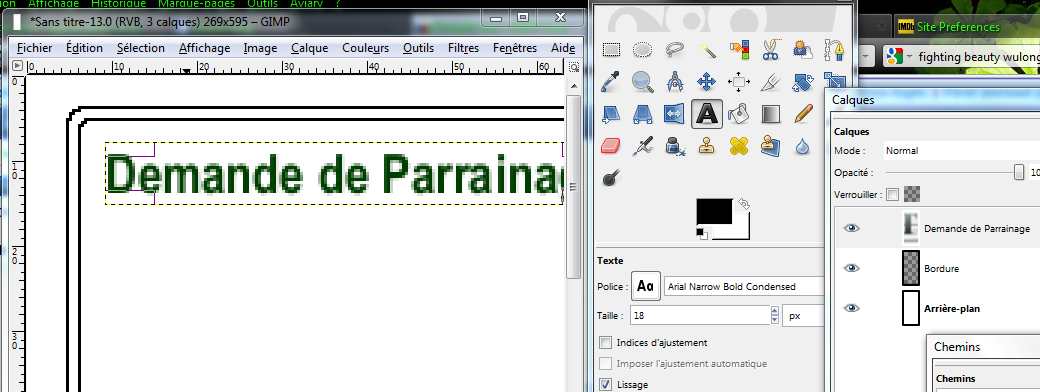
Ok, thanks. Here goes....

Image

This is driving me BATS!!
I've even tried re-doing the damn thing with Open Office then tranfering the text.gif into GIMP but the results are pretty much the same.


Top
 Post subject: Re: Smooth text
PostPosted: Sun Jul 24, 2011 10:37 am  (#6) 
Offline
GimpChat Member

Joined: Mar 29, 2011
Posts: 346
Location: Wisconsin
Try setting the Hinting (Indices d'adjustment) and the Force hinting (Imposer...) check boxes. They often produce a better result.

_________________
Image


Top
 Post subject: Re: Smooth text
PostPosted: Sun Jul 24, 2011 11:18 am  (#7) 
Offline
Script Coder
User avatar

Joined: Oct 25, 2010
Posts: 4812
Of course, you are looking at your font at x2 or x4 zoom, so it looks pixellated...

A 18-size font only has that many pixels to play with to be smooth. If your image is meant to be printed, set the image definition to 300PPI and work with a much bigger image (about 3x in each dimension). Then you use a 60-font and it looks much cleaner.

Also, if all you have is line art and text, Gimp isn't really the best tool, look into Inkscape or Scribus.

_________________
Image


Top
 Post subject: Re: Smooth text
PostPosted: Sun Jul 24, 2011 2:20 pm  (#8) 
Offline
GimpChat Member
User avatar

Joined: Oct 07, 2010
Posts: 439
Location: home/Nixnine/.gimp-2.0/scripts/nixnine.scm
Make a bigger image with bigger text then scale the entire thing down when/if you need to. My default image size is 3600x2700 and text size -- depending on font -- 200 px+. When creating a logo, I set the text to 1000 px and scale it down. Always have sharp, clear, crispy text like that.

_________________
I refuse to be confused, but am often confused at this refusal.


Top
 Post subject: Re: Smooth text
PostPosted: Sun Jul 24, 2011 2:34 pm  (#9) 
Offline
Retired Staff
User avatar

Joined: May 22, 2008
Posts: 6946
Location: Somewhere in GIMP
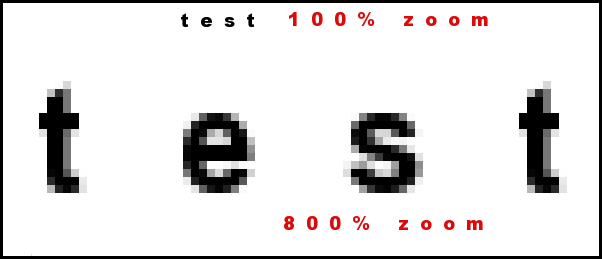
It looks like you have zoomed in on your small text (size - 18) and you are viewing the antialiasing. Make your zoom mode 100% and see if it looks better. You DO need antialiasing to make your text smooth, but it looks funny when you've zoomed way in.

Since I don't have your font I used Arial Bold, size 18. I see I had the spacing set at 11, but it won't make a difference in the results.

Image

_________________
Image
World War IV will be fought with sticks and stones. - Albert Einstein


Top
 Post subject: Re: Smooth text
PostPosted: Sun Jul 24, 2011 10:53 pm  (#10) 
Offline
Global Moderator
User avatar

Joined: May 16, 2010
Posts: 16168
Yes it will look much better at it's correct size. :)
If you want it to look very, very sharp go with Inkscape and make it 3 times bigger than you want it and scale it down when you save it as a PNG file.

There is actually a plugin that extracts text from XCF files.You can then copy all that text.Open Inkscape and paste it into a new document as text using the text tool in Inkscapes tool box.Then just select the font you want, scale it up, save as PNG and if you wish, re-open it in Gimp for further editing.

_________________
Image


Top
 Post subject: Re: Smooth text
PostPosted: Mon Jul 25, 2011 5:40 am  (#11) 
Offline
GimpChat Member
User avatar

Joined: Jul 24, 2011
Posts: 6
Location: France
Ok. thanks ya'll for your advice.
Conclusion: Create the document x3 and then reduce to target size.
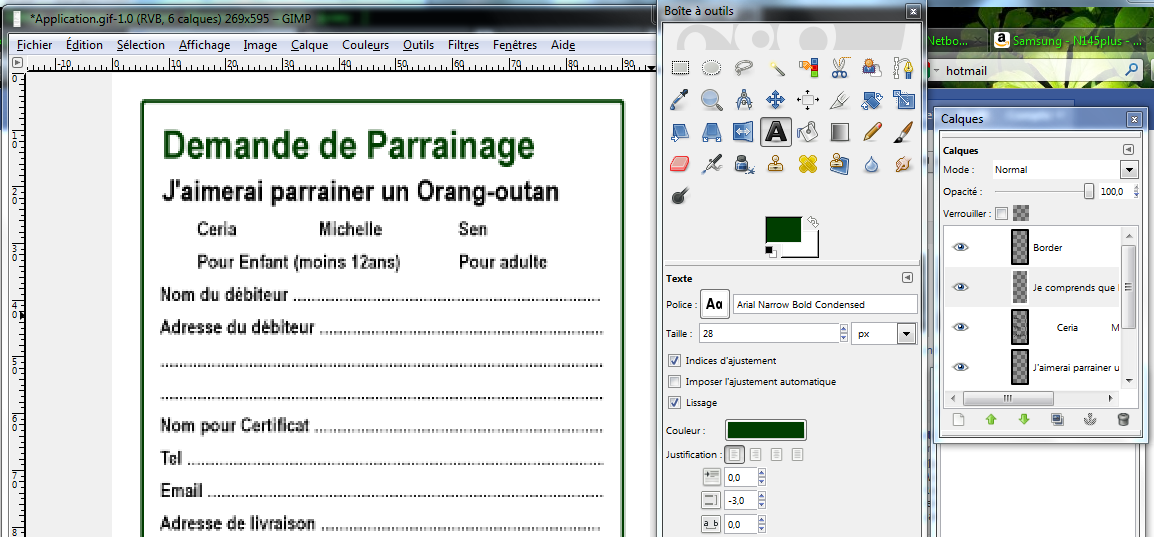
Heres the result (no vast improvement as far as I can see)
This is with 200% zoom, just for info.

Image

If this is the best that GIMP can provide then so be it, but I'd really like to do better somehow.
The final doc, with all its text, is gonna be laid onto graphic images and photos by the way.
Anybody got any ideas or views?
Thanks again


Top
 Post subject: Re: Smooth text
PostPosted: Mon Jul 25, 2011 7:30 am  (#12) 
Offline
Script Coder
User avatar

Joined: Oct 25, 2010
Posts: 4812
Hey... it's a GIF! This is a very different case...

If you really want to keep it a GIF, before converting from RGB to indexed, use the Layer/Transarency/semi-flatten (but it wil look OK only a the background color you'll use for that).

Or, come into the 21st century, and use the PNG format.

Why so? The antialiasing (ie the processing that makes smooth edges) uses semi-transparent pixels, and GIF doesn't support them.. PNG does.

But, again, using GIMP for what is 98% text and 2% line art isn't a good use of Gimp. Look at InkScape or Scribus or provide your application form in PDF.

_________________
Image


Top
 Post subject: Re: Smooth text
PostPosted: Mon Jul 25, 2011 10:57 am  (#13) 
Offline
Global Moderator
User avatar

Joined: May 16, 2010
Posts: 16168
Yes i would definitely use Scribus or Inkscape for this type of work.
Scribus is made for it.

Desktop publishing freeware. :)
Just Google Scribus.

_________________
Image


Top
 Post subject: Re: Smooth text
PostPosted: Mon Jul 25, 2011 12:42 pm  (#14) 
Offline
GimpChat Member
User avatar

Joined: Jul 24, 2011
Posts: 6
Location: France
Ok, Ihear what you are saying but the final result will include a graphics/photo backround plus layers with photos and logos....
Is GIMP the one for me under these conditions?
For the gif/png thing I'll take your advice happily Ofnuts cos, frankly, you are lightyears ahead of me on this one.
Many many thanks for your help guys.


Top
 Post subject: Re: Smooth text
PostPosted: Mon Jul 25, 2011 12:50 pm  (#15) 
Offline
GimpChat Member
User avatar

Joined: Apr 18, 2011
Posts: 620
Location: New York
bersabal wrote:
...............
For the gif/png thing I'll take your advice happily Ofnuts cos, frankly, you are lightyears ahead of me on this one.

a gif can only go up to 256 colors and is "indexed"

a png can have millions of colors and still have transparency. So, most of us really prefer the png format for many reasons not the least of which is that it is lossless (no loss of date even when compressed)

_________________
Ubuntu 24.04.1, Kernel i686, 6.8.0-52-generic
python3 v3.12.3 ----- GIMP - ver 2.10.38


Top
 Post subject: Re: Smooth text
PostPosted: Mon Jul 25, 2011 2:02 pm  (#16) 
Offline
GimpChat Member
User avatar

Joined: Jul 24, 2011
Posts: 6
Location: France
I've tried it and it works !!! :bigthup
I am, hereby, a PNG converted man.
As I said before:
Many many thanks for your help guys ('n gals?)
I know where to come the next time for advice from the experts


Top
 Post subject: Re: Smooth text
PostPosted: Mon Jul 25, 2011 2:18 pm  (#17) 
Offline
Script Coder
User avatar

Joined: Oct 25, 2010
Posts: 4812
bersabal wrote:
I've tried it and it works !!! :bigthup
I am, hereby, a PNG converted man.
As I said before:
Many many thanks for your help guys ('n gals?)
I know where to come the next time for advice from the experts

Btw, the species is called orang-outang in French (http://fr.wiktionary.org/wiki/orang-outang)

_________________
Image


Top
 Post subject: Re: Smooth text
PostPosted: Mon Jul 25, 2011 10:37 pm  (#18) 
Offline
GimpChat Member
User avatar

Joined: Jul 04, 2010
Posts: 2253
Location: Retired Moderator Slowly Returning to the Living.
ofnuts wrote:
Btw, the species is called orang-outang in French (http://fr.wiktionary.org/wiki/orang-outang)


That's funny, I thought the species was "Uncle George" :hehe

_________________
Artists aren't crazy! We're eccentric! ~G.M. Ross

Image

My Sigs = My Photos
Check out my work at http://www.flickr.com/photos/photomastergreg.


Top
Post new topic Reply to topic  [ 18 posts ] 

All times are UTC - 5 hours [ DST ]


* Login  


Powered by phpBB3 © phpBB Group