It is currently Sat Jul 25, 2026 6:46 am


All times are UTC - 5 hours [ DST ]


Post new topic Reply to topic  [ 42 posts ]  Go to page 1, 2, 3  Next
Author Message
 Post subject: GIMP 3 is released
PostPosted: Tue Mar 18, 2025 12:06 am  (#1) 
Offline
GimpChat Member
User avatar

Joined: Oct 31, 2020
Posts: 2013
GIMP 3 released March 17 2025. News is here
https://www.gimp.org/news/2025/03/16/gimp-3-0-released/


What do you think of it and what will you be doing with it?

Attachment:
2025-03-17_14-57.png
2025-03-17_14-57.png [ 1.54 MiB | Viewed 68633 times ]


I personally will be retiring from covering GIMP and developing GIMP plugins but still enjoying GIMP 3 in my own personal life. In this thread we can discuss GIMP 3 and what we can do with it.


Share on Facebook Share on Twitter Share on Orkut Share on Digg Share on MySpace Share on Delicious Share on Technorati
Top
 Post subject: Re: GIMP 3 is released
PostPosted: Tue Mar 18, 2025 6:53 am  (#2) 
Offline
GimpChat Member
User avatar

Joined: Jan 13, 2011
Posts: 2646
Location: Poland
For various reasons I will stick with Gimp-2.10.

However, I like to learn about new things.

I wanted to check:

Experimental Tool

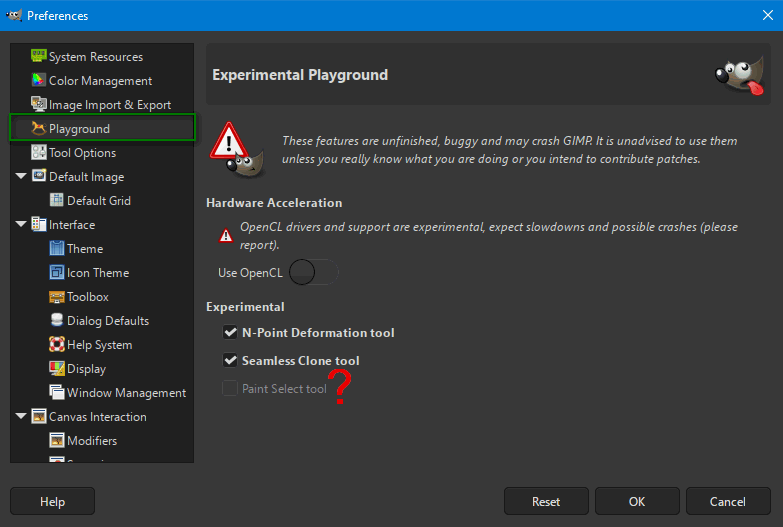
GIMP 3.0 includes a new experimental selection tool, Paint Select. This tool allows you to use a brush to progressively select an object or area in an image.
While it is a very nice feature, it still has some stability issues.
Therefore, it is not visible by default - you will need to enable it in the Playground section of the Preferences Dialog to test it out.
You can access this section by running GIMP 3.0 with the --show-playground flag.


I activated 'Playground' but the option "Paint Select" is grayed out without the possibility of enabling.

Image

Am I missing something or did the developers forget to make it available despite a separate announcement?

_________________
Image


Top
 Post subject: Re: GIMP 3 is released
PostPosted: Tue Mar 18, 2025 10:11 am  (#3) 
Offline
GimpChat Member
User avatar

Joined: Jan 13, 2011
Posts: 2646
Location: Poland
Completely unexpected bug in Win Gimp-3.0.0 - no Python plugins work.

Confirmation see also here:
viewtopic.php?f=9&t=21412&p=295459#p295459

Replacing .../lib/python3.12 from Gimp 3 RC3 fixes the issue.

_________________
Image


Top
 Post subject: Re: GIMP 3 is released
PostPosted: Tue Mar 18, 2025 6:06 pm  (#4) 
Offline
GimpChat Member
User avatar

Joined: Dec 09, 2018
Posts: 735
Just had a quick look.

Filters -> Light and Shadow -> Drop Shadow now has a different range of values for opacity.

In gimp 2.10 and 3.0.0-RC3 it was 0.0 to 2.0.
Now in gimp 3.0.0 it's 0.0 to 1.0.

Did anyone notice that in the release notes?

Also still 0.0 to 2.0 here:
https://gegl.org/operations/gegl-dropshadow.html
Is that still the right place to look up gegl operations or is there somewhere newer?


Top
 Post subject: Re: GIMP 3 is released
PostPosted: Tue Mar 18, 2025 8:06 pm  (#5) 
Offline
Global Moderator
User avatar

Joined: Apr 01, 2012
Posts: 8434
Location: On the other side of your screen
Thank you Contrast for the heads up!
I deleted 3RC3 before downloading this one and found that I deleted the GMIC-qt plugin for 3 as well. Downloaded it again and it works now.
Looks like any 'extra' plugins we had installed for 3 need to be reinstalled.
I will probably keep my 2.10.38 until this one is working well too.

_________________
Image
Free Fun Photo Editing & resources
Poems from the Lord
Gimp Newby
Gimp version 3.2.4 and GMIC-Qt 4.2.0 OS :- Windows 10 Home 64


Top
 Post subject: Re: GIMP 3 is released
PostPosted: Wed Mar 19, 2025 2:38 am  (#6) 
Offline
GimpChat Member
User avatar

Joined: Jul 06, 2013
Posts: 2662
Location: California
I am downloading 3.0 now. I just haven't installed it yet. What does everyone think of it?


Top
 Post subject: Re: GIMP 3 is released
PostPosted: Wed Mar 19, 2025 6:52 am  (#7) 
Offline
GimpChat Member
User avatar

Joined: Jan 13, 2011
Posts: 2646
Location: Poland
You have to decide for yourself which one to use Gimp for.

Hint (by lylejk):
https://discuss.pixls.us/t/can-i-keep-m ... -0/48917/8

Regardless of your decision, I would wait with the installation for a probably quick fix version (fixing Python's operation).

_________________
Image


Top
 Post subject: Re: GIMP 3 is released
PostPosted: Wed Mar 19, 2025 7:09 am  (#8) 
Offline
GimpChat Member
User avatar

Joined: Jan 13, 2011
Posts: 2646
Location: Poland
Another solution to the Python plugin problem (at your own risk - but very simple):
Gimp 3 RC3 uses Python 3.12.8 which requires libgirepository-1.0-1.dll.
Gimp 3.0.0 uses Python 3.12.9 which requires libgirepository-2.0-0.dll (but the file was omitted).

Attached is libgirepository-2.0-0.dll which should be added to Gimp 3/bin/.
The file (temporarily available) comes from:
https://packages.msys2.org/packages/min ... 6_64-glib2
mingw-w64-clang-x86_64-glib2-2.84.0-1-any.pkg.tar.zst

Edit:
Attachment removed because the file was added to the current installer.
(downloaded 22 times)
:roll:

_________________
Image


Last edited by MareroQ on Wed Mar 26, 2025 6:50 am, edited 2 times in total.

Top
 Post subject: Re: GIMP 3 is released
PostPosted: Wed Mar 19, 2025 11:01 am  (#9) 
Offline
GimpChat Member
User avatar

Joined: Jul 06, 2013
Posts: 2662
Location: California
MareroQ wrote:
You have to decide for yourself which one to use Gimp for.

Hint (by lylejk):
https://discuss.pixls.us/t/can-i-keep-m ... -0/48917/8

Regardless of your decision, I would wait with the installation for a probably quick fix version (fixing Python's operation).


Since there are problems arising with the new release of gimp 3.0, I'll just wait on installing it and I'll continue to use GIMP 2.10.38.


Top
 Post subject: Re: GIMP 3 is released
PostPosted: Wed Mar 19, 2025 12:00 pm  (#10) 
Offline
New Member

Joined: Aug 01, 2023
Posts: 4
Why can't I resize the window vertically?

It's like this on both Linux and Windows.


Top
 Post subject: Re: GIMP 3 is released
PostPosted: Wed Mar 19, 2025 5:05 pm  (#11) 
Offline
GimpChat Member
User avatar

Joined: Oct 31, 2020
Posts: 2013
teapot wrote:
Just had a quick look.

Filters -> Light and Shadow -> Drop Shadow now has a different range of values for opacity.

In gimp 2.10 and 3.0.0-RC3 it was 0.0 to 2.0.
Now in gimp 3.0.0 it's 0.0 to 1.0.

Did anyone notice that in the release notes?

Also still 0.0 to 2.0 here:
https://gegl.org/operations/gegl-dropshadow.html
Is that still the right place to look up gegl operations or is there somewhere newer?

GEGL's lead dev made that change like about two weeks ago at the last minute to solve another bug. I was against it and favored an alternative fix method but my idea was rejected.


Top
 Post subject: Re: GIMP 3 is released
PostPosted: Wed Mar 19, 2025 11:44 pm  (#12) 
Offline
GimpChat Member
User avatar

Joined: Jan 13, 2011
Posts: 2646
Location: Poland
doobes

The window size can be freely changed within a certain range (horizontally and vertically).
My minimum Gimp size is:

Image

_________________
Image


Top
 Post subject: Re: GIMP 3 is released
PostPosted: Thu Mar 20, 2025 12:33 am  (#13) 
Offline
Global Moderator
User avatar

Joined: May 16, 2010
Posts: 16132
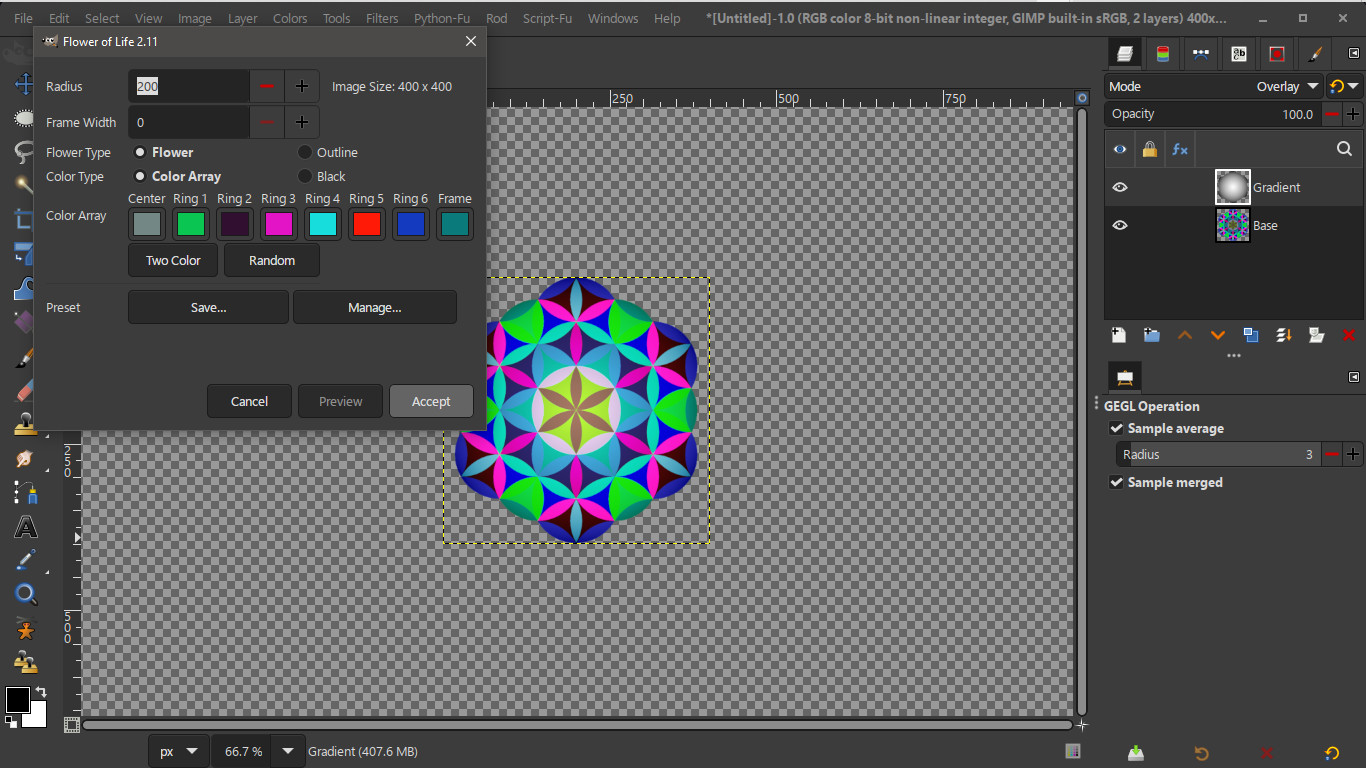
Thank you MareroQ for the dll fix. :) I can indeed confirm it working in the latest DEV commit on GitLab.
Gimp-3.0.1 :bigthup Gasmasks Flower of Life 2.11 plug-in tested.
Image

_________________
Image


Top
 Post subject: Re: GIMP 3 is released
PostPosted: Thu Mar 20, 2025 5:22 pm  (#14) 
Offline
GimpChat Member
User avatar

Joined: Jul 06, 2013
Posts: 2662
Location: California
So, what plugins, scripts can be used in GIMP 3.0? It's obvious to me that whatever scripts, gradients, palettes, patterns, brushes, and plugins that everyone was using in 2.10.38, most likely can't be used in GIMP 3.0. Examples would be the photoshop plugins & the theme selector.


Top
 Post subject: Re: GIMP 3 is released
PostPosted: Thu Mar 20, 2025 11:31 pm  (#15) 
Offline
GimpChat Member
User avatar

Joined: Jan 13, 2011
Posts: 2646
Location: Poland
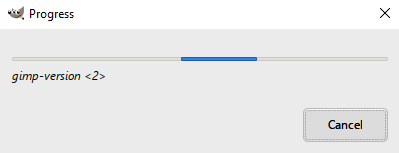
After three long days ;) , the Python plugins issue has been officially resolved (the added file is identical to the one in post #8).

Image

_________________
Image


Top
 Post subject: Re: GIMP 3 is released
PostPosted: Fri Mar 21, 2025 1:02 pm  (#16) 
Offline
GimpChat Member
User avatar

Joined: Jul 06, 2013
Posts: 2662
Location: California
MareroQ wrote:
After three long days ;) , the Python plugins issue has been officially resolved (the added file is identical to the one in post #8).

[ Image ]


These images are what I see during the loading of GIMP 3.0 and after:

Image

Image

Why is this happening & is it happpening to anyone else using Windows 10?


Top
 Post subject: Re: GIMP 3 is released
PostPosted: Fri Mar 21, 2025 1:39 pm  (#17) 
Offline
New Member

Joined: Aug 01, 2023
Posts: 4
Greetings,

Is there a version of shellout.py (for using NIK programs) that works with v3.0?

I tried a couple of versions from Github without luck. I'm not allowed to post links...

Thanks

chris


Last edited by doobes on Fri Mar 21, 2025 2:20 pm, edited 1 time in total.

Top
 Post subject: Re: GIMP 3 is released
PostPosted: Fri Mar 21, 2025 2:11 pm  (#18) 
Offline
New Member

Joined: Aug 01, 2023
Posts: 4
MareroQ wrote:
doobes

The window size can be freely changed within a certain range (horizontally and vertically).
My minimum Gimp size is:

[ Image ]


Unfortunately, I'm finding that is that I can only change the horizontal size on my Windows 10 and Ubuntu 22.04 variant (Elementary OS).

On Windows, when maximized, GIMP will not allow the taskbar to show (I have it set to hidden).

On my Ubuntu 24.04 variant, it does not exhibit this behavior.

cheers,

chris


Top
 Post subject: Re: GIMP 3 is released
PostPosted: Tue Mar 25, 2025 9:13 am  (#19) 
Offline
GimpChat Member
User avatar

Joined: Jan 13, 2011
Posts: 2646
Location: Poland
2025-Mar-24 version GIMP 3.0.2 was released.
Apparently even more mistakes:
https://discuss.pixls.us/t/completely-u ... rk/48948/9

_________________
Image


Top
 Post subject: Re: GIMP 3 is released
PostPosted: Tue Mar 25, 2025 12:03 pm  (#20) 
Offline
New Member

Joined: Mar 25, 2025
Posts: 2
Can't get any plugins to be recognized by Gimp 3.0
Trying to install Beautify-0.5.3_32bits-64bits-Win, Resynthesizer_v1.0-i686 on a Win 11 laptop, any ideas on how to get this done? I have added individual ****.exe plugin files to user\appdata\roming\gimp\3.0\plugins as well as in c:\program files\gimp\lib\gimp\3.0\plugins to no avail. also put them in their own folders and both locations and also added the locations through the preferences\folder\plugins folders section....... The only one that has been successfully added is the G'MIC 3.0


Top
Post new topic Reply to topic  [ 42 posts ]  Go to page 1, 2, 3  Next

All times are UTC - 5 hours [ DST ]


* Login  


Powered by phpBB3 © phpBB Group