It is currently Tue Jun 23, 2026 2:58 pm


All times are UTC - 5 hours [ DST ]


Post new topic Reply to topic  [ 3 posts ] 
Author Message
 Post subject: Locate Gimp profile in Linux Mint
PostPosted: Mon Mar 24, 2025 11:34 am  (#1) 
Offline
GimpChat Member

Joined: Apr 09, 2018
Posts: 1888
Location: France
GIMP Version: 2.10.38
Operating System: Windows
GIMP Experience: Basic Level


Hello everyone, :wvy
I just installed Linux Mint instead of Windows 7 on an old PC.
The installed Gimp is 2.10.36, and I'll wait for the update to Gimp 2.10.38 to be released.
I've been using Windows for 20 years, so I know nothing about Linux (and I've been educating myself for the past month with YouTube tutorials and browsing forums).
In Windows 10, the profile is in C:\Users\xxxxxxxxxx\AppData\Roaming\GIMP\2.10, but in Linux Mint Cinnamon, where is the profile located?

_________________
Les parfums, les couleurs et les sons se répondent.Baudelaire (Les fleurs du mal)
2.10.36/(Samj) Gimp 2.10.38 OS Windows 10 Home 64 bits


Share on Facebook Share on Twitter Share on Orkut Share on Digg Share on MySpace Share on Delicious Share on Technorati
Top
 Post subject: Re: Locate Gimp profile in Linux Mint
PostPosted: Mon Mar 24, 2025 12:07 pm  (#2) 
Offline
GimpChat Member

Joined: Mar 04, 2011
Posts: 2604
level_0 wrote:
GIMP Version: 2.10.38
Operating System: Windows
GIMP Experience: Basic Level


Hello everyone, :wvy
I just installed Linux Mint instead of Windows 7 on an old PC.
The installed Gimp is 2.10.36, and I'll wait for the update to Gimp 2.10.38 to be released.
I've been using Windows for 20 years, so I know nothing about Linux (and I've been educating myself for the past month with YouTube tutorials and browsing forums).
In Windows 10, the profile is in C:\Users\xxxxxxxxxx\AppData\Roaming\GIMP\2.10, but in Linux Mint Cinnamon, where is the profile located?


Welcome to the linux world. Mint is a good choice.

The same as in Windows, you can find the location from Edit -> Preferences -> Folders
A standard installation and your Gimp 2.10 profile is /home/your-name/.config/GIMP/2.10/
The dot-name as in .config means it is a "hidden" file or folder. In the Mint file manager enable View -> Show Hidden Files (shortcut CTRL-H)

Attachment:
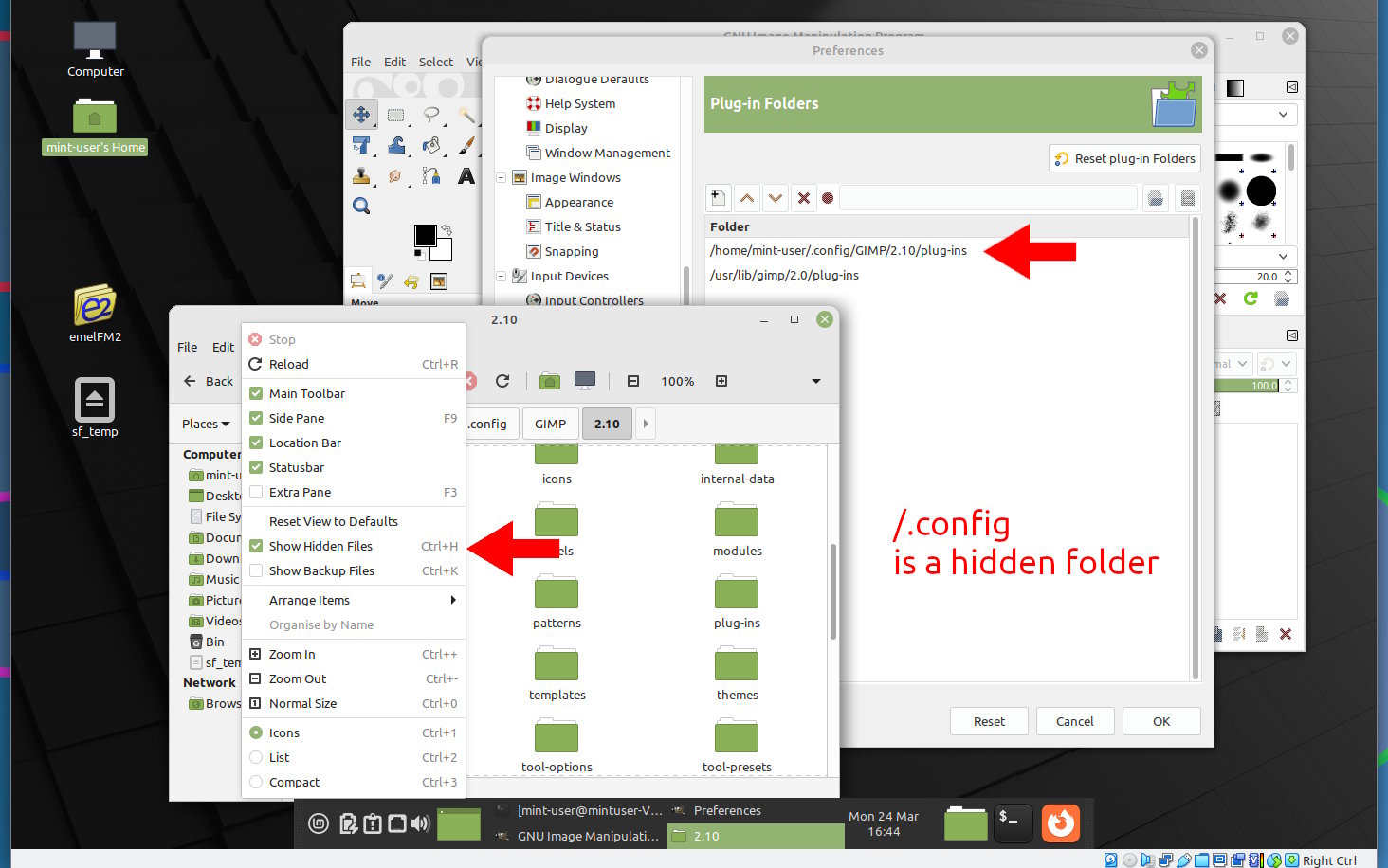
hidden.jpg
hidden.jpg [ 172.61 KiB | Viewed 5273 times ]


One thing that is different in linux, plugins are "executable" Not difficult, you can do this using the Mint file manager.

Attachment:
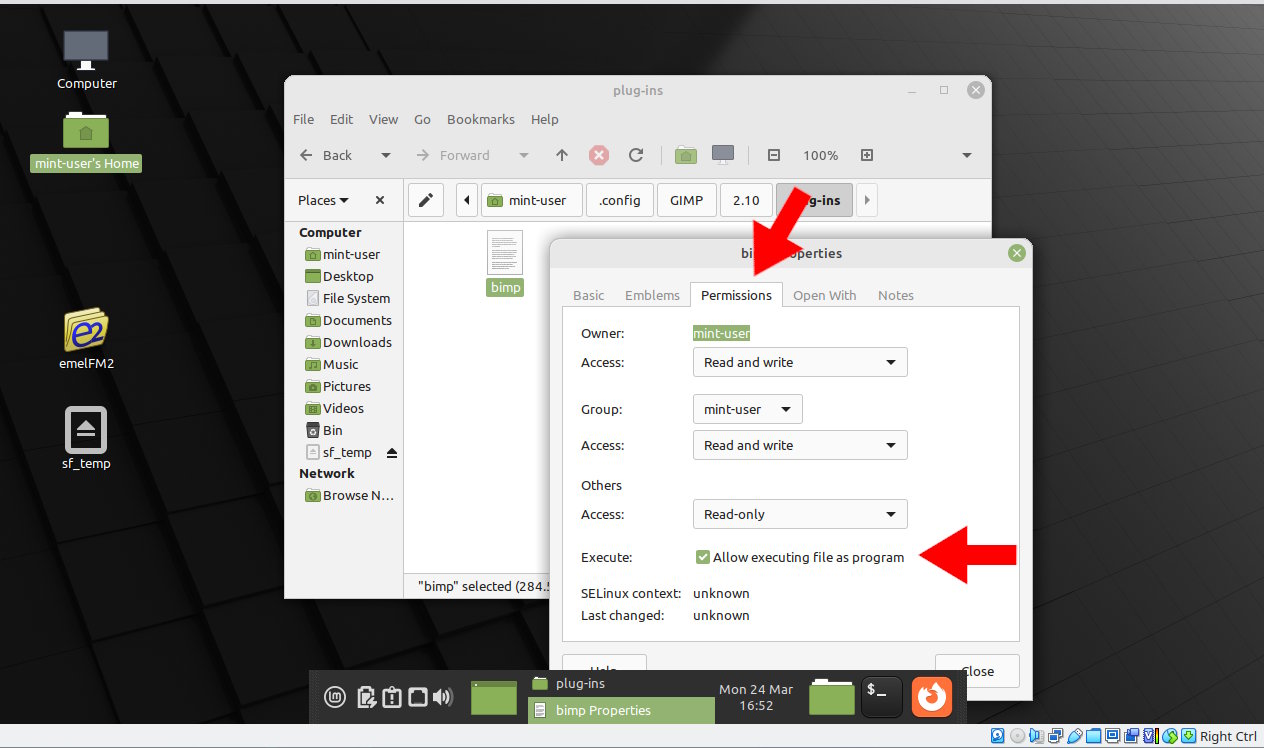
permissions.jpg
permissions.jpg [ 102.92 KiB | Viewed 5273 times ]


It is different, do not give up


Top
 Post subject: Re: Locate Gimp profile in Linux Mint
PostPosted: Mon Mar 24, 2025 2:08 pm  (#3) 
Offline
GimpChat Member

Joined: Apr 09, 2018
Posts: 1888
Location: France
Thanks, rich2005 :hugme
I'll make a note of all this. :)

_________________
Les parfums, les couleurs et les sons se répondent.Baudelaire (Les fleurs du mal)
2.10.36/(Samj) Gimp 2.10.38 OS Windows 10 Home 64 bits


Top
Post new topic Reply to topic  [ 3 posts ] 

All times are UTC - 5 hours [ DST ]


* Login  


Powered by phpBB3 © phpBB Group