It is currently Thu Aug 06, 2026 12:58 pm


All times are UTC - 5 hours [ DST ]


Post new topic Reply to topic  [ 50 posts ]  Go to page Previous  1, 2, 3
Author Message
 Post subject: Re: Plugin UNICODE to shapes and paths.py
PostPosted: Fri Nov 18, 2022 5:12 am  (#41) 
Offline
GimpChat Member
User avatar

Joined: Jul 06, 2013
Posts: 2662
Location: California
MareroQ wrote:
To the set added:
- script-fu "Symbol Display Rel 0.04" created by Graechan,
- a shortcut to call BabelMap.


The Symbols Display script doesn't appear in Gimp 2.10.32 for me. I'm using Windows 10.
Image


Top
 Post subject: Re: Plugin UNICODE to shapes and paths.py
PostPosted: Fri Nov 18, 2022 11:36 am  (#42) 
Offline
GimpChat Member

Joined: Mar 04, 2011
Posts: 2610
Should work

What do you get when you right-click in the fonts dock ? Is there a Symbol Display entry ? Choose that option.

Attachment:
01-menu.jpg
01-menu.jpg [ 74.09 KiB | Viewed 1345 times ]


Put the font name in the script-fu dialogue. OK to render a font map as a new image.

Attachment:
02-map.jpg
02-map.jpg [ 124.29 KiB | Viewed 1345 times ]


Top
 Post subject: Re: Plugin UNICODE to shapes and paths.py
PostPosted: Sat Nov 19, 2022 7:57 pm  (#43) 
Offline
GimpChat Member
User avatar

Joined: Jul 06, 2013
Posts: 2662
Location: California
rich2005 wrote:
Should work

What do you get when you right-click in the fonts dock ? Is there a Symbol Display entry ? Choose that option.

Attachment:
01-menu.jpg


Put the font name in the script-fu dialogue. OK to render a font map as a new image.

Attachment:
02-map.jpg


I haven't done that yet because I thought "font" would be at the top of the menu. Now that I know it's not, I will check the location that's in the screen shots. Thanks, Rich! :)

EDIT: What you did in the screenshots, works. I have what you have in the screen shots.


Last edited by mackenzieh on Mon Nov 21, 2022 2:36 am, edited 3 times in total.

Top
 Post subject: Re: Plugin UNICODE to shapes and paths.py
PostPosted: Sun Nov 20, 2022 10:16 am  (#44) 
Offline
Administrator
User avatar

Joined: Aug 10, 2012
Posts: 14145
Location: Native to NYC living in Arizona, Gimp 2.8 - 3.0, Win 11 PC.
Nice!!!

_________________
Image
"A wise man learns more from a foolish question than a fool can learn from a wise answer"
Image


Top
 Post subject: Re: Plugin UNICODE to shapes and paths.py
PostPosted: Mon Jun 16, 2025 9:00 am  (#45) 
Offline
GimpChat Member
User avatar

Joined: Jan 13, 2011
Posts: 2648
Location: Poland
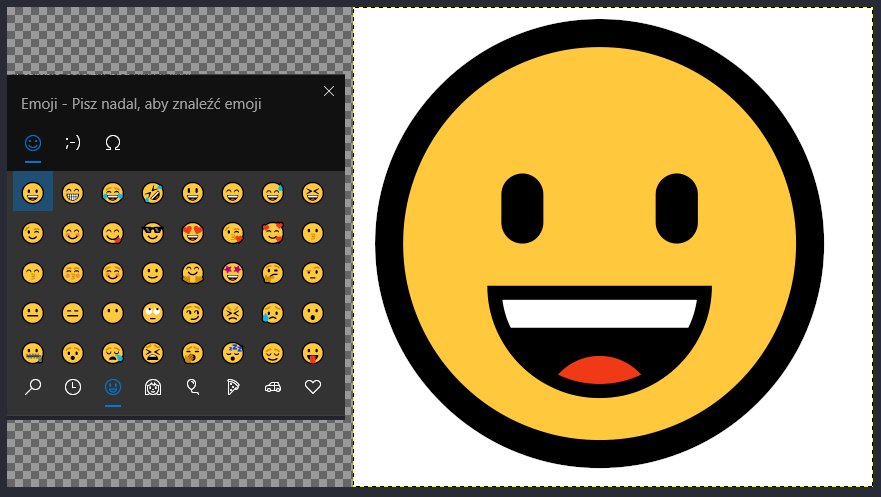
Complete surprise in Gimp 3:
https://www.gimp-forum.net/Thread-Windo ... 3#pid44583

Many thanks to Rich2005 for sharing this information.

Image

_________________
Image


Top
 Post subject: Re: Plugin UNICODE to shapes and paths.py
PostPosted: Mon Jun 16, 2025 11:19 am  (#46) 
Offline
Global Moderator
User avatar

Joined: May 16, 2010
Posts: 16150
Hah! Nifty! :)

Windows key + . To open emoticons. Pretty cool. :)

:tyspin :clap

Does this work in Gimp-2.10.38 as well? Has this always worked? What other developer hidden options are there. ;)

_________________
Image


Top
 Post subject: Re: Plugin UNICODE to shapes and paths.py
PostPosted: Mon Jun 16, 2025 12:29 pm  (#47) 
Offline
GimpChat Member

Joined: Mar 04, 2011
Posts: 2610
That win key + . came in with a Windows 10 update. The Windows 10 version is more basic than win 11 when it comes to more than "smiley" emoticons, entering characters not normally on a keyboard.

The question came up for inserting "smart quotes" which you can do in Gimp 2.10 using unicode entry shift-ctrl-u + a code. This is gone in Windows Gimp 3 using GTK3 because no way to enable text entry simple mode.
https://gitlab.gnome.org/GNOME/gimp/-/issues/14212

Attachment:
emoji.jpg
emoji.jpg [ 87.34 KiB | Viewed 636 times ]


For just the "smileys" and Gimp 3.0 you can also use the old Gimp Text Editor, and right click now has an emoji option.


Top
 Post subject: Re: Plugin UNICODE to shapes and paths.py
PostPosted: Mon Jun 16, 2025 7:27 pm  (#48) 
Offline
GimpChat Member
User avatar

Joined: Jul 06, 2013
Posts: 2662
Location: California
Is there an updated version of this plugin for Windows, Mac, and Linux for the current version of GIMP 3.0 and for GIMP 2.10.38?


Top
 Post subject: Re: Plugin UNICODE to shapes and paths.py
PostPosted: Tue Jun 17, 2025 2:29 am  (#49) 
Offline
GimpChat Member
User avatar

Joined: Jan 13, 2011
Posts: 2648
Location: Poland
Unicode Map Ver.1.1.
Only for Gimp-2.10.38 Win.

In the menu:
Filters ➤ ° Unicode to shape ➤ UNICODE Map...


Attachments:
Unicode Map Ver.1.1.png
Unicode Map Ver.1.1.png [ 59.6 KiB | Viewed 609 times ]
Unicode_to_shape_Map.zip [11 KiB]
Downloaded 32 times

_________________
Image
Top
 Post subject: Re: Plugin UNICODE to shapes and paths.py
PostPosted: Tue Jun 17, 2025 2:59 am  (#50) 
Offline
GimpChat Member

Joined: Mar 04, 2011
Posts: 2610
mackenzieh wrote:
Is there an updated version of this plugin for Windows, Mac, and Linux for the current version of GIMP 3.0 and for GIMP 2.10.38?


Good, you have the updated plugin from MareroQ

--------------------------------
To try and explain the basic differences between Windows 10 and Windows 11

The Winkey plus dot is built in. Without Gimp running do winkey . and it brings up an emoji selector. There are differences, Win11 has a few more options.

Attachment:
01-versions.jpg
01-versions.jpg [ 59.42 KiB | Viewed 603 times ]


In Windows 11 and Gimp 3.0 you can also use the Text Editor function, Right click to add an emoji.

Attachment:
03-30.jpg
03-30.jpg [ 73.23 KiB | Viewed 603 times ]


In Windows 10 / Gimp 2.10.38 and simple text mode, you can add a character using shift-ctrl-u or winkey-dot for that emoji selector.

Attachment:
02-win10.jpg
02-win10.jpg [ 77.07 KiB | Viewed 603 times ]


Confused ? - bound to be ;)


Top
Post new topic Reply to topic  [ 50 posts ]  Go to page Previous  1, 2, 3

All times are UTC - 5 hours [ DST ]


cron

* Login  


Powered by phpBB3 © phpBB Group