It is currently Sat Jun 20, 2026 6:25 pm


All times are UTC - 5 hours [ DST ]


Post new topic Reply to topic  [ 12 posts ] 
Author Message
 Post subject: Embroidery Stitcher for Gimp-3.0
PostPosted: Sun May 18, 2025 2:13 am  (#1) 
Offline
Global Moderator
User avatar

Joined: May 16, 2010
Posts: 16037
This plugin creates an Embroidery Effect on your opened image, or layer.
Works best with lots of colors.

No dialog, just run the filter and it creates the effect.

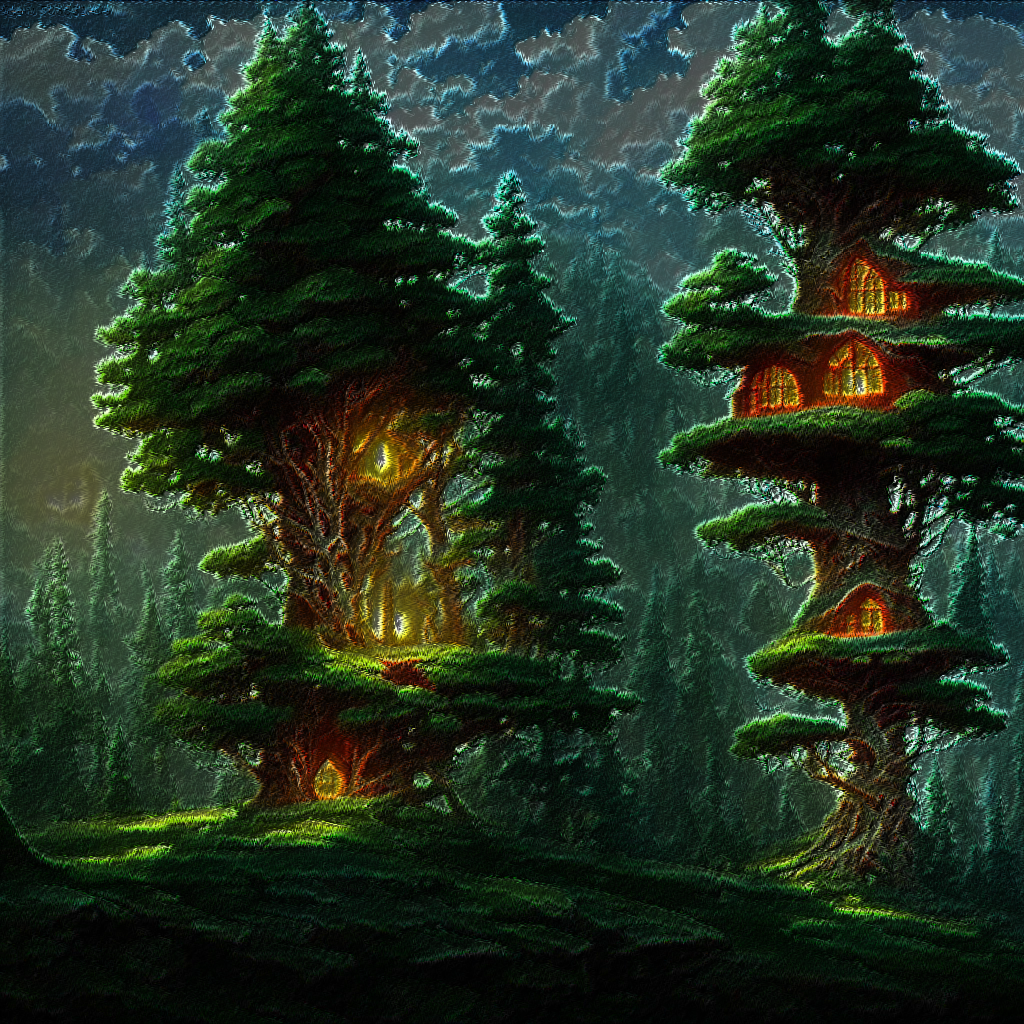
Image created in Gimp using Gimp Stable Diffusion (AI text to Image plugin for Gimp-2.10).
viewtopic.php?f=9&t=21674

Image

Results after running the filter on the open image.

Image

Plugin can be found under Rod>Artistic>Embroidery Stitcher. You can change that menu location if you wish. I prefer to have all my newly installed filters under each creator's name.

Where to install -
Gimp-3.0/Plugins folder It is a scm filter but needs to be unzipped to your plugins folder to work.

Instructions to use -
Just select the layer your image is on and run the filter. Everything is automatic. The filter will keep the original image and create the effect layer above it. The GEGL FX are not saved.

Image

Have fun! :bigthup


Attachments:
embroidery-stitcher-Gimp-3.0_RD.7z [1.34 KiB]
Downloaded 1229 times

_________________
Image
Share on Facebook Share on Twitter Share on Orkut Share on Digg Share on MySpace Share on Delicious Share on Technorati
Top
 Post subject: Re: Embroidery Stither for Gimp-3.0
PostPosted: Sun May 18, 2025 2:31 am  (#2) 
Offline
Global Moderator
User avatar

Joined: May 16, 2010
Posts: 16037
Another tree house image

Image

_________________
Image


Top
 Post subject: Re: Embroidery Stither for Gimp-3.0
PostPosted: Mon May 19, 2025 2:25 am  (#3) 
Offline
Global Moderator
User avatar

Joined: May 16, 2010
Posts: 16037
A meaty Cyborg

Image

_________________
Image


Top
 Post subject: Re: Embroidery Stitcher for Gimp-3.0
PostPosted: Fri May 30, 2025 7:16 pm  (#4) 
Offline
Global Moderator
User avatar

Joined: May 16, 2010
Posts: 16037
A witch image created in Gimp Diffusion.

Input image

Image

Output after Embroidery Stitcher

Image

_________________
Image


Top
 Post subject: Re: Embroidery Stitcher for Gimp-3.0
PostPosted: Sun Jun 22, 2025 10:56 pm  (#5) 
Offline
GimpChat Member
User avatar

Joined: Oct 31, 2020
Posts: 2012
I rewrote this plugin as non-destructive GEGL syntax

Notice how noise spread and edge neon are inside the hsv value composer, and hsv value's composer is set to 68%. I also added a `gegl:opacity` because I needed to match the legacy hsv value's blend mode that I don't like using.

id=1 gimp:layer-mode layer-mode=hsv-value opacity=0.68 aux=[ ref=1  noise-spread amount-x=7 amount-y=7 seed=0 edge-neon radius=4.081 amount=0.080
opacity value=1.3 ]


I can turn it into a plugin with sliders and blend modes other then hsv value.

Image


Top
 Post subject: Re: Embroidery Stitcher for Gimp-3.0
PostPosted: Sun Jun 22, 2025 11:17 pm  (#6) 
Offline
GimpChat Member
User avatar

Joined: Oct 31, 2020
Posts: 2012
I have an idea. Of course I could easily convert this plugin to GEGL but maybe it would be more fun if Rod made his first GEGL plugin this way with my help. I can guide him step by step on how to make a GEGL plugin.

We will keep the plugin simple It will feature just three sliders

Spread (for noise spread X and Y), Edge ( for edge-neon's radius) Intensity (for Opacity 1.3)

Spread can go from (1-10)
Edge can go from (2-10)
Opacity can go from (1 to 1.5)

I already started by listing all the nodes we will be using and I assigned them properties.

GeglNode *input    = gegl_node_get_input_proxy (gegl, "input");

GeglNode *output   = gegl_node_get_output_proxy (gegl, "output");

GeglNode *hsvvalue = gegl_node_new_child (gegl, "operation", "gimp:layer-mode", "layer-mode", 40, "opacity", 0.68, NULL);

GeglNode *edge = gegl_node_new_child (gegl, "operation", "gegl:edge-neon", "amount", 0.080,  NULL);

GeglNode *opacity = gegl_node_new_child (gegl, "operation", "gegl:opacity", "value", 1.3,  NULL);

GeglNode *noise = gegl_node_new_child (gegl, "operation", "gegl:noise-spread",   NULL);


and of course the title and description and op name area


    "name",        "rod:embroidery-stitcher",
    "title",       _("Embroidery Stitcher"),
    "reference-hash", "3ro45trpjot4kl0n2odff",
    "description", _("Embroidery Stitcher"),
    "gimp:menu-path", "<Image>/Filters/Rod",
    "gimp:menu-label", _("Embroidery Stitcher..."),
}

#endif


Once again this plugin would be incredibly simple for me to make :geek but if Rod wants he can manually attempt to complete it with my guidance and he will successfully make a GEGL plugin.


Last edited by contrast_ on Mon Jun 23, 2025 2:53 am, edited 1 time in total.

Top
 Post subject: Re: Embroidery Stitcher for Gimp-3.0
PostPosted: Mon Jun 23, 2025 2:19 am  (#7) 
Offline
Global Moderator
User avatar

Joined: May 16, 2010
Posts: 16037
contrast_ wrote:
I have an idea. Of course I could easily convert this plugin to GEGL but maybe it would be more fun if Rod made his first GEGL this way with my help. I can guide him step by step on how to make a GEGL plugin.

We will keep the plugin simple It will feature just three sliders

Spread (for noise spread X and Y), Edge ( for edge-neon's radius) Intensity (for Opacity 1.3)

Spread can go from (1-10)
Edge can go from (2-10)
Opacity can go from (1 to 1.5)

I already started by listing all the nodes we will be using and I assigned them properties.

GeglNode *input    = gegl_node_get_input_proxy (gegl, "input");

GeglNode *output   = gegl_node_get_output_proxy (gegl, "output");

GeglNode *hsvvalue = gegl_node_new_child (gegl, "operation", "gimp:layer-mode", "layer-mode", 40, "opacity", 0.68, NULL);

GeglNode *edge = gegl_node_new_child (gegl, "operation", "gegl:edge-neon", "amount", 0.080,  NULL);

GeglNode *opacity = gegl_node_new_child (gegl, "operation", "gegl:opacity", "value", 1.3,  NULL);

GeglNode *noise = gegl_node_new_child (gegl, "operation", "gegl:noise-spread",   NULL);


and of course the title and description and op name area


    "name",        "rod:embroidery-stitcher",
    "title",       _("Embroidery Stitcher"),
    "reference-hash", "3ro45trpjot4kl0n2odff",
    "description", _("Embroidery Stitcher"),
    "gimp:menu-path", "<Image>/Filters/Rod",
    "gimp:menu-label", _("Embroidery Stitcher..."),
}

#endif


Once again this plugin would be incredibly simple for me to make :geek but if Rod wants he can manually attempt to complete it with my guidance and he will successfully make a GEGL plugin.

Wonderful! You go ahead and write it Beaver. :) I am going on vacation soon.
I am really interested in writing SCHEME that keeps the FX though. ;) And i will figure that out and re-write all of my filters.

Thanks though for the offer. :hi5

_________________
Image


Top
 Post subject: Re: Embroidery Stitcher for Gimp-3.0
PostPosted: Sun Jul 06, 2025 11:15 am  (#8) 
Offline
GimpChat Member
User avatar

Joined: Jan 13, 2011
Posts: 2639
Location: Poland
Waiting for the GEGL version...

This is a translation of Rod's Embroidery-stitcher_RD.scm to plugin py. The initial output of the py plugin should be scm compatible.
Image

Image

In menu: Filters ➤ Artistic ➤ Embroidery effect


Attachments:
Embroidery_effect.zip [2.51 KiB]
Downloaded 102 times

_________________
Image
Top
 Post subject: Re: Embroidery Stitcher for Gimp-3.0
PostPosted: Sun Jul 06, 2025 3:15 pm  (#9) 
Offline
GimpChat Member
User avatar

Joined: Oct 31, 2020
Posts: 2012
I don't have a personal interest in making a "noise spreaded edge detect", its a very simple thing indeed but without a personal interest and already 160+ plugins I was hoping someone else could do it.

Put simply, I'm gambling someone else will learn to make a GEGL plugin through this, most of the code needed is already in this thread.


Top
 Post subject: Re: Embroidery Stitcher for Gimp-3.0
PostPosted: Sun Jul 06, 2025 3:24 pm  (#10) 
Offline
GimpChat Member
User avatar

Joined: Oct 31, 2020
Posts: 2012
Below are Embroidery Stitcher's properties being listed and referenced

Remember, "noise" is defined as gegl:noise-spread

property_int    (spread, _("Spread"), 5)
    description (_("Spread amount"))
    value_range (1, 10)
    ui_meta     ("unit", "pixel-distance")
    ui_meta     ("axis", "x")


property_seed (seed, _("Random seed"), rand)


and the redirect for the properties

  gegl_operation_meta_redirect (operation, "spread", noise, "amount-x");
  gegl_operation_meta_redirect (operation, "spread", noise, "amount-y");
  gegl_operation_meta_redirect (operation, "seed", noise, "seed");


You are even more closer to a complete GEGL Plugin if you can figure out how to complete it. You need to add a property for edge neon's radius `edge-neon radius=` and `gegl:opacity value=`


Top
 Post subject: Re: Embroidery Stitcher for Gimp-3.0
PostPosted: Sun Jul 06, 2025 3:46 pm  (#11) 
Offline
GimpChat Member
User avatar

Joined: Oct 31, 2020
Posts: 2012
Here is the definition based GEGL Graph for Embroidery Stitcher. This will work regardless of what order the three lines are in.


            gegl_node_link_many (input, hsvvalue, output, NULL);
            gegl_node_link_many (input, edge, noise, opacity,  NULL);
            gegl_node_connect (hsvvalue, "aux", opacity, "output");


What's going on here?

HSV VALUE is connecting to the final node which is gegl:opacity
Which means "gegl:edge-neon, gegl:noise-spread and gegl:opacity
are all inside HSV VALUE. GIMP is not capable of putting multiple filters in the same blend mode
but GEGL is. The node input unironically is being used as an output being put inside the HSV VALUE blend mode.
Think of input as a node that is connecting the start of the graph to the blend mode. It is both the `id` and the `ref`
as seen here.

id=input gimp:layer-mode layer-mode=hsv-value opacity=0.68 aux=[ ref=input  noise-spread amount-x=7 amount-y=7 seed=0 edge-neon radius=4.081 amount=0.080
opacity value=1.3 ]


GEGL calls the blend mode HSV VALUE an aux because other nodes can be put inside it.

Almost all "gegl_node_link/connect" areas begins with "input" and ends with "output" with the only exceptions being filters like gegl:cell-noise, gegl:color, or gegl:spiral and other render filters do not need inputs. This filter is not an exception. All filters need gegl output.

Examples of very simple defined GEGL Graphs calling just one node

the render filter exception without input is


GeglNode *output   = gegl_node_get_output_proxy (gegl, "output");

GeglNode *cellnoise = gegl_node_new_child (gegl, "operation", "gegl:cell-noise",  NULL);

            gegl_node_link_many (cellnoise, output, NULL);


But the rule for non render filters is

GeglNode *input    = gegl_node_get_input_proxy (gegl, "input");

GeglNode *output   = gegl_node_get_output_proxy (gegl, "output");

GeglNode *gaus = gegl_node_new_child (gegl, "operation", "gegl:gaussian-blur", "std-dev-x", 3.0, "std-dev-y", 3.0,  NULL);

            gegl_node_link_many (input, gaus, output, NULL);


Top
 Post subject: Re: Embroidery Stitcher for Gimp-3.0
PostPosted: Sat Aug 23, 2025 2:20 am  (#12) 
Offline
GimpChat Member
User avatar

Joined: May 10, 2013
Posts: 1430
Location: FInland
Thanks for the update Rod and MareroQ, the cyborg looks nice.
I was always chasing a plugin that would create realistic machine embroidery. All the plugins/actions looked too sleek or weird somehow. Usually the problem seemed to be that the thread does not travel like it would on real embroidery done by machine. When I had time to consume I used ofnuts path tools (zig-zag), stroked the path and applied effects to make it thread-like. But this is good for quick results.

Maybe Super Intelligence will overcome Embroidery Digitizer in future?


Top
Post new topic Reply to topic  [ 12 posts ] 

All times are UTC - 5 hours [ DST ]


* Login  


Powered by phpBB3 © phpBB Group