It is currently Tue Nov 24, 2026 2:03 am


All times are UTC - 5 hours [ DST ]


Post new topic Reply to topic  [ 76 posts ]  Go to page Previous  1, 2, 3, 4  Next
Author Message
 Post subject: Re: Tools not working
PostPosted: Wed Jul 27, 2011 5:40 pm  (#21) 
Offline
GimpChat Member

Joined: Jul 25, 2011
Posts: 33
Actually, this is an apparent problem. I did a google on this which is how I found the forum. I typed in gimp tools not working as a search. And there were several people having the same issue. With no resolutions which is why I came here hoping that someone might have an answer.


Top
 Post subject: Re: Tools not working
PostPosted: Wed Jul 27, 2011 5:54 pm  (#22) 
Offline
GimpChat Member
User avatar

Joined: Jun 24, 2010
Posts: 504
Location: Western Vic Australia
A long shot, are you working with a pen and tablet only? If so try the microsoft mouse only or disconnect the tablet and restart.
Your pen and tablet will work off the shelf with every other program except Gimp if not properly registered to Gimp

_________________
Image


Top
 Post subject: Re: Tools not working
PostPosted: Wed Jul 27, 2011 7:24 pm  (#23) 
Offline
Global Moderator
User avatar

Joined: May 16, 2010
Posts: 16306
Your best bet is to try and see if Gimp_Portable works.If that doesn't work it is your system not Gimp.
The only other thing i can think of is GTK-Runtimes are being blocked.

Try this go to Edit/Preferences/Themes/select small and see if that fixes it.

_________________
Image


Top
 Post subject: Re: Tools not working
PostPosted: Wed Jul 27, 2011 8:02 pm  (#24) 
Offline
GimpChat Member

Joined: Apr 12, 2010
Posts: 5870
Quote:
honestly i never heard of a similar problem


cssaddict wrote:
Actually, this is an apparent problem. I did a google on this which is how I found the forum. I typed in gimp tools not working as a search. And there were several people having the same issue. With no resolutions which is why I came here hoping that someone might have an answer.


Ok let me rephrase: i never heard of a similar problem that was not quickly solved, and for years i was daily answering to gimp help request on several forum...and usually was not a gimp problem but a trivial user' s error (as pretend the tools to work without a image open )

But as far i know you are the first to have the tools REALLY not working , without any error messages or crashes.
(except that in case of corrupted installers, ..that may happen for instability in the connession during the download , but you said to have reistalled....well i didn't asked if you reistalled from the same installer or you downloaded again and then reistalled
But only because was obvious, what the sense to try to unistall and then reinstall using the same corrupted installer ? )

_________________
My 3D Gallery on Deviantart http://photocomix2.deviantart.com/
Main gallery http://www.flickriver.com/photos/photocomix-mandala/
Mandala and simmetry http://www.flickriver.com/photos/photocomix_mandala/

Image

Mrs Wilbress


Top
 Post subject: Re: Tools not working
PostPosted: Thu Jul 28, 2011 8:52 am  (#25) 
Offline
GimpChat Member

Joined: Jul 25, 2011
Posts: 33
Ok, I'm not using the pen and tablet, so that isn't the issue.

I did the portable install, and still nothing.

Rod, I also did the thing that you suggested with the theme, and still nothing.

If it is my system, what could be interfering? All other programs I have installed work fine. No issues with the other graphics programs.

And I have re-downloaded the installer several times.

I really need to get this working, so this is so frustrating.


Top
 Post subject: Re: Tools not working
PostPosted: Thu Jul 28, 2011 9:08 am  (#26) 
Offline
GimpChat Member

Joined: Apr 12, 2010
Posts: 5870
Could you make a VIDEO grab including the whole screen (not just gimp)?
Doesn't matter how big will be the file, start from gimp loading and end after some attempts to edit with tools.

For debug will be better start gimp from command line in verbose mode but ..i know how scaring " start gimp from command line in verbose mode" may sound for Windows users as us
make a video grab looks easier and with some luck may help:

BTW
the only possibility i may image is gimp blocked by some error message,( or warning ), that require to be clicked away to unblock
but that for some reason remain hidden or minimized ,and if not seen can't be clicked away.

(if gimp has a defect on Windows is about dialogues that may remain hidden instead then pop out on top of everything)

A example is at soon loading a photo a message popping with " a RGB-something color profile was detected, do you want convert in RGB-something-else ?"
and if you don't chose yes or not ,nothing will work anymore
Again the problem is that the dialog window very hard to be seeen

_________________
My 3D Gallery on Deviantart http://photocomix2.deviantart.com/
Main gallery http://www.flickriver.com/photos/photocomix-mandala/
Mandala and simmetry http://www.flickriver.com/photos/photocomix_mandala/

Image

Mrs Wilbress


Top
 Post subject: Re: Tools not working
PostPosted: Thu Jul 28, 2011 9:34 am  (#27) 
Offline
GimpChat Member

Joined: Jul 25, 2011
Posts: 33
how do I make this video?


Top
 Post subject: Re: Tools not working
PostPosted: Thu Jul 28, 2011 9:35 am  (#28) 
Offline
Global Moderator
User avatar

Joined: May 16, 2010
Posts: 16306
I have a feeling this has to do with GTK being blocked/or not found in the path.
Because Gimp is loading but nothing works.

THIS WILL ONLY WORK IF YOU HAVE ADMIN RIGHTS -
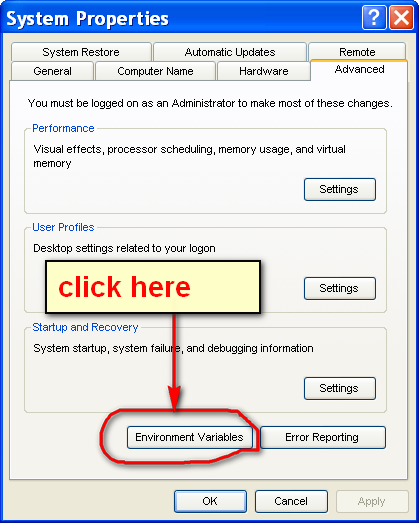
Try this - look in Start/Control Panel/System - click the advanced tab - click environment variables - look for a Variable named GTK_HOME in system variables listing.
If it is there make sure the path to GTK include is at the very end - Edit - look for this line or add this line - ;C:\Program Files\GTK2-Runtime\bin
make sure to add it with the semicolon IF the semi colon isn't present at the end of the variable list.

IF the variable GTK_HOME isn't listed create it select NEW -
variable - GTK_HOME
value - ;C:\Program Files\GTK2-Runtime\bin - click ok, ok again and ok again -

Restart your computer (this will make sure windows see's the new settings), and try to run Gimp again.

_________________
Image


Top
 Post subject: Re: Tools not working
PostPosted: Thu Jul 28, 2011 10:09 am  (#29) 
Offline
GimpChat Member

Joined: Jul 25, 2011
Posts: 33
In the advanced tab I have performance, user profiles and startup and recovery. I don't see environment variables


Top
 Post subject: Re: Tools not working
PostPosted: Thu Jul 28, 2011 11:00 am  (#30) 
Offline
Global Moderator
User avatar

Joined: May 16, 2010
Posts: 16306
Image

_________________
Image


Top
 Post subject: Re: Tools not working
PostPosted: Thu Jul 28, 2011 11:16 am  (#31) 
Offline
GimpChat Member

Joined: May 09, 2011
Posts: 28
try this to see what may be going on.
Windows Key+R
then gimp-2.6.exe -c --verbose

You should see error messages with gimp started.

If you are using a tablet then as gimp is launching and see the splash screen make sure the cursor is over the splash screen during the whole startup process or else it will appear that nothing is working when you trying to do something with the tools.


Last edited by capnhud on Thu Jul 28, 2011 1:35 pm, edited 2 times in total.

Top
 Post subject: Re: Tools not working
PostPosted: Thu Jul 28, 2011 12:15 pm  (#32) 
Offline
GimpChat Member

Joined: Apr 12, 2010
Posts: 5870
Wow..thank capnhud to have explained in few simple words
If " gimp-2.6.exe -c --verbose " result in a error message replace "gimp-2.6.exe " with the full path ( "C:/Program Files/gimp/bin/gimp-2.6.exe

_________________
My 3D Gallery on Deviantart http://photocomix2.deviantart.com/
Main gallery http://www.flickriver.com/photos/photocomix-mandala/
Mandala and simmetry http://www.flickriver.com/photos/photocomix_mandala/

Image

Mrs Wilbress


Top
 Post subject: Re: Tools not working
PostPosted: Fri Jul 29, 2011 9:28 am  (#33) 
Offline
GimpChat Member

Joined: Jul 25, 2011
Posts: 33
capnhud wrote:
try this to see what may be going on.
Windows Key+R
then gimp-2.6.exe -c --verbose

You should see error messages with gimp started.

If you are using a tablet then as gimp is launching and see the splash screen make sure the cursor is over the splash screen during the whole startup process or else it will appear that nothing is working when you trying to do something with the tools.

I didn't notice anything that looked like an error message. It was parsing tools etc... Was there something I should have been looking for specifically?


Top
 Post subject: Re: Tools not working
PostPosted: Fri Jul 29, 2011 9:33 am  (#34) 
Offline
GimpChat Member

Joined: Apr 12, 2010
Posts: 5870
if the tools are no working some error should pop out, at least after opening a image and trying to use a tool

You may just copy the console output and post

BTW if Ctrl-C doesn't work to copy from the console try Shift-Ctrl-C

_________________
My 3D Gallery on Deviantart http://photocomix2.deviantart.com/
Main gallery http://www.flickriver.com/photos/photocomix-mandala/
Mandala and simmetry http://www.flickriver.com/photos/photocomix_mandala/

Image

Mrs Wilbress


Top
 Post subject: Re: Tools not working
PostPosted: Fri Jul 29, 2011 10:05 am  (#35) 
Offline
GimpChat Member

Joined: Jul 25, 2011
Posts: 33
Rod wrote:
I have a feeling this has to do with GTK being blocked/or not found in the path.
Because Gimp is loading but nothing works.

THIS WILL ONLY WORK IF YOU HAVE ADMIN RIGHTS -
Try this - look in Start/Control Panel/System - click the advanced tab - click environment variables - look for a Variable named GTK_HOME in system variables listing.
If it is there make sure the path to GTK include is at the very end - Edit - look for this line or add this line - ;C:\Program Files\GTK2-Runtime\bin
make sure to add it with the semicolon IF the semi colon isn't present at the end of the variable list.

IF the variable GTK_HOME isn't listed create it select NEW -
variable - GTK_HOME
value - ;C:\Program Files\GTK2-Runtime\bin - click ok, ok again and ok again -

Restart your computer (this will make sure windows see's the new settings), and try to run Gimp again.


Ok, I did this, and restarted gimp, but it still isn't working :( And I know that I put it in correctly because I copied and pasted what you had just to make sure that it was correct.

I'm determined to find out what is causing this now. It is like making sure the program doesn't beat me, if that makes any sense.


Top
 Post subject: Re: Tools not working
PostPosted: Fri Jul 29, 2011 10:08 am  (#36) 
Offline
GimpChat Member

Joined: Jul 25, 2011
Posts: 33
PhotoComix wrote:
if the tools are no working some error should pop out, at least after opening a image and trying to use a tool

You may just copy the console output and post

BTW if Ctrl-C doesn't work to copy from the console try Shift-Ctrl-C

When I tried ctrl-c to copy, it just shut everything down.


Top
 Post subject: Re: Tools not working
PostPosted: Fri Jul 29, 2011 10:47 am  (#37) 
Offline
Global Moderator
User avatar

Joined: May 16, 2010
Posts: 16306
In windows the DOS console window text area can be copied by clicking the top left icon.A drop menu will appear and you can choose edit select all - then edit copy.Then just paste the info here in a post. :)

Image

_________________
Image


Top
 Post subject: Re: Tools not working
PostPosted: Fri Jul 29, 2011 10:58 am  (#38) 
Offline
GimpChat Member

Joined: Jul 25, 2011
Posts: 33
Thanks Rod,

Quote:
INIT: gimp_load_config
Parsing 'C:\Documents and Settings\Debbie\.gimp-2.6\unitrc'
Parsing 'C:\Program Files\GIMP-2.0\etc\gimp\2.0\gimprc'
Parsing 'C:\Documents and Settings\Debbie\.gimp-2.6\gimprc'
gimp_composite: use=yes, verbose=no
Processor instruction sets: +mmx +sse +sse2 -3dnow -altivec -vis
Adding theme 'Default' (C:\Program Files\GIMP-2.0\share\gimp\2.0\themes\Default)

Adding theme 'Small' (C:\Program Files\GIMP-2.0\share\gimp\2.0\themes\Small)
Writing 'C:\Documents and Settings\Debbie\.gimp-2.6\themerc'
Trying splash 'C:\Documents and Settings\Debbie\.gimp-2.6\gimp-splash.png' ... f
ailed
Trying splash 'C:\Program Files\GIMP-2.0\share\gimp\2.0\images\gimp-splash.png'
... OK
INIT: gimp_initialize
INIT: gimp_real_initialize
INIT: gui_initialize_after_callback
INIT: gimp_restore
Parsing 'C:\Documents and Settings\Debbie\.gimp-2.6\parasiterc'
Loading 'brush factory' data
Loading 'pattern factory' data
Loading 'palette factory' data
Loading 'gradient factory' data
Loading fonts
Parsing 'C:\Documents and Settings\Debbie\.gimp-2.6\templaterc'
Parsing 'C:\Documents and Settings\Debbie\.gimp-2.6\modulerc'
INIT: gui_restore_callback
clipboard: writable pixbuf format: image/png
clipboard: writable pixbuf format: image/bmp
clipboard: writable pixbuf format: image/x-bmp
clipboard: writable pixbuf format: image/x-MS-bmp
clipboard: writable pixbuf format: image/tiff
clipboard: writable pixbuf format: image/gif
clipboard: writable pixbuf format: image/jpeg
Parsing 'C:\Documents and Settings\Debbie\.gimp-2.6\sessionrc'
Parsing 'C:\Documents and Settings\Debbie\.gimp-2.6\dockrc'
Parsing 'C:\Documents and Settings\Debbie\.gimp-2.6\toolrc'
Parsing 'C:\Documents and Settings\Debbie\.gimp-2.6\contextrc'
Parsing 'C:\Documents and Settings\Debbie\.gimp-2.6\tool-options\gimp-rect-selec
t-tool'
Parsing 'C:\Documents and Settings\Debbie\.gimp-2.6\tool-options\gimp-rect-selec
t-tool.presets'
Parsing 'C:\Documents and Settings\Debbie\.gimp-2.6\tool-options\gimp-ellipse-se
lect-tool'
Parsing 'C:\Documents and Settings\Debbie\.gimp-2.6\tool-options\gimp-ellipse-se
lect-tool.presets'
Parsing 'C:\Documents and Settings\Debbie\.gimp-2.6\tool-options\gimp-free-selec
t-tool'
Parsing 'C:\Documents and Settings\Debbie\.gimp-2.6\tool-options\gimp-free-selec
t-tool.presets'
Parsing 'C:\Documents and Settings\Debbie\.gimp-2.6\tool-options\gimp-fuzzy-sele
ct-tool'
Parsing 'C:\Documents and Settings\Debbie\.gimp-2.6\tool-options\gimp-fuzzy-sele
ct-tool.presets'
Parsing 'C:\Documents and Settings\Debbie\.gimp-2.6\tool-options\gimp-by-color-s
elect-tool'
Parsing 'C:\Documents and Settings\Debbie\.gimp-2.6\tool-options\gimp-by-color-s
elect-tool.presets'
Parsing 'C:\Documents and Settings\Debbie\.gimp-2.6\tool-options\gimp-iscissors-
tool'
Parsing 'C:\Documents and Settings\Debbie\.gimp-2.6\tool-options\gimp-iscissors-
tool.presets'
Parsing 'C:\Documents and Settings\Debbie\.gimp-2.6\tool-options\gimp-foreground
-select-tool'
Parsing 'C:\Documents and Settings\Debbie\.gimp-2.6\tool-options\gimp-foreground
-select-tool.presets'
Parsing 'C:\Documents and Settings\Debbie\.gimp-2.6\tool-options\gimp-vector-too
l'
Parsing 'C:\Documents and Settings\Debbie\.gimp-2.6\tool-options\gimp-vector-too
l.presets'
Parsing 'C:\Documents and Settings\Debbie\.gimp-2.6\tool-options\gimp-color-pick
er-tool'
Parsing 'C:\Documents and Settings\Debbie\.gimp-2.6\tool-options\gimp-color-pick
er-tool.presets'
Parsing 'C:\Documents and Settings\Debbie\.gimp-2.6\tool-options\gimp-zoom-tool'

Parsing 'C:\Documents and Settings\Debbie\.gimp-2.6\tool-options\gimp-zoom-tool.
presets'
Parsing 'C:\Documents and Settings\Debbie\.gimp-2.6\tool-options\gimp-measure-to
ol'
Parsing 'C:\Documents and Settings\Debbie\.gimp-2.6\tool-options\gimp-measure-to
ol.presets'
Parsing 'C:\Documents and Settings\Debbie\.gimp-2.6\tool-options\gimp-move-tool'

Parsing 'C:\Documents and Settings\Debbie\.gimp-2.6\tool-options\gimp-move-tool.
presets'
Parsing 'C:\Documents and Settings\Debbie\.gimp-2.6\tool-options\gimp-align-tool
'
Parsing 'C:\Documents and Settings\Debbie\.gimp-2.6\tool-options\gimp-align-tool
.presets'
Parsing 'C:\Documents and Settings\Debbie\.gimp-2.6\tool-options\gimp-crop-tool'

Parsing 'C:\Documents and Settings\Debbie\.gimp-2.6\tool-options\gimp-crop-tool.
presets'
Parsing 'C:\Documents and Settings\Debbie\.gimp-2.6\tool-options\gimp-rotate-too
l'
Parsing 'C:\Documents and Settings\Debbie\.gimp-2.6\tool-options\gimp-rotate-too
l.presets'
Parsing 'C:\Documents and Settings\Debbie\.gimp-2.6\tool-options\gimp-scale-tool
'
Parsing 'C:\Documents and Settings\Debbie\.gimp-2.6\tool-options\gimp-scale-tool
.presets'
Parsing 'C:\Documents and Settings\Debbie\.gimp-2.6\tool-options\gimp-shear-tool
'
Parsing 'C:\Documents and Settings\Debbie\.gimp-2.6\tool-options\gimp-shear-tool
.presets'
Parsing 'C:\Documents and Settings\Debbie\.gimp-2.6\tool-options\gimp-perspectiv
e-tool'
Parsing 'C:\Documents and Settings\Debbie\.gimp-2.6\tool-options\gimp-perspectiv
e-tool.presets'
Parsing 'C:\Documents and Settings\Debbie\.gimp-2.6\tool-options\gimp-flip-tool'

Parsing 'C:\Documents and Settings\Debbie\.gimp-2.6\tool-options\gimp-flip-tool.
presets'
Parsing 'C:\Documents and Settings\Debbie\.gimp-2.6\tool-options\gimp-text-tool'

Parsing 'C:\Documents and Settings\Debbie\.gimp-2.6\tool-options\gimp-text-tool.
presets'
Parsing 'C:\Documents and Settings\Debbie\.gimp-2.6\tool-options\gimp-bucket-fil
l-tool'
Parsing 'C:\Documents and Settings\Debbie\.gimp-2.6\tool-options\gimp-bucket-fil
l-tool.presets'
Parsing 'C:\Documents and Settings\Debbie\.gimp-2.6\tool-options\gimp-blend-tool
'
Parsing 'C:\Documents and Settings\Debbie\.gimp-2.6\tool-options\gimp-blend-tool
.presets'
Parsing 'C:\Documents and Settings\Debbie\.gimp-2.6\tool-options\gimp-pencil-too
l'
Parsing 'C:\Documents and Settings\Debbie\.gimp-2.6\tool-options\gimp-pencil-too
l.presets'
Parsing 'C:\Documents and Settings\Debbie\.gimp-2.6\tool-options\gimp-paintbrush
-tool'
Parsing 'C:\Documents and Settings\Debbie\.gimp-2.6\tool-options\gimp-paintbrush
-tool.presets'
Parsing 'C:\Documents and Settings\Debbie\.gimp-2.6\tool-options\gimp-eraser-too
l'
Parsing 'C:\Documents and Settings\Debbie\.gimp-2.6\tool-options\gimp-eraser-too
l.presets'
Parsing 'C:\Documents and Settings\Debbie\.gimp-2.6\tool-options\gimp-airbrush-t
ool'
Parsing 'C:\Documents and Settings\Debbie\.gimp-2.6\tool-options\gimp-airbrush-t
ool.presets'
Parsing 'C:\Documents and Settings\Debbie\.gimp-2.6\tool-options\gimp-ink-tool'
Parsing 'C:\Documents and Settings\Debbie\.gimp-2.6\tool-options\gimp-ink-tool.p
resets'
Parsing 'C:\Documents and Settings\Debbie\.gimp-2.6\tool-options\gimp-clone-tool
'
Parsing 'C:\Documents and Settings\Debbie\.gimp-2.6\tool-options\gimp-clone-tool
.presets'
Parsing 'C:\Documents and Settings\Debbie\.gimp-2.6\tool-options\gimp-heal-tool'

Parsing 'C:\Documents and Settings\Debbie\.gimp-2.6\tool-options\gimp-heal-tool.
presets'
Parsing 'C:\Documents and Settings\Debbie\.gimp-2.6\tool-options\gimp-perspectiv
e-clone-tool'
Parsing 'C:\Documents and Settings\Debbie\.gimp-2.6\tool-options\gimp-perspectiv
e-clone-tool.presets'
Parsing 'C:\Documents and Settings\Debbie\.gimp-2.6\tool-options\gimp-convolve-t
ool'
Parsing 'C:\Documents and Settings\Debbie\.gimp-2.6\tool-options\gimp-convolve-t
ool.presets'
Parsing 'C:\Documents and Settings\Debbie\.gimp-2.6\tool-options\gimp-smudge-too
l'
Parsing 'C:\Documents and Settings\Debbie\.gimp-2.6\tool-options\gimp-smudge-too
l.presets'
Parsing 'C:\Documents and Settings\Debbie\.gimp-2.6\tool-options\gimp-dodge-burn
-tool'
Parsing 'C:\Documents and Settings\Debbie\.gimp-2.6\tool-options\gimp-dodge-burn
-tool.presets'
Parsing 'C:\Documents and Settings\Debbie\.gimp-2.6\tool-options\gimp-desaturate
-tool'
Parsing 'C:\Documents and Settings\Debbie\.gimp-2.6\tool-options\gimp-desaturate
-tool.presets'
Parsing 'C:\Documents and Settings\Debbie\.gimp-2.6\tool-options\gimp-color-bala
nce-tool'
Parsing 'C:\Documents and Settings\Debbie\.gimp-2.6\tool-options\gimp-color-bala
nce-tool.presets'
Parsing 'C:\Documents and Settings\Debbie\.gimp-2.6\tool-options\gimp-hue-satura
tion-tool'
Parsing 'C:\Documents and Settings\Debbie\.gimp-2.6\tool-options\gimp-hue-satura
tion-tool.presets'
Parsing 'C:\Documents and Settings\Debbie\.gimp-2.6\tool-options\gimp-colorize-t
ool'
Parsing 'C:\Documents and Settings\Debbie\.gimp-2.6\tool-options\gimp-colorize-t
ool.presets'
Parsing 'C:\Documents and Settings\Debbie\.gimp-2.6\tool-options\gimp-brightness
-contrast-tool'
Parsing 'C:\Documents and Settings\Debbie\.gimp-2.6\tool-options\gimp-brightness
-contrast-tool.presets'
Parsing 'C:\Documents and Settings\Debbie\.gimp-2.6\tool-options\gimp-threshold-
tool'
Parsing 'C:\Documents and Settings\Debbie\.gimp-2.6\tool-options\gimp-threshold-
tool.presets'
Parsing 'C:\Documents and Settings\Debbie\.gimp-2.6\tool-options\gimp-levels-too
l'
Parsing 'C:\Documents and Settings\Debbie\.gimp-2.6\tool-options\gimp-levels-too
l.presets'
Parsing 'C:\Documents and Settings\Debbie\.gimp-2.6\tool-options\gimp-curves-too
l'
Parsing 'C:\Documents and Settings\Debbie\.gimp-2.6\tool-options\gimp-curves-too
l.presets'
Parsing 'C:\Documents and Settings\Debbie\.gimp-2.6\tool-options\gimp-posterize-
tool'
Parsing 'C:\Documents and Settings\Debbie\.gimp-2.6\tool-options\gimp-posterize-
tool.presets'
Parsing 'C:\Documents and Settings\Debbie\.gimp-2.6\tool-options\gimp-gegl-tool'

Parsing 'C:\Documents and Settings\Debbie\.gimp-2.6\tool-options\gimp-gegl-tool.
presets'
INIT: gimp_real_restore
Parsing 'C:\Documents and Settings\Debbie\.gimp-2.6\pluginrc'
Starting extension: 'extension-script-fu'
INIT: gui_restore_after_callback
Parsing 'C:\Documents and Settings\Debbie\.gimp-2.6\menurc'
Parsing 'C:\Documents and Settings\Debbie\.gimp-2.6\devicerc'
Parsing 'C:\Documents and Settings\Debbie\.gimp-2.6\controllerrc'
Parsing 'C:\Documents and Settings\Debbie\.gimp-2.6\colorrc'
loading menu 'C:\Program Files\GIMP-2.0\share\gimp\2.0\menus\image-menu.xml' for
/image-menubar


Top
 Post subject: Re: Tools not working
PostPosted: Fri Jul 29, 2011 11:05 am  (#39) 
Offline
Global Moderator
User avatar

Joined: May 16, 2010
Posts: 16306
It looks fine it should load without a hitch.I do not get it.
It loaded all the rc files and the splash screen.
It loaded all the plugins ,and tool presets and tools.
It loaded script-fu and started it...
It loaded the menus.

By all rights the Gimp UI should be loaded and running fine.

What gives? :\

_________________
Image


Top
 Post subject: Re: Tools not working
PostPosted: Fri Jul 29, 2011 1:23 pm  (#40) 
Offline
GimpChat Member

Joined: Jul 25, 2011
Posts: 33
Quote:
What gives?


I wish I knew.

On the menu above the window for new if I click on tool box, it gives a dotted outline of the tool, but then it goes away. There is no color or anything, it just disappears. It only stays for about maybe 2 seconds and then it is gone


Top
Post new topic Reply to topic  [ 76 posts ]  Go to page Previous  1, 2, 3, 4  Next

All times are UTC - 5 hours [ DST ]


* Login  


Powered by phpBB3 © phpBB Group