It is currently Wed Jul 15, 2026 12:35 pm


All times are UTC - 5 hours [ DST ]


Post new topic Reply to topic  [ 14 posts ] 
Author Message
 Post subject: GEGL VECTOR LAYERS PLUGIN - Shapes made by Grok
PostPosted: Mon May 19, 2025 11:17 pm  (#1) 
Offline
GimpChat Member
User avatar

Joined: Oct 31, 2020
Posts: 2012
Grok made a plugin that renders a dozen shapes or more with or without outline variations. I know Vibe coded GEGL plugins have there own containment thread but this plugin is so amazing IMO that I think it deserves its own thread.

Image

Image

Image

Image

Attachment:
WindowsBinaries.zip [106.02 KiB]
Downloaded 241 times


Attachment:
LinuxBinaries.zip [30.2 KiB]
Downloaded 165 times


Attachment:
SourceCode.zip [97.1 KiB]
Downloaded 118 times


LOCATION TO PUT BINARIES

Windows

C:\Users\(USERNAME)\AppData\Local\gegl-0.4\plug-ins

Linux

~/.local/share/gegl-0.4/plug-ins

Linux (Flatpak includes Chromebook)

~/.var/app/org.gimp.GIMP/data/gegl-0.4/plug-ins

-
Then restart GIMP and Look for Filters>AI GEGL or GEGL operation drop down list if you use GIMP 2.10 but I recommend using GIMP 3.0.2 and 3.0.4.


Last edited by contrast_ on Tue May 20, 2025 5:11 am, edited 4 times in total.

Share on Facebook Share on Twitter Share on Orkut Share on Digg Share on MySpace Share on Delicious Share on Technorati
Top
 Post subject: Re: GEGL VECTOR LAYERS PLUGIN - Shapes made by Grok
PostPosted: Tue May 20, 2025 2:39 am  (#2) 
Offline
GimpChat Member
User avatar

Joined: Jan 13, 2011
Posts: 2646
Location: Poland
Excellent
:tyspin

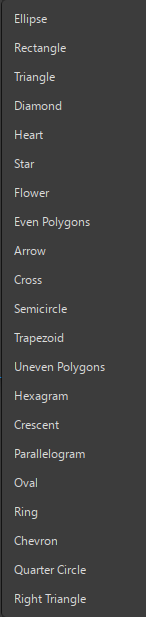
21 Shapes:
Image

_________________
Image


Last edited by MareroQ on Tue May 20, 2025 3:27 am, edited 1 time in total.

Top
 Post subject: Re: GEGL VECTOR LAYERS PLUGIN - Shapes made by Grok
PostPosted: Tue May 20, 2025 2:45 am  (#3) 
Offline
GimpChat Member
User avatar

Joined: Oct 31, 2020
Posts: 2012
I just pushed a tiny update where X and Y are easier to control


Top
 Post subject: Re: GEGL VECTOR LAYERS PLUGIN - Shapes made by Grok
PostPosted: Tue May 20, 2025 3:16 am  (#4) 
Offline
GimpChat Member

Joined: Mar 04, 2011
Posts: 2606
Very good, could be a replacement for the (well-past-sell-by-date) gfig.
Works fine with (kubuntu) Gimp 3.0.4 appimage and Gimp 2.10.38 (PPA)

Only one comment, Instead of Blending Options Mode -> Replace which replaces the active layer
Set Mode -> Normal to default. Then you can make several shapes on one layer.


Top
 Post subject: Re: GEGL VECTOR LAYERS PLUGIN - Shapes made by Grok
PostPosted: Tue May 20, 2025 4:19 am  (#5) 
Offline
Global Moderator
User avatar

Joined: May 16, 2010
Posts: 16104
Works great in DEV version 3.0.5. :bigthup

Really not sure if it will ever replace GFIG though. ;)

_________________
Image


Top
 Post subject: Re: GEGL VECTOR LAYERS PLUGIN - Shapes made by Grok
PostPosted: Tue May 20, 2025 4:27 am  (#6) 
Offline
GimpChat Member
User avatar

Joined: Oct 31, 2020
Posts: 2012
I pushed another update to make the scale slider work better so it shows more progress in the slider instead of scaling 90% of the screen and still having a lot of distance in the bar to go.


Top
 Post subject: Re: GEGL VECTOR LAYERS PLUGIN - Shapes made by Grok
PostPosted: Tue May 20, 2025 5:12 am  (#7) 
Offline
GimpChat Member
User avatar

Joined: Oct 31, 2020
Posts: 2012
Please update above, the plugin now has

1.canvas point and click abilities to move the shapes

2.a fix for rectangles rotation bug

3. Ring shape has a new slider that controls its thickness

but as of now the update is only on this page as I am too tired to update other areas. Goodnight gimpchat. Tomorrow morning I'll update it elsewhere The update is global on Github

https://github.com/LinuxBeaver/LinuxBeaver/releases/


Top
 Post subject: Re: GEGL VECTOR LAYERS PLUGIN - Shapes made by Grok
PostPosted: Sat Sep 27, 2025 4:21 pm  (#8) 
Offline
Global Moderator
User avatar

Joined: May 16, 2010
Posts: 16104
I wonder if you could copy and paste these shapes into a new editable vector layer?

_________________
Image


Top
 Post subject: Re: GEGL VECTOR LAYERS PLUGIN - Shapes made by Grok
PostPosted: Sat Sep 27, 2025 4:28 pm  (#9) 
Offline
Global Moderator
User avatar

Joined: May 16, 2010
Posts: 16104
Adding gloss and bevel to this would be pretty amazing as well. :)

_________________
Image


Top
 Post subject: Re: GEGL VECTOR LAYERS PLUGIN - Shapes made by Grok
PostPosted: Sat Sep 27, 2025 5:08 pm  (#10) 
Offline
Global Moderator
User avatar

Joined: May 16, 2010
Posts: 16104
Ok i have no clue how this happened. Possibly the Vibe coded shape for a heart begins with a triangle path?
I created a vibe coded layer (heart)
Then i created a vector layer background behind the heart. I can now move the triangle nodes on canvas to edit shape, width, and length of the heart. Sort of like the cage transform filter. But i have no idea where the triangle path came from.

Image

I've attached the xcf work file. Can anyone with Gimp-3.1.4 test this and see if the triangle path is present as well.

Weird i just reopened it in Gimp again and the heart is gone. The triangle is there with the stroke and fill though. :rofl


Attachments:
Controlled-on-canvas-vector_RD.xcf [472.09 KiB]
Downloaded 64 times

_________________
Image
Top
 Post subject: Re: GEGL VECTOR LAYERS PLUGIN - Shapes made by Grok
PostPosted: Sat Sep 27, 2025 5:09 pm  (#11) 
Offline
Global Moderator
User avatar

Joined: May 16, 2010
Posts: 16104
Oh and also when i deleted a node from the triangle path the heart misshaped as well. So i know they were connected somehow.

_________________
Image


Top
 Post subject: Re: GEGL VECTOR LAYERS PLUGIN - Shapes made by Grok
PostPosted: Sun Sep 28, 2025 11:47 am  (#12) 
Offline
GimpChat Member
User avatar

Joined: Oct 31, 2020
Posts: 2012
No, its not possible to paste it into the vector path tool. I'm pretty sure its not directly controlling the heart shape.

The heart shape is just a render in GEGL no different then when GEGL renders anything else, it can't interact with the fill and outline path vectors in GIMP 3.1.4 that is something different.


Top
 Post subject: Re: GEGL VECTOR LAYERS PLUGIN - Shapes made by Grok
PostPosted: Sat Oct 11, 2025 10:50 am  (#13) 
Offline
GimpChat Member

Joined: Oct 11, 2025
Posts: 12
Hello!

I saw that at the beginning of the forum there is the plugin file for Linux Linux-binary.zip, but later provided the link where there is the file top-Linux-binary.zip. My question is the following: should I replace the first one with top-linux-binary and leave only this one installed?


Top
 Post subject: Re: GEGL VECTOR LAYERS PLUGIN - Shapes made by Grok
PostPosted: Mon Oct 13, 2025 1:58 am  (#14) 
Offline
GimpChat Member
User avatar

Joined: May 10, 2013
Posts: 1430
Location: FInland
dunham wrote:
Hello!

I saw that at the beginning of the forum there is the plugin file for Linux Linux-binary.zip, but later provided the link where there is the file top-Linux-binary.zip. My question is the following: should I replace the first one with top-linux-binary and leave only this one installed?


You mean...
viewtopic.php?f=9&t=21452

Top binaries includes only the top rated GEGL plugins, whereas Linux binaries includes all GEGL plugins.

I'd grab 'em always from Beaver's github.

https://github.com/LinuxBeaver


Top
Post new topic Reply to topic  [ 14 posts ] 

All times are UTC - 5 hours [ DST ]


* Login  


Powered by phpBB3 © phpBB Group