It is currently Tue Jul 21, 2026 5:48 pm


All times are UTC - 5 hours [ DST ]


Post new topic Reply to topic  [ 29 posts ]  Go to page 1, 2  Next
Author Message
 Post subject: GEGL plugin GIMP 3.2 problem solving page
PostPosted: Mon Mar 16, 2026 12:47 am  (#1) 
Offline
GimpChat Member
User avatar

Joined: Oct 31, 2020
Posts: 2013
Original thread has been edited since these Binaries don't work on Windows, but the ones at the bottom do.

Attachment:
source_code_of_all_GEGL_plugins.zip [2.34 MiB]
Downloaded 105 times


Also, changes happened

Image

Image

Image

1. We have a new plugin named "Wood Text"
2. Neon Text got slight tweaking with its grow radius
3. Inner glow has a new mode called Inner Shade
4. None of this is on Github yet, this is the bleeding edge
5. Linux works without signatures ,but I didn't include it because I want to know if this works on Windows


Let me know if this works. DeepSeek AI verified the signature with the creation of asc files and a literal display in the terminal congratulating me for having signatures. So it should work.


Also here is the main clue I just read today

https://github.com/LinuxBeaver/LinuxBeaver/issues/17


Last edited by contrast_ on Fri Mar 20, 2026 10:32 am, edited 2 times in total.

Share on Facebook Share on Twitter Share on Orkut Share on Digg Share on MySpace Share on Delicious Share on Technorati
Top
 Post subject: Re: Signed GEGL plugins that should work on GIMP 3.0.6/3.2 Windows
PostPosted: Mon Mar 16, 2026 3:19 pm  (#2) 
Offline
GimpChat Member
User avatar

Joined: Jan 01, 2026
Posts: 514
Thank You So Much!!

_________________
Image
Gimp 3.2.4 with Nik Collection and G'mic-QT
Windows 11 Pro with 32 Gigs of RAM
Intel(R) Core(TM) Ultra 7
Previous Paint Shop Pro User v9 - 2023


Top
 Post subject: Re: Signed GEGL plugins that should work on GIMP 3.0.6/3.2 Windows
PostPosted: Mon Mar 16, 2026 6:19 pm  (#3) 
Offline
GimpChat Member
User avatar

Joined: Oct 31, 2020
Posts: 2013
TeaMouse wrote:
Thank You So Much!!


So are you confirming it works?


Top
 Post subject: Re: Signed GEGL plugins that should work on GIMP 3.0.6/3.2 Windows
PostPosted: Tue Mar 17, 2026 5:09 am  (#4) 
Offline
GimpChat Member
User avatar

Joined: Jan 13, 2011
Posts: 2646
Location: Poland
Windows 10 Gimp-3.2.0
Your unsigned and signed filters work (with the exception of replacing libinitl-8.dll - they don't work without it).
The G'MIC-GEGL filters also work, with the important note about not overwriting existing files in the GIMP bin directory.
So I suspect this is a Windows 11-specific issue.

Image

Image

_________________
Image


Top
 Post subject: Re: Signed GEGL plugins that should work on GIMP 3.0.6/3.2 Windows
PostPosted: Tue Mar 17, 2026 5:12 am  (#5) 
Offline
GimpChat Member
User avatar

Joined: Jan 01, 2026
Posts: 514
It did work on Gimp 3.0.6, went throught each one and everthing was okay. Will be trying them on the latest version of Gimp later today on a new laptop. Will post back.

_________________
Image
Gimp 3.2.4 with Nik Collection and G'mic-QT
Windows 11 Pro with 32 Gigs of RAM
Intel(R) Core(TM) Ultra 7
Previous Paint Shop Pro User v9 - 2023


Top
 Post subject: Re: Signed GEGL plugins that should work on GIMP 3.0.6/3.2 Windows
PostPosted: Tue Mar 17, 2026 7:22 am  (#6) 
Offline
GimpChat Member
User avatar

Joined: Oct 31, 2020
Posts: 2013
TeaMouse wrote:
It did work on Gimp 3.0.6, went throught each one and everthing was okay. Will be trying them on the latest version of Gimp later today on a new laptop. Will post back.


Did you ever replace libinitl-8.dll in GIMP or not? I need to know if it works for you without replacing that library.


Top
 Post subject: Re: Signed GEGL plugins that should work on GIMP 3.0.6/3.2 Windows
PostPosted: Tue Mar 17, 2026 7:27 am  (#7) 
Offline
GimpChat Member
User avatar

Joined: Oct 31, 2020
Posts: 2013
contrast_ wrote:
TeaMouse wrote:
Thank You So Much!!


So are you confirming it works?


Do you get errors in the terminal like
https://github.com/LinuxBeaver/LinuxBeaver/issues/17


Top
 Post subject: Re: Signed GEGL plugins that should work on GIMP 3.0.6/3.2 Windows
PostPosted: Tue Mar 17, 2026 8:15 am  (#8) 
Offline
GimpChat Member
User avatar

Joined: Jan 13, 2011
Posts: 2646
Location: Poland
Hi Contrast

Since GIMP-3.0.8, your filters stopped appearing in the menu.

I regularly replaced the libinitl-8.dll file with the one from GIMP-3.0.4.

And everything started working wonderfully. I didn't notice any problems with GIMP after replacing the file.

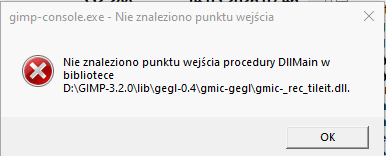
Lots of errors in gimp-console with the original libinitl-8.dll.

Image

And for G'MIC-GEGL filters there are also additional ones (for each installed filter):

Image

_________________
Image


Last edited by MareroQ on Wed Mar 18, 2026 12:21 am, edited 1 time in total.

Top
 Post subject: Re: Signed GEGL plugins that should work on GIMP 3.0.6/3.2 Windows
PostPosted: Tue Mar 17, 2026 12:12 pm  (#9) 
Offline
GimpChat Member
User avatar

Joined: Oct 31, 2020
Posts: 2013
DeepSeek made me a python script that scanned GIMP 3.2's libintl-8.dll against my plugins and he says the problem is most likely a dependency issue and offered a fix without recompiling.


Tell me if this works on 3.0.6+ Windows without needing to swap libintl-8.dll

Attachment:
WindowsBinaries_without_dll_dependency.zip [4.65 MiB]
Downloaded 57 times


Source code (exactly the same as above) is here
download/file.php?id=82413


Top
 Post subject: Re: Signed GEGL plugins that should work on GIMP 3.0.6/3.2 Windows
PostPosted: Tue Mar 17, 2026 1:01 pm  (#10) 
Offline
GimpChat Member
User avatar

Joined: Jan 13, 2011
Posts: 2646
Location: Poland
It doesn't work for me and depends on libinitl-8 (gimp3.2.0).

Image

_________________
Image


Top
 Post subject: Re: Signed GEGL plugins that should work on GIMP 3.0.6/3.2 Windows
PostPosted: Tue Mar 17, 2026 7:40 pm  (#11) 
Offline
GimpChat Member
User avatar

Joined: Jan 01, 2026
Posts: 514
For Gimp 3.0.6 I replace the Dll's with the new signed one
and everything worked as they should, including the new wood text. SO
I tried Gimp 3.2 with the signed one, with no luck, they did not show up. Then I added the new
unsigned files to the plugin folder (gegl-0.4/plug-ins), overriding the signed ones, still no luck. Then I took
the libintl-8.dll in Gimp 3.2, and replaced it with the one that I'm using in Gimp 3.0.6,
which I just checked them, and all the control panels opened for each one, still they did not show up
in Gimp 3.2, I tried both signed and unsigned. Both my laptop's are Windows 11.

Attachment:
Screenshot.jpg
Screenshot.jpg [ 312.58 KiB | Viewed 15293 times ]

I don't know much about creating Dynamic Link Library Files. But it seems to me if the files work with
with a certain file (libintl-8.dll), it's not the Dll's, but something else has changed in Gimp 3.2 that stopping
them from working. It would be a shame to lose these great add-ons.

_________________
Image
Gimp 3.2.4 with Nik Collection and G'mic-QT
Windows 11 Pro with 32 Gigs of RAM
Intel(R) Core(TM) Ultra 7
Previous Paint Shop Pro User v9 - 2023


Top
 Post subject: Re: Signed GEGL plugins that should work on GIMP 3.0.6/3.2 Windows
PostPosted: Tue Mar 17, 2026 8:55 pm  (#12) 
Offline
GimpChat Member
User avatar

Joined: Jan 01, 2026
Posts: 514
After all this I uninstall Gimp 3.2, ran a register cleaner and cleaned up
the left-over entree from Gimp, did instruct the install to delete everything. Then reinstall
Gimp 3.0.6-1, and there is all the add-on in the GEGL Operation, did not have to replace
the libintl-8.dll for them to work.

Attachment:
Untitled.png
Untitled.png [ 541.82 KiB | Viewed 15291 times ]

Everything is better with Gold.

_________________
Image
Gimp 3.2.4 with Nik Collection and G'mic-QT
Windows 11 Pro with 32 Gigs of RAM
Intel(R) Core(TM) Ultra 7
Previous Paint Shop Pro User v9 - 2023


Top
 Post subject: Re: Signed GEGL plugins that should work on GIMP 3.0.6/3.2 Windows
PostPosted: Wed Mar 18, 2026 8:54 pm  (#13) 
Offline
GimpChat Member
User avatar

Joined: Oct 31, 2020
Posts: 2013
Mr. Q/MareroQ, Hello, I did some test with DeepSeek and confirmed these plugins do not have LibInt-8 when Grep scans them, but all old ones do.

So I'm confident these have the highest chance of working without any modifications they are also about 80 megabytes larger in file size because they static link gettext.

Windows GEGL plugin Binaries:
https://github.com/LinuxBeaver/LinuxBea ... onward.zip

Source Code:
download/file.php?id=82413


and by GPL contract I must provide the source code to gettext
https://www.gnu.org/software/gettext/ and thank its authors.


Location to put binaries

C:\Users\(USERNAME)\AppData\Local\gegl-0.4\plug-ins

_
if all goes well I will make a special build environment for Windows that includes gettext's source code and binaries. So the Windows users can compile my plugins again, but they will need extra junk and the AI plugins will come to separately.


Top
 Post subject: Re: Signed GEGL plugins that should work on GIMP 3.0.6/3.2 Windows
PostPosted: Wed Mar 18, 2026 11:03 pm  (#14) 
Offline
GimpChat Member
User avatar

Joined: Oct 31, 2020
Posts: 2013
Here are the fixed AI plugins

https://github.com/LinuxBeaver/LinuxBea ... _fixed.zip

Source code Only

https://github.com/LinuxBeaver/LinuxBea ... e_code.zip

This should work on 3.0.8 and 3.2, no LibInit-8


Top
 Post subject: Re: Signed GEGL plugins that should work on GIMP 3.0.6/3.2 Windows
PostPosted: Thu Mar 19, 2026 7:02 am  (#15) 
Offline
GimpChat Member
User avatar

Joined: Jan 13, 2011
Posts: 2646
Location: Poland
Congratulations on solving the problem.
The filters from WindowsBinaries306onward load correctly.
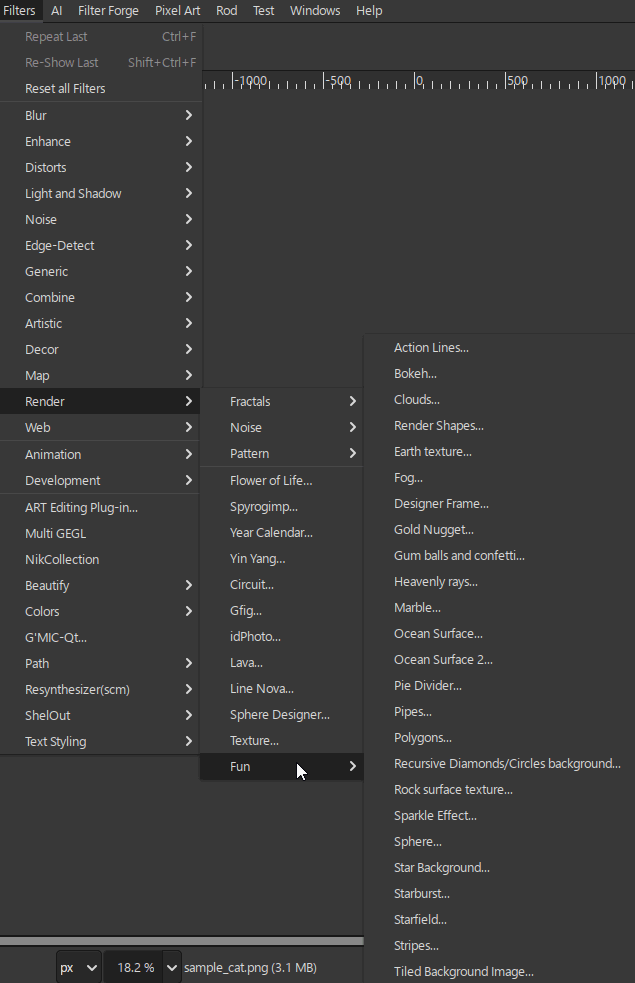
However, those from AI_Plugins_fixed 71 filters show errors (the Filters/AI GEGL category is missing altogether).
Perhaps the link is incorrect?

Image

_________________
Image


Last edited by MareroQ on Thu Mar 19, 2026 1:37 pm, edited 1 time in total.

Top
 Post subject: Re: Signed GEGL plugins that should work on GIMP 3.0.6/3.2 Windows
PostPosted: Thu Mar 19, 2026 8:07 am  (#16) 
Offline
GimpChat Member

Joined: Mar 27, 2025
Posts: 5
I installed the latest version dated 18-03-2026
Windows 11 GIMP 3.2 doesn't show up


Top
 Post subject: Re: gegl plugin GIMP 3.2 problem sovling page
PostPosted: Thu Mar 19, 2026 12:13 pm  (#17) 
Offline
GimpChat Member
User avatar

Joined: Oct 31, 2020
Posts: 2013
Embarrassing to admit I made a mistake and compiled these the wrong way last night.

These should work they are verified independent and take 50 megabytes instead of a few

Download here

https://github.com/LinuxBeaver/LinuxBea ... orking.zip

Source Code here

https://github.com/LinuxBeaver/LinuxBea ... lugins.zip


Top
 Post subject: Re: gegl plugin GIMP 3.2 problem sovling page
PostPosted: Thu Mar 19, 2026 12:40 pm  (#18) 
Offline
GimpChat Member
User avatar

Joined: Oct 31, 2020
Posts: 2013
Attachment:
GEGL_Effects_GIMP_32.zip [5.24 MiB]
Downloaded 63 times


Here is GEGL Effects individual binaries for Windows 11 GIMP 3.2, let me know if this works. Its much larger in file size as you can tell.


My independence script DeepSeek made confirmed it should work

✅ bevel.dll - INDEPENDENT
✅ gegleffectspending.dll - INDEPENDENT
✅ glassovertext.dll - INDEPENDENT
✅ inner-glow.dll - INDEPENDENT
✅ loadport.dll - INDEPENDENT
✅ zzstrokebevelimage.dll - INDEPENDENT
contrast@cosmos:~/DevelopingGEGL/Final_Filt

Source code here

https://github.com/LinuxBeaver/Gimp_Lay ... L_Effects/


Top
 Post subject: Re: gegl plugin GIMP 3.2 problem sovling page
PostPosted: Thu Mar 19, 2026 1:39 pm  (#19) 
Offline
GimpChat Member
User avatar

Joined: Jan 13, 2011
Posts: 2646
Location: Poland
Thanks for the quick solution. :bigthup

Ai/lb filters now work for Windows 10.

Can Your solution also be applied to GEGL-G'MIC filters?

_________________
Image


Top
 Post subject: Re: gegl plugin GIMP 3.2 problem sovling page
PostPosted: Thu Mar 19, 2026 2:06 pm  (#20) 
Offline
GimpChat Member
User avatar

Joined: Oct 31, 2020
Posts: 2013
MareroQ wrote:
Thanks for the quick solution. :bigthup

Ai/lb filters now work for Windows 10.

Can Your solution also be applied to GEGL-G'MIC filters?


I never provided windows dlls in the first place for that. I don't know how because it requires MORE libraries. You used the other thread for that
viewtopic.php?f=28&t=22072&hilit=gmic


Top
Post new topic Reply to topic  [ 29 posts ]  Go to page 1, 2  Next

All times are UTC - 5 hours [ DST ]


* Login  


Powered by phpBB3 © phpBB Group