It is currently Sat Jul 25, 2026 11:49 am


All times are UTC - 5 hours [ DST ]


Post new topic Reply to topic  [ 68 posts ]  Go to page Previous  1, 2, 3, 4  Next
Author Message
 Post subject: Re: [Update] Pseudo Adjustment Layer: Colors, Custom Filters, Crash Fi
PostPosted: Thu Mar 26, 2026 8:08 pm  (#21) 
Offline
GimpChat Member
User avatar

Joined: Feb 06, 2026
Posts: 40
@Rod:
Thank you for verifying this!
It looks like Curve is working well on Windows 10 yet.

Regarding your point about processing speed... This is a problem that depends on the processing speed of the GIMP itself and the PC, so there is nothing we can do on the plug-in side.
I believe this will be improved in future updates of GIMP.


Top
 Post subject: Re: [Update] Pseudo Adjustment Layer: Colors, Custom Filters, Crash Fi
PostPosted: Thu Mar 26, 2026 8:25 pm  (#22) 
Offline
Global Moderator
User avatar

Joined: May 16, 2010
Posts: 16132
How do you add a favorite?

NM i figured it out. :)

Thanks for this plugin! I am having loads of fun with this. :clap :bigthup

_________________
Image


Top
 Post subject: Re: [Update] Pseudo Adjustment Layer: Colors, Custom Filters, Crash Fi
PostPosted: Fri Mar 27, 2026 1:36 pm  (#23) 
Offline
GimpChat Member
User avatar

Joined: Oct 31, 2020
Posts: 2013
I'm on GIMP 3.0.5 that's why.

I manually edited your filter and replaced gimp:levels with gegl:levels and removed curves. and now it works for me.


Top
 Post subject: Re: [Update] Pseudo Adjustment Layer: Colors, Custom Filters, Crash Fi
PostPosted: Fri Mar 27, 2026 6:55 pm  (#24) 
Offline
GimpChat Member
User avatar

Joined: Feb 06, 2026
Posts: 40
Hi contrast_,

Ah, that makes perfect sense! The version difference between GIMP 3.0.5 and 3.2.x completely explains why "gimp:curves" and "gimp:levels" were causing crashes on your end.

I am really glad you were able to easily tweak the Python script to use "gegl:levels" and remove the problematic curves to get it working! That is the beauty of Python plugins.

Since my primary target for this plugin is GIMP 3.2 and newer, I will keep the current official list as it is. However, it is fantastic that we have this documented here in the thread. If anyone else using the older 3.0.x branch runs into the same issue, they will know exactly how to fix it thanks to your finding!

Thanks again for testing and figuring this out!


Top
 Post subject: Re: [Update] Pseudo Adjustment Layer: Colors, Custom Filters, Crash Fi
PostPosted: Fri Mar 27, 2026 9:06 pm  (#25) 
Offline
GimpChat Member
User avatar

Joined: Jan 01, 2026
Posts: 526
Does this mean, once you say ok to your adjustment, you can come back to the
layer and the adjustment palette reappear when you click on it so you can adjust or readjust it more. Or is it a
one time thing, and you have to either delete it, or undo your steps back to when you made it?
And does it work like having, a layer mask with a adjustment in the same layer, working as one
adjustment, giving you more options for editing any area you want by painting black or white with
in that layer. Having a little problem understanding here how this works.

_________________
Image
Gimp 3.2.4 with Nik Collection and G'mic-QT
Windows 11 Pro with 32 Gigs of RAM
Intel(R) Core(TM) Ultra 7
Previous Paint Shop Pro User v9 - 2023


Top
 Post subject: Re: [Update] Pseudo Adjustment Layer: Colors, Custom Filters, Crash Fi
PostPosted: Fri Mar 27, 2026 9:26 pm  (#26) 
Offline
GimpChat Member
User avatar

Joined: Feb 06, 2026
Posts: 40
Hi TeaMouse,

Yes to both! That is exactly the point of this plugin.


1. Readjustment:
Because this uses GIMP 3's new non-destructive editing (NDE) features, it is not a one-time thing.
You can double-click the filter icon on the generated layer group at any time to bring up the settings dialog and readjust the values.

2. Layer Masks:
When you apply a filter, the plugin automatically creates a Layer Group with the adjustment filter attached.
It also automatically adds a Layer Mask to that group (based on your active selection).
Of course, you can also apply a layer mask later on.
You can paint black or white on this mask to hide or reveal the effect in specific areas, just like Photoshop's adjustment layers!

Give it a try, and let me know how it works for you!


Top
 Post subject: Re: [Update] Pseudo Adjustment Layer: Colors, Custom Filters, Crash Fi
PostPosted: Fri Mar 27, 2026 10:19 pm  (#27) 
Offline
GimpChat Member
User avatar

Joined: Jan 01, 2026
Posts: 526
Things did not go well

Attachment:
Error of adjustment PLug-in.jpg
Error of adjustment PLug-in.jpg [ 257.79 KiB | Viewed 8099 times ]

Did a reset list and the window popup behind as shown in image. Once
I pressed the Enter Key I got a list of error messages on the right. Close everything and tried again.
This time I move the adjustment window to the far left and still the same thing.
Couldn't get Gimp to close this time, so I had to go to the task manager and close Gimp there. But
still had this.

Attachment:
Error of adjustment PLug-in -01.jpg
Error of adjustment PLug-in -01.jpg [ 330.1 KiB | Viewed 8099 times ]

Attachment:
Error of adjustment PLug-in -02.jpg
Error of adjustment PLug-in -02.jpg [ 417.23 KiB | Viewed 8099 times ]

This time I had to close Gimp and Python in the task manger.

Had about 10 or so error messages after I tried the enter key on the first time,
the third time I tried the Gaussian Blur, all it did was create a new layer and blur it for me,
no options to adjust, and I tried painting on this layer and it said this layer was not paintable.
The second attempt, still the same, all three with the same error messages.

_________________
Image
Gimp 3.2.4 with Nik Collection and G'mic-QT
Windows 11 Pro with 32 Gigs of RAM
Intel(R) Core(TM) Ultra 7
Previous Paint Shop Pro User v9 - 2023


Top
 Post subject: Re: [Update] Pseudo Adjustment Layer: Colors, Custom Filters, Crash Fi
PostPosted: Fri Mar 27, 2026 10:22 pm  (#28) 
Offline
GimpChat Member
User avatar

Joined: Jan 01, 2026
Posts: 526
I'm all fun'd out for today will undo the Plug-in for now.

_________________
Image
Gimp 3.2.4 with Nik Collection and G'mic-QT
Windows 11 Pro with 32 Gigs of RAM
Intel(R) Core(TM) Ultra 7
Previous Paint Shop Pro User v9 - 2023


Top
 Post subject: Re: [Update] Pseudo Adjustment Layer: Colors, Custom Filters, Crash Fi
PostPosted: Sat Mar 28, 2026 2:55 am  (#29) 
Offline
GimpChat Member
User avatar

Joined: Feb 06, 2026
Posts: 40
Hi TeaMouse,

Thank you for providing the screenshots and detailed feedback! Let me explain what is happening.


1. The popup hiding & Error messages:
The error messages you saw on the right (Error Console) are completely normal. When you click "Reset List", the plugin automatically tests all filters in the background, and unsupported filters send an error to the console.
Regarding the confirmation popup hiding behind the main window (which forced you to use the Task Manager) — I have already fixed this bug in my local development version! The next update will prevent this from happening.

2. "No options to adjust" (Gaussian Blur):
Unlike old GIMP plugins, this doesn't show the settings dialog immediately upon application. To adjust the blur, look at the Layers dialog and double-click the "fx" icon next to the generated layer group. The adjustment window will pop up, and you can change the values at any time!

3. "Layer not paintable":
You were likely trying to paint directly on the Layer Group folder. GIMP does not allow painting on folders. To apply the effect partially, you must select the Layer Mask (the white box right next to the folder icon) and paint on that mask with black or white.

I hope this clears things up! I will release a new version with the popup fix and other improvements very soon.


Attachments:
mask.png
mask.png [ 650.07 KiB | Viewed 8091 times ]
fx.png
fx.png [ 62.04 KiB | Viewed 8091 times ]
Top
 Post subject: Re: [Update] Pseudo Adjustment Layer: Colors, Custom Filters, Crash Fi
PostPosted: Sun Mar 29, 2026 11:06 pm  (#30) 
Offline
GimpChat Member
User avatar

Joined: Jan 13, 2011
Posts: 2646
Location: Poland
Hi Yousei3D.

You probably already know that version 1.7 has a few issues.
Confirmed for Win10 and Gimp-3.2.2 on two different computers (with the portable version and the classic default installation).
1. Selecting a language freezes the plugin and Gimp.
2. Using 'Reset List' generates numerous error messages and freezes the plugin and Gimp.

Image

In addition:
1. Searching in the 'Others' category is no longer possible.
2. Normal filter execution doesn't end with a layer group.

Image

However, it can be accessed using Ctrl+Z or Ctrl+Y.

Image

Perhaps an additional option to "Merge layer group"?

_________________
Image


Top
 Post subject: Re: [Update] Pseudo Adjustment Layer: Colors, Custom Filters, Crash Fi
PostPosted: Mon Mar 30, 2026 12:34 am  (#31) 
Offline
GimpChat Member
User avatar

Joined: Feb 06, 2026
Posts: 40
Hi MareroQ,
Thank you for the detailed report and screenshots!


1.Freezing and Errors:
I have already fixed the freezing issues (Language and Reset List) in my local development version. The dialog window was accidentally hiding behind the main window. This will be resolved in the next update!

2.Search in "Others":

The search logic has also been completely rewritten and fixed in the upcoming version.

3.Layer Group not appearing:
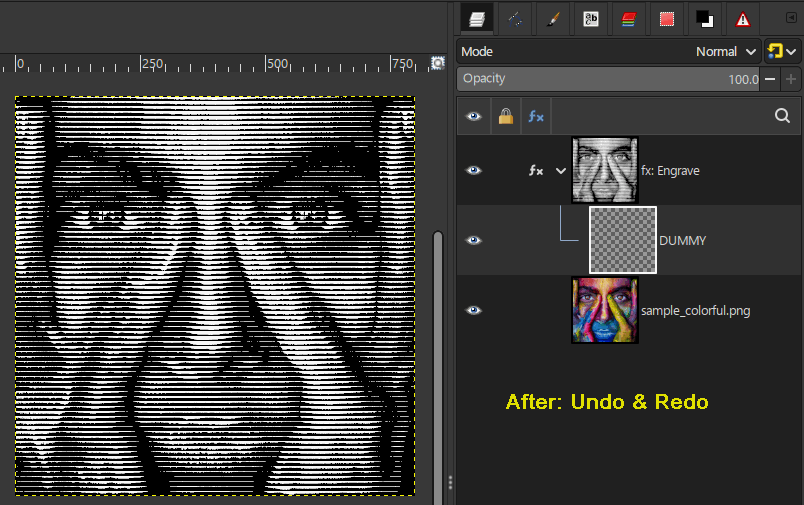
If you look closely at your first screenshot, there is a small ">" icon next to "fx: Engrave". The plugin DID create a layer group, but it is set to be collapsed by default.
This is actually intentional! The goal of this plugin is to simulate Photoshop's "Adjustment Layers", which are single items in the layer stack. To recreate this in GIMP 3, the plugin uses a Layer Group containing a hidden "DUMMY" layer (which is technically required to add filter and a mask). By keeping the group collapsed, it looks and acts more like a single Adjustment Layer.
However, there IS a UI refresh bug in GIMP 3.2.2 where the layer tree doesn't visually update properly sometimes (which is why you had to Undo/Redo). I have added a workaround in the next version to force GIMP to refresh the UI immediately.


An update is coming soon. Thanks for testing!


Last edited by Yousei3D on Mon Mar 30, 2026 1:38 am, edited 1 time in total.

Top
 Post subject: Re: [Update] Pseudo Adjustment Layer: Colors, Custom Filters, Crash Fi
PostPosted: Mon Mar 30, 2026 1:29 am  (#32) 
Offline
GimpChat Member
User avatar

Joined: Feb 06, 2026
Posts: 40
Pseudo-Adjustment-Layers Ver1.8 is released.

New features:
- Multiple Filter Selection
- Multiple freely named Favorites
- Organize third-party filters by grouping
- Translation setting function from the plugin UI

GIMP3-Pseudo-Adjustment-Layers Ver1.8
https://github.com/yousei3/GIMP3-Pseudo ... tag/Ver1.8

Tested with GIMP 3.2.2 on Windows 11 and Linux Mint environments.
If you have any problems, please let us know.


Attachments:
1.8-03.png
1.8-03.png [ 59.3 KiB | Viewed 7527 times ]
1.8-02.png
1.8-02.png [ 72.83 KiB | Viewed 7527 times ]
1.8-01.png
1.8-01.png [ 57.85 KiB | Viewed 7527 times ]
Top
 Post subject: Re: [Update] Pseudo Adjustment Layer Ver1.8
PostPosted: Mon Mar 30, 2026 2:30 am  (#33) 
Offline
Global Moderator
User avatar

Joined: May 16, 2010
Posts: 16132
Personally i didn't have any problems with the last version. Thanks for the update. :) :bigthup

_________________
Image


Top
 Post subject: Re: [Update] Pseudo Adjustment Layer Ver1.8
PostPosted: Mon Mar 30, 2026 2:57 am  (#34) 
Offline
GimpChat Member
User avatar

Joined: Jan 13, 2011
Posts: 2646
Location: Poland
You're 100% right about the layer group.
I was surprised that the layer group could be "collapsed" (but that's normal, as I'm still using GIMP 2.10.38 and am currently testing GIMP 3 just in case priorities change).
I have one more question.
Is there a version for GIMP 2.10.38 possible (as it would be even more useful than in GIMP 3).

A quick test of version 1.8.
The only remaining issue is the search in 'Third-party Filters'.
And one more thing:
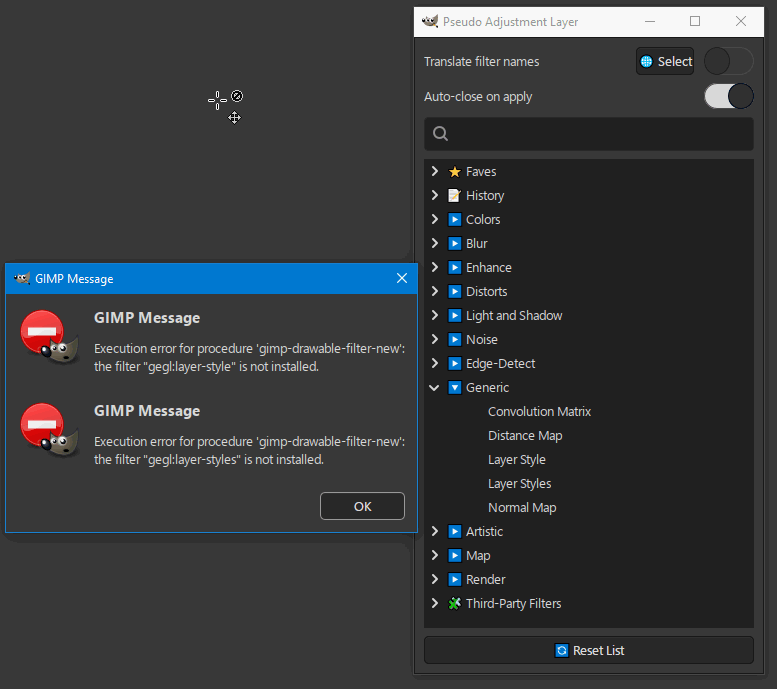
If Text Styling = Layers Styles, then the plugin is using the wrong procedure.

Image

Image

I think it would also be useful to have the version number visible (in the menu or filter header).

_________________
Image


Top
 Post subject: Re: [Update] Pseudo Adjustment Layer Ver1.8
PostPosted: Mon Mar 30, 2026 3:10 am  (#35) 
Offline
GimpChat Member
User avatar

Joined: Feb 06, 2026
Posts: 40
Hi MareroQ,
Thank you so much for the continuous testing! Your feedback is incredibly precise and helpful.


GIMP 2.10.38 Version:
Unfortunately, making a version for GIMP 2.10 is impossible. The entire plugin relies on the new "Non-Destructive Editing (NDE)" layer filter features and the new Python 3 API, which only exist in GIMP 3.0 and above. GIMP 2.10 simply lacks the underlying engine to support this kind of workflow.

Search in "Third-Party Filters":
You are a lifesaver! I checked the search code and found a silly bug. The search function was accidentally skipping categories that had specific emojis (like the puzzle piece for Third-Party Filters and the star for Favorites). I have completely rewritten the search logic to be fully recursive. It now works perfectly!

Layer Styles wrong procedure:
You are 100% correct again. "gegl:layer-style" and "gegl:layer-styles" were incorrect internal names (likely leftovers from an older version). I have updated the code to use the correct procedure name "gegl:styles" (Text Styling), and removed the invalid ones. It works without throwing errors now.

I am currently working on the corrections, so I will post an update as soon as they are ready.


Top
 Post subject: Re: [Update] Pseudo Adjustment Layer Ver1.8
PostPosted: Mon Mar 30, 2026 3:36 am  (#36) 
Offline
GimpChat Member
User avatar

Joined: Jan 13, 2011
Posts: 2646
Location: Poland
Off topic.

In GIMP 2.10, of course, it's not about NDE, but about the fact that additional filters don't appear in the menu or in the "Search and Run Command," only as a list in Gegl Operation.
Tell me, at least from Your own experience, whether you think additional filters were detectable in a plugin like yours in GIMP 2.10?

_________________
Image


Top
 Post subject: Re: [Update] Pseudo Adjustment Layer Ver1.8
PostPosted: Mon Mar 30, 2026 5:05 am  (#37) 
Offline
GimpChat Member
User avatar

Joined: Feb 06, 2026
Posts: 40
As I have only developed plugins for GIMP 3.0 and later, I have not personally tested how this works in GIMP 2.10.
The view I expressed earlier—that this is not possible in GIMP 2.10—is based on information from the official GIMP website.
Additionally, GIMP 3.0 introduced GObject Introspection (gi.repository) for Python 3, which allows plugins to directly access the GEGL library and scan Gegl.list_operations().
GIMP 2.10's old Python 2 environment lacked this direct integration, so detecting hidden GEGL filters this way would likely have been impossible anyway.


Top
 Post subject: Re: [Update] Pseudo Adjustment Layer Ver1.8
PostPosted: Mon Mar 30, 2026 6:35 am  (#38) 
Offline
GimpChat Member
User avatar

Joined: Jan 13, 2011
Posts: 2646
Location: Poland
Thank You very much for your quick response.
I'll explain why I asked.
The author of Batcher once gave me this answer to a similar question:

https://github.com/kamilburda/gimp-expo ... issues/115

This is only theoretically possible, but absolutely beyond my coding capabilities.

_________________
Image


Top
 Post subject: Re: [Update] Pseudo Adjustment Layer Ver1.8
PostPosted: Mon Mar 30, 2026 7:37 am  (#39) 
Offline
GimpChat Member
User avatar

Joined: Feb 06, 2026
Posts: 40
I’ve had a look at the link.

This is a bit beyond me, too.
To be honest, I haven't the faintest idea what sort of program I'd need to write to make this happen.


Top
 Post subject: Re: [Update] Pseudo Adjustment Layer Ver1.8
PostPosted: Mon Mar 30, 2026 5:20 pm  (#40) 
Offline
GimpChat Member
User avatar

Joined: Jul 06, 2013
Posts: 2662
Location: California
When it comes to the shape maker third party filter, I only see a rectangle when double clicking to see a result. What other shapes are available? I'm using GIMP 3.2.2 on Windows 10. Also, filters Shapes Core & Amazing throw an error. The SVG filters also throw errors.


Top
Post new topic Reply to topic  [ 68 posts ]  Go to page Previous  1, 2, 3, 4  Next

All times are UTC - 5 hours [ DST ]


cron

* Login  


Powered by phpBB3 © phpBB Group