It is currently Sat Jul 25, 2026 12:43 pm


All times are UTC - 5 hours [ DST ]


Post new topic Reply to topic  [ 68 posts ]  Go to page Previous  1, 2, 3, 4  Next
Author Message
 Post subject: Re: [Update] Pseudo Adjustment Layer Ver1.8
PostPosted: Tue Mar 31, 2026 3:03 am  (#41) 
Offline
GimpChat Member
User avatar

Joined: Oct 31, 2020
Posts: 2013
"ai/lb:shapescore" and "lb:amazing" are meant to be hidden processes. They are instructed NOT to show up in GIMP, and if they were they wouldn't do much useful, they are needed for OTHER Plugins of mine to work, They are components.

Make sure all operations of mine with the op name `core` are hidden from Pseudo Adjustment Layers as well as "lb:amazing" and "lb:zzwind" and "lb:zzstrokebevelimage" and "lb:osga"


Last edited by contrast_ on Tue Mar 31, 2026 3:05 am, edited 1 time in total.

Top
 Post subject: Re: [Update] Pseudo Adjustment Layer Ver1.8
PostPosted: Tue Mar 31, 2026 3:03 am  (#42) 
Offline
GimpChat Member
User avatar

Joined: Oct 31, 2020
Posts: 2013
mackenzieh wrote:
When it comes to the shape maker third party filter, I only see a rectangle when double clicking to see a result. What other shapes are available? I'm using GIMP 3.2.2 on Windows 10. Also, filters Shapes Core & Amazing throw an error. The SVG filters also throw errors.


The DropDown List on Shapes should change it.


Top
 Post subject: Re: [Update] Pseudo Adjustment Layer Ver1.8
PostPosted: Tue Mar 31, 2026 9:24 pm  (#43) 
Offline
GimpChat Member
User avatar

Joined: Feb 06, 2026
Posts: 40
Hi mackenzieh,
Thank you for trying out the plugin and sharing your feedback!


To explain briefly how my plugin works: it simply creates a standard Layer Group and tells GIMP to apply the selected filter to it as an NDE (Non-Destructive Editing) effect. The plugin itself doesn't control how the filters behave inside.

The filters you mentioned (Shape Maker, Shapes Core, Amazing, SVG filters) are third-party custom filters. There are a few reasons why they might behave strangely or throw errors:

- Dummy Layer Interaction:
My plugin uses a solid "DUMMY" layer inside the group to make the layer masks work properly. Filters that generate complex shapes or SVGs often require specific inputs (like empty transparent layers, active paths, or text). When forced onto a solid dummy layer, they might crash or default to a simple rectangle.

- NDE Compatibility:
Many third-party filters are not yet fully optimized for GIMP 3.2.2's new NDE engine, especially when applied to a layer group instead of a single layer.

Unfortunately, since the errors are coming from the third-party filters themselves, I cannot fix them from within my plugin.
I highly recommend right-clicking those problematic filters in my plugin's list and selecting "Hide" so they don't get in your way.

I hope this clarifies the situation!


Last edited by Yousei3D on Tue Mar 31, 2026 9:35 pm, edited 1 time in total.

Top
 Post subject: Re: [Update] Pseudo Adjustment Layer Ver1.8
PostPosted: Tue Mar 31, 2026 9:34 pm  (#44) 
Offline
GimpChat Member
User avatar

Joined: Feb 06, 2026
Posts: 40
While I was thinking of a reply, contrast_ had already provided the answer lol
Thank you, contrast_!


Top
 Post subject: Re: [Update] Pseudo Adjustment Layer Ver1.8
PostPosted: Tue Mar 31, 2026 10:01 pm  (#45) 
Offline
GimpChat Member
User avatar

Joined: Feb 06, 2026
Posts: 40
[Update] Pseudo Adjustment Layer Ver 1.9
Pseudo Adjustment Layer Ver 1.9 is now available.

Download
https://github.com/yousei3/GIMP3-Pseudo ... tag/Ver1.9

This is primarily a maintenance update. I have reviewed the entire script and focused on fixing various bugs and UI inconsistencies found in Ver 1.8.

One important fix concerns the official Drop Shadow. It was previously thought to be a plugin API issue, but I discovered that in GIMP 3.2.2, the internal procedure name has changed to gegl:dropshadow (removing the hyphen). This version has been updated to use the correct name.

However, please note that applying Drop Shadow to a Layer Group often behaves unreliably due to incomplete NDE support in GIMP 3.2.2. For instance, when you group the adjustment layer with a target layer, the contents might temporarily disappear. You can sometimes force the image to reappear by opening the filter settings and toggling the preview on and off, but it remains unstable.

I have also confirmed that this issue does not occur in the GIMP 3.2.1 Development Version AppImage.
It seems to be a regression specifically in GIMP 3.2.2.


Please give it a try and let me know if you encounter any further issues!


Top
 Post subject: Re: [Update] Pseudo Adjustment Layer Ver1.9 Plug-in for GIMP 3
PostPosted: Tue Mar 31, 2026 11:33 pm  (#46) 
Offline
Global Moderator
User avatar

Joined: May 16, 2010
Posts: 16132
Thank you Yousei3D! This is a great addition to Gimp-3.2.2. :)
Also i see you added the version # in the bottom right corner. Nice touch. :bigthup

I also noticed the filters seem to run faster or maybe it's just me.

_________________
Image


Top
 Post subject: Re: [Update] Pseudo Adjustment Layer Ver1.9 Plug-in for GIMP 3
PostPosted: Tue Mar 31, 2026 11:53 pm  (#47) 
Offline
Global Moderator
User avatar

Joined: May 16, 2010
Posts: 16132
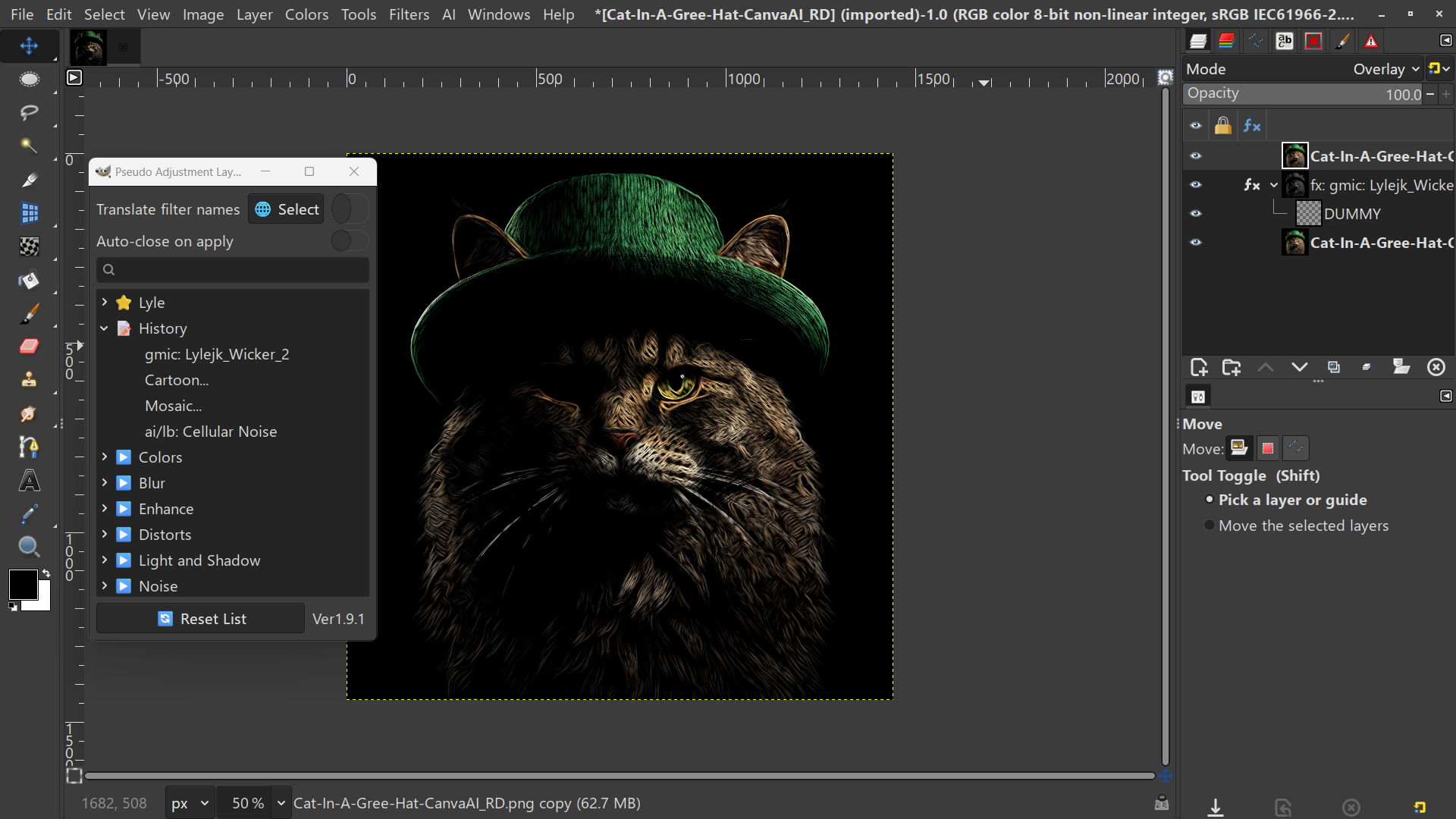
After 15 minutes i am still waiting for the building filter list message box to disappear. LOL
I think it may have stalled. :hoh

Perhaps this message window could be incorporated into the plugin widget as well? It sets in the center of my screen and stays on top of all my opened programs.

_________________
Image


Top
 Post subject: Re: [Update] Pseudo Adjustment Layer Ver1.9 Plug-in for GIMP 3
PostPosted: Wed Apr 01, 2026 12:04 am  (#48) 
Offline
GimpChat Member
User avatar

Joined: Feb 06, 2026
Posts: 40
@ROD:
The more third party filters there are, the longer it takes to detect them.
And as you pointed out, it is not good to have the message always at the forefront because it interferes with other programs.
I didn't notice this because I don't have that many filters in my development environment.
I will improve it in the next version so that it does not interfere.

Advice for the current situation
If you display the GIMP error console out, you will keep getting an error message (which is the result of actually testing whether the filter can be applied to the group, which is not a problem) if the process is working properly.
If the plugin or GIMP is hanging, the error message should also stop.

Thank you for the valuable information!


Top
 Post subject: Re: [Update] Pseudo Adjustment Layer Ver1.9 Plug-in for GIMP 3
PostPosted: Wed Apr 01, 2026 12:06 am  (#49) 
Offline
Global Moderator
User avatar

Joined: May 16, 2010
Posts: 16132
Took 20 minutes but the filter list is built. Glad i only have to do that when the plugin is updated. LOL :P

_________________
Image


Top
 Post subject: Re: [Update] Pseudo Adjustment Layer Ver1.9 Plug-in for GIMP 3
PostPosted: Wed Apr 01, 2026 12:18 am  (#50) 
Offline
GimpChat Member
User avatar

Joined: Feb 06, 2026
Posts: 40
@ROD:
I have released Ver. 1.9.1 which fixes only the problems reported to us in a big hurry!
I simply made it so that the message that appears while the Reset List is running is not fixed to the front of the display.
So (thanks for waiting 20 minutes!) There is no need to replace it from Ver1.9, which is now available.

I will continue to develop with this specification from now on, so you won't have the problem of messages occupying the screen. Rest assured!

GIMP3-Pseudo-Adjustment-Layers Ver1.9.1
https://github.com/yousei3/GIMP3-Pseudo ... g/Ver1.9.1


Top
 Post subject: Re: [Update] Pseudo Adjustment Layer Ver1.9 Plug-in for GIMP 3
PostPosted: Wed Apr 01, 2026 12:35 am  (#51) 
Offline
Global Moderator
User avatar

Joined: May 16, 2010
Posts: 16132
Yousei3D wrote:
@ROD:
I have released Ver. 1.9.1 which fixes only the problems reported to us in a big hurry!
I simply made it so that the message that appears while the Reset List is running is not fixed to the front of the display.
So (thanks for waiting 20 minutes!) There is no need to replace it from Ver1.9, which is now available.

I will continue to develop with this specification from now on, so you won't have the problem of messages occupying the screen. Rest assured!

GIMP3-Pseudo-Adjustment-Layers Ver1.9.1
https://github.com/yousei3/GIMP3-Pseudo ... g/Ver1.9.1


Thanks for the super quick fix! :bigthup

_________________
Image


Top
 Post subject: Re: [Update] Pseudo Adjustment Layer Ver1.9.1 Plug-in for GIMP 3
PostPosted: Wed Apr 01, 2026 1:07 am  (#52) 
Offline
Global Moderator
User avatar

Joined: May 16, 2010
Posts: 16132
Love the new addition to Favorites as well. :) :clap :bigthup

Image

Question though, why doesn't the plugin find the SCM filters?
Such as my Embroidery Stitcher under the Artistic menu?

_________________
Image


Top
 Post subject: Re: [Update] Pseudo Adjustment Layer Ver1.9.1 Plug-in for GIMP 3
PostPosted: Wed Apr 01, 2026 2:17 am  (#53) 
Offline
GimpChat Member
User avatar

Joined: Jan 13, 2011
Posts: 2646
Location: Poland
@Rod
This is an idea for a different plugin, as this one only applies to NDE filters (i.e., most GEGL filters).

@Yousei3D
Thanks for the quick search fix.
Regarding error console messages:
If possible, I would disable them completely because:
1. They generate messages even when there are no other (additional) plugins.
2. When refreshing (resetting the list), the message is completely useless because it doesn't specify which plugin it applies to.
Instead, simply display a window with the message as it already is,

Image

with a progress bar if necessary (the better the plugin, the more requests to add 'bells and whistles').

_________________
Image


Top
 Post subject: Re: [Update] Pseudo Adjustment Layer Ver1.9.1 Plug-in for GIMP 3
PostPosted: Wed Apr 01, 2026 3:12 am  (#54) 
Offline
GimpChat Member
User avatar

Joined: Feb 06, 2026
Posts: 40
@MareroQ
Indeed, it does not make sense for the user to have an error message.
In the next version, the error console will not have error messages either.
I also plan to improve the method of checking during Reset List.
By eliminating the processing that used to be multiplexed, the checking should be very fast.
Thank you for your valuable input.


Top
 Post subject: Re: [Update] Pseudo Adjustment Layer Ver1.8
PostPosted: Thu Apr 02, 2026 6:41 pm  (#55) 
Offline
GimpChat Member
User avatar

Joined: Jul 06, 2013
Posts: 2662
Location: California
contrast_ wrote:
mackenzieh wrote:
When it comes to the shape maker third party filter, I only see a rectangle when double clicking to see a result. What other shapes are available? I'm using GIMP 3.2.2 on Windows 10. Also, filters Shapes Core & Amazing throw an error. The SVG filters also throw errors.


The DropDown List on Shapes should change it.


Contrast_, Within Pseudo Adjustment Layer filter, is Shape Maker under third party filters. Shape Maker only produces a red square and there is no dropdown list for the Shapes (which is also a third party filter) to change the shapes. The only way to change the shape is to click on the shapes fx and change it that way. The shapes filter produces a blank transparent layer at first. The SVG filters, which are also third party filters still throw errors.


Top
 Post subject: Re: [Update] Pseudo Adjustment Layer Ver1.9.1 Plug-in for GIMP 3
PostPosted: Fri Apr 03, 2026 2:14 am  (#56) 
Offline
GimpChat Member
User avatar

Joined: Jan 13, 2011
Posts: 2646
Location: Poland
Hi Mackenzieh

Everything is OK (and what was discussed in previous posts ;) ) this plugin is meant to be used the way you described for Shape Maker (first filters with default parameters, then adjusting them via fx).

_________________
Image


Top
 Post subject: Re: [Update] Pseudo Adjustment Layer Ver1.9.1 Plug-in for GIMP 3
PostPosted: Fri Apr 03, 2026 4:47 pm  (#57) 
Offline
GimpChat Member
User avatar

Joined: Jul 06, 2013
Posts: 2662
Location: California
MareroQ wrote:
Hi Mackenzieh

Everything is OK (and what was discussed in previous posts ;) ) this plugin is meant to be used the way you described for Shape Maker (first filters with default parameters, then adjusting them via fx).


Okay, that's good to know. What about the SVG filters? They still produce errors.


Top
 Post subject: Re: [Update] Pseudo Adjustment Layer Ver1.9.1 Plug-in for GIMP 3
PostPosted: Sat Apr 04, 2026 6:51 am  (#58) 
Offline
GimpChat Member
User avatar

Joined: Feb 06, 2026
Posts: 40
Hey all,

It was more of a struggle to suppress both the error popups and the console output than I initially thought, but I finally managed to do it.
However, it took a lot of trial and error to get to this point. Successfully suppressing the console output was honestly a bit of a fluke after trying various workarounds. (It might actually be a bug in GIMP itself.)
Therefore, I'm releasing this as a test version.

It seems to be working well in my environments: Linux Mint, and Windows 11 with GIMP 3.2.2.
If possible, please test it out in your environment and let me know the results!

GIMP3-Pseudo-Adjustment-Layers Ver1.9.2Beta
https://github.com/yousei3/GIMP3-Pseudo ... r1.9.2Beta


Top
 Post subject: Re: [Update] Pseudo Adjustment Layer Ver1.9.1 Plug-in for GIMP 3
PostPosted: Sat Apr 04, 2026 8:00 am  (#59) 
Offline
GimpChat Member
User avatar

Joined: Jan 13, 2011
Posts: 2646
Location: Poland
Windows 10 Gimp-3.2.2_portable.

Thank You very much - everything works.
Do you have any further development plans for this plugin?

_________________
Image


Top
 Post subject: Re: [Update] Pseudo Adjustment Layer Ver1.9.1 Plug-in for GIMP 3
PostPosted: Sat Apr 04, 2026 8:21 am  (#60) 
Offline
GimpChat Member
User avatar

Joined: Feb 06, 2026
Posts: 40
@MareroQ:
Thank you! I'm glad to hear it's working well.
At this point, I’ve pretty much covered all the features I initially planned for this version.

My main focus now will be maintaining compatibility with any GEGL changes in future GIMP releases.
I’m also keeping an eye on the API—if dockable windows ever become available for plugins, I’ll definitely look into supporting that.

If you have any interesting ideas, feel free to share! I’ll see what I can do to incorporate them.


Top
Post new topic Reply to topic  [ 68 posts ]  Go to page Previous  1, 2, 3, 4  Next

All times are UTC - 5 hours [ DST ]


* Login  


Powered by phpBB3 © phpBB Group