It is currently Thu Nov 26, 2026 7:42 pm


All times are UTC - 5 hours [ DST ]


Post new topic Reply to topic  [ 10 posts ] 
Author Message
 Post subject: Help with Text
PostPosted: Sun Aug 14, 2011 12:54 pm  (#1) 
Offline
GimpChat Member

Joined: Jul 11, 2011
Posts: 111
GIMP Version: 2.6.11
Operating System: Windows
OS Version: XP - SP3
GIMP Experience: Beginner Level

List any relevant plug-ins or scripts:
I wish I knew

List any ERROR messages you received:
no errors..just question...


Soooooo...I wanna do some work on "Text" and not sure what script to use. I've been looking randomly thru my Gimp but just don't know what to use. I did find Alpha to Logo, which seems interesting enough to use but I want to use have the text on a transparent layer so I can plop in on other graphics.

I'll keep looking in my install of Gimp but would appreciate a heads up as what I can do with text on transparent layer design wise. Bevel and emboss? Those are ok but I'd like to find some way to texture the text. Possible?

WW


Share on Facebook Share on Twitter Share on Orkut Share on Digg Share on MySpace Share on Delicious Share on Technorati
Top
 Post subject: Re: Help with Text
PostPosted: Sun Aug 14, 2011 1:08 pm  (#2) 
Offline
GimpChat Member
User avatar

Joined: Apr 07, 2010
Posts: 14182
The list has no end to it what you can do to texture text. If you have an idea of what you want your text to look like, you could post a link so someone can help you achieve what you have in mind. There are just too many different textures to list on how to do them all.

There are some text tutorials here, but these are only a few of the many you could do.
viewtopic.php?f=10&t=1325

http://www.google.ca/search?q=Gimp+text ... =firefox-a

_________________
Image


Top
 Post subject: Re: Help with Text
PostPosted: Sun Aug 14, 2011 2:04 pm  (#3) 
Offline
Script Coder
User avatar

Joined: Oct 25, 2010
Posts: 4812
WW wrote:
GIMP Version: 2.6.11
Operating System: Windows
OS Version: XP - SP3
GIMP Experience: Beginner Level

List any relevant plug-ins or scripts:
I wish I knew

List any ERROR messages you received:
no errors..just question...


Soooooo...I wanna do some work on "Text" and not sure what script to use. I've been looking randomly thru my Gimp but just don't know what to use. I did find Alpha to Logo, which seems interesting enough to use but I want to use have the text on a transparent layer so I can plop in on other graphics.

I'll keep looking in my install of Gimp but would appreciate a heads up as what I can do with text on transparent layer design wise. Bevel and emboss? Those are ok but I'd like to find some way to texture the text. Possible?

WW
When you use the Text tool, the text is produced on its own layer (which is transparent outside of the text). "Layer/Transparency/Alpha to selection" creates a "selection" from the transparency of the layer and will therefore create a text-shaped selection, with which you can do whatever you please (fill with a pattern, paint, cut an existing image....)
Attachment:
Building.png
Building.png [ 169.36 KiB | Viewed 2762 times ]


The more expert user will also use the "Path from text" button, that creates a "path" from the text but this is another story...

_________________
Image


Top
 Post subject: Re: Help with Text
PostPosted: Sun Aug 14, 2011 3:02 pm  (#4) 
Offline
GimpChat Founder
User avatar

Joined: May 22, 2008
Posts: 5248
Location: Gimpville
WW wrote:
Soooooo...I wanna do some work on "Text" and not sure what script to use. I've been looking randomly thru my Gimp but just don't know what to use.

There are tons of scripts that manipulate text in various ways so it just depends on what you want to do.

A few can be found in sticky threads in the scripts section Gimp Chat. The multi-effect text script is pretty versatile. By deselecting animation, selecting no effect and keeping raw layers, it allows you to quickly create text with whatever font, stroke, color, shadow and offsets you need. By keeping the raw layers, you have good stating point for your text creation. It only takes a few seconds to produce this as a starting point.

Image

With lava-effect text, you can easily create a stained glass effect.

Image

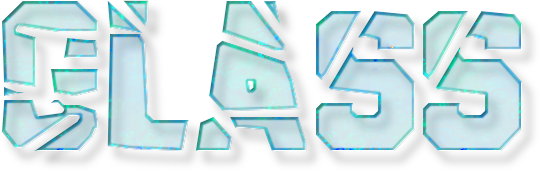
With the glass effect text script, you can do this kind of thing..
Image

I find scripts like these a time saver when creating text effects and logos. Experiment, be creative and you'll get good results.

_________________
Image


Top
 Post subject: Re: Help with Text
PostPosted: Sun Aug 14, 2011 3:16 pm  (#5) 
Offline
GimpChat Member
User avatar

Joined: Oct 07, 2010
Posts: 439
Location: home/Nixnine/.gimp-2.0/scripts/nixnine.scm
Anything done with Alpha-to-logo can be made transparent by merely deleting the background layer and merging all visible layers. In file/Create/Logos, those can all be done the same way. Delete background, merge all layers. Drop and drag from one image to the next.

_________________
I refuse to be confused, but am often confused at this refusal.


Top
 Post subject: Re: Help with Text
PostPosted: Sun Aug 14, 2011 10:22 pm  (#6) 
Offline
GimpChat Member

Joined: Jul 11, 2011
Posts: 111
Wow folks! This is awesome! I had no direction with learning how to make text and now I have very organized and systematic way of going about it. Certainly beats my attempts and all the rummaging around in the interface. (Which is good I suppose, cause then I learn eventually where everything is located :)) )

I'm loving that list! Thank you. Thank you Molly.

@ofnuts... thank you for the explanation of Text tool...helps to know what the heck is going on.

@GnuTux...you give me some really cool looks with text that I hope I'll be able to accomplish. I never even dreamed I could use the multi-effect because it had animations in it. Thank you!

@nixtine.. thank you too! You certainly sound well at ease with this tool. I am just a newbie/noob/noobie/rookie/fresh meat/early learner/beginner to all this. Thank you all very much!

WW


Top
 Post subject: Re: Help with Text
PostPosted: Sun Aug 14, 2011 10:40 pm  (#7) 
Offline
Global Moderator
User avatar

Joined: May 16, 2010
Posts: 16317
GnuTux wrote:
WW wrote:
Soooooo...I wanna do some work on "Text" and not sure what script to use. I've been looking randomly thru my Gimp but just don't know what to use.

There are tons of scripts that manipulate text in various ways so it just depends on what you want to do.

A few can be found in sticky threads in the scripts section Gimp Chat. The multi-effect text script is pretty versatile. By deselecting animation, selecting no effect and keeping raw layers, it allows you to quickly create text with whatever font, stroke, color, shadow and offsets you need. By keeping the raw layers, you have good stating point for your text creation. It only takes a few seconds to produce this as a starting point.

Image

With lava-effect text, you can easily create a stained glass effect.

Image

With the glass effect script, you can do this kind of thing..

Image

I find scripts like these a time saver when creating text effects and logos. Experiment, be creative and you'll get good results.


Wow Tux i downloaded that script for multi effects! I can not believe i missed that post. :lol
Thanks!

_________________
Image


Top
 Post subject: Re: Help with Text
PostPosted: Mon Aug 15, 2011 1:37 pm  (#8) 
Offline
GimpChat Member
User avatar

Joined: Apr 08, 2010
Posts: 5420
Location: Northwest Ohio
I didn't see it in my scripts even though I had a sample in the thread...soooo, grabbed it again!


Top
 Post subject: Re: Help with Text
PostPosted: Mon Aug 15, 2011 1:56 pm  (#9) 
Offline
GimpChat Founder
User avatar

Joined: May 22, 2008
Posts: 5248
Location: Gimpville
Sometimes it's easy to overlook features in a script. There are a few updates and bug fixes I'd like to make to several of my scripts but I'm gonna wait for the next stable GIMP release.

_________________
Image


Top
 Post subject: Re: Help with Text
PostPosted: Mon Aug 15, 2011 10:01 pm  (#10) 
Offline
Global Moderator
User avatar

Joined: May 16, 2010
Posts: 16317
GnuTux wrote:
Sometimes it's easy to overlook features in a script. There are a few updates and bug fixes I'd like to make to several of my scripts but I'm gonna wait for the next stable GIMP release.


I hear you Tux.I am constantly opening old scripts and seeing new ways to use their features. :)
I suppose this is what you would call "growing with Gimp"

_________________
Image


Top
Post new topic Reply to topic  [ 10 posts ] 

All times are UTC - 5 hours [ DST ]


* Login  


Powered by phpBB3 © phpBB Group