It is currently Thu Nov 26, 2026 7:41 pm


All times are UTC - 5 hours [ DST ]


Post new topic Reply to topic  [ 15 posts ] 
Author Message
 Post subject: 2-D to 3-D
PostPosted: Mon Aug 15, 2011 1:24 pm  (#1) 
Offline
GimpChat Member
User avatar

Joined: Apr 08, 2010
Posts: 5420
Location: Northwest Ohio
GIMP Version: 2.6.11
Operating System: Mac OS
OS Version: XP - SP3
GIMP Experience: Basic Level


I was just reading a blog and the blogger mentioned that he didn't want to completely from scratch re-do some older 2-D promotions into 3-D but didn't think converting them would be satisfactory. So I was wondering, what would be a good way to take images/posters/renders from 2-D to 3-D using Gimp?


Share on Facebook Share on Twitter Share on Orkut Share on Digg Share on MySpace Share on Delicious Share on Technorati
Top
 Post subject: Re: 2-D to 3-D
PostPosted: Mon Aug 15, 2011 2:06 pm  (#2) 
Offline
GimpChat Founder
User avatar

Joined: May 22, 2008
Posts: 5248
Location: Gimpville
A 3D "effect" can be simulated in GIMP but there is no way to truly create a 3D object. To create a true virtual 3D object, the modeling application must be able to describe the object in three spacial dimensions (x,y and z coordinates).

In my opinion, using GIMP to simulate 3D is akin to using a screwdriver to drive in a nail. With a lot of effort, you may eventually get something done, but it's the wrong tool for the job.

I'd say the better approach for 2D->3D is to use a true 3D app and "extrude" along the z axis. Most good 3D apps have this feature.

_________________
Image


Top
 Post subject: Re: 2-D to 3-D
PostPosted: Mon Aug 15, 2011 3:24 pm  (#3) 
Offline
GimpChat Member
User avatar

Joined: Jan 03, 2011
Posts: 1656
There is a nice filter that is trying to do that in G'MIC.
It has been made by Tom Keil, who is very active in 2D to 3D conversion.
More infos at : http://www.flickr.com/groups/gmic/discu ... 154386744/


Top
 Post subject: Re: 2-D to 3-D
PostPosted: Mon Aug 15, 2011 3:39 pm  (#4) 
Offline
GimpChat Member
User avatar

Joined: Apr 27, 2010
Posts: 1510
Location: Sweden
Depends very much on how the object looks. If it's a simple extrude operation I wouldn't really call it "3D" ...

Building a model of it in a 3D program is the real answer only if one wants to the ability to view the object from many angles in the future. For a single "3D" view of an existing 2D design, I'd probably first at least try to draw it; western perspective is not that hard to apply unless it's super-complex in shape (and super-complex shapes will be a stiff challenge in a 3D modeller as well).
.
Griatch

_________________


Top
 Post subject: Re: 2-D to 3-D
PostPosted: Mon Aug 15, 2011 6:57 pm  (#5) 
Offline
GimpChat Member
User avatar

Joined: Apr 08, 2010
Posts: 5420
Location: Northwest Ohio
thanks, so I guess photoshop isn't so hot in this respect, either. I think I"ll give the G-mic a try, since I was only hoping to give a decent looking "3-D effect".


Top
 Post subject: Re: 2-D to 3-D
PostPosted: Mon Aug 15, 2011 9:54 pm  (#6) 
Offline
Global Moderator
User avatar

Joined: May 16, 2010
Posts: 16317
2-ton you can extrude using Inkscape and then export the image to Gimp. :)
What are you trying to 3-d ... shapes, or text?

_________________
Image


Top
 Post subject: Re: 2-D to 3-D
PostPosted: Tue Aug 16, 2011 6:56 am  (#7) 
Offline
GimpChat Member
User avatar

Joined: Apr 08, 2010
Posts: 5420
Location: Northwest Ohio
I was just going to try and see if I could make a photo have more depth, or a render slapped onto a photo look somewhat 3-D-ish.


Top
 Post subject: Re: 2-D to 3-D
PostPosted: Tue Aug 16, 2011 10:08 pm  (#8) 
Offline
GimpChat Founder
User avatar

Joined: May 22, 2008
Posts: 5248
Location: Gimpville
Ronounours wrote:

That's a cool effect. I think I have some old 3D gasses around here somewhere.

We're all geeky enough already, but can you image what we look like when we are working on our computers wearing those cardboard glasses? :sglasses :lol

2-ton wrote:
I was just going to try and see if I could make a photo have more depth, or a render slapped onto a photo look somewhat 3-D-ish.

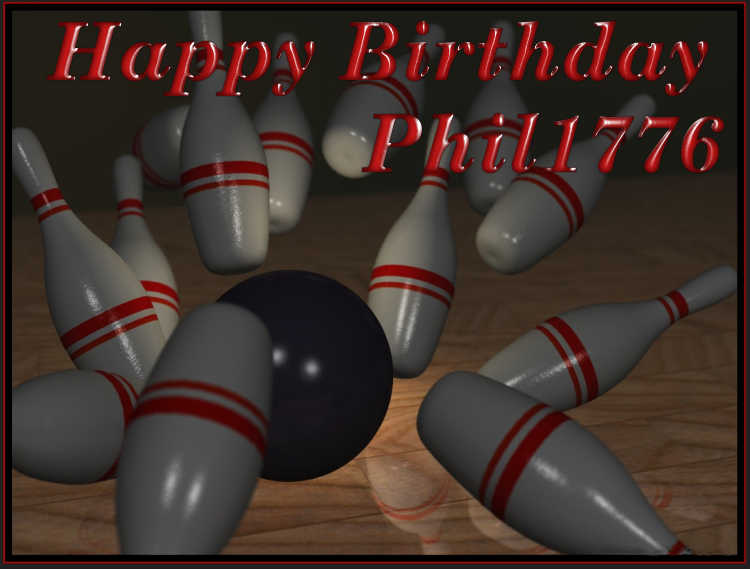
I've seen a few scripts around that do a nice job of creating 3D looking text so those might be useful. You might be able to place some sculpted, shiny text over the top of a photo/image and with the right shadowing (and maybe some reflections), get a nice floating text effect.

It would be cool to have an extruding effect that would give some height to an otherwise flat image. I guess programatically determining where to extrude would be the trick. :hehe

I did this for someone on another site (not my bowling pin render). The shiny text has depth and pops pretty well on this .
Image

_________________
Image


Top
 Post subject: Re: 2-D to 3-D
PostPosted: Tue Aug 16, 2011 11:17 pm  (#9) 
Offline
Global Moderator
User avatar

Joined: May 16, 2010
Posts: 16317
Pop out photos are also a very cool effect.
Where you take an object in an image and make it look like it is coming out of the photo. :)
Those can really give your photos and posters that 3-D depth look.

_________________
Image


Top
 Post subject: Re: 2-D to 3-D
PostPosted: Wed Aug 17, 2011 4:35 am  (#10) 
Offline
GimpChat Member
User avatar

Joined: Apr 07, 2010
Posts: 14182
Nice Text Tux, how did you get it so shiny?

_________________
Image


Top
 Post subject: Re: 2-D to 3-D
PostPosted: Wed Aug 17, 2011 11:02 am  (#11) 
Offline
GimpChat Founder
User avatar

Joined: May 22, 2008
Posts: 5248
Location: Gimpville
molly wrote:
Nice Text Tux, how did you get it so shiny?

I used the old Shrek text script (see attached) and bumped the contrast to make it shinier (I think that's all I did).

Image


Attachments:
File comment: Shrek Text (2.6)
shrek-text.scm [4.93 KiB]
Downloaded 128 times

_________________
Image
Top
 Post subject: Re: 2-D to 3-D
PostPosted: Wed Aug 17, 2011 11:08 am  (#12) 
Offline
GimpChat Member
User avatar

Joined: Apr 07, 2010
Posts: 14182
Thank you Tux, It looks like a Text-ju-jube, or maybe a gummy bear. Love it.
Image

Image

_________________
Image


Top
 Post subject: Re: 2-D to 3-D
PostPosted: Thu Aug 18, 2011 1:33 am  (#13) 
Offline
Former Member
User avatar

Joined: Nov 17, 2010
Posts: 618
Location: Rockford, IL
I love how it's beveled.


Top
 Post subject: Re: 2-D to 3-D
PostPosted: Thu Aug 18, 2011 6:55 pm  (#14) 
Offline
GimpChat Member
User avatar

Joined: Apr 18, 2011
Posts: 620
Location: New York
Attachment:
shrek.png
shrek.png [ 28.41 KiB | Viewed 2878 times ]


that worked out nicely!! :tyspin


btw, the name of the font is Addis Ababa and it looks like squeezed toothpaste with this effect on it

_________________
Ubuntu 24.04.1, Kernel i686, 6.8.0-52-generic
python3 v3.12.3 ----- GIMP - ver 2.10.38


Top
 Post subject: Re: 2-D to 3-D
PostPosted: Thu Aug 18, 2011 7:17 pm  (#15) 
Offline
Global Moderator
User avatar

Joined: May 16, 2010
Posts: 16317
hah it really does doesn't it! :)
Nice effect for those rounded fonts.

_________________
Image


Top
Post new topic Reply to topic  [ 15 posts ] 

All times are UTC - 5 hours [ DST ]


* Login  


Powered by phpBB3 © phpBB Group