It is currently Thu Nov 26, 2026 7:30 pm


All times are UTC - 5 hours [ DST ]


Post new topic Reply to topic  [ 9 posts ] 
Author Message
 Post subject: Ghostwriter
PostPosted: Sun Aug 14, 2011 9:23 pm  (#1) 
Offline
GimpChat Member

Joined: Aug 14, 2011
Posts: 7
GIMP Version: 2.7.3
Operating System: Windows
OS Version: XP - SP3
GIMP Experience: Beginner Level

List any relevant plug-ins or scripts:
G'MIC 1.5.0.0
G'MIC 1.4.9.4
G'MIC 1.4.9.3


List any ERROR messages you received:
Error Starting Ghost Script. Make sure your ghost script is installed- and if necessary- use the environmental variable GS_PROG to tell GIMP about it's location. Failed to execute helper program (invalid argument)


I've tried to download the ghost script and install it several different times making sure it was for the 64 bit windows 7 but I keep getting an error message about the environmental variable. I can't seem to find anyone that can tell me what the correct variable should be for 64 bit on win 7 and what I should do. I'm quite new to all this and my knowledge of computer programming is null. I've been working at this for about a week. Someone help me!


Share on Facebook Share on Twitter Share on Orkut Share on Digg Share on MySpace Share on Delicious Share on Technorati
Top
 Post subject: Re: Ghostwriter
PostPosted: Sun Aug 14, 2011 9:53 pm  (#2) 
Offline
Global Moderator
User avatar

Joined: May 16, 2010
Posts: 16317
Access your environment variables and look for the variable
GS_PROG

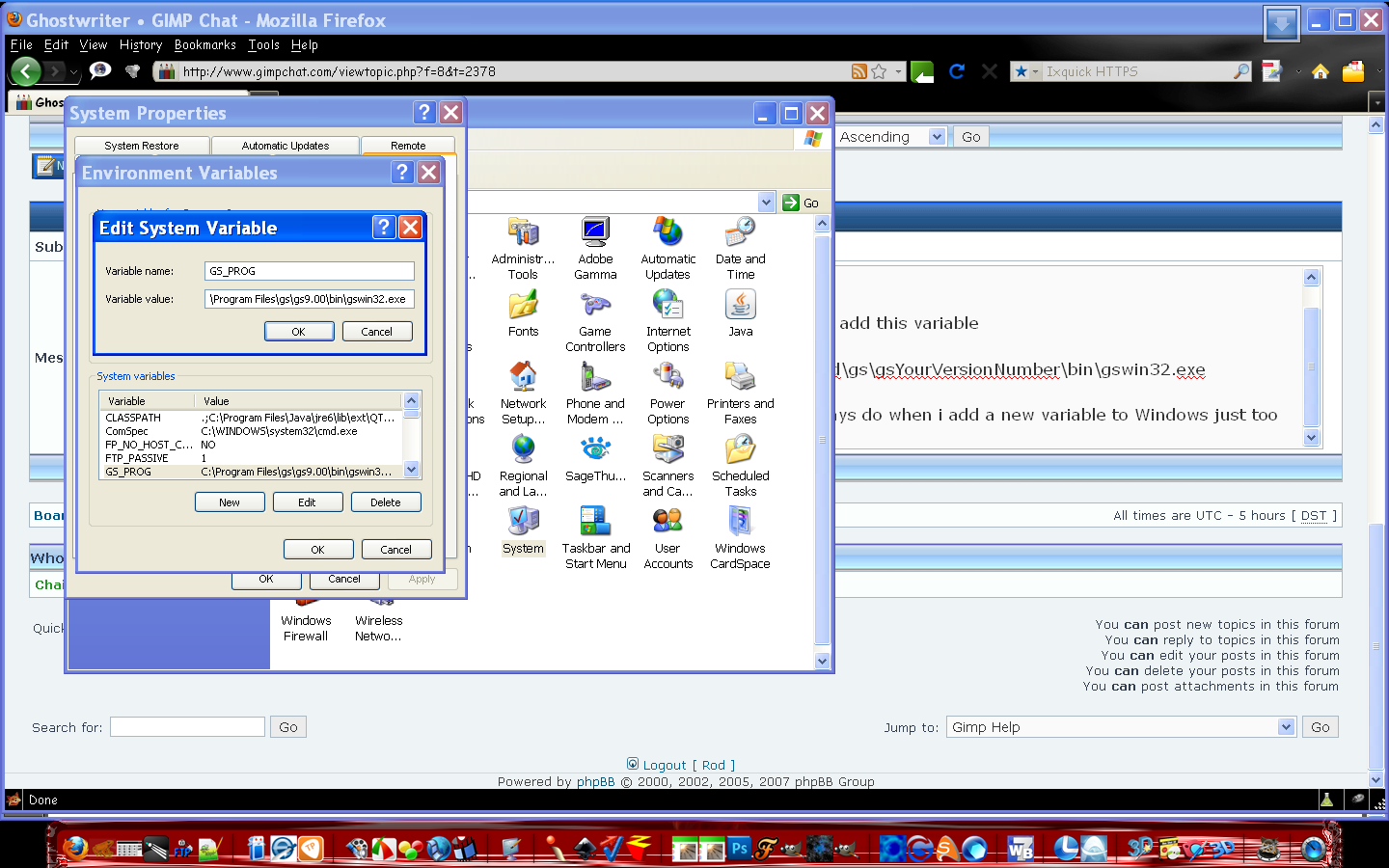
Then if it isn't listed under System Variables, select new and add this variable
variable name - GS_PROG
variable value - C:\YourDirectoryWhereGhostScriptIsInstalled\gs\gsYourVersionNumber\bin\gswin32.exe
Image example-
Image

You shouldn't have to restart, but you should anyways.I always do when i add a new variable to Windows just too be sure. :)

_________________
Image


Top
 Post subject: Re: Ghostwriter
PostPosted: Sun Aug 14, 2011 10:51 pm  (#3) 
Offline
GimpChat Member

Joined: Aug 14, 2011
Posts: 7
Where would I find my version number? Is it the one that pops up when I mouse over it or the one that is already in the enviornmental variable code when I open it? Because those are two different numbers. Thanks!


Top
 Post subject: Re: Ghostwriter
PostPosted: Sun Aug 14, 2011 11:05 pm  (#4) 
Offline
GimpChat Member

Joined: Aug 14, 2011
Posts: 7
It still isn't working. :(


Top
 Post subject: Re: Ghostwriter
PostPosted: Sun Aug 14, 2011 11:33 pm  (#5) 
Offline
GimpChat Member

Joined: Aug 14, 2011
Posts: 7
This is what the Environmental Variable looks like. And it isn't working. Is it that I was supposed to use the 32 one? Even though my computer is a 64 bit?


Attachments:
My GIMP Problem.jpg
My GIMP Problem.jpg [ 148.4 KiB | Viewed 4281 times ]
Top
 Post subject: Re: Ghostwriter
PostPosted: Mon Aug 15, 2011 12:18 am  (#6) 
Offline
Global Moderator
User avatar

Joined: May 16, 2010
Posts: 16317
Whatever version of Ghost Script you downloaded should be the path for the variable Star.
If you are using 64 bit Ghost Script that should be the correct path for the 64 bit programs.
My next question is did you install 64 bit Gimp-2.7.3?
Did you install Parthas 64 bit version of GMIC?

Partha has compiled the 64 bit version of GMIC here.
http://partha.com/downloads/Gmic-1.5.0.0-64bit.exe

_________________
Image


Top
 Post subject: Re: Ghostscript
PostPosted: Wed Aug 17, 2011 11:42 pm  (#7) 
Offline
GimpChat Member

Joined: Aug 14, 2011
Posts: 7
Yeah I did dl the Partha GIMP. Thank you for the link. So then would the enviornmental variable change then with the Partha's type GS? Or would it still be the same? Would the version then be 1.5.0.0? And then the last part of course would be 64 instead of 32. Should I uninstall the other version of Ghostscript?


Top
 Post subject: Re: Ghostscript
PostPosted: Thu Aug 18, 2011 4:49 am  (#8) 
Offline
GimpChat Member

Joined: Mar 14, 2011
Posts: 998
Chainedlady wrote:
Yeah I did dl the Partha GIMP. Thank you for the link. So then would the enviornmental variable change then with the Partha's type GS? Or would it still be the same? Would the version then be 1.5.0.0? And then the last part of course would be 64 instead of 32. Should I uninstall the other version of Ghostscript?

Hi,

You are mixing 2 different software programs. :) G'MIC is version 1.5.0.0 and Ghostscript is currently version 9.04.

At the moment, Ghostscript does not work in the windows environment, sorry about that. I have been communicating with the author of the plug-in and we are investigating why. In the meantime, may I suggest that you convert your PS file to PDF and then load the PDF?

Open a command prompt and type the following in the directory where you keep your PS files:
%GS_PROG% -sDEVICE=pdfwrite -sOutputFile=file.pdf -f file.ps

where file.ps is your PS file and file.pdf is the outfile you want. Note that if you have not set the environment variable (as others have suggested) then you will need the full path for your Ghostscript installation, typically:
C:\Program Files\gs\gs9.04\bin\gswin64c.exe. In this case, do the following:
set GS_PROG="c:\Program Files\gs\gs9.04\bin\gswin64c.exe"
%GS_PROG% -sDEVICE=pdfwrite -sOutputFile=file.pdf -f file.ps

Then load the PDF file normally in Gimp.

Hope this helps.

Thanks,
Partha


Top
 Post subject: Re: Ghostwriter
PostPosted: Thu Aug 18, 2011 8:18 pm  (#9) 
Offline
Global Moderator
User avatar

Joined: May 16, 2010
Posts: 16317
Thanks Partha that advice should help a lot. :)

_________________
Image


Top
Post new topic Reply to topic  [ 9 posts ] 

All times are UTC - 5 hours [ DST ]


* Login  


Powered by phpBB3 © phpBB Group